Wstęp
This user manual provides detailed instructions for the operation and maintenance of your BSZHI A80 Portable Bluetooth Speaker. Please read this manual thoroughly before using the product to ensure proper function and longevity.
Co jest w pudełku
- 1 x A80 Bluetooth Speaker
- 1 x kabel do ładowania USB
- Kabel 1 x AUX
- 1 x Pilot zdalnego sterowania
- 1 x Instrukcja obsługi
Produkt ponadview i funkcje

The BSZHI A80 Portable Bluetooth Speaker, shown with its accompanying remote control. The speaker features a vibrant LED light display on the front and a control panel at the top.
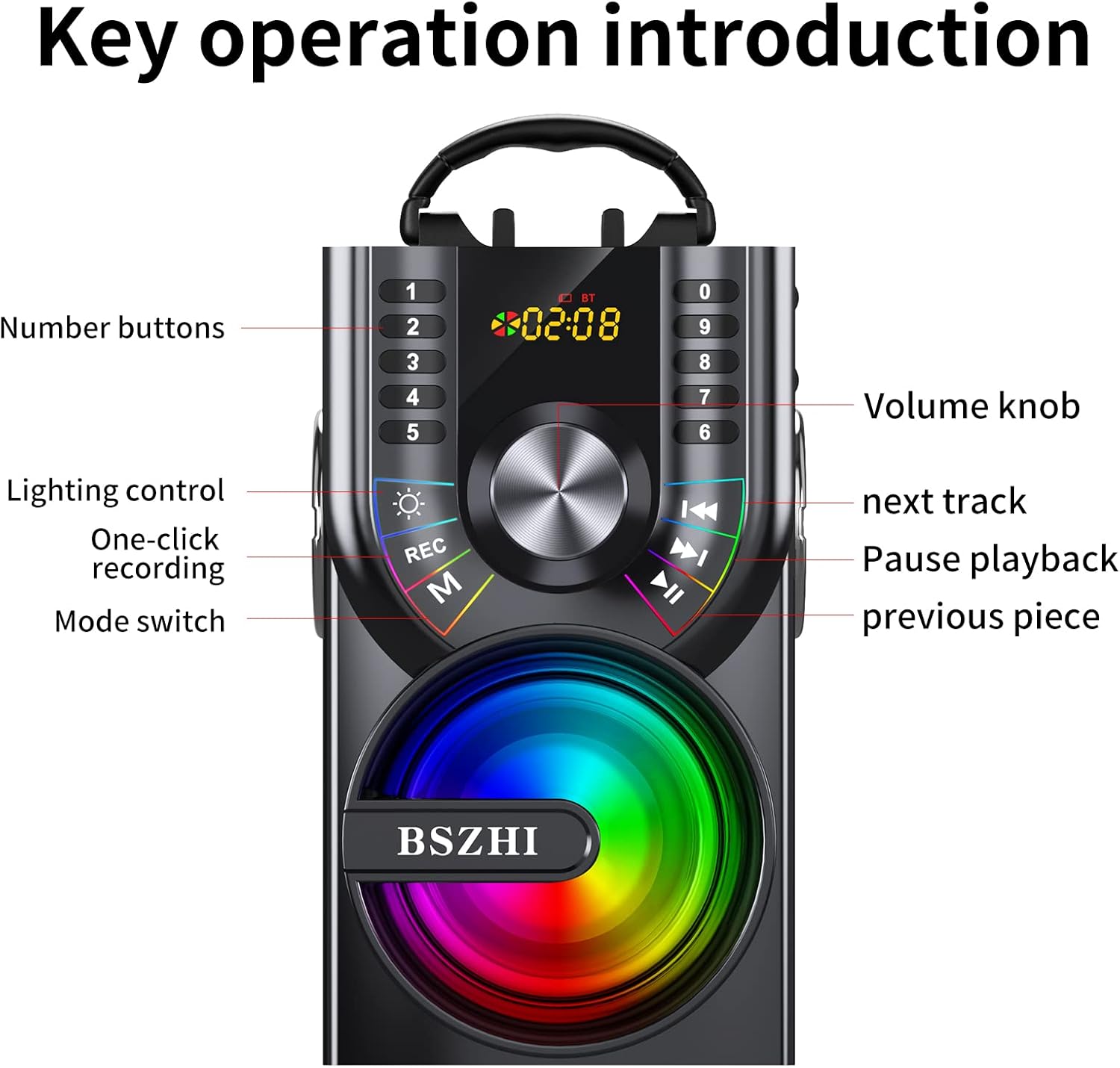
Szczegółowy view of the speaker's control panel, highlighting the number buttons, volume knob, lighting control, one-click recording, mode switch, next track, pause/playback, and previous piece buttons.
- Mocne wyjście audio: Equipped with two 25W woofers and two 15W tweeters, delivering 80W of total output for heavy bass and surround stereo sound.
- Wiele opcji łączności: Supports Bluetooth 5.1 for wireless connection up to 100ft, AUX input (3.5mm), TF Card, and U-disk playback.
- Dynamiczne światła LED: Features colorful LED lights with multiple dynamic modes that synchronize with music rhythm.
- Prawdziwe bezprzewodowe stereo (TWS): Allows pairing of two A80 speakers for a combined 160W stereo sound experience.
- Radio FM: Built-in FM radio function with automatic station search and manual input via remote control.
- Długa żywotność baterii: Integrated 10800mAh rechargeable battery provides 8-20 hours of playtime depending on volume.
- Przenośna konstrukcja: Features a hand-held pull ring for easy transport and a stand holder for mobile devices.
- Zdalne sterowanie: Wielofunkcyjny pilot zdalnego sterowania zapewniający wygodną obsługę.
- Wejście mikrofonowe: Includes a 6.35mm microphone jack for karaoke or public speaking.
Organizować coś
Ładowanie głośnika
Before first use, fully charge the speaker. Connect the provided USB charge cable to the speaker's charging port and a compatible USB power adapter (not included). The charging indicator will show the charging status.

The speaker is equipped with a large capacity battery for extended playtime. Ensure it is fully charged before use.
Instrukcja obsługi
Włączanie/wyłączanie zasilania
Locate the power button on the speaker's control panel. Press and hold to power on or off the device.
Kontrola głośności
Adjust the volume using the large volume knob on the control panel or the volume buttons on the remote control.
Przełączanie trybów
Press the 'M' (Mode) button on the speaker or the 'MODE' button on the remote control to cycle through available modes: Bluetooth, FM Radio, AUX, TF Card, and U-disk.
Łączność Bluetooth
- Włącz głośnik. Automatycznie przejdzie on w tryb parowania Bluetooth.
- Włącz Bluetooth w swoim urządzeniu (smartfonie, tablecie itp.).
- Szukaj "A80" in your device's Bluetooth list and select it to connect.
- Dźwięk potwierdzenia wskaże, że parowanie przebiegło pomyślnie.

The speaker utilizes Bluetooth 5.1 technology for stable wireless connections up to 100 feet.
Wejście AUX
Connect one end of the 3.5mm AUX cable to the speaker's AUX port and the other end to the audio output of your external device (e.g., TV, computer, MP3 player). The speaker will automatically switch to AUX mode.
TF Card / U-disk Playback
Insert a TF card or U-disk (USB flash drive) containing audio files do odpowiedniego gniazda. Głośnik automatycznie wykryje i rozpocznie odtwarzanie muzyki z urządzenia pamięci masowej.
Sterowanie oświetleniem LED
Press the light control button (often indicated by a sun icon) on the speaker's control panel or the remote control to turn the LED lights on/off or cycle through different lighting modes.

The speaker features dynamic LED lights that enhance the listening experience, especially in low-light environments.
Parowanie True Wireless Stereo (TWS)
To pair two A80 speakers for TWS stereo sound:
- Upewnij się, że oba głośniki A80 są włączone i nie są podłączone do żadnego urządzenia Bluetooth.
- On one speaker (this will be the primary speaker), long press the TWS pairing button (refer to the control panel diagram if available, or try the play/pause button if not specified).
- The speakers will attempt to connect to each other. A successful connection will be indicated by an audible prompt.
- Po sparowaniu połącz urządzenie z głównym głośnikiem przez Bluetooth. Dźwięk będzie teraz odtwarzany przez oba głośniki w stereo.
Obsługa radia FM
- Switch the speaker to FM Radio mode using the 'M' (Mode) button.
- To automatically search and save available stations, long press the Play/Pause button.
- Use the Previous/Next track buttons to navigate through saved stations.
- Manual station input can be done using the number buttons on the remote control.
Korzystanie z pilota zdalnego sterowania
The included remote control provides convenient access to various speaker functions, including power, mode switching, volume adjustment, track control, LED light control, and FM radio tuning.

The wireless remote control allows for convenient operation of the speaker from a distance.
Konserwacja
- Czyszczenie: Do czyszczenia obudowy głośnika należy używać miękkiej, suchej ściereczki. Nie należy używać środków czyszczących o właściwościach ściernych ani rozpuszczalników.
- Składowanie: Przechowuj głośnik w chłodnym, suchym miejscu, z dala od bezpośredniego światła słonecznego i ekstremalnych temperatur, jeśli nie będziesz go używać przez dłuższy czas.
- Pielęgnacja baterii: Aby przedłużyć żywotność baterii, unikaj częstego całkowitego rozładowywania baterii. Ładuj głośnik regularnie, nawet jeśli nie jest używany.
- Narażenie na działanie wody: Ten głośnik nie jest wodoodporny. Unikaj narażenia na działanie wody i wysokiej wilgotności.
Rozwiązywanie problemów
| Problem | Możliwe rozwiązanie |
|---|---|
| Głośnik nie włącza się. | Upewnij się, że bateria jest naładowana. Podłącz głośnik do źródła zasilania i spróbuj ponownie. |
| Brak dźwięku z głośnika. | Check the volume level on both the speaker and the connected device. Ensure the correct input mode is selected (Bluetooth, AUX, etc.). |
| Parowanie Bluetooth nie powiodło się. | Ensure the speaker is in Bluetooth pairing mode. Turn off and on Bluetooth on your device. Move the speaker closer to your device. Clear previous Bluetooth connections on your device. |
| Odbiór radia FM jest słaby. | Adjust the speaker's position. Extend any external antenna if available. |
| Pilot nie działa. | Sprawdź baterię w pilocie. Upewnij się, że między pilotem a głośnikiem nie ma żadnych przeszkód. |
Specyfikacje
| Funkcja | Szczegół |
|---|---|
| Marka | BSZHI |
| Numer modelu | A80 |
| Moc wyjściowatage | 80 watów |
| Liczba kanałów | 4 (Two 25W woofers, two 15W tweeters) |
| Technologia łączności | Bluetooth 5.1, USB, AUX |
| Wejście audio | 3.5mm Microphone jack, AUX line-in |
| Bateria | 10800mAh litowo-jonowy (w zestawie) |
| Pauza w szkole | 8-20 hours (depends on playing volume) |
| Tworzywo | Drewno, Plastik |
| Waga przedmiotu | 4.4 funta (2 kilograma) |
| Wymiary produktu (dł. x szer. x wys.) | 5.51 x 6.69 x 10 cala |
| Impedancja | 4 omy |

Internal components of the speaker, including the 3.5-inch subwoofer and two 2.5-inch tweeters, designed for powerful stereo bass.

Dimensions of the BSZHI A80 speaker, indicating its compact and portable design suitable for various uses.
Gwarancja i wsparcie
For any questions or support regarding your BSZHI A80 speaker, please contact customer service. The manufacturer aims to reply within 7-24 hours to provide assistance.
Note: Specific warranty details may vary by region and retailer. Please refer to your purchase documentation for precise warranty terms.


