Wstęp
Thank you for choosing the Cecotec Conga 9090 IA Robot Vacuum Cleaner. This advanced 4-in-1 robot is designed to vacuum, sweep, mop, and scrub simultaneously, providing comprehensive floor cleaning. Equipped with Artificial Intelligence and laser technology, it offers maximum cleaning precision by recognizing household objects and adapting its cleaning path. This manual provides essential information for the safe and efficient operation and maintenance of your robot vacuum cleaner.
Instrukcje bezpieczeństwa
Przed użyciem urządzenia prosimy o dokładne zapoznanie się z niniejszą instrukcją bezpieczeństwa i zachowanie jej do wykorzystania w przyszłości. Nieprzestrzeganie tych instrukcji może spowodować porażenie prądem, pożar lub poważne obrażenia.
- Upewnij się, że moc voltage pasuje do objętościtagpodano na tabliczce znamionowej urządzenia.
- Nie zanurzaj urządzenia, przewodu zasilającego ani wtyczki w wodzie lub innej cieczy.
- Keep the appliance away from heat sources, direct sunlight, humidity, and sharp edges.
- Do not use the appliance on wet surfaces or in areas with standing water.
- Pilnuj dzieci, aby nie bawiły się urządzeniem.
- Przed przystąpieniem do czyszczenia lub konserwacji należy zawsze odłączyć urządzenie od gniazdka elektrycznego.
- Nie używaj urządzenia, jeśli przewód zasilający lub wtyczka są uszkodzone.
- Przed przystąpieniem do czyszczenia usuń z obszaru czyszczenia wszelkie luźne kable, małe przedmioty i delikatne przedmioty, aby zapobiec ich zaplątaniu lub uszkodzeniu.
Zawartość opakowania
Sprawdź, czy wszystkie elementy są obecne i w dobrym stanie po rozpakowaniu.
- Cecotec Conga 9090 IA Robot Vacuum Cleaner
- Special Silicone Brush for pets
- Jalisco Brush
- Vibration Wash Basin (Water Tank)
- Solid Tank (Dust Bin)
- Zdalne sterowanie
- 2 Mopy
- 2 szczotki boczne
- 1 High-Efficiency Filter
- Self-Cleaning Brush
- Stacja ładowania
- Zasilacz

Image: The Conga 9090 IA robot vacuum cleaner along with its comprehensive set of accessories, including various brushes, remote control, and a mobile phone showing the companion app.
Produkt ponadview
The Conga 9090 IA features advanced components for intelligent and efficient cleaning.
- AI and Laser Technology: The robot uses a front camera and a three-dimensional sensor to recognize common household objects and adapt its cleaning path accordingly. It also identifies floors and rooms, automatically mapping them.
- Szczotka Jalisco: A specialized brush designed for effective cleaning on various floor types.
- Twerking Scrub Tank: Provides three intelligent scrubbing levels for thorough mopping.
- Room Assist: Intelligent room management for customized cleaning.

Image: The robot vacuum intelligently detects and navigates around obstacles like shoes, thanks to its advanced AI and laser technology.

Image: The robot vacuum positioned on a floor, ready to clean various small debris, demonstrating its powerful suction.

Image: The robot vacuum near its charging base, illustrating its object detection capabilities for items such as socks and power cables.
Organizować coś
- Umiejscowienie stacji ładującej: Place the charging station against a wall in an open area, ensuring there are no obstacles within 1 meter to the sides and 2 meters in front. Connect the power adapter to the charging station and a power outlet.
- Opłata początkowa: Place the robot on the charging station. Ensure the charging contacts on the robot align with those on the station. The robot will begin charging automatically. For first use, fully charge the robot (approximately 3-4 hours).
- Montaż szczotek bocznych: Wsuń lewą (L) i prawą (R) szczotkę boczną w odpowiednie gniazda na spodzie robota, aż zatrzasną się na swoim miejscu.
- Montaż szczotki głównej: If not already installed, insert the Jalisco brush into its compartment on the underside of the robot.
- Download the Conga App: Szukaj "Conga" in your smartphone's app store (iOS or Android) and download the official application.
- Połącz się z Wi-Fi: Follow the in-app instructions to connect your robot to your home Wi-Fi network. This will enable smart features, mapping, and remote control.
Instrukcja obsługi
Your Conga 9090 IA offers various cleaning modes and smart functionalities.
Tryby czyszczenia
- Tryb automatyczny: The robot automatically plans the optimal cleaning path for your entire home.
- Tryb krawędzi: Czyści wzdłuż ścian i krawędzi mebli.
- Tryb punktowy: Koncentruje się na czyszczeniu konkretnego zabrudzonego obszaru.
- Tryb szorowania: Utilizes the vibration wash basin for deep mopping. You can select from three intelligent scrubbing levels via the app.
- Obszary o ograniczonym dostępie: Use the app to define no-go zones or virtual walls to prevent the robot from entering specific areas.

Image: The robot vacuum demonstrating its ability to respect virtual boundaries, preventing it from entering designated areas like a play zone.
Inteligentne funkcje
- Kontrola aplikacji: Use the Conga app to start/stop cleaning, select modes, schedule cleaning, view maps, and manage rooms.
- Sterowanie głosowe: The robot is compatible with Amazon Echo and Google Home. You can control it using voice commands.

Image: The robot vacuum can be controlled via voice commands through smart home devices like Amazon Echo.
Konserwacja
Regularna konserwacja zapewnia optymalną wydajność i wydłuża żywotność robota odkurzającego.
Harmonogram sprzątania
- Po każdym użyciu: Empty the dust bin and clean the main brush.
- Tygodnik: Clean the side brushes, filters, and sensors.
- Miesięczny: Clean the charging contacts and wheels. Replace filters and brushes as needed.
Detailed Cleaning Instructions
- Dust Bin and Filters: Open the robot's cover, remove the dust bin, and empty its contents. Tap the filter gently to remove dust. Do not wash the HEPA filter with water.
- Zbiornik na wodę i mop: Remove the water tank and empty any remaining water. Detach and wash the mop pad with water. Allow it to air dry completely before reattaching.
- Main Brush (Jalisco Brush): Zdejmij główną osłonę szczotki i wyjmij szczotkę. Użyj dołączonego narzędzia do czyszczenia, aby usunąć włosy i zanieczyszczenia.
- Szczotki boczne: Pull the side brushes upwards to remove them. Clean any tangled hair or debris. If damaged, replace them.
- Czujniki i styki ładowania: Use a clean, dry cloth to wipe the anti-drop sensors (on the bottom) and the charging contacts (on the robot and charging station).
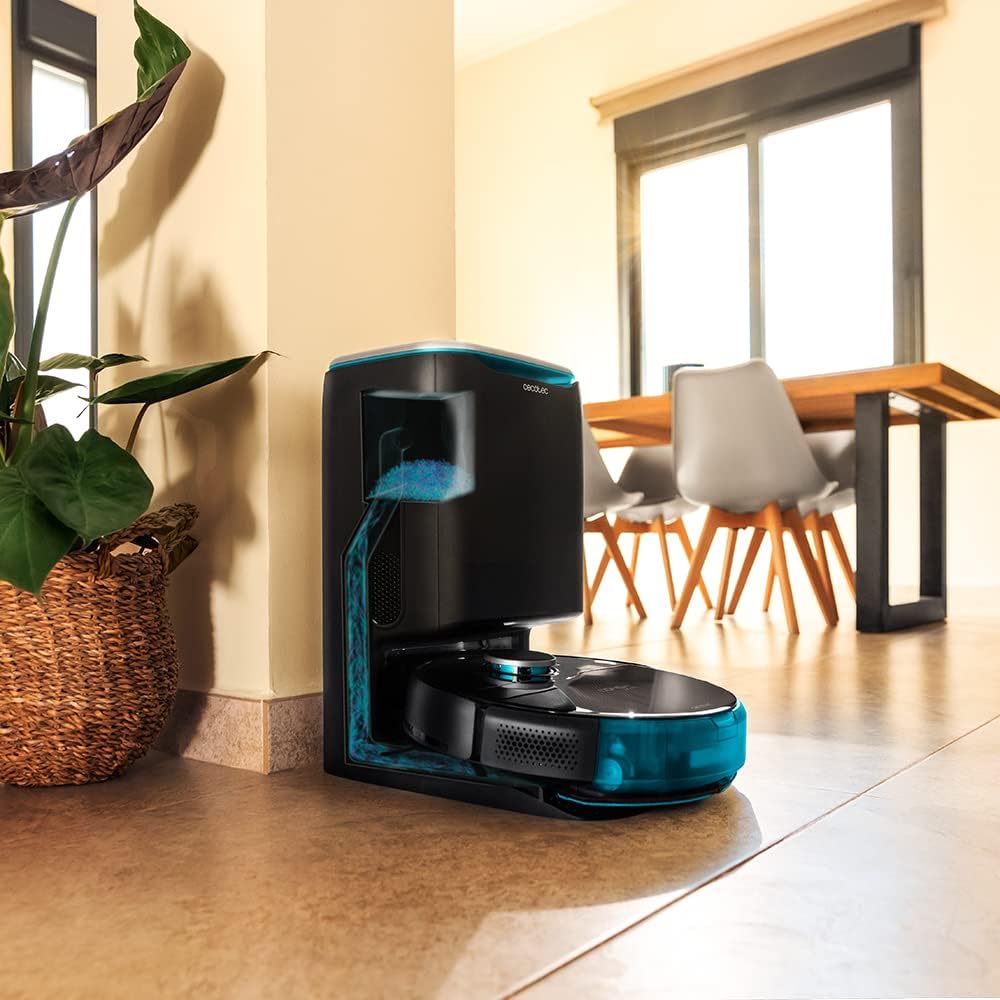
Image: The robot vacuum is compatible with the CongaHome 10.000 self-emptying station for convenient dust disposal.
Rozwiązywanie problemów
Jeśli masz problemy z odkurzaczem, zapoznaj się z poniższą tabelą, w której znajdziesz listę typowych problemów i ich rozwiązań.
| Problem | Możliwa przyczyna | Rozwiązanie |
|---|---|---|
| Robot nie włącza się ani nie ładuje. | Niski poziom naładowania baterii; brudne styki ładowania; zasilacz niepodłączony. | Place robot on charging station; clean charging contacts; ensure power adapter is securely connected. |
| Słaba skuteczność czyszczenia. | Pełny pojemnik na kurz; szczotki splątane; zatkany filtr. | Empty dust bin; clean main and side brushes; clean or replace filter. |
| Robot często się zacina. | Zbyt wiele przeszkód; czujniki zabrudzone. | Clear the cleaning area of loose cables and small objects; clean all sensors. |
| Problemy z łącznością aplikacji. | Nieprawidłowe hasło Wi-Fi; słaby sygnał Wi-Fi; robot nie jest w trybie parowania. | Verify Wi-Fi password; ensure robot is within Wi-Fi range; reset robot and re-attempt pairing as per app instructions. |
| Robot wydaje nietypowe dźwięki. | Brush or wheel obstructed; foreign object inside. | Check and clean main brush, side brushes, and wheels for obstructions. |
Specyfikacje
| Funkcja | Szczegół |
|---|---|
| Marka | Cecotec |
| Nazwa modelu | Conga 9090 AI |
| Numer modelu | 05416 |
| Kolor | Czarny |
| Wymiary produktu | Wymiary 17.5 x 40 x 54.2 cm |
| Waga przedmiotu | 4.1 kilograma |
| Pojemność (pojemnik na śmieci) | 2.5 litrów |
| Poziom hałasu | 64dB |
| Automatyczne wyłączanie | NIE |
| Kompatybilne urządzenia | Amazon Echo, Google Home |
| Funkcja specjalna | Programowalny |
Gwarancja i wsparcie
Aby uzyskać informacje dotyczące gwarancji, pomocy technicznej lub zgłoszeń serwisowych, zapoznaj się z kartą gwarancyjną dołączoną do produktu lub odwiedź oficjalną stronę Cecotec webZachowaj paragon jako dowód zakupu na wypadek reklamacji.
Możesz również odwiedzić Sklep Cecotec na Amazonie Aby uzyskać więcej informacji o produkcie i zasobach pomocy.


