1. Wprowadzenie
This manual provides instructions for the installation, operation, and troubleshooting of your ARRIS Touchstone TM804G DOCSIS 3.0 Telephone Modem. The TM804G is designed to provide high-speed data access and up to four lines of Voice over IP (VoIP) telephone service over your cable network. It features DOCSIS 3.0 technology for enhanced internet speeds and reliability.
2. Główne cechy
- DOCSIS 3.0 compliant for high-speed internet.
- Four (4) dedicated VoIP telephone ports.
- Supports download speeds up to 343 Mbps.
- Two independent 96MHz RF tuners.
- Ethernet connectivity for network devices.
3. Zawartość opakowania
Sprawdź, czy w przesyłce znajdują się następujące elementy:
- ARRIS Touchstone TM804G Telephone Modem
- Zasilacz
- Kabel Ethernet
- Dokumentacja (skrócony przewodnik, informacje dotyczące bezpieczeństwa)
Note: A backup battery is sold separately and is not included in the standard package.
4. Cechy fizyczne
4.1 Wskaźniki na panelu przednim
The front panel of the TM804G modem features several LED indicators that provide status information.

Rysunek 1: Przód view of the ARRIS Touchstone TM804G Telephone Modem. This image shows the modem's black casing with ventilation holes on top and a row of green LED indicator lights on the right side of the front panel.
| Wskaźnik | Status | Opis |
|---|---|---|
| MOC | Jednolity zielony | Modem jest włączony. |
| DS (poniżej) | Jednolity zielony | Downstream channel is connected. |
| USA (w górę) | Jednolity zielony | Upstream channel is connected. |
| ONLINE | Jednolity zielony | The modem is registered and online. |
| POŁĄCZYĆ | Jednolity zielony | An Ethernet device is connected. |
| TEL1-4 | Jednolity zielony | Telephone line is active. |
4.2 Porty na tylnym panelu
The rear panel provides all necessary connection ports for the modem.
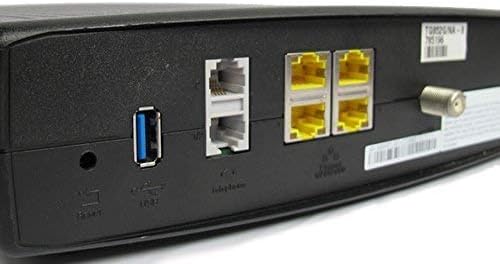
Rysunek 2: Tył view of the ARRIS Touchstone TM804G Telephone Modem. This image displays the back of the modem, featuring a coaxial cable connector, four yellow Ethernet ports, two grey telephone ports (RJ-11), a USB port, a reset button, and the power input.
- WSPÓŁOSIOWY: Connects to the cable wall outlet.
- ETHERNET (SIEĆ LOKALNA): Four (4) RJ-45 ports for connecting to a computer or router.
- TEL1-4 (RJ-11): Four (4) telephone ports for connecting to telephones or a home telephone wiring system.
- USB: (Functionality may vary or be disabled by your service provider).
- RESETOWANIE: Recessed button to reset the modem to factory defaults (use with caution).
- MOC: Łączy się z zasilaczem.
5. Konfiguracja i instalacja
Follow these steps to install your ARRIS Touchstone TM804G modem.
- Podłącz kabel koncentryczny: Connect one end of a coaxial cable to the COAXIAL port on the modem and the other end to a cable wall outlet. Ensure the connection is finger-tight.
- Podłącz kabel Ethernet: Connect one end of the Ethernet cable to one of the ETHERNET ports on the modem and the other end to your computer's network port or your wireless router's WAN/Internet port.
- Podłącz linie telefoniczne: If using telephone service, connect your telephone(s) or home telephone wiring to the TEL1, TEL2, TEL3, or TEL4 ports on the modem using standard RJ-11 telephone cables.
- Podłącz zasilacz: Podłącz zasilacz do portu POWER w modemie, a następnie podłącz zasilacz do gniazdka elektrycznego.
- Włączanie: The modem will automatically power on. Observe the front panel indicator lights. The POWER, DS, US, and ONLINE lights should eventually turn solid green, indicating a successful connection to the cable network and internet. The TEL lights will illuminate when telephone lines are active.
- Aktywuj usługę: Contact your Internet Service Provider (ISP) to activate the modem. You will need to provide them with the MAC address and serial number, typically found on a label on the bottom or back of the modem.
Important: Do not connect the modem to a power outlet until all other connections are made.
6. Instrukcja obsługi
Once the modem is successfully installed and activated, it operates automatically.
- Dostęp do Internetu: Any device connected via Ethernet to the modem (or through a connected router) should have internet access once the ONLINE light is solid green.
- Obsługa telefoniczna: If your service plan includes VoIP, connected telephones will have dial tone and function once the corresponding TEL lights are solid green.
- Status monitorowania: Refer to the front panel LED indicators (Section 4.1) to monitor the modem's operational status.
7. Konserwacja
- Czyszczenie: Keep the modem clean and free of dust. Use a soft, dry cloth to wipe the exterior. Do not use liquid cleaners or aerosols.
- Wentylacja: Upewnij się, że modem znajduje się w dobrze wentylowanym miejscu, aby zapobiec przegrzaniu. Nie zasłaniaj otworów wentylacyjnych.
- Aktualizacje oprogramowania układowego: Firmware updates are typically managed automatically by your Internet Service Provider. Do not attempt to manually update the firmware unless instructed by your ISP.
- Restarting the Modem: If you experience connectivity issues, try restarting the modem by unplugging the power adapter for 10-15 seconds and then plugging it back in.
- Przywrócenie ustawień fabrycznych: The recessed RESET button on the rear panel can be used to restore factory default settings. This should only be done if instructed by your ISP, as it will erase all custom configurations. To perform a factory reset, use a paperclip to press and hold the RESET button for at least 10 seconds.
8. Rozwiązywanie Problemów
If you encounter problems with your modem, refer to the following common issues and solutions.
| Problem | Możliwa przyczyna | Rozwiązanie |
|---|---|---|
| Brak zasilania | Zasilacz nie jest podłączony lub gniazdko jest uszkodzone. | Ensure power adapter is securely connected to the modem and a working electrical outlet. Check the POWER LED. |
| Brak dostępu do Internetu | Coaxial cable loose, modem not activated, or ISP outage. |
|
| No Dial Tone on Phone | Telephone cable loose, TEL light off, or service issue. |
|
| Niska prędkość Internetu | Przeciążenie sieci, stary router lub problem z dostawcą usług internetowych. |
|
For further assistance, contact your Internet Service Provider's technical support.
9. Specyfikacje
| Numer modelu | TM804G |
| Standard DOCSIS | DOCSIS 3.0 |
| Internet Download Speed | Do 343 Mb/s (zależnie od dostawcy usług internetowych) |
| Porty VoIP | 4 (RJ-11) |
| Porty Ethernet | 4 (RJ-45) |
| Technologia łączności | Sieć Ethernetowa |
| Wymiary (dł. x szer. x wys.) | Około 11.81 x 9.13 x 2.56 cala |
| Waga | Około 2.16 funtów |
| Kompatybilni dostawcy usług internetowych | Optimum, Mediacom (and others, check with your provider) |
10. Gwarancja i wsparcie
Ten produkt jest oferowany jako produkt odnowiony Amazon. Produkty odnowione Amazon są profesjonalnie sprawdzane i testowane pod kątem działania i wyglądu jak nowe. W ramach Gwarancji Odnowionej Amazon przysługuje Ci wymiana lub zwrot pieniędzy, jeśli nie jesteś zadowolony z zakupu.
For technical support, troubleshooting, or service-related inquiries, please contact your Internet Service Provider (ISP) directly. Your ISP is responsible for the activation, configuration, and ongoing support of the modem on their network.


