1. Wprowadzenie
Thank you for choosing the CHONCHOW US801 Gaming Keyboard and Mouse Combo. This manual provides detailed instructions for setting up, operating, and maintaining your new peripheral set. Please read this manual carefully before use to ensure optimal performance and longevity of your product.

Image: The CHONCHOW US801 Gaming Keyboard and Mouse Combo, showcasing its full-size layout and ergonomic design.
2. Zawartość opakowania
The CHONCHOW US801 Gaming Keyboard and Mouse Combo package includes:
- 1 x CHONCHOW US801 Wired Gaming Keyboard
- 1 x CHONCHOW US801 Wired Gaming Mouse
- 1 x Instrukcja obsługi (ten dokument)
3. Instrukcje konfiguracji
The CHONCHOW US801 Gaming Keyboard and Mouse Combo is a plug-and-play device. No additional drivers or software are typically required for basic functionality.
- Podłącz klawiaturę: Locate an available USB 2.0 port on your computer, laptop, or gaming console. Insert the USB connector of the keyboard into the port.
- Podłącz mysz: Locate another available USB 2.0 port. Insert the USB connector of the mouse into the port.
- Rozpoznawanie systemu: Your operating system (Windows, Mac OS, Xbox, PS4) should automatically detect and install the necessary drivers. This process may take a few moments. A notification typically appears once the device is ready for use.
- Initial Functionality Test: After installation, test the keyboard by typing and the mouse by moving the cursor and clicking buttons to ensure they are working correctly.
Note on Initial Connection:
In rare cases, after connecting the USB cable, the keyboard backlight may not illuminate fully or correctly. This can occur due to static electricity or repeated disconnections/reconnections causing signal issues with the operating system. If this happens, please wait patiently for approximately 20 seconds for the keyboard's light control chip to restart. If the issue persists, ensure your computer is connected to the internet, then reconnect the keyboard and wait for the "driver installation is complete" notification. If problems continue, refer to the Troubleshooting section or contact customer support.
4. Keyboard Features and Operation
4.1. Kontrola podświetlenia
Klawiatura posiada regulowane podświetlenie RGB z wieloma trybami i poziomami jasności.
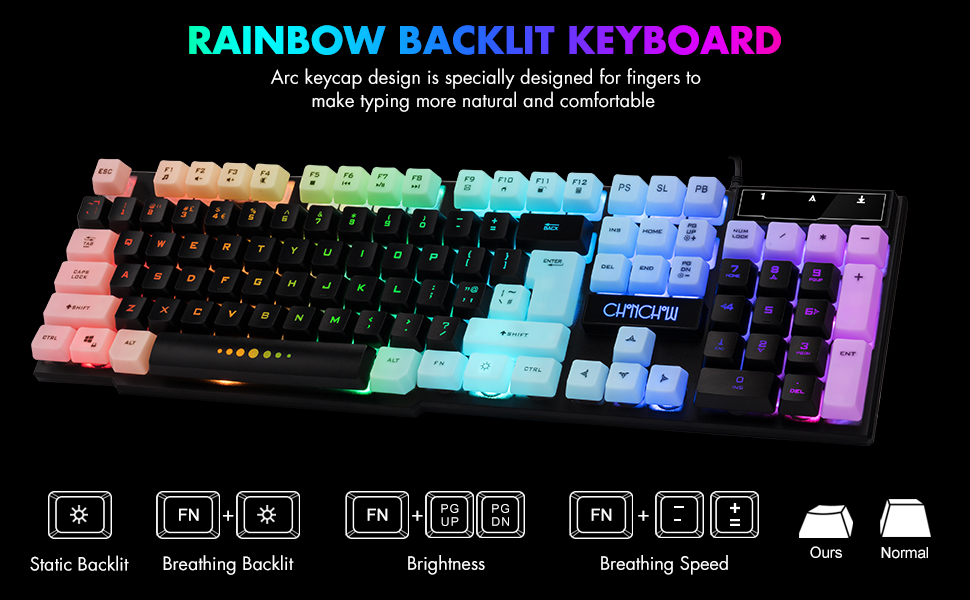
Image: Visual guide for controlling keyboard backlighting, showing key combinations for various effects.
- Włączanie/wyłączanie podświetlenia: Naciśnij Żarówka key (usually located near the right Ctrl key).
- Switch Backlight Mode (Breathing/Static): Naciskać FN + Żarówka klawisz.
- Dostosuj jasność: Naciskać FN + PG UP to increase brightness, or FN + PG DN aby zmniejszyć jasność.
- Dostosuj prędkość oddechu: Naciskać FN + + to increase breathing speed, or FN + - aby zmniejszyć prędkość oddechu.
4.2. Klawisze multimedialne
The keyboard includes 12 multimedia function shortcut keys for quick access to common functions.

Image: Layout of the keyboard highlighting the 12 multimedia function keys and their corresponding FN key combinations.
| Kombinacja klawiszy | Funkcjonować |
|---|---|
| FN+F1 | Odtwarzacz muzyki |
| FN+F2 | Zmniejsz głośność |
| FN+F3 | Zwiększ głośność |
| FN+F4 | Niemy |
| FN+F5 | Odtwórz/Zatrzymaj |
| FN+F6 | Poprzedni utwór |
| FN+F7 | Odtwórz/Pauza |
| FN+F8 | Następny utwór |
| FN+F9 | |
| FN+F10 | Web Dom |
| FN+F11 | Ekran blokady |
| FN+F12 | Kalkulator |
4.3. Klawisze anty-ghostingowe
The keyboard features 19 anti-ghosting keys, ensuring that multiple key presses are registered simultaneously, which is crucial for gaming.

Image: The keyboard layout with 19 anti-ghosting keys visually indicated.
4.4. WIN Key Lock
The Windows key can be disabled to prevent accidental presses during gaming sessions.

Image: Close-up of the Windows key with an overlay indicating its lock function.
- Disable/Enable WIN Key: Naciskać FN + WYGRAĆ klawisz.
5. Mouse Features and Operation
The gaming mouse features 7-color breathing LED lighting and adjustable DPI settings.

Image: The CHONCHOW gaming mouse displaying its 7-color LED breathing light effect.
5.1. Regulacja DPI
The mouse offers four levels of DPI sensitivity to suit different tasks and preferences.
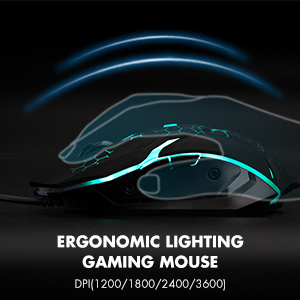
Image: The ergonomic design of the gaming mouse, highlighting its lighting and DPI settings.
- Poziomy DPI: 1200 / 1800 / 2400 / 3600 DPI.
- Dostosuj DPI: Naciśnij Przycisk DPI (usually located behind the scroll wheel) to cycle through the available DPI settings.
5.2. Mouse Buttons
The mouse is equipped with 6 buttons for enhanced control:
- Lewy przycisk myszy
- Prawy przycisk myszy
- Kółko przewijania (klikalne)
- Przycisk DPI
- Przycisk do przodu
- Przycisk wstecz
6. Zgodność
The CHONCHOW US801 Gaming Keyboard and Mouse Combo offers wide compatibility with various operating systems and devices.
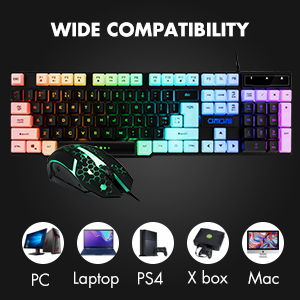
Image: Icons representing various compatible devices including PC, Laptop, PS4, Xbox, and Mac.
- Systemy operacyjne: Windows 2000 / 2003 / XP / Vista / Win7 / Win8 / Win10
- Urządzenia: PC, Computer, Laptop, PS4, Xbox, Mac
7. Konserwacja
Właściwa konserwacja zapewnia długowieczność i optymalną wydajność klawiatury i myszy.
- Czyszczenie: Use a soft, dry cloth to wipe down the surfaces of the keyboard and mouse. For deeper cleaning, especially for dust under keycaps, the keycaps are removable. Gently pull them off for cleaning and press them back into place. Avoid using harsh chemicals or abrasive materials.
- Wycieki: The keyboard features drainage holes to help mitigate damage from minor spills. In case of a liquid spill, immediately disconnect the keyboard from your device, turn it upside down to drain, and allow it to dry completely before reconnecting.
- Składowanie: Przechowuj klawiaturę i mysz w chłodnym, suchym miejscu, z dala od bezpośredniego światła słonecznego i ekstremalnych temperatur.
8. Rozwiązywanie Problemów
If you encounter issues with your CHONCHOW US801 Gaming Keyboard and Mouse Combo, please refer to the following common solutions:
- Klawiatura/mysz nie odpowiada:
- Ensure both USB cables are securely plugged into your device's USB ports.
- Try connecting the keyboard and mouse to different USB ports.
- Uruchom ponownie komputer lub konsolę do gier.
- Przetestuj urządzenia na innym komputerze, aby wykluczyć problemy specyficzne dla systemu.
- Backlight Issues (Not Bright / Partially Lit):
- Wait approximately 20 seconds after connecting; the keyboard's light control chip may be restarting due to static electricity or repeated connections.
- Ensure your computer is connected to the internet, then reconnect the keyboard. Wait for the "driver installation is complete" notification.
- Dostosuj jasność za pomocą FN + PG UP/PG DN.
- Klucze nie rejestrują się / efekt ghostingu:
- Upewnij się, że klawiatura jest czysta i nie ma pod klawiszami żadnych zanieczyszczeń.
- Verify that the WIN key lock is not accidentally engaged if you are experiencing issues with the Windows key.
- Kursor myszy skacze lub porusza się nieregularnie:
- Wyczyść czujnik optyczny znajdujący się na spodzie myszy.
- Upewnij się, że używasz myszy na odpowiedniej powierzchni (np. podkładce pod mysz).
- Jeśli kursor jest zbyt czuły, zmień ustawienia DPI na niższe.
If the problem persists after attempting these steps, please contact CHONCHOW customer support for further assistance.
9. Specyfikacje
| Funkcja | Szczegół |
|---|---|
| Marka | CHONCHOW |
| Numer modelu | US801 |
| Technologia łączności | Przewodowy USB |
| Układ klawiatury | 104-Keys Full Size |
| Podświetlenie klawiatury | RGB (Rainbow Backlit) |
| Funkcje specjalne klawiatury | 19 Anti-Ghosting Keys, 12 Multimedia Keys, WIN Key Lock, Ergonomic, Removable Keycaps |
| Poziomy DPI myszy | 1200 / 1800 / 2400 / 3600 DPI |
| Przyciski myszy | 6 Buttons (Left, Right, Forward, Backward, DPI, Scroll Wheel) |
| Podświetlenie myszy | 7-kolorowa dioda LED z funkcją oddychania |
| Wymiary produktu (klawiatura) | 17 x 5.1 x 1.3 cala |
| Waga przedmiotu | 1.94 funta |
| Tworzywo | Plastikowy |
10. Gwarancja i wsparcie
CHONCHOW stands behind the quality of its products. Your CHONCHOW US801 Gaming Keyboard and Mouse Combo is covered by the following:
- 30-Day Refund or Replacement: W przypadku jakichkolwiek problemów zgłoszonych w ciągu 30 dni od daty zakupu.
- 12-Month After-Sales Service: For quality-related problems within 12 months of purchase.
For friendly and easy-to-reach support, please contact our customer service team. Refer to your purchase documentation or the CHONCHOW official webstrona dla danych kontaktowych.

