1. Wprowadzenie
The BirdDog PF120 is a high-performance Full HD NDI box camera designed for professional video production environments. It features an Exmor R back-illuminated sensor, 20x optical zoom, and a full color matrix, all housed within a durable all-metal chassis. This manual provides essential information for the proper setup, operation, and maintenance of your PF120 camera.
2. Zawartość opakowania
Please verify that all items listed below are included in your package. If any items are missing or damaged, contact your vendor immediately.
- BirdDog PF120 Full HD NDI 20x Box Camera
- Zasilacz (prąd stały 12 V)
- Osłona obiektywu
- Dokumentacja (skrócony przewodnik, informacje dotyczące bezpieczeństwa)
3. Koniec produktuview
The BirdDog PF120 is engineered for versatility and robust performance. Key features include:
- Full NDI support for seamless integration into IP workflows.
- 20x optical zoom for detailed close-ups.
- Exmor R back-illuminated sensor for superior low-light performance.
- Durable all-metal housing.
- Multiple connectivity options including HDMI, NDI/PoE, RS-232, and USB2.0.
3.1 Kamera Views and Components

Rysunek 3.1: Przód view of the BirdDog PF120 camera, showcasing the lens and the BirdDog logo on the side panel.
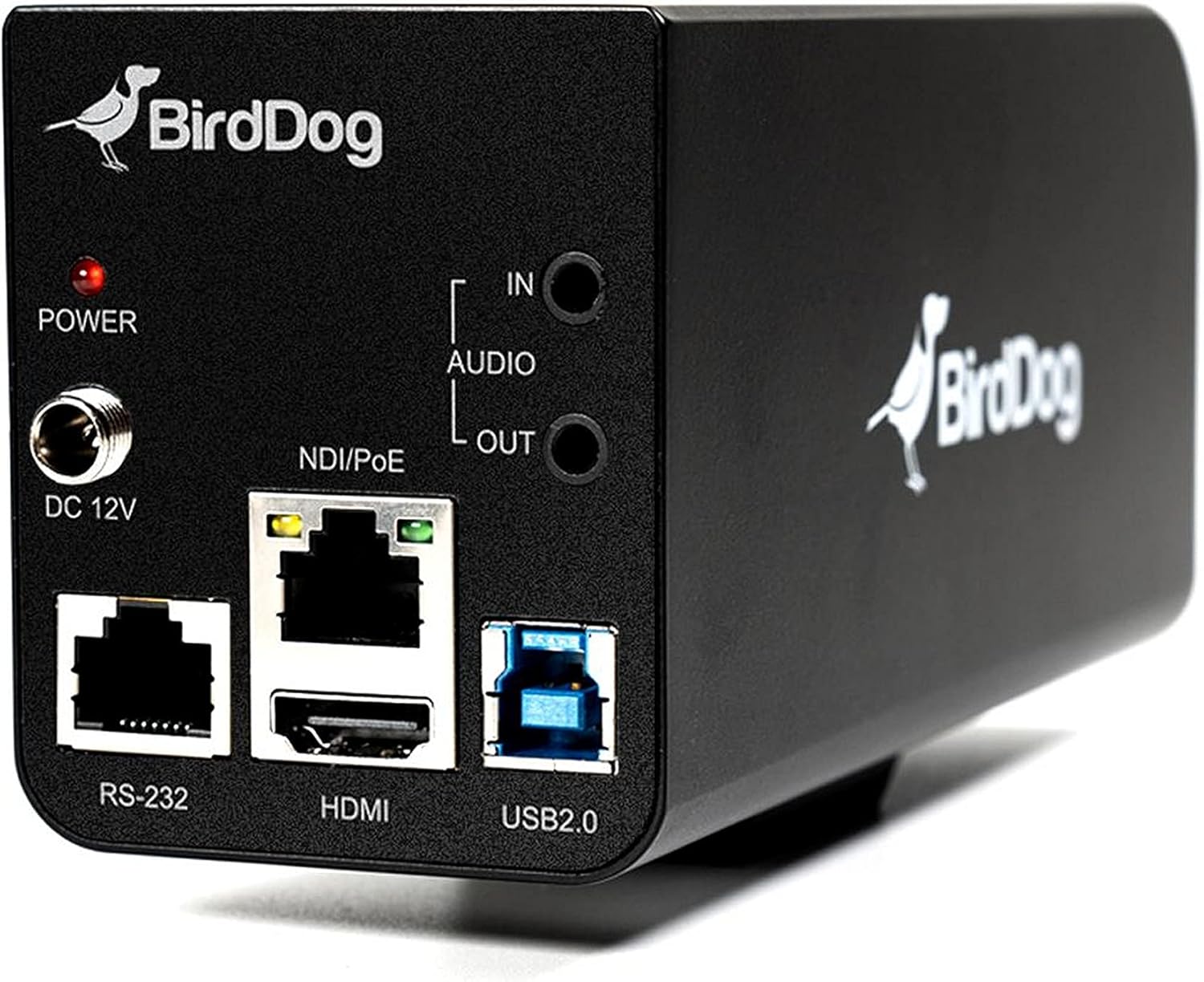
Rysunek 3.2: Rear panel of the BirdDog PF120, displaying the power input (DC 12V), audio input/output, NDI/PoE port, HDMI output, RS-232 port, and USB2.0 port.
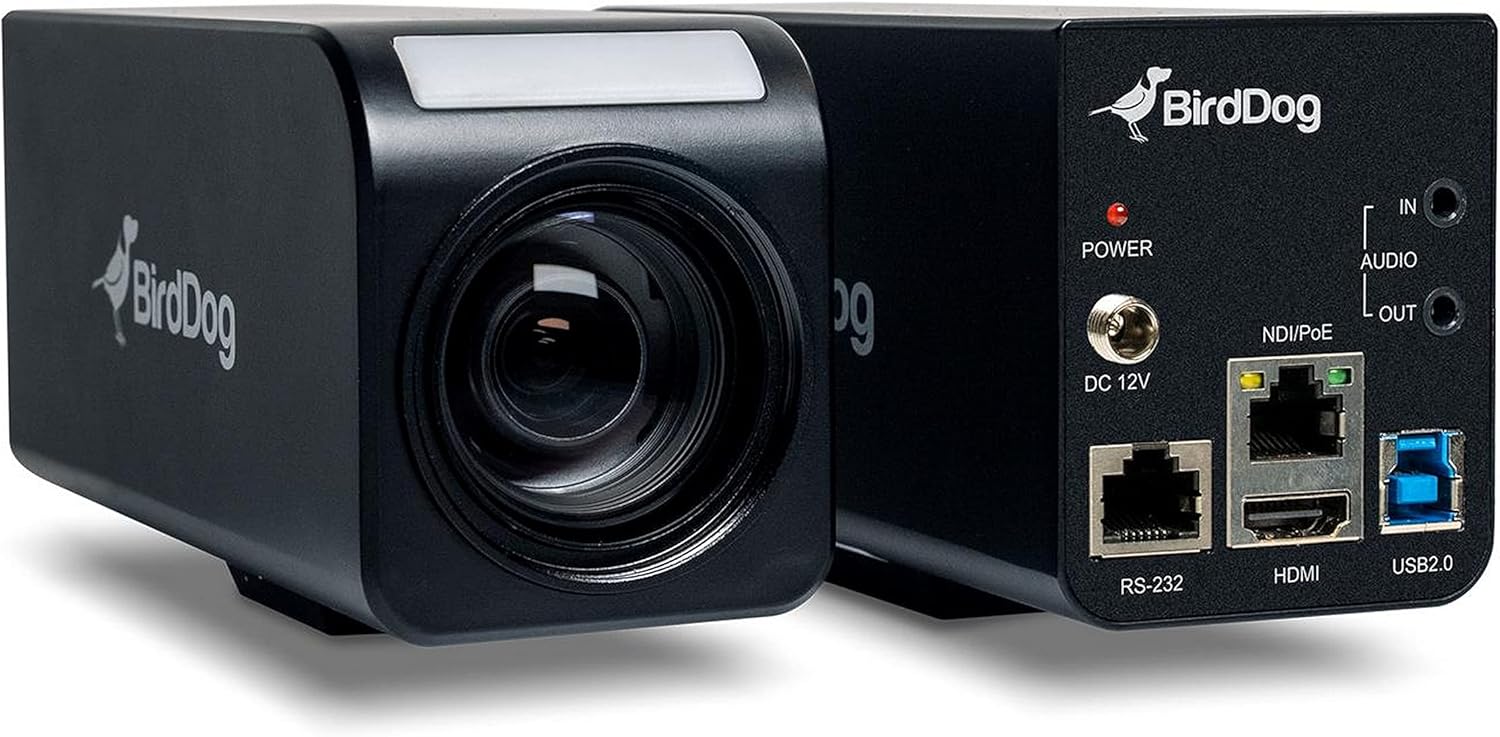
Rysunek 3.3: Łączny view of the BirdDog PF120, showing both the front lens assembly and the rear connectivity panel.

Rysunek 3.4: Szczyt view of the BirdDog PF120 camera, highlighting the sleek design and BirdDog branding.
4. Konfiguracja
4.1 Włączanie
- Connect the supplied DC 12V power adapter to the "DC 12V" port on the rear of the camera.
- Podłącz zasilacz do odpowiedniego gniazdka elektrycznego.
- Alternatively, if using a PoE-enabled network switch, connect an Ethernet cable to the "NDI/PoE" port. The camera will power on via Power over Ethernet.
4.2 Network Connection (NDI)
- Connect an Ethernet cable from the "NDI/PoE" port on the camera to your network switch or router.
- Ensure your network is configured to support NDI protocols.
- The camera will obtain an IP address automatically via DHCP. For static IP configuration, refer to the BirdDog Central application or web interfejs.
4.3 wyjścia wideo
- NDI Output: The primary video output is via NDI over the Ethernet connection.
- Wyjście HDMI: Connect an HDMI cable from the "HDMI" port on the camera to a monitor or video switcher for direct video monitoring.
5. Obsługa aparatu
5.1 Dostęp do Web Interfejs
- Once connected to the network, use the BirdDog Central application or an IP scanner to discover the camera's IP address.
- Otwórz web przeglądarka i wprowadź adres IP kamery, aby uzyskać do niej dostęp web interfejs.
- Z web interface, you can configure video settings, network parameters, and control camera functions.
5.2 Sterowanie kamerą
The PF120 can be controlled via:
- NDI Tools: Utilize NewTek NDI Tools (e.g., NDI Studio Monitor) for basic control.
- BirdDog Central / Cam Control: BirdDog's dedicated software provides comprehensive control over camera settings, including zoom, focus, iris, and color matrix.
- RS-232: Connect a compatible serial controller to the RS-232 port for hardware control.
- Zdalne sterowanie: The camera supports remote control methods as specified in the product documentation.
5.3 Zoom i ostrość
The PF120 features a 20x optical zoom lens. Zoom and focus adjustments are typically made through the web interface or compatible control software.
6. Konserwacja
- Czyszczenie: Use a soft, dry cloth to clean the camera body. For the lens, use a specialized lens cleaning solution and microfiber cloth. Avoid abrasive cleaners.
- Aktualizacje oprogramowania układowego: Periodically check the BirdDog website for firmware updates. Keeping the firmware updated ensures optimal performance and access to new features.
- Składowanie: When not in use for extended periods, store the camera in a cool, dry place, away from direct sunlight and extreme temperatures.
7. Rozwiązywanie Problemów
7.1 Brak zasilania
- Upewnij się, że zasilacz jest prawidłowo podłączony do aparatu i do sprawnego gniazdka elektrycznego.
- If using PoE, verify that the Ethernet cable is connected to a PoE-enabled port on your switch and that the switch is providing power.
7.2 No NDI Signal
- Sprawdź połączenie kabla Ethernet.
- Verify that the camera has obtained an IP address (check your router's DHCP client list or use BirdDog Central).
- Ensure your network firewall is not blocking NDI traffic.
- Confirm that NDI tools or software on your receiving device are correctly configured to discover NDI sources.
7.3 Problemy z jakością obrazu
- Check lens for smudges or dust and clean if necessary.
- Adjust focus settings via the web interface or control software.
- Review exposure, white balance, and color matrix settings in the camera's web interfejs.
8. Specyfikacje
| Funkcja | Szczegół |
|---|---|
| Numer modelu | BD-BDPF120 |
| Rozdzielczość przechwytywania wideo | 1080p |
| Efektywna rozdzielczość wideo | 720 pikseli |
| Zoom optyczny | 20x |
| Typ powiększenia | Digital Zoom, Optical Zoom |
| Technologia łączności | Przewodowy |
| Protokół łączności | Wi-Fi (for control/management, NDI is primary video) |
| Metoda kontroli | Remote, Iris, RS-232 |
| Źródło zasilania | AC/DC, PoE |
| Cotage | 5 watów |
| Tworzywo | Metal |
| Pozycja Wymiary (dł. x szer. x wys.) | 9.9 x 9 x 3.6 cala |
| Waga przedmiotu | 2.94 funta |
| Typ montażu | Wall Mount (as per spec, but typically box cameras are versatile) |
| Międzynarodowa Ocena Ochrony | IP65 |
| Technologia słabego oświetlenia | Kolor nocy |
9. Gwarancja i wsparcie
For warranty information and technical support, please refer to the official BirdDog website or contact your authorized BirdDog reseller. Keep your proof of purchase for warranty claims.
BirdDog Official Webstrona: www.bird-dog.tv


