1. Wprowadzenie
Thank you for choosing the PROXTEND X502 Full HD Webcam. This manual provides detailed instructions to help you set up, operate, and maintain your webcam for optimal performance. The X502 is designed to deliver clear 1080p video at 30 frames per second, featuring an omni-directional microphone and automatic low light correction for various lighting conditions.
2. Zawartość opakowania
Sprawdź, czy w przesyłce znajdują się wszystkie elementy:
- PROXTEND X502 Full HD Webcam (PX-CAM007)
- Integrated Universal Mounting Clip
- Instrukcja obsługi (ten dokument)
3. Konfiguracja
Follow these steps to set up your PROXTEND X502 Webkrzywka:
- Montaż Webkrzywka:
Ten webcam features an integrated universal mounting clip. You can place the webUmieść kamerę na monitorze komputera, ekranie laptopa lub płaskiej powierzchni. Wyreguluj klips, aby bezpiecznie zamocować kamerę. webcam in position. The webcam also supports mini tripod mounting (tripod not included).
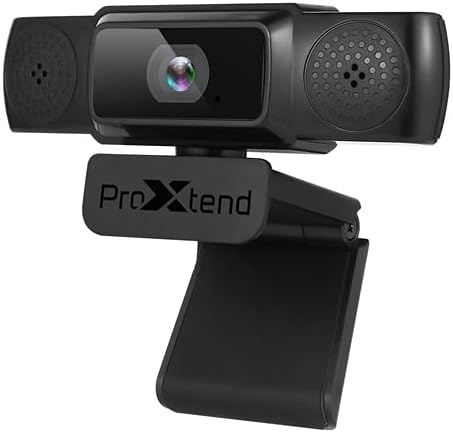
Image: The PROXTEND X502 Full HD Webcam shown with its universal mounting clip, suitable for monitors or flat surfaces.
- Łączenie się z komputerem:
Podłącz kabel USB do webpodłącz kamerę do wolnego portu USB w komputerze. webcam is plug-and-play, meaning your operating system should automatically detect and install the necessary drivers. No additional software installation is typically required.
- Driver Installation Verification:
After connecting, allow a few moments for your computer to recognize the device. You can verify successful installation in your operating system's Device Manager (Windows) or System Information (macOS) under 'Cameras' or 'Imaging Devices'.
4. Instrukcja obsługi
Kiedy webcam is set up, you can begin using it with various applications:
- Wybór Webkrzywka:
Open your preferred video conferencing, streaming, or recording application (e.g., Zoom, Microsoft Teams, Skype, OBS Studio). Navigate to the application's video and audio settings. Select "PROXTEND X502" as your camera and microphone input device.

Obraz: Przód view of the PROXTEND X502 Full HD Webcam, highlighting the lens and integrated microphones.
- Jakość wideo:
Ten webcam automatically adjusts for optimal image quality, including auto-focus and auto low light correction. Ensure adequate lighting for the best video performance. The 1920x1080p resolution at 30fps provides clear and smooth video.
- Jakość dźwięku:
The integrated omni-directional microphone captures sound from all directions. Position yourself appropriately to ensure your voice is clearly picked up. Most applications allow you to adjust microphone input levels in their audio settings.
5. Funkcje
Key features of the PROXTEND X502 Full HD Webcam include:
- Przetwornik obrazu CMOS 1/2.7”
- 2 megapiksela
- Resolution: 1920x1080 at 30 frames per second
- Mikrofon wielokierunkowy
- Uniwersalny klips montażowy
- Mini Tripod Support
- Automatyczna korekcja przy słabym oświetleniu
6. Specyfikacje
Detailed technical specifications for the PROXTEND X502 Full HD Webkrzywka:

Image: A visual representation of the PROXTEND X502 Full HD Webcam's key features and technical specifications.
| Funkcja | Specyfikacja |
|---|---|
| Czujnik obrazu | 1/2.7" CMOS Image Sensor |
| Megapiksele | 2 MP |
| Maksymalna rozdzielczość | 1920x1080 |
| Rozdzielczość wideo | 1920x1080 |
| Maksymalna liczba klatek na sekundę | 30 klatek na sekundę |
| Format dekodowania wideo | H.264/MJPG |
| Tryb ekspozycji | Automatyczny |
| Balans bieli | Automatyczny |
| Osiągać | Automatyczny |
| Kompensacja słabego oświetlenia | Automatyczny |
| Viewing kąt | 77° |
| Odległość ogniskowa | 10 cm do nieskończoności |
| Typ fokusu | Automatyczny |
| Mikrofon | Dookólne |
| Dźwięk Sampling Oceń | 1 kanał 16bit 16K 32K 44.1K 48K |
| Format audio | PCM, kompatybilny z UAC 1.0 |
| Interfejs | USB 2.0 |
| Długość kabla | 1.5m |
| Kompatybilny system operacyjny | Windows XP, Windows 7 (32bit/64bit), Windows 8, Windows 10, Android V5.0 or higher OS, MAC OS 10.6 or higher |
| Wymiary produktu | Wymiary 12.7 x 7.62 x 5.08 cm |
| Waga produktu | 453.59 gramów |
7. Rozwiązywanie Problemów
If you encounter issues with your PROXTEND X502 Webcam, try the following solutions:
- Brak obrazu/wideo:
- Upewnij się, że kabel USB jest bezpiecznie podłączony do obu urządzeń. webkamera i komputer.
- Wypróbuj inny port USB na swoim komputerze.
- Uruchom ponownie komputer.
- Check your application's settings to ensure the PROXTEND X502 is selected as the video input.
- Verify that no other application is currently using the webkamera
- Brak dźwięku/niedziałający mikrofon:
- Ensure the PROXTEND X502 is selected as the microphone input in your application's audio settings.
- Sprawdź ustawienia dźwięku komputera, aby upewnić się, że mikrofon jest włączony i nie wyciszony.
- Adjust the microphone input level in your system or application settings.
- Słaba jakość wideo:
- Ensure sufficient lighting in your environment.
- Wyczyść webcam lens gently with a soft, lint-free cloth.
- Check your internet connection speed if streaming, as bandwidth can affect video quality.
8. Konserwacja
Aby zapewnić długowieczność i optymalną wydajność Twojego webkrzywka:
- Czyszczenie: Delikatnie wytrzyj webcam lens with a soft, dry, lint-free cloth. Avoid using harsh chemicals or abrasive materials.
- Składowanie: Gdy nie jest używany, przechowuj webPrzechowywać w czystym, suchym miejscu, z dala od ekstremalnych temperatur i bezpośredniego światła słonecznego.
- Obsługiwanie: Unikaj upuszczania webcam or subjecting it to strong impacts.
9. Gwarancja i wsparcie
The PROXTEND X502 Full HD Webkamera jest wyposażona w 7-letnia gwarancja, ensuring peace of mind regarding your purchase. For warranty claims, technical support, or any inquiries not covered in this manual, please refer to the contact information provided with your product packaging or visit the official PROXTEND webstrona.
10. Informacje o zgodności
This device complies with relevant regulatory standards for electronic equipment. For detailed compliance information, please refer to the product packaging or the official PROXTEND webstrona.


