Wstęp
This manual provides detailed instructions for the Pyle PKBRD8100 Portable Foldable 88-Key Digital Piano Keyboard. Please read this manual thoroughly before using the product to ensure proper operation and to maximize your musical experience. Keep this manual for future reference.
Co jest w pudełku
Po rozpakowaniu upewnij się, że wszystkie wymienione poniżej przedmioty są obecne i w dobrym stanie:
- Przenośna i składana klawiatura fortepianowa
- Kabel ładowarki USB
- Adapter USB
- Instrukcja obsługi (ten dokument)
- Piano Bag for Easy Storage & Travel
- Pedał podtrzymujący

Image: All components included in the Pyle PKBRD8100 package, neatly arranged. This includes the foldable keyboard, a sustain pedal, a USB charger, a USB cable, and a black carrying bag.
Cechy produktu
The Pyle PKBRD8100 Digital Piano Keyboard offers a range of features designed for versatility and ease of use:
- 88 pełnowymiarowych klawiszy: Provides a comprehensive range for musical expression.
- Składana konstrukcja: Umożliwia kompaktowe przechowywanie i przenoszenie.
- Łączność Bluetooth: Enables connection to smart devices for MIDI and audio streaming.
- 129 Selectable Tones: A wide variety of instrument sounds.
- 128 Rhythm Styles: Accompaniment options for practice and performance.
- Built-in Full Range Stereo Speakers: Dla uzyskania czystego dźwięku.
- Record & Playback Mode: Złap i odzyskajview your performances.
- Wejście pedału podtrzymania: For expressive playing.
- Aux (3.5mm) Input Jack / Mic Input: For connecting external audio sources or a microphone.
- Gniazdo słuchawkowe (3.5 mm): Do prywatnej praktyki.
- Digital LCD Display & LED Indicators: For easy navigation and status updates.
- Wbudowany akumulator: Do użytku przenośnego.
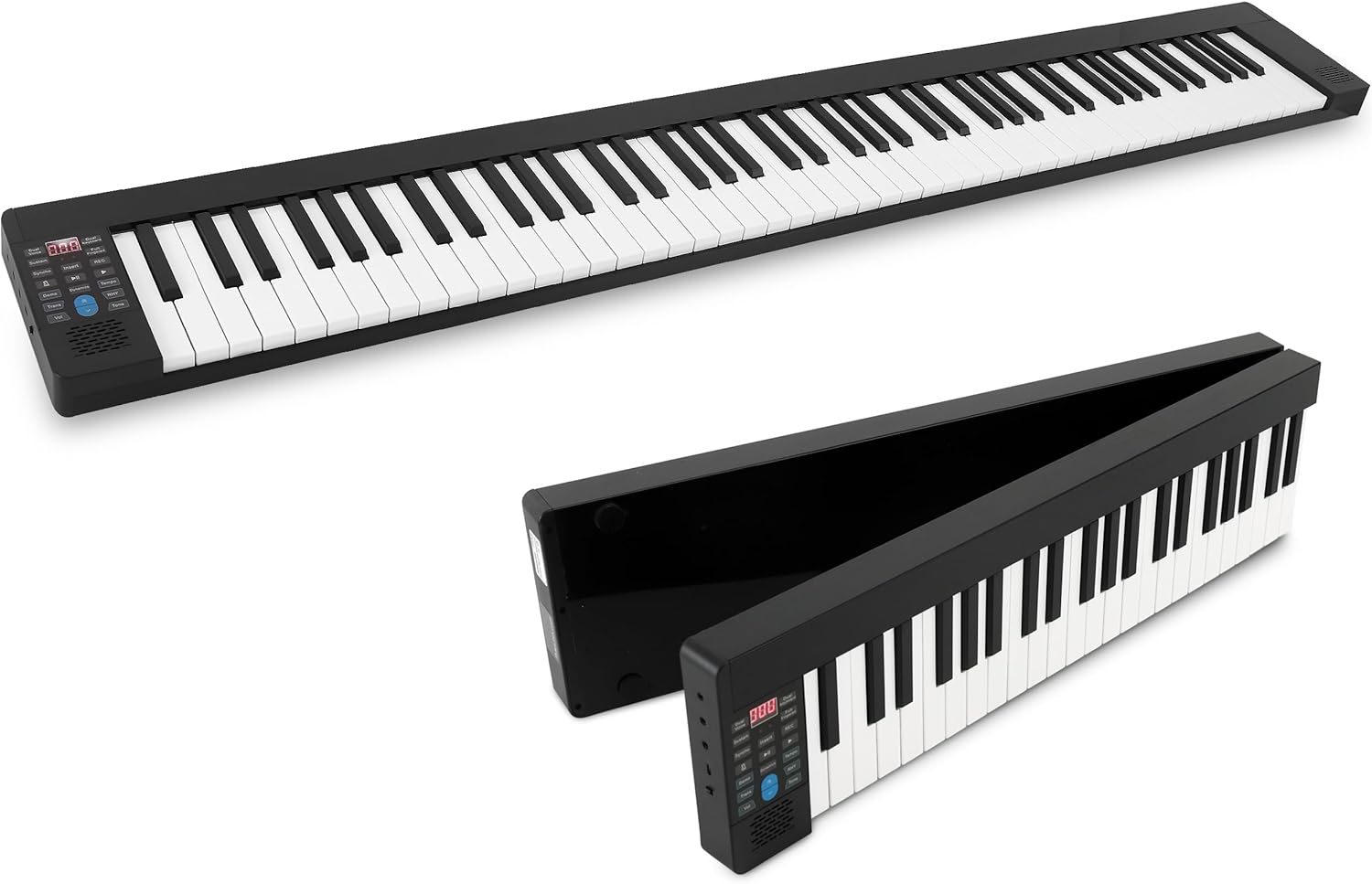
Image: The Pyle PKBRD8100 digital piano keyboard fully extended, showcasing its 88 keys and compact design.

Image: The Pyle PKBRD8100 keyboard in the process of folding, highlighting its 180-degree foldable design and a user carrying it in the included travel bag.
Organizować coś
- Rozpakuj klawiaturę: Ostrożnie wyjąć wszystkie elementy z opakowania.
- Rozłóż klawiaturę: Gently unfold the keyboard until it lies flat and locks into position. Ensure it is placed on a stable, flat surface.
- Podłączenie zasilania:
- Ładowanie: Connect the USB charger cable to the keyboard's USB port and the USB adapter to a power outlet. The built-in battery will begin charging.
- Moc bezpośrednia: The keyboard can also be operated directly from the power adapter while charging.
- Podłączenie pedału podtrzymującego: Insert the sustain pedal cable into the designated sustain pedal interface on the keyboard.
- Headphones/External Speakers (Optional): For private practice, connect headphones to the 3.5mm headphone jack. To connect to external speakers, use the Aux (3.5mm) Input Jack.
- Parowanie Bluetooth (opcjonalnie): To connect via Bluetooth, ensure Bluetooth is enabled on your smart device. The keyboard will appear as an available device for pairing.

Obraz: Szczegółowy view of the input/output ports on the Pyle PKBRD8100, including the headphone jack, USB port for power/data, and the sustain pedal connection point.
Instrukcja obsługi
Panel sterowania nadview

Image: A detailed diagram illustrating the various buttons and their functions on the Pyle PKBRD8100 control panel, including LED display, volume, tone, rhythm, and function buttons.
- Włączanie/wyłączanie: Locate the power button on the side or control panel to turn the keyboard on or off.
- Regulacja głośności: Use the 'Vol' buttons (Decrease/Increase) to adjust the master volume.
- Wybór tonu: Press the 'Tone' button, then use the arrow buttons to cycle through the 129 available tones. The selected tone number will appear on the LED display.
- Wybór rytmu: Press the 'RHY' (Rhythm) button, then use the arrow buttons to select from the 128 rhythm styles. Press the 'START/STOP' button to begin or end the rhythm.
- Utwory demonstracyjne: Press the 'Demo' button to play a demonstration song. Press it again to stop.
- Nagrywanie i odtwarzanie:
- Press 'REC' to start recording your performance.
- Press 'PLAY' to listen to your recorded performance.
- Sustain Function: Press the 'Sustain' button to activate or deactivate the sustain effect. The connected sustain pedal will also control this function.
- Podwójny głos: Press the 'Dual Voice' button to layer two different instrument sounds simultaneously.
- Metronom: Press the 'Metronome' button to activate the metronome function for timing practice.
- Bluetooth MIDI/Audio:
- MIDI Bluetooth: Connect to music apps on your smart device for learning or composition.
- Bluetooth Audio: Stream audio from your device through the keyboard's speakers.

Obraz: Ponadview of the Bluetooth and MIDI capabilities, demonstrating how the keyboard connects to computers and mobile devices for editing, creating music, and using learning applications.
Konserwacja
- Czyszczenie: Use a soft, dry cloth to wipe the surface of the keyboard. Do not use liquid cleaners, waxes, or solvents, as they may damage the finish.
- Składowanie: When not in use, fold the keyboard and store it in the provided piano bag to protect it from dust and damage. Store in a cool, dry place away from direct sunlight and extreme temperatures.
- Pielęgnacja baterii: Aby przedłużyć żywotność baterii, unikaj częstego całkowitego rozładowywania baterii. Regularnie ładuj klawiaturę, nawet jeśli nie jest używana regularnie.
- Obsługiwanie: Unikaj upuszczania klawiatury i narażania jej na silne uderzenia. Nie kładź na niej ciężkich przedmiotów.
Rozwiązywanie problemów
| Problem | Możliwa przyczyna | Rozwiązanie |
|---|---|---|
| Klawiatura się nie włącza. | Akumulator jest rozładowany lub zasilacz nie jest prawidłowo podłączony. | Connect the USB charger cable and adapter to a power outlet. Ensure the power button is pressed. |
| Brak dźwięku z głośników. | Volume is too low, headphones are connected, or external speakers are not properly connected. | Increase the volume. Disconnect headphones if not needed. Check connections to external speakers. |
| Połączenie Bluetooth nie powiodło się. | Bluetooth is not enabled on the device, keyboard is not in pairing mode, or interference. | Ensure Bluetooth is active on your device. Restart both the keyboard and your device. Move closer to the keyboard. |
| Pedał podtrzymujący nie działa. | Pedal not fully inserted or sustain function is off. | Ensure the sustain pedal cable is securely connected. Press the 'Sustain' button on the control panel to activate the function. |
Specyfikacje
- Klawisze klawiatury: 88 pełnowymiarowych klawiszy
- Preset Selectable Tones: 129 Tony
- Preset Selectable Rhythms: 128 rytmów
- Interfejs audio: Wejście Aux (3.5 mm) / wejście mikrofonowe
- Maksymalny poziom dźwięku: Do 110 dB
- Długość kabla USB/zasilania: 3.9 stóp (1.2 metrów)
- Materiały budowlane: Engineered ABS, PC, PVC
- Wbudowany akumulator: Akumulator litowo-jonowy 3.7 V, 1100 mAh
- Zasilanie: 120/240V, USB 5V/1A
- Piano Dimensions (Unfolded): 28.7'' x 9.0'' x 2.6'' inches (72.9 cm x 22.9 cm x 6.6 cm)
- Waga przedmiotu: Około 12.27 funta (5.57 kg)
- Technologia łączności: Bluetooth
- Obsługiwane oprogramowanie: Pop piano, GarageBand, Perfect Piano (via Bluetooth MIDI)
- Zgodność z systemem operacyjnym: iOS, Android, Windows, macOS (via Bluetooth MIDI)
Gwarancja i wsparcie
Aby uzyskać informacje dotyczące gwarancji i pomocy technicznej, zapoznaj się z oficjalną stroną Pyle webna stronie internetowej lub skontaktuj się bezpośrednio z działem obsługi klienta. Szczegóły zazwyczaj znajdują się w dokumentacji zakupu lub na stronie producenta. webstrona.
Pyle Official Webstrona: www.pyleusa.com


