1. Wprowadzenie
This manual provides essential information for the setup, operation, and maintenance of your LOUTOC Universal Replacement Remote Control. This remote is designed to provide a seamless replacement experience for compatible Roku streaming devices.
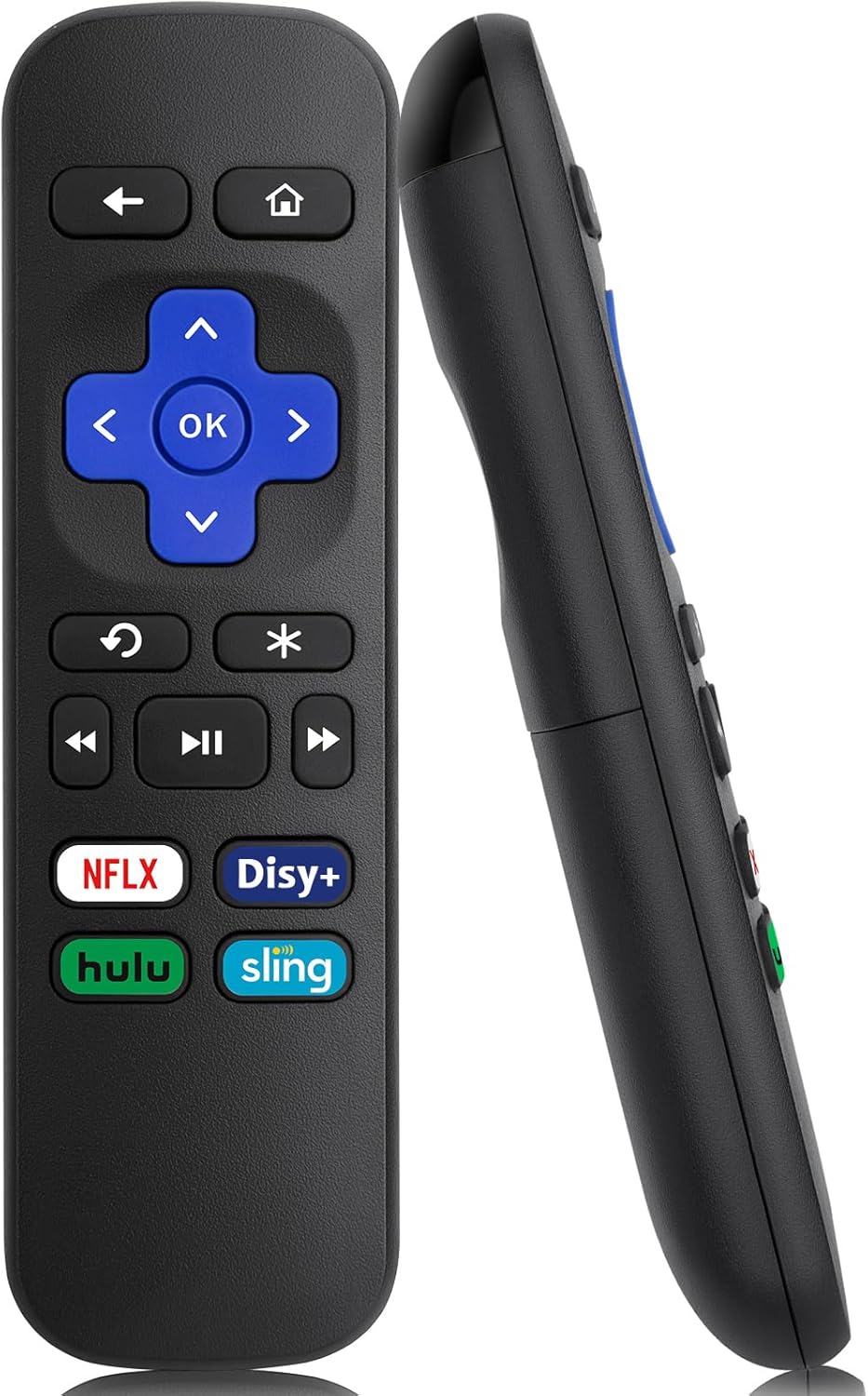
Obraz 1: Przód i bok view of the LOUTOC Universal Replacement Remote Control.
2. Zgodność
The LOUTOC Universal Replacement Remote Control is compatible with a range of Roku streaming players and boxes. Please verify your Roku model against the list below to ensure compatibility.
2.1 Compatible Roku Models:
- Roku 1 SE (Model 2710)
- Roku 2 HD (Model 3000), Roku 2 XD (Model 3050), Roku 2 XS (Model 3100), Roku 2 (Models 2720, 4210)
- Roku 3 (Models 4200, 4230)
- Roku 4 (Model 4400)
- Roku HD (Models 2500, 2000, N1100), Roku LT (Models 2450, 2400), Roku XD (Model 2050), Roku XDS (Model 2100)
- Roku Express (Models 3700, 3900, 3930R)
- Roku Express+ (Models 3710, 3910, 3931W)
- Roku Premiere (Models 4620, 3920R)
- Roku Premiere+ (Models 4630, 3921RW)
2.2 Incompatible Devices:
Ten pilot zdalnego sterowania jest NIE compatible with the following devices:
- Any Roku Streaming Stick model
- Any Roku TV model (e.g., TCL Roku TV, Hisense Roku TV)
- Roku Ultra
- Roku devices requiring an RF (Radio Frequency) remote
- Roku Gaming devices
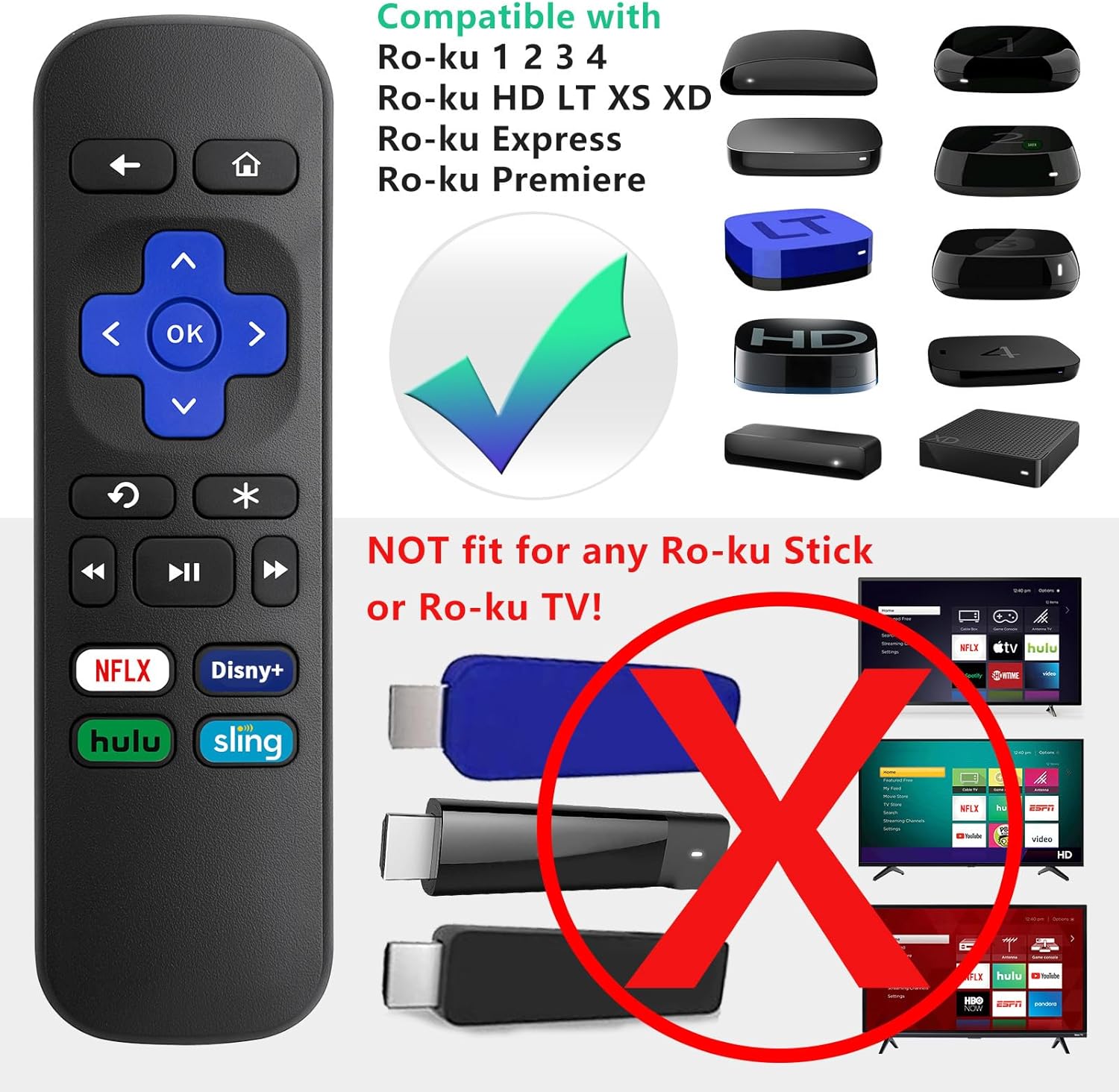
Image 2: Visual guide to compatible Roku players and incompatible Roku Sticks/TVs.

Image 3: Comprehensive compatibility chart for Roku devices.
3. Features and Limitations
3.1 kluczowych cech:
- Technologia podczerwieni (IR): Operates using infrared signals, requiring a direct line of sight to your Roku device.
- Brak konieczności konfiguracji: Functions immediately upon battery insertion with compatible Roku devices. No programming or pairing is needed.
- Dedykowane przyciski skrótów: Includes four direct access buttons for popular streaming services: Netflix, Disney+, Hulu, and Sling.
- Trwała konstrukcja: Made from ABS material for longevity.

Image 4: Remote in use, emphasizing ease of use and IR technology.
3.2 Important Limitations:
Please note that this remote control does NIE include the following functionalities:
- No Headphone Jack
- No Pairing Button
- Brak kontroli głośności
- Brak wyszukiwania głosowego
- No Power Button
- Not an RF (Radio Frequency) Model

Image 5: Visual representation of features not included (volume, pairing, headphone jack).

Image 6: Visual representation of features not included (power, voice search, RF model).
4. Konfiguracja
4.1 Instalacja baterii:
- Znajdź komorę baterii z tyłu pilota.
- Aby otworzyć pokrywę baterii, przesuń ją w dół.
- Insert two (2) AAA batteries, ensuring correct polarity (+ and -) as indicated inside the compartment. Batteries are not included.
- Załóż pokrywę baterii, przesuwając ją do góry, aż zatrzaśnie się na swoim miejscu.

Image 7: Battery compartment for AAA batteries.
4.2 Pierwsze użycie:
Once batteries are installed, the remote is ready for immediate use with your compatible Roku device. No additional programming or pairing steps are required.
5. Instrukcja obsługi
Point the remote control directly at your Roku streaming device. Ensure there are no obstructions between the remote and the Roku player for optimal performance.
5.1 Funkcje przycisków:
| Przycisk | Funkcjonować |
|---|---|
| Dom | Powrót do ekranu głównego Roku. |
| Z powrotem | Wraca do poprzedniego ekranu lub menu. |
| Pad kierunkowy (góra, dół, lewo, prawo) | Umożliwia nawigację po menu i treściach. |
| OK | Wybiera element lub potwierdza czynność. |
| Natychmiastowa powtórka | Replays the last few seconds of video. |
| Options (*) | Accesses additional options or settings within an app. |
| Przewijać | Rewinds video playback. |
| Odtwórz/Pauza | Plays or pauses video content. |
| Przewiń do przodu | Fast forwards video playback. |
| Netflix | Bezpośredni dostęp do aplikacji Netflix. |
| Disney+ | Direct access to the Disney+ application. |
| Hulu | Direct access to the Hulu application. |
| Temblak | Direct access to the Sling application. |

Image 8: Remote control highlighting the dedicated streaming service buttons.
6. Rozwiązywanie Problemów
6.1 Pilot nie odpowiada:
- Sprawdź baterie: Ensure the batteries are inserted correctly with the proper polarity. Replace old or depleted batteries with fresh AAA batteries.
- Linia wzroku: Confirm that there is a clear, unobstructed path between the remote control and the infrared receiver on your Roku device.
- Zgodność: Double-check that your Roku model is listed as compatible in Section 2.1. This remote will not work with Roku Sticks or Roku TVs.
- Ingerencja: Upewnij się, że żadne silne źródła światła (takie jak bezpośrednie światło słoneczne lub jasne lampy fluorescencyjne) nie zakłócają sygnału IR.
7. Specyfikacje
| Specyfikacja | Szczegół |
|---|---|
| Wymiary produktu | 5.5 x 1.65 x 0.79 cala (13.97 x 4.19 x 2.01 cm) |
| Waga przedmiotu | 1.76 uncji (50 grama) |
| Źródło zasilania | Baterie 2 x AAA (brak w zestawie) |
| Technologia łączności | Podczerwieni (IR) |
| Tworzywo | ABS |

Image 9: Remote control dimensions.
8. Gwarancja i wsparcie
LOUTOC offers a 60-dniowa wymiana policy for this product. If you experience any issues within 60 days of purchase, please contact your retailer for a replacement.

Image 10: 60-Day Replacement icon.
For further assistance or inquiries, please refer to the contact information provided by your point of purchase or visit the official LOUTOC brand store.


