Ważne instrukcje bezpieczeństwa
- Upewnij się, że urządzenie jest umieszczone na stabilnej, płaskiej powierzchni.
- Trzymać z dala od wody i środowisk o dużej wilgotności.
- Nie wystawiać na bezpośrednie działanie promieni słonecznych i ekstremalnych temperatur.
- Use only the provided USB power cable. Do not attempt to power with batteries.
- Avoid disassembling the device; refer servicing to qualified personnel.
1. Konfiguracja
1.1 Zawartość opakowania
Sprawdź, czy w opakowaniu znajdują się wszystkie elementy:
- JALL Wooden Digital Alarm Clock (Model WX18039)
- USB Power Cable (Power adapter not included)
- Instrukcja obsługi (ten dokument)
1.2 Włączanie urządzenia
The JALL Digital Alarm Clock is powered exclusively via USB. It does not support battery operation.
- Podłącz mniejszy koniec kabla zasilającego USB do portu DC 5 V z tyłu budzika.
- Plug the larger end of the USB cable into a standard USB power adapter (e.g., phone charger, computer USB port) or a wall outlet with a USB port.
- Wyświetlacz zaświeci się, co oznacza, że urządzenie jest włączone.

Image: The JALL alarm clock connected to a USB power source, illustrating the 'Powered by USB Only' feature. This clock requires continuous USB power to function.
1.3 Initial Time and Date Settings
Przy pierwszym włączeniu lub po przerwie w dostawie prądu może zaistnieć konieczność ustawienia czasu i daty.
- Dostęp do ustawień: Locate the 'SET' button (usually on the back or top). Press and hold it for a few seconds until the display flashes.
- Setting Time Format (12H/24H): While the time is flashing, use the 'UP' or 'DOWN' buttons to switch between 12-hour and 24-hour formats. Press 'SET' to confirm.
- Setting Hour: The hour digit will flash. Use 'UP' or 'DOWN' to adjust the hour. Press 'SET' to confirm.
- Setting Minute: The minute digit will flash. Use 'UP' or 'DOWN' to adjust the minute. Press 'SET' to confirm.
- Setting Year, Month, Day: Follow similar steps to set the current year, month, and day. Press 'SET' after each adjustment.
- Ustawianie jednostki temperatury: After setting the date, the temperature unit (℃/℉) may flash. Use 'UP' or 'DOWN' to select your preferred unit. Press 'SET' to exit settings.
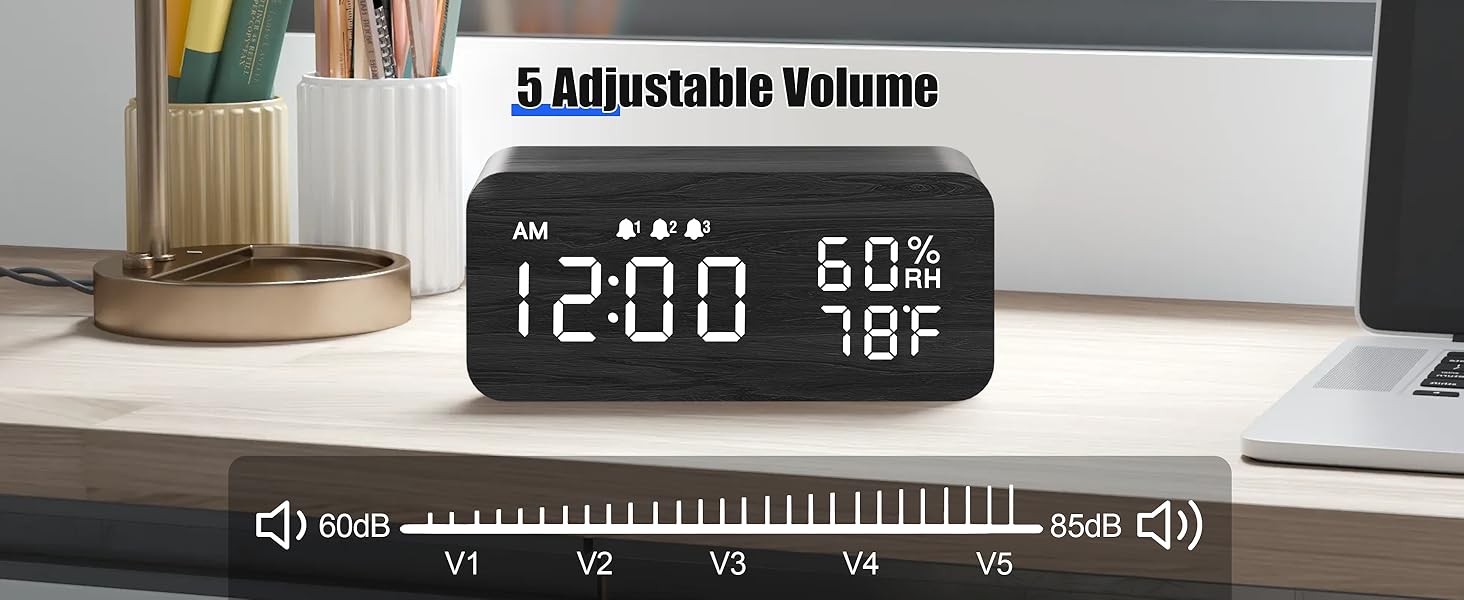
Image: The alarm clock showing both 12-hour (PM 3:00) and 24-hour (15:00) time formats, demonstrating the switchable display option.
2. Instrukcja obsługi
2.1 Regulacja jasności wyświetlacza
The clock features adjustable brightness levels to suit your environment.
- In normal time display mode, press the 'UP' or 'DOWN' button (or a dedicated brightness button if available) to cycle through the brightness levels.
- There are typically multiple levels, from very dim (L1) to brightest (L6), allowing for comfortable vieww dzień iw nocy.

Image: A visual representation of the alarm clock's six adjustable brightness levels, ranging from dim (L1) to bright (L6), suitable for various lighting conditions.
2.2 Setting Alarms (AL1, AL2, AL3)
The clock supports up to three independent alarms with customizable modes.
- Dostęp do ustawień alarmu: Press the 'ALARM' button (or 'SET' button repeatedly until 'AL1' appears).
- Ustawianie czasu alarmu: When 'AL1' flashes, press and hold 'SET'. The hour will flash. Use 'UP' or 'DOWN' to adjust, then 'SET' to confirm. Repeat for minutes.
- Ustawianie trybu alarmu: After setting the time, the alarm mode will flash (e.g., 'MON-SUN', 'MON-FRI', 'SAT-SUN'). Use 'UP' or 'DOWN' to select the desired mode. Press 'SET' to confirm.
- Aktywacja/Dezaktywacja alarmu: In normal time display, press the 'ALARM' button to cycle through AL1, AL2, AL3. Press 'UP' or 'DOWN' when an alarm is displayed to turn it ON or OFF. An alarm icon will appear on the display when active.
- Repeat steps for AL2 and AL3 as needed.

Image: The alarm clock displaying three distinct alarm settings, each configurable for 'Everyday', 'Weekday', or 'Weekend' operation, allowing for flexible scheduling.
2.3 Funkcja drzemki
When an alarm sounds, you can temporarily silence it using the snooze function.
- When the alarm rings, press any button (except the 'OFF' button, if present) to activate snooze.
- Alarm zostanie przerwany na około 9 minut, a następnie włączy się ponownie.
- To turn off the alarm completely, press the designated 'OFF' button or follow the instructions in the manual for your specific model.

Image: A person reaching to press the top of the JALL alarm clock to activate the 9-minute snooze function, with the time set to 7:00 AM.
2.4 Funkcja ładowania bezprzewodowego
The top surface of the alarm clock features a wireless charging pad compatible with most Qi-enabled smartphones.
- Sprawdź, czy budzik jest włączony.
- Place your Qi-enabled smartphone directly onto the center of the charging pad on top of the clock.
- The phone's display should indicate that charging has begun. If not, slightly adjust the phone's position.
- Zdejmij z telefonu wszelkie grube etui i metalowe przedmioty, które mogą zakłócać ładowanie bezprzewodowe.

Image: A smartphone placed on top of the JALL alarm clock, actively displaying a charging icon, demonstrating the wireless charging capability.

Image: An illustration showing the JALL alarm clock's universal compatibility with various smartphone models for wireless charging, including iPhones and Samsung Galaxy devices.
2.5 Regulacja głośności alarmu
The alarm volume can be adjusted to your preference.
- In normal time display mode, press the 'VOLUME' button (or a combination of 'SET' and 'UP'/'DOWN' if no dedicated button) to enter volume adjustment mode.
- Use the 'UP' or 'DOWN' buttons to increase or decrease the alarm volume.
- Confirm your selection by pressing 'SET' or waiting a few seconds for the setting to save automatically.

Image: The alarm clock displaying a volume bar with five distinct levels (V1 to V5), indicating the range of adjustable alarm sound intensity from 60dB to 85dB.
3. Konserwacja
3.1 Czyszczenie
- Before cleaning, disconnect the power cable.
- Wipe the surface of the clock with a soft, dry, or slightly damp płótno.
- Nie należy używać środków czyszczących o działaniu ściernym, rozpuszczalników ani środków chemicznych w sprayu, gdyż mogą one uszkodzić powłokę.
- Upewnij się, że do otworów urządzenia nie dostanie się żadna ciecz.
3.2 Przechowywanie
- If storing the device for an extended period, disconnect it from power.
- Przechowywać w chłodnym, suchym miejscu, z dala od bezpośredniego światła słonecznego i ekstremalnych temperatur.
4. Rozwiązywanie Problemów
4.1 Typowe problemy i rozwiązania
| Wydanie | Możliwa przyczyna | Rozwiązanie |
|---|---|---|
| Clock not powering on / Display is blank. | No power connection or faulty cable/adapter. | Upewnij się, że kabel USB jest prawidłowo podłączony zarówno do zegara, jak i do działającego źródła zasilania. Wypróbuj inny adapter lub port USB. |
| Wyświetlacz jest zbyt ciemny lub zbyt jasny. | Brightness level is set incorrectly. | Adjust the display brightness using the 'UP' or 'DOWN' buttons as described in Section 2.1. |
| Alarm nie działa. | Alarm is not activated, volume is too low, or incorrect alarm mode. | Verify the alarm is turned ON (check for alarm icon). Increase alarm volume (Section 2.5). Ensure the alarm mode (Weekday/Weekend/Everyday) is set correctly for the current day (Section 2.2). |
| Ładowanie bezprzewodowe nie działa. | Phone not positioned correctly, phone case interference, or phone not Qi-enabled. | Reposition the phone centrally on the charging pad. Remove thick phone cases or metallic objects. Confirm your phone supports Qi wireless charging. Ensure the clock is powered on. |
| Clock losing time. | Internal clock drift or power interruptions. | Reset the time as per Section 1.3. Ensure a stable power supply. If the issue persists, contact customer support. |
5. Specyfikacje
| Funkcja | Szczegół |
|---|---|
| Marka | JALL |
| Numer modelu | WX18039 |
| Typ wyświetlacza | Cyfrowa dioda LED |
| Tworzywo | Drewno |
| Źródło zasilania | Corded Electric (USB DC 5V) |
| Praca na baterii | Nieobsługiwane |
| Budziki | 3 Independent Alarms |
| Cechy specjalne | Wireless Charging, Dimmable Display, Adjustable Volume, Snooze, Temperature Display, Humidity Display |
| Waga przedmiotu | 9.9 uncji (0.62 funta) |
| Wymiary opakowania | 7.24 x 3.46 x 3.23 cala |
6. Gwarancja i wsparcie
6.1 Gwarancja na produkt
JALL products are manufactured with quality and performance in mind. This product comes with a standard manufacturer's warranty against defects in materials and workmanship under normal use. Please refer to the product packaging or the official JALL webSzczegółowe warunki gwarancji i jej czas trwania można znaleźć na stronie.
6.2 Obsługa klienta
If you encounter any issues or have questions regarding your JALL Wooden Digital Alarm Clock, please contact JALL customer support. For the most up-to-date contact information, visit the official JALL webodwiedź witrynę lub zapoznaj się z dokumentacją zakupu.
Note: Please have your model number (WX18039) and purchase details ready when contacting support.


