1. Wprowadzenie
Welcome to your JBL J777 Wireless In-Ear Headphones. This manual provides detailed instructions to help you get the most out of your device, ensuring proper setup, operation, and maintenance. Please read this manual thoroughly before using your headphones.
2. Koniec produktuview
The JBL J777 headphones are designed for wireless audio playback and hands-free calling, offering convenience and quality sound.
2.1 Składniki
- In-ear earbuds with silicone tips
- Flexible neckband cable
- Inline remote control with integrated microphone
- USB charging port (typically located on the remote)
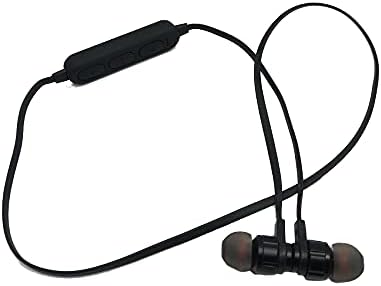
This image displays the complete JBL J777 wireless in-ear headphones. It features two black earbuds connected by a flexible cable, with an inline remote control positioned on the cable. The design is intended for comfortable wear around the neck.
2.2 Sterowanie
The inline remote control provides easy access to various functions:
- Przycisk zasilania/wielofunkcyjny: Used for powering on/off, play/pause music, and answering/ending calls.
- Przycisk zwiększania głośności: Increases volume, also used for skipping to the next track.
- Przycisk zmniejszania głośności: Decreases volume, also used for skipping to the previous track.

Szczegółowy view of the inline remote control for the JBL J777 headphones. It shows three distinct buttons for power/multi-function, volume up, and volume down, along with a small microphone opening for hands-free calls.
3. Konfiguracja
3.1 Ładowanie słuchawek
- Connect the micro-USB charging cable to the charging port on the inline remote control.
- Podłącz drugi koniec kabla do źródła zasilania USB (np. portu USB komputera, zasilacza ściennego USB).
- The LED indicator will typically show red during charging and turn off or blue when fully charged.
- The integrated 90mAh lithium battery provides wireless operation.
3.2 parowanie Bluetooth
To connect your JBL J777 headphones to a Bluetooth-enabled device:
- Upewnij się, że słuchawki są wyłączone.
- Naciśnij i przytrzymaj Power/Multi-function button for approximately 5-7 seconds until the LED indicator flashes red and blue alternately. This indicates the headphones are in pairing mode.
- On your mobile phone or Bluetooth-enabled device, go to the Bluetooth settings and enable Bluetooth.
- Szukaj available devices and select "JBL J777" from the list.
- Once paired, the LED indicator will typically flash blue slowly or remain solid blue.
- The headphones have an operation distance of up to 10 meters (33 feet) in an open environment.
4. Instrukcja obsługi
4.1 Włączanie/wyłączanie zasilania
- Włączanie: Naciśnij i przytrzymaj Power/Multi-function button for 3 seconds. The LED will flash blue.
- Aby wyłączyć: Naciśnij i przytrzymaj Power/Multi-function button for 3 seconds. The LED will flash red and then turn off.
4.2 Odtwarzanie muzyki
- Odtwórz/Pauza: Naciśnij Power/Multi-function naciśnij przycisk raz.
- Następny utwór: Naciśnij i przytrzymaj Zwiększ głośność przycisk.
- Poprzedni utwór: Naciśnij i przytrzymaj Zmniejsz głośność przycisk.
- Zwiększenie głośności: Naciśnij Zwiększ głośność naciśnij przycisk krótko.
- Ściszanie: Naciśnij Zmniejsz głośność naciśnij przycisk krótko.
4.3 Zarządzanie połączeniami
- Odbieranie/kończenie połączeń: Naciśnij Power/Multi-function naciśnij przycisk raz.
- Odrzuć połączenie: Naciśnij i przytrzymaj Power/Multi-function przycisk przez 2 sekundy.
- Ponowne wybieranie ostatniego numeru: Naciśnij dwukrotnie Power/Multi-function przycisk.
4.4 Aktywna redukcja szumów
The JBL J777 headphones feature active noise cancellation to reduce ambient noise for a more immersive listening experience. This feature operates automatically or is controlled via the multi-function button, depending on the specific model variant.
5. Konserwacja
Proper care ensures the longevity and optimal performance of your headphones.
- Czyszczenie: Gently wipe the earbuds and cable with a soft, dry cloth. Do not use harsh chemicals or abrasive materials.
- Składowanie: Store the headphones in a cool, dry place away from direct sunlight and extreme temperatures. Avoid tangling the cable.
- Pielęgnacja baterii: Aby przedłużyć żywotność baterii, unikaj częstego całkowitego rozładowywania baterii. Regularnie ładuj słuchawki, nawet jeśli nie są używane przez dłuższy czas.
6. Rozwiązywanie Problemów
If you encounter any issues with your JBL J777 headphones, refer to the following common problems and solutions:
- Słuchawki się nie włączają: Upewnij się, że bateria jest naładowana. Podłącz ją do źródła zasilania i spróbuj ponownie.
- Nie można sparować z urządzeniem:
- Ensure the headphones are in pairing mode (flashing red and blue).
- Upewnij się, że Bluetooth jest włączony w Twoim urządzeniu.
- Przysuń słuchawki bliżej urządzenia.
- Turn off and on both the headphones and your device, then try pairing again.
- Brak dźwięku:
- Sprawdź poziom głośności zarówno na słuchawkach, jak i na podłączonym urządzeniu.
- Sprawdź, czy słuchawki są prawidłowo sparowane i podłączone.
- Spróbuj odtworzyć dźwięk z innej aplikacji lub źródła.
- Słaba jakość dźwięku lub przerywane połączenie:
- Upewnij się, że między słuchawkami a urządzeniem nie ma żadnych przeszkód.
- Odsuń się od innych urządzeń bezprzewodowych, które mogą powodować zakłócenia.
- Ponownie sparuj słuchawki z urządzeniem.
7. Specyfikacje
Detailed technical specifications for the JBL J777 Wireless In-Ear Headphones:
| Marka | JBL |
| Numer modelu | J777 |
| Typ | Słuchawki bezprzewodowe dokanałowe |
| Łączność | Bezprzewodowa (Bluetooth 4.2) |
| BluetoothProfiles | HFP, A2DP, AVCTP, AVDTP, AVRCP |
| Odległość operacyjna | Do 10 metrów (33 stóp) |
| Przekazywanie mocy | Klasa 2 |
| Zakres częstotliwości | 2.402 - 2.480 GHz |
| Średnica głośnika | Ø15mm |
| Impedancja | 32Ω |
| Mikrofon | Zintegrowany |
| Kontrola hałasu | Aktywna redukcja szumów |
| Bateria | Rechargeable Lithium, 90mAh |
| Kompatybilny z | Telefony komórkowe |
| Obsługa kart TF | 128MB - 32GB |
| Zawarte komponenty | Poduszki na uszy |

This image shows the rear side of the JBL J777 product packaging. It clearly lists technical specifications such as Bluetooth version, supported profiles, operation distance, transmitting power, frequency range, speaker size, impedance, and battery capacity. It also indicates TF card support.
8. Gwarancja i wsparcie
For warranty information regarding your JBL J777 Wireless In-Ear Headphones, please refer to the documentation provided at the time of purchase. This information is typically included in the product packaging or available on the official JBL webstrona.
For further assistance, technical support, or to inquire about service, please visit the official JBL support page or contact their customer service department directly. Keep your proof of purchase handy for any warranty claims.


