1. Wprowadzenie
Thank you for choosing the Ipega Bluetooth 3.0 Wireless Game Controller. This device is designed to enhance your gaming experience across multiple platforms, including Android, iOS, and PC. This manual provides detailed instructions on how to set up, operate, and maintain your controller to ensure optimal performance.
2. Koniec produktuview
2.1 Główne cechy
- Połączenie bezprzewodowe: Bluetooth 3.0 for stable connection within 6-8 meters.
- Obsługa wielu platform: Compatible with Android (3.2+), iOS (4.3+), and PC (WinXP/Win7/Win8).
- Zintegrowany uchwyt na telefon: Retractable support accommodates smartphones up to 6 inches.
- Długa żywotność baterii: Built-in 380mAh lithium battery provides up to 16 hours of continuous play on a single charge.
- Obsługa bez kierowcy: No additional drivers required; simply pair via Bluetooth.
- Multimedialne klawisze funkcyjne: Includes 5 dedicated multimedia keys for enhanced control.
- Tryb oszczędzania energii: Automatically enters power-saving mode when not connected.
2.2 Zawartość opakowania
- Ipega Bluetooth 3.0 Wireless Game Controller
- Kabel ładujący USB
- Instrukcja obsługi (ten dokument)

Przód view of the Ipega Bluetooth Wireless Game Controller in its compact, closed state, showcasing the dual analog sticks, D-pad, action buttons, and central control buttons.
3. Konfiguracja
3.1 Ładowanie Kontrolera
Before first use, fully charge the controller. Connect the provided USB charging cable to the controller's charging port and the other end to a USB power source (e.g., computer USB port, USB wall adapter). The charging indicator light will illuminate during charging and turn off when fully charged.
3.2 parowanie Bluetooth
The controller supports various pairing modes for different operating systems. Ensure your device's Bluetooth is enabled before proceeding.
- Tryb Androida: Press and hold the 'X' button + 'HOME' button simultaneously until the indicator light flashes rapidly. Szukaj 'Ipega Gamepad' on your Android device's Bluetooth settings and connect.
- Tryb iOS: Press and hold the 'B' button + 'HOME' button simultaneously until the indicator light flashes rapidly. Szukaj 'Ipega Gamepad' on your iOS device's Bluetooth settings and connect.
- Tryb PC: Connect the controller to your PC using the USB cable. For wireless connection, ensure your PC has Bluetooth capabilities. Press and hold the 'A' button + 'HOME' button simultaneously until the indicator light flashes rapidly. Szukaj 'Ipega Gamepad' on your PC's Bluetooth settings and connect.
Once successfully paired, the indicator light will remain solid. The controller will automatically attempt to reconnect to the last paired device upon power-on.
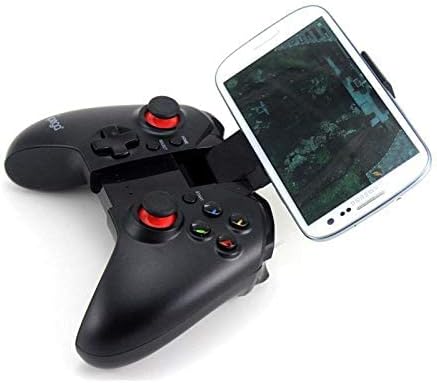
The Ipega Game Controller extended with a smartphone securely mounted in the integrated holder, ready for mobile gaming.
4. Obsługa kontrolera
4.1 Podłączanie smartfona
Gently extend the retractable holder located in the center of the controller. Carefully place your smartphone (up to 6 inches) into the holder, ensuring it is securely seated. The holder is designed to provide a stable grip during gameplay.

Strona profile of the Ipega Game Controller, illustrating the retractable phone holder mechanism with a smartphone inserted.

An angled perspective of the Ipega Game Controller, showing a smartphone held firmly in its adjustable mount, highlighting the ergonomic design.
4.2 Zgodność z grą
The controller is compatible with various game application platforms and emulators. For optimal performance, ensure your game supports external controllers. Some popular platforms mentioned include micro game hall, chicken simulator, KO gaming City, and grape game hall.
4.3 Funkcje multimedialne
The controller features 5 dedicated multimedia function keys. These keys typically control media playback functions such as play/pause, volume up/down, and track skip, depending on the connected device and application.

The Ipega Bluetooth Wireless Game Controller fully extended, revealing its internal structure and the mechanism for holding a smartphone, without a phone attached.
5. Konserwacja
- Czyszczenie: Do czyszczenia kontrolera używaj miękkiej, suchej ściereczki. Unikaj stosowania silnych środków chemicznych i materiałów ściernych.
- Składowanie: Przechowuj kontroler w chłodnym, suchym miejscu, z dala od bezpośredniego światła słonecznego i ekstremalnych temperatur.
- Pielęgnacja baterii: Aby przedłużyć żywotność baterii, unikaj częstego całkowitego rozładowywania baterii. Regularnie ładuj kontroler, nawet jeśli nie jest używany przez dłuższy czas.
6. Rozwiązywanie Problemów
- Kontroler nie łączy się: Ensure the controller is charged and in the correct pairing mode for your device. Turn off and on your device's Bluetooth, then try pairing again.
- Opóźnienia lub rozłączenia: Ensure you are within the 6-8 meter operating range. Reduce interference from other wireless devices.
- Przyciski nie reagują: Check if the controller is properly connected. Restart the controller and your device.
- Bateria nie ładuje się: Verify the USB cable is securely connected to both the controller and the power source. Try a different USB port or cable.
7. Specyfikacje
| Łączność | Bluetooth 3.0 |
| Zasięg działania | 6-8 metrów |
| Bateria | Wbudowany akumulator litowo-jonowy 380 mAh |
| Żywotność baterii | Do 16 godzin (ciągłe użytkowanie) |
| Obsługiwany system operacyjny | Android 3.2+, iOS 4.3+, WinXP/Win7/Win8 |
| Max Phone Size | 6 cali |
| Waga przedmiotu | 11 gramów |
8. Gwarancja i wsparcie
This product is covered by a standard manufacturer's warranty. For specific warranty terms and conditions, please refer to the documentation provided at the time of purchase or contact your retailer. For technical support or further assistance, please visit the official Ipega webwitryny lub skontaktuj się z obsługą klienta.


