Wstęp
This manual provides comprehensive instructions for the installation, operation, and maintenance of your AeroCool Miragebk ATX PC Case. The Miragebk features an ARGB LED strip on the front panel, a hinged tempered glass side panel, and a 12 cm ARGB fan, designed for optimal component visibility and cooling performance.
Zawartość opakowania
- AeroCool Miragebk ATX PC Case
- Accessory kit (screws, standoffs, cable ties)
- Instrukcja obsługi (ten dokument)
Informacje dotyczące bezpieczeństwa
Przed instalacją lub uruchomieniem produktu prosimy o zapoznanie się ze wszystkimi instrukcjami bezpieczeństwa. Nieprzestrzeganie ich może spowodować obrażenia ciała lub uszkodzenie produktu.
- Przed przystąpieniem do jakichkolwiek prac instalacyjnych lub konserwacyjnych należy zawsze odłączyć zasilanie od gniazdka ściennego.
- Unikać wystawiania obudowy na bezpośrednie działanie promieni słonecznych lub umieszczania jej w pobliżu źródeł ciepła.
- Keep the case away from water and excessive humidity.
- Handle the tempered glass panel with care to prevent breakage.
- Zapewnij właściwe uziemienie, aby zapobiec zagrożeniom elektrycznym.
Konfiguracja i instalacja
Follow these steps to set up your AeroCool Miragebk PC case and install components.
1. Przygotowanie sprawy
- Połóż obudowę na stabilnej, płaskiej powierzchni.
- Carefully open the hinged tempered glass side panel. This panel provides full access to the interior.
- Remove any protective films from the glass and other surfaces.

Rycina 1: Przód view of the AeroCool Miragebk PC case, showcasing the ARGB LED strip and tempered glass panel.
2. Instalacja płyty głównej
- Zainstaluj osłonę I/O w tylnym otworze obudowy.
- Align your ATX, Micro ATX, or Mini ITX motherboard with the standoffs inside the case.
- Przymocuj płytę główną za pomocą dołączonych śrub.
3. Instalacja zasilania
- Install the power supply unit (PSU) into the dedicated compartment at the bottom of the case.
- Przymocuj zasilacz za pomocą śrub znajdujących się z tyłu obudowy.
4. Storage Drive Installation (HDDs/SSDs)
The case supports up to 7 HDDs and SSDs.
- Locate the drive bays or mounting points.
- Mount your 2.5" SSDs or 3.5" HDDs using the appropriate screws.
5. Instalacja karty graficznej (GPU)
Obudowa obsługuje karty graficzne o długości do 356 mm.
- Zdejmij niezbędne zaślepki gniazd rozszerzeń z tyłu obudowy.
- Insert your graphics card into the PCIe slot on the motherboard.
- Przymocuj kartę graficzną za pomocą śrub.
6. Cooling System Installation (Fans/Liquid Cooling)
The case supports up to 8 fans and liquid cooling on the front, top, and rear.
- Install additional fans as needed for optimal airflow.
- For liquid cooling, mount radiators to the designated areas (front, top, or rear).
- The case includes one 12 cm ARGB fan.
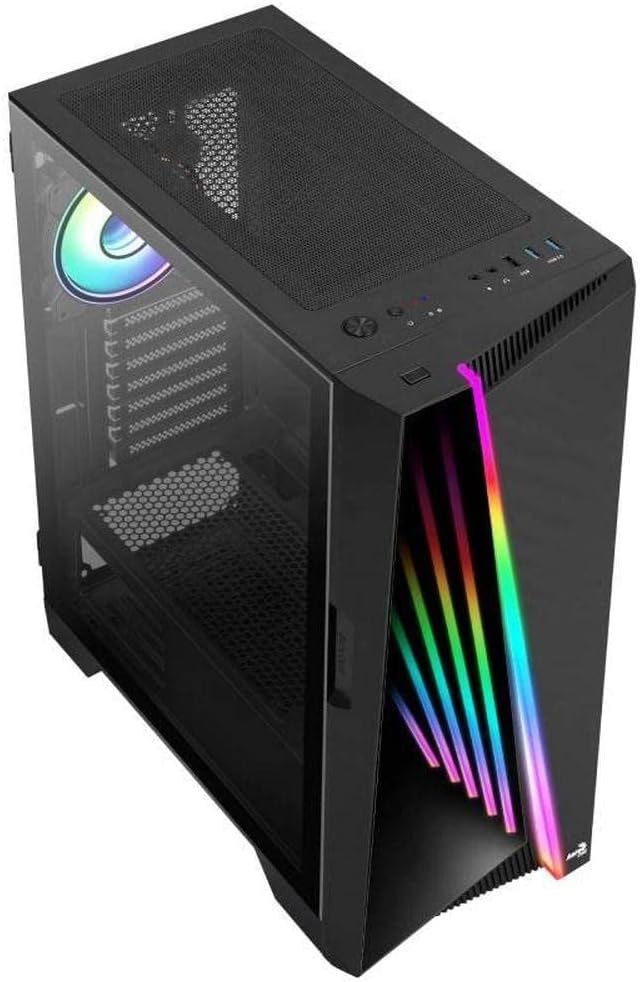
Rysunek 2: Kątowy view of the AeroCool Miragebk PC case, highlighting the top mesh for ventilation and the front panel design.
7. Zarządzanie kablami
Wykorzystaj wycięcia do prowadzenia kabli i punkty mocowania znajdujące się za tacką płyty głównej, aby uporządkować kable i poprawić przepływ powietrza oraz estetykę.
8 Zamknięcie sprawy
Once all components are installed and cables are managed, close the tempered glass side panel and secure it.
Instrukcja obsługi
Wejście / wyjście na panelu przednim
The top panel of the AeroCool Miragebk provides convenient access to essential ports and controls:
- Przycisk zasilania: Turns the PC on/off.
- Przycisk resetowania: Restarts the PC.
- Przycisk sterowania diodą LED: Cycles through ARGB lighting modes or syncs with the motherboard.
- Porty USB 3.0 (x2): Do przesyłu danych z dużą prędkością.
- Port USB 2.0 (x1): Do standardowych urządzeń USB.
- HD Audio & Microphone Jacks: Do wejścia i wyjścia audio.
Sterowanie oświetleniem ARGB
The ARGB lighting on the front panel and included fan can be controlled in two ways:
- Przycisk sterowania diodą LED: Press the dedicated LED button on the top panel to cycle through various pre-set ARGB lighting effects.
- Synchronizacja płyty głównej: Connect the ARGB lighting to a compatible 3-pin +5V ARGB header on your motherboard. This allows software control of 16.8 million colors and synchronization with other ARGB components. The Mirage control hub supports up to 6 ARGB fans and 2 additional 3-pin ARGB accessories.
Konserwacja
Regularna konserwacja pomaga zapewnić optymalną wydajność i długowieczność obudowy komputera.
- Filtry przeciwpyłowe: Periodically remove and clean the dust filters (if present) to maintain good airflow and prevent dust buildup inside the case.
- Czyszczenie zewnętrzne: Przetrzyj zewnętrzne powierzchnie miękką, damp szmatką. Unikaj środków czyszczących o działaniu ściernym i rozpuszczalników.
- Czyszczenie wnętrza: Use compressed air to remove dust from internal components and fans. Ensure the PC is powered off and unplugged before cleaning.
- Szkło hartowane: Wyczyść panel ze szkła hartowanego za pomocą ściereczki z mikrofibry i środka do czyszczenia szkła przeznaczonego do urządzeń elektronicznych.
Rozwiązywanie problemów
If you encounter issues with your AeroCool Miragebk case, refer to the following common solutions:
- PC Not Powering On:
- Sprawdź, czy zasilacz jest prawidłowo podłączony do gniazdka ściennego i włączony.
- Verify all internal power cables (24-pin ATX, CPU, GPU) are securely connected.
- Check that the front panel power switch cable is correctly connected to the motherboard.
- Oświetlenie ARGB nie działa:
- Confirm the ARGB cables are correctly connected to the motherboard's 3-pin +5V ARGB header or the internal control hub.
- If using motherboard sync, ensure the motherboard's ARGB software is installed and configured correctly.
- Try pressing the LED control button on the top panel to see if pre-set modes function.
- Słaby przepływ powietrza/przegrzanie:
- Check if all installed fans are spinning correctly.
- Clean any dust filters and internal components.
- Ensure proper fan orientation (intake/exhaust) for optimal airflow.
Specyfikacje
| Funkcja | Szczegół |
|---|---|
| Marka | AeroCool |
| Nazwa modelu | MIRAGEBK |
| Typ sprawy | Tower (Semitower) |
| Zgodność płyty głównej | ATX, Micro ATX, Mini ITX |
| Tworzywo | Szkło hartowane |
| Kolor | Czarny |
| Waga przedmiotu | 12.98 funta |
| Wymiary produktu (dł. x szer. x wys.) | 19.65 x 8.5 x 16.46 cala |
| Liczba portów USB 3.0 | 2 |
| Liczba portów USB 2.0 | 1 |
| Typ montażu zasilacza | Mocowanie dolne |
| Metoda chłodzenia | Powietrze |
| Rozmiar wentylatora (w zestawie) | 12 Centimeters (ARGB) |
| Maksymalna wysokość chłodnicy procesora | 162mm |
| Maksymalna długość GPU | 356mm |
| Zatoki napędowe | 7 (HDDs and SSDs) |
Gwarancja i wsparcie
For warranty information or technical support, please refer to the official AeroCool webOdwiedź witrynę lub skontaktuj się z działem obsługi klienta. Zachowaj dowód zakupu na wypadek reklamacji.


