1. Wprowadzenie
Thank you for choosing the Yaheetech Mid Mesh Back Office Chair. This manual provides essential information for the safe assembly, operation, and maintenance of your new office chair. Please read these instructions carefully before assembly and retain them for future reference.

Obraz 1.1: Przód view of the Yaheetech Mid Mesh Back Office Chair, showcasing its mesh backrest, padded leather seat, and five-star base with casters.
2. Informacje dotyczące bezpieczeństwa
- Przed montażem upewnij się, że wszystkie części są kompletne i nieuszkodzone. Nie używaj, jeśli którejkolwiek części brakuje lub jest uszkodzona.
- Follow assembly instructions precisely. Incorrect assembly can lead to instability and injury.
- Nie stawaj na krześle. Używaj go wyłącznie do siedzenia.
- Nie przekraczać maksymalnego udźwigu 265 funtów.
- Trzymaj dzieci z dala od miejsca montażu. Małe części mogą stanowić zagrożenie zadławienia.
- Okresowo sprawdzaj, czy wszystkie śruby i wkręty są dobrze dokręcone.
3. Zawartość opakowania
Before beginning assembly, verify that all components listed below are present in your package. Necessary tools and fittings are included.
- Oparcie (1)
- Poduszka siedziska (1)
- Podłokietniki (2)
- Siłownik gazowy (1)
- Gas Lift Cover (1)
- Baza pięciogwiazdkowa (1)
- Kółka (5)
- Płytka mechanizmu (1)
- Zestaw elementów złącznych (śruby, podkładki, klucz imbusowy)
4. Instrukcja montażu i konfiguracji
Assembly typically takes about 15 minutes for an adult. Follow these steps carefully.
- Zamontuj kółka do podstawy: Insert the five casters into the holes at the end of each leg of the five-star base. Push firmly until they click into place.
- Włóż podnośnik gazowy: Umieść siłownik podnośnika gazowego w środkowym otworze pięcioramiennej podstawy. Zakryj go osłoną podnośnika gazowego.
- Zamocuj płytę mechanizmu do siedziska: Align the mechanism plate with the screw holes on the underside of the seat cushion. Ensure the front of the mechanism (with the lever) faces the front of the seat. Secure with screws using the provided Allen wrench.
- Zamontuj podłokietniki na siedzisku: Attach the armrests to the sides of the seat cushion using the appropriate screws. Do not fully tighten yet.
- Attach Backrest to Armrests: Align the backrest with the armrests and secure with screws. Once all screws are in place for the armrests and backrest, tighten all screws firmly.
- Podłączanie zespołu siedziska do podnośnika gazowego: Ostrożnie umieść zmontowane siedzisko i oparcie na siłowniku podnośnika gazowego, upewniając się, że środkowy otwór w płycie mechanizmu pokrywa się z górną częścią podnośnika gazowego. Dociśnij mocno, aby zabezpieczyć.
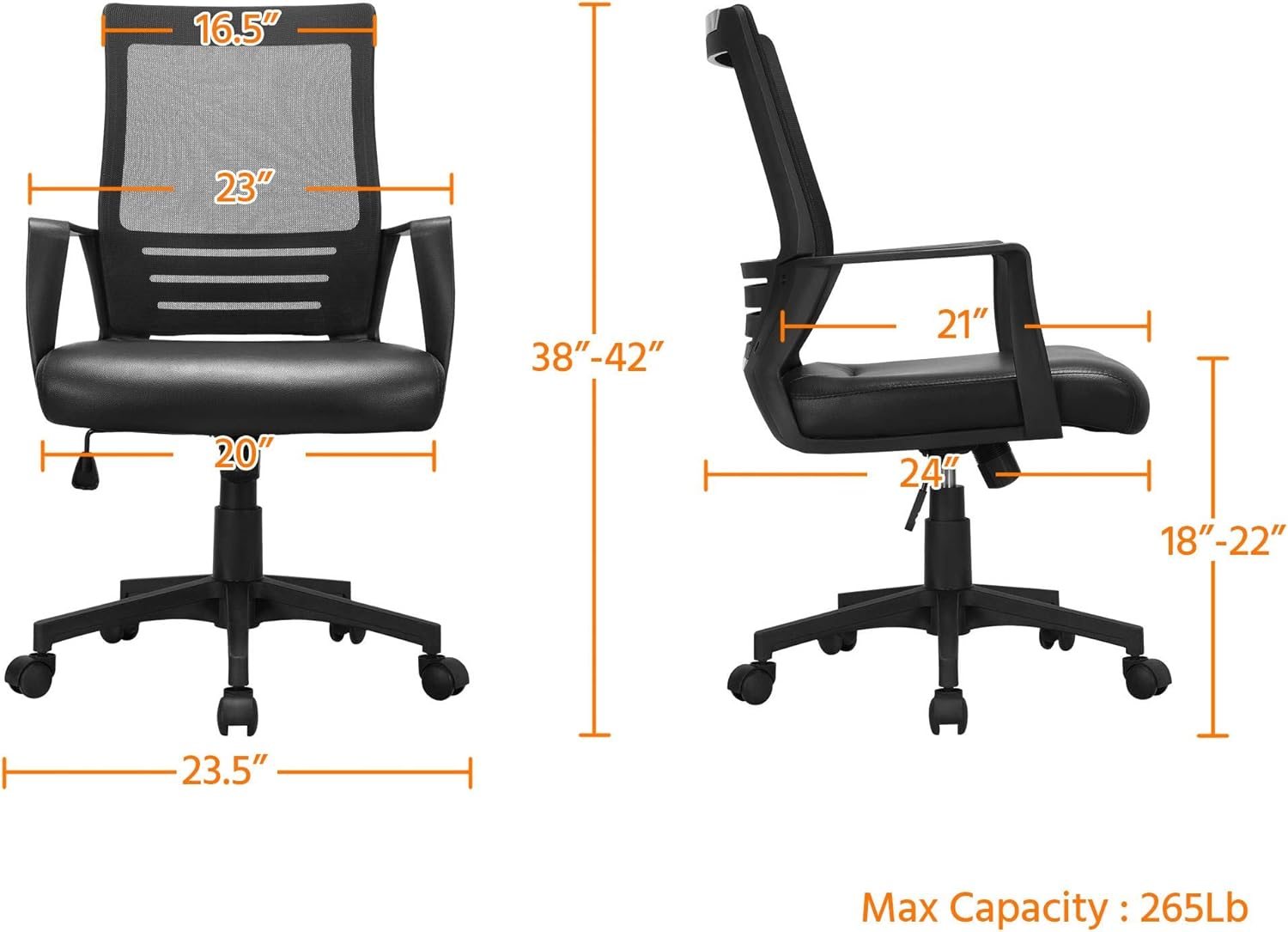
Image 4.1: Dimensional diagram of the Yaheetech office chair, illustrating height, width, and depth measurements, and maximum capacity of 265 lbs.
5. Instrukcja obsługi
Your Yaheetech office chair features several adjustable functions for personalized comfort.
5.1. Regulacja wysokości siedziska
To adjust the seat height (from 18 to 22 inches):
- To raise the seat: While seated, lift the lever located on the right side of the seat. The seat will rise. Release the lever at the desired height.
- To lower the seat: While seated, lift the lever. Apply slight body weight to lower the seat. Release the lever at the desired height.
5.2. Tilt Function and Tension Adjustment
The chair features a rocking function and adjustable tilt tension.
- Activate/Deactivate Tilt: Pull the same lever (used for height adjustment) outwards to allow the chair to rock. Push the lever inwards to lock the chair in an upright position.
- Adjust Tilt Tension: Turn the round knob located beneath the seat (at the front of the mechanism plate). Turn clockwise to increase tension (making it harder to recline) or counter-clockwise to decrease tension (making it easier to recline).
5.3. 360° Swivel and Mobility
The chair is designed with 5 dual-wheel nylon casters for smooth 360° mobility. This allows for effortless movement across hard floors without scratching and without the need to stand up.

Image 5.1: Visual guide to the chair's adjustable features, including the lever for activating/deactivating tilt and adjusting seat height, and the knob for tilt tension.

Image 5.2: Illustration demonstrating the ergonomic lumbar support provided by the chair's design, conforming to the natural curve of the spine.
6. Konserwacja
To ensure the longevity and appearance of your Yaheetech office chair, follow these simple maintenance guidelines:
- Czyszczenie: Wyczyść za pomocą reklamyamp cloth. For the PU leather seat, use a mild soap solution if necessary, then wipe dry immediately. Avoid harsh chemicals or abrasive cleaners.
- Kontrola: Periodically check all screws and bolts for tightness. Re-tighten if loose to maintain stability and safety.
- Kółka: Utrzymuj kółka wolne od włosów i zanieczyszczeń, aby zapewnić ich płynne obracanie.

Image 6.1: Close-up of the PU leather seat, showing its texture and water-resistant properties, making it easy to clean.

Image 6.2: Detail of the mesh backrest, illustrating its breathable design for enhanced comfort during prolonged use.
7. Rozwiązywanie Problemów
Jeśli napotkasz jakiekolwiek problemy z krzesłem, zapoznaj się z poniższymi typowymi problemami i ich rozwiązaniami:
| Problem | Możliwa przyczyna | Rozwiązanie |
|---|---|---|
| Krzesło chwieje się lub jest niestabilne. | Luźne śruby lub nierówny montaż. | Sprawdź i dokręć wszystkie śruby montażowe. Upewnij się, że krzesło stoi na płaskiej, równej powierzchni. |
| Regulacja wysokości siedziska nie działa. | Gas lift cylinder issue or lever malfunction. | Upewnij się, że dźwignia jest całkowicie zablokowana. Jeśli problem nadal występuje, podnośnik gazowy może wymagać wymiany. |
| Chair does not rock or tilt. | Tilt function locked or tension too high. | Pull the lever outwards to unlock the tilt. Turn the tension knob counter-clockwise to reduce tension. |
| Kółka nie obracają się płynnie. | Zanieczyszczenia uwięzione w kółkach. | Odwróć krzesło i usuń z kółek wszelkie włosy, kurz i zanieczyszczenia. |
8. Specyfikacje
| Funkcja | Szczegół |
|---|---|
| Marka | Yaheetech |
| Nazwa modelu | Mid Mesh Back Leather Padded Seat Computer Chair with Lumbar Support |
| Kolor | Czarny |
| Wymiary produktu (Gł. x Szer. x Wys.) | 24"D x 20"W x 42"H (Adjustable Height: 38-42") |
| Regulacja wysokości siedziska | 18" - 22" |
| Maksymalna zalecana waga | 265 funtów |
| Styl pleców | Solidny tył (siatka) |
| Funkcja specjalna | Adjustable, Ergonomic, Lumbar Support, Swivel |
| Tworzywo | PU Leather (Seat), Mesh (Back), Foam (Fill), Plastic (Base) |
| Ruch podstawy mebla | Swivel, Caster Wheels |
| Zawarte komponenty | Casters, User Manual, Assembly Hardware |
| Instrukcje pielęgnacji produktu | Wytrzeć |
9. Gwarancja i wsparcie
Yaheetech is committed to providing quality products. For any questions, concerns, or assistance with your product, please contact Yaheetech customer support. Please refer to your purchase documentation for specific warranty details.
Aby uzyskać dalszą pomoc, odwiedź stronę Sklep Yaheetech na Amazon.


