1. Wprowadzenie
This manual provides instructions for the installation, operation, and maintenance of the Grandstream GRP2604 IP Phone. The GRP2604 is a 3-line, 6-SIP account IP phone designed for ease of use and advanced functionality, featuring a 2.7-inch LCD display and dual-port Gigabit Ethernet.
2. Informacje dotyczące bezpieczeństwa
- Używaj wyłącznie zasilacza dołączonego do telefonu.
- Nie narażaj urządzenia na działanie wody i wilgoci.
- Unikaj umieszczania telefonu w pobliżu źródeł ciepła i bezpośredniego światła słonecznego.
- Nie próbuj samodzielnie otwierać ani naprawiać urządzenia. Wszelkie prace serwisowe zleć wykwalifikowanemu personelowi.
- Ensure proper ventilation around the phone.
3. Zawartość opakowania
Sprawdź, czy w przesyłce znajdują się następujące elementy:
- GRP2604 IP Phone Unit
- Handset with Cord
- Stojak na telefon
- Kabel Ethernet
- Zasilacz
- Quick Installation Guide (this manual serves as the full guide)
4. Koniec produktuview
4.1. Układ telefonu

Rysunek 4.1: Przód view of the Grandstream GRP2604 IP Phone. This image displays the phone's main body, handset, 2.7-inch LCD display, numeric keypad, function keys, and programmable line keys.
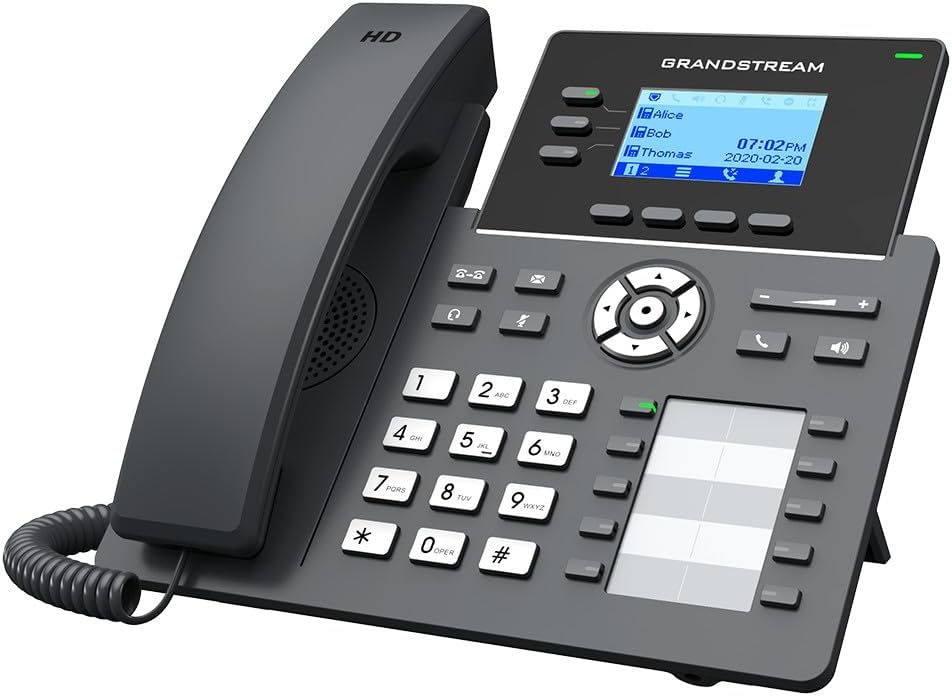
Rysunek 4.2: Kątowy view of the Grandstream GRP2604 IP Phone. This perspective highlights the ergonomic design of the handset and the slight tilt of the main unit, providing a clearer view of the display and keypad.

Rysunek 4.3: Strona view of the Grandstream GRP2604 IP Phone with its stand attached. This image illustrates how the phone is positioned for desktop use, showing the angle provided by the stand.
4.2. Panel tylny i porty

Rysunek 4.4: Tył view of the Grandstream GRP2604 IP Phone, showing the various ports and connections. From left to right, these include the handset port, headset port, two Gigabit Ethernet ports (LAN and PC), and the DC 5V power input.
The rear panel of the GRP2604 features essential connection ports:
- Port słuchawki: Connects the coiled handset cord.
- Port zestawu słuchawkowego: For connecting a wired headset.
- PC Port (LAN Out): Connects to a computer or other network device.
- LAN Port (Network In): Connects to your network switch or router.
- Wejście zasilania 5 V DC: Łączy zasilacz.
5. Konfiguracja
- Attach the Phone Stand: Align the stand with the slots on the back of the phone and slide it into place until it clicks securely.
- Podłącz słuchawkę: Plug one end of the coiled handset cord into the handset and the other end into the handset port on the rear of the phone.
- Połącz z siecią:
- Podłącz jeden koniec kabla Ethernet do portu LAN w telefonie.
- Podłącz drugi koniec kabla Ethernet do przełącznika sieciowego lub routera.
- If connecting a computer, use another Ethernet cable to connect the PC port on the phone to your computer.
- Podłącz zasilanie: Plug the DC 5V power adapter into the power input port on the phone, then plug the adapter into a power outlet. The phone will automatically power on and begin the boot-up sequence.
- Konfiguracja wstępna: Once the phone boots up, it will attempt to obtain an IP address via DHCP. You may need to access the phone's web interface for further SIP account configuration, as instructed by your VoIP service provider or network administrator.
6. Instrukcja obsługi
6.1. Wykonywanie połączeń
- Wybieranie numeru bez podnoszenia słuchawki: Podnieś słuchawkę lub naciśnij Głośnik button. Dial the number and press the Cyferblat soft key or wait a few seconds.
- Wybieranie numeru przy odłożonej słuchawce: Dial the number first, then pick up the handset or press the Głośnik przycisk.
- Using Line Keys: Press an available line key, dial the number, and press the Cyferblat klawisz programowy.
6.2. Odbieranie połączeń
- Answer with Handset: Podnieś słuchawkę.
- Answer with Speakerphone: Naciśnij Głośnik przycisk.
- Answer with Headset: Naciśnij Zestaw słuchawkowy button (if a headset is connected).
6.3. Funkcje połączeń
- Trzymać: Podczas aktywnego połączenia naciśnij Trzymać przycisk. Naciśnij go ponownie, aby wznowić połączenie.
- Transfer: Podczas aktywnego połączenia naciśnij Przenosić button. Dial the transfer destination number and press the Przenosić soft key again (attended transfer) or hang up (blind transfer).
- Konferencja: Podczas aktywnego połączenia naciśnij Konferencja button. Dial the second party's number and press the Konferencja soft key to join all parties. The GRP2604 supports 5-way voice conferencing.
- Poczta głosowa: Naciśnij Wiadomość przycisk, aby uzyskać dostęp do poczty głosowej.
6.4. Regulacja głośności
Użyj Objętość +/- buttons located on the phone to adjust the ringer volume when idle, or the handset/speaker/headset volume during a call.
7. Konserwacja
- Czyszczenie: Use a soft, dry cloth to clean the phone's surface. Do not use liquid cleaners or aerosol sprays.
- Składowanie: If storing the phone for an extended period, disconnect it from power and network, and store it in a cool, dry place.
- Aktualizacje oprogramowania układowego: Regularnie sprawdzaj Grandstream webwitryna z aktualizacjami oprogramowania sprzętowego, zapewniająca optymalną wydajność i bezpieczeństwo.
8. Rozwiązywanie Problemów
| Problem | Możliwe rozwiązanie |
|---|---|
| Telefon się nie włącza. |
|
| Brak sygnału wybierania. |
|
| Nie można wykonywać ani odbierać połączeń. |
|
| Wyświetlacz jest pusty lub zawieszony. |
|
9. Specyfikacje
- Model: GRP2604
- Kwestia: 3
- Konta SIP: 6
- Wyświetlacz: 2.7-inch (132x48) LCD
- Porty Ethernet: Dwuportowy Gigabit Ethernet
- Voice Conferencing: 5-drożny
- Wymiary (dł. x szer. x wys.): 3.94 x 3.94 x 3.94 cala
- Waga przedmiotu: 1.1 funta (500 gramów)
- Tworzywo: Plastikowy
- Źródło zasilania: Przewodowy elektryczny (prąd stały 5 V)
- Kolor: Czarny
10. Gwarancja i wsparcie
The Grandstream GRP2604 IP Phone comes with a manufacturer's warranty. For detailed warranty information, please refer to the warranty card included with your product or visit the official Grandstream website. For technical support, product inquiries, or service, please contact Grandstream customer support through their official channels.
Grandstream Networks Inc.
www.grandstream.com


