1. Wprowadzenie
This manual provides comprehensive instructions for the installation, operation, and maintenance of your Aigo Warrior AK700 Max 700W Power Supply. Designed for high-performance desktop computers, this power supply unit (PSU) delivers stable and efficient power to your system components. Please read this manual thoroughly before installation and use to ensure proper functionality and safety.
2. Informacje dotyczące bezpieczeństwa
Always observe the following safety precautions to prevent injury or damage to the product and other components:
- Przed instalacją lub jakąkolwiek czynnością należy upewnić się, że zasilacz jest odłączony od głównego gniazdka elektrycznego.
- Nie otwierać zasilacza casing. Wysoka objętośćtages are present inside, even when disconnected, and can cause electric shock.
- Aby zapobiec przegrzaniu, zasilacz należy zainstalować w dobrze wentylowanym pomieszczeniu.
- Należy używać wyłącznie kabli dostarczonych wraz z zasilaczem.
- Unikaj wystawiania urządzenia na działanie wilgoci i ekstremalnych temperatur.
- Produkt przeznaczony jest wyłącznie do użytku wewnątrz pomieszczeń.
3. Zawartość opakowania
Sprawdź, czy w przesyłce znajdują się wszystkie elementy:
- Aigo Warrior AK700 Max 700W Power Supply Unit
- Przewód zasilający AC
- Modular Cables (if applicable, otherwise fixed cables)
- Śruby montażowe
- Instrukcja obsługi (ten dokument)
4. Koniec produktuview
The Aigo Warrior AK700 Max is a 700-watt power supply designed to meet the demands of modern gaming and high-performance computing systems. It features an energy-efficient design with a silent 12cm hydraulic bearing fan for optimal cooling and quiet operation. The unit incorporates a built-in Power Factor Correction (PFC) and a dual magnetic ring magnetic amplifier circuit, along with high-frequency low-resistance filter capacitors, to ensure a pure and stable current output. Multiple protection circuits are integrated to safeguard against overvoltage, overcurrent, overload, undervoltage i zwarcia.
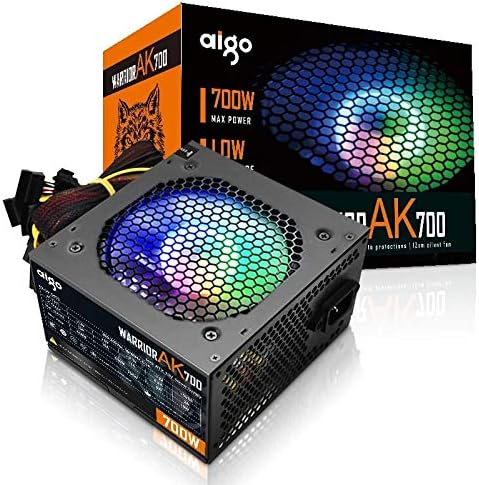
Figure 4.1: The Aigo Warrior AK700 Max 700W Power Supply, showcasing its RGB fan and retail packaging.
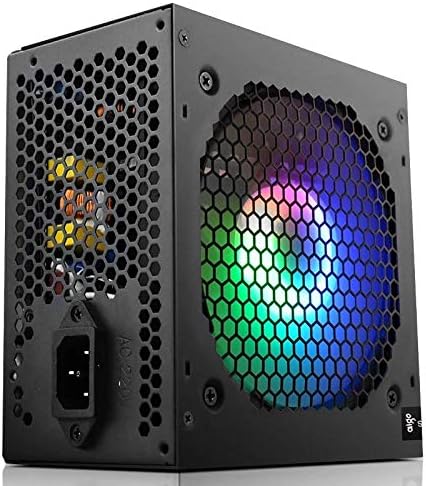
Rysunek 4.2: Strona view of the power supply, highlighting the 12cm RGB cooling fan and honeycomb grille.

Rysunek 4.3: Tył view of the power supply, illustrating the exhaust grille and AC power input socket.
5. Konfiguracja i instalacja
Follow these steps to properly install the Aigo Warrior AK700 Max power supply into your computer system:
- Przygotowanie: Upewnij się, że komputer jest całkowicie wyłączony i odłączony od gniazdka ściennego. Otwórz obudowę komputera.
- Wyjmij stary zasilacz (jeśli dotyczy): Odłącz wszystkie kable od starego zasilacza i wykręć śruby mocujące. Ostrożnie wysuń go z obudowy.
- Zainstaluj nowy zasilacz: Gently slide the Aigo Warrior AK700 Max into the power supply bay of your computer case. Ensure the fan is oriented correctly for optimal airflow (usually facing down or up, depending on your case design).
- Bezpieczny zasilacz: Align the screw holes on the power supply with those on your case. Secure the power supply using the provided mounting screws.
- Podłącz kable:
- 24-pinowe złącze ATX płyty głównej: Connect the main 24-pin cable to your motherboard.
- CPU Power Connector (4+4 pin or 8-pin EPS): Connect the CPU power cable to the appropriate socket on your motherboard.
- PCIe Power Connectors (6+2 pin): Connect these to your graphics card(s) if required.
- Złącza zasilania SATA: Connect to your storage drives (HDDs, SSDs) and optical drives.
- Złącza peryferyjne (Molex): W razie potrzeby podłącz inne urządzenia peryferyjne.
- Zarządzanie kablami: Ułóż kable w uporządkowany sposób, aby poprawić przepływ powietrza i estetykę obudowy.
- Zamknij sprawę: Once all connections are made and verified, close your computer case.
- Podłącz zasilanie sieciowe: Podłącz przewód zasilający do zasilacza, a następnie do gniazdka ściennego.
6. Instrukcja obsługi
After successful installation, follow these steps to operate your computer system with the Aigo Warrior AK700 Max power supply:
- Włączanie: Ensure the power switch on the back of the PSU is in the 'ON' (I) position. Press the power button on your computer case.
- Rozruch systemu: Your computer should now power on and begin its boot sequence. The RGB fan on the power supply will illuminate.
- Wyłączone: To turn off your computer, use the operating system's shutdown function. For a complete power cycle, switch the PSU to the 'OFF' (O) position after shutting down the computer.
The intelligent temperature control design automatically adjusts the fan speed to maintain optimal cooling and extend the lifespan of the unit, ensuring quiet operation under various loads.
7. Konserwacja
Właściwa konserwacja zapewnia długowieczność i optymalną wydajność zasilacza:
- Czyszczenie kurzu: Okresowo czyść wentylator i otwory wentylacyjne zasilacza sprężonym powietrzem, usuwając z nich kurz. Przed czyszczeniem upewnij się, że komputer jest wyłączony i odłączony od zasilania.
- Przepływ powietrza: Ensure that the power supply's intake and exhaust vents are not obstructed by cables or other components within the computer case.
- Warunki środowiskowe: Operate the power supply in a clean, dry environment with adequate ventilation.
- Nie rozmontowywać: Never attempt to open the power supply unit. There are no user-serviceable parts inside, and doing so will void your warranty and poses a risk of electric shock.
8. Rozwiązywanie Problemów
If you encounter issues with your Aigo Warrior AK700 Max power supply, refer to the following common problems and solutions:
| Problem | Możliwa przyczyna | Rozwiązanie |
|---|---|---|
| Komputer się nie włącza. |
|
|
| System włącza się, ale natychmiast się wyłącza. |
|
|
| Fan is not spinning or is excessively loud. |
|
|
If the problem persists after attempting these solutions, please contact Aigo customer support for further assistance.
9. Specyfikacje
Detailed technical specifications for the Aigo Warrior AK700 Max 700W Power Supply:
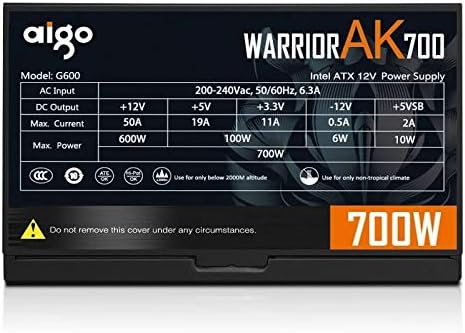
Figure 9.1: The specifications label found on the Aigo Warrior AK700 Max Power Supply.
| Funkcja | Szczegół |
|---|---|
| Model | AK700 Max |
| Cotage | 700 watów |
| Współczynnik kształtu | ATX, ATX12V |
| Wejście Voltage | 220V (Minimum 220V, Maximum 220V) |
| Metoda chłodzenia | Chłodzenie powietrzem |
| Rozmiar wentylatora | 120 Millimeters (Hydraulic Bearing) |
| Kompatybilne urządzenia | Komputer osobisty |
| Typ złącza | SATA, PCIe (6+2 pin), ATX 24-pin, EPS 4+4 pin |
| Funkcje ochronne | Przepełnienietage, Overcurrent, Overload, Undervoltage, Short Circuit, Light Protection |
| Waga przedmiotu | 1.9 kilograma |
| Wymiary opakowania | 5 x 5 x 5 cm (w przybliżeniu) |
10. Gwarancja i wsparcie
Aby uzyskać informacje dotyczące gwarancji i pomocy technicznej, zapoznaj się z oficjalną stroną Aigo webOdwiedź witrynę lub skontaktuj się z lokalnym sprzedawcą. Zachowaj dowód zakupu na wypadek reklamacji.
Aigo Official Webstrona: www.aigocorp.com (Uwaga: To jest symbol zastępczy URL ponieważ nie ma oficjalnego website was provided in the product data. Please refer to actual product documentation for correct contact information.)


