1. Wprowadzenie
This instruction manual provides detailed guidance for the installation, operation, and maintenance of your Beghelli Dom-e Wi-Fi Full HD Pan/Tilt Surveillance Camera. Please read this manual thoroughly before using the product to ensure proper functionality and safety. Keep this manual for future reference.

Figure 1: Beghelli Dom-e Wi-Fi Full HD Pan/Tilt Surveillance Camera.
2. Koniec produktuview
The Beghelli Dom-e Wi-Fi Camera is a versatile surveillance device designed for indoor use, offering Full HD 1080p resolution and comprehensive monitoring capabilities. It integrates seamlessly into your smart home system via the Dom-e Beghelli application.
Główne cechy:
- Rozdzielczość Full HD 1080p: Zapewnia wyraźny i szczegółowy obraz wideotage.
- Funkcja panoramowania i pochylania: Motorized rotation of 355° horizontally and 85° vertically, controllable via the app.
- Widzenie nocne: Equipped with IR LEDs for clear visibility up to 10 meters in low-light conditions.
- Detekcja ruchu: Sends real-time push notifications to your smartphone upon detecting movement, including specific person detection.
- Automatyczne śledzenie: The "Tracking" function enables the camera to automatically follow moving subjects.
- Dwukierunkowy dźwięk: Built-in microphone and speaker allow for hands-free communication.
- Elastyczne opcje nagrywania: Record directly to your smartphone, to a MicroSD card (up to 128GB, not included), or via optional cloud storage.
- Łączność Wi-Fi: Connects to your home Wi-Fi network (2.4 GHz).
- Szyfrowanie danych: Ensures the security of your video data.
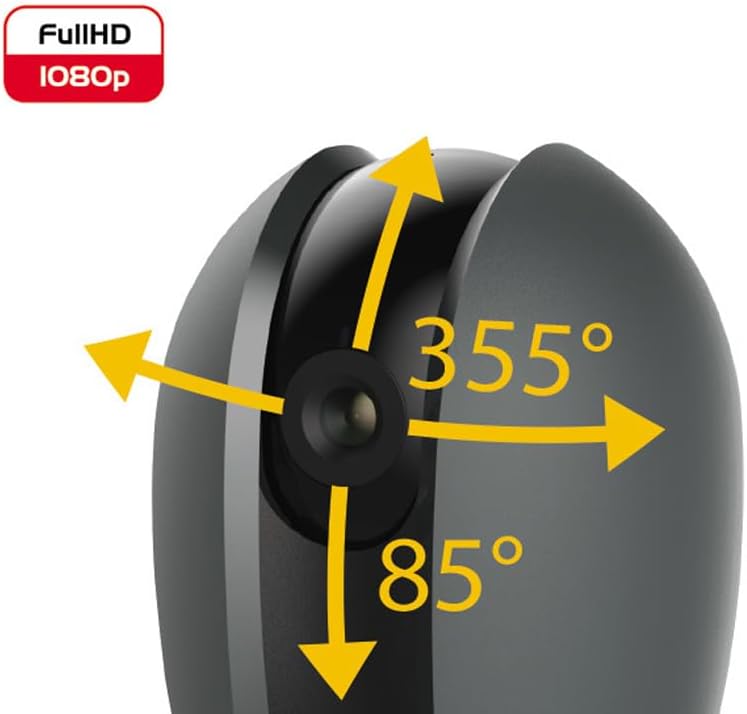
Figure 2: Camera's pan and tilt capabilities.
3. Zawartość opakowania
Sprawdź, czy w opakowaniu znajdują się wszystkie elementy:
- Beghelli Dom-e Wi-Fi Full HD Pan/Tilt Surveillance Camera
- USB Power Adapter (230V – DC 5V/1A)
- Mounting accessories (if included, not explicitly listed but implied by "wall or ceiling installation")
- Instrukcja obsługi (ten dokument)

Figure 3: Product packaging for the Beghelli Dom-e Camera.
4. Konfiguracja
4.1 Włączanie kamery
- Connect the provided USB power adapter to the camera's power input.
- Plug the adapter into a standard 230V power outlet. The camera will power on and initiate its startup sequence.
4.2 Instalacja aplikacji mobilnej
The Beghelli Dom-e camera is controlled via the dedicated "Dom-e Beghelli" mobile application.
- Download the "Dom-e Beghelli" app from the Apple App Store (for iOS 8.0 or later) or Google Play Store (for Android 4.2 or later).
- Zainstaluj aplikację na swoim smartfonie lub tablecie.
- Zarejestruj nowe konto lub zaloguj się, jeśli już je posiadasz.
4.3 Connecting to Wi-Fi and Pairing
Ensure your Wi-Fi network is 2.4 GHz (IEEE802.11 b/g/n). The camera does not support 5 GHz networks.
- Open the Dom-e Beghelli app and follow the on-screen instructions to add a new device.
- Select the Beghelli Dom-e camera from the list of available devices.
- Gdy zostaniesz o to poproszony, wprowadź nazwę swojej sieci Wi-Fi (SSID) i hasło.
- The app will guide you through the pairing process, which typically involves scanning a QR code displayed on your phone with the camera, or listening for an audio prompt.
- Once successfully paired, the camera's status indicator will change, and you will see the live feed in the app.

Figure 4: Simplified setup steps via the Dom-e Beghelli app.
4.4 Montaż kamery
Kamerę można zamontować na ścianie lub suficie. Wybierz lokalizację zapewniającą pożądany viewpod odpowiednim kątem i znajduje się w zasięgu sieci Wi-Fi oraz gniazdka elektrycznego.
- Mark the drilling points on the desired surface using the mounting template (if provided).
- W razie potrzeby wywierć otwory i włóż kołki rozporowe.
- Secure the mounting bracket (if provided) to the surface.
- Zamontuj kamerę w uchwycie montażowym.
- Adjust the camera's angle manually or via the app after installation.
5. Instrukcja obsługi
5.1 Na żywo View i sterowanie obrotem/pochyleniem
- Open the Dom-e Beghelli app and select your camera to view kanał na żywo.
- Use the directional controls within the app to pan the camera horizontally (355°) and tilt it vertically (85°) to adjust the viewObszar objęty badaniem.
5.2 Detekcja ruchu i powiadomienia
- Navigate to the camera settings in the app to enable motion detection.
- Skonfiguruj poziomy czułości i strefy wykrywania według potrzeb.
- Włącz powiadomienia push, aby otrzymywać alerty na smartfon po wykryciu ruchu.
- The camera also features person detection for more accurate alerts.
5.3 Dźwięk dwukierunkowy
- Chwila viewing the live feed, tap the microphone icon in the app to speak through the camera's speaker.
- The camera's built-in microphone will capture audio from the monitored area, allowing you to listen in.
5.4 Rejestrowanie i przechowywanie
- Nagrywanie na karcie MicroSD: Insert a MicroSD card (up to 128GB, not included) into the camera's slot for continuous recording or event-triggered recording.
- Smartphone Recording: You can manually record video clips directly to your smartphone while viewoglądając transmisję na żywo.
- Przechowywanie w chmurze: An optional cloud storage service is available via subscription for off-site video backup. Refer to the app for details.
- Zaplanowane nagrywanie: Set up specific times for the camera to record automatically through the app settings.
5.5 Widzenie nocne
The camera automatically switches to night vision mode in low-light conditions, utilizing its IR LEDs to provide clear black-and-white footagdo 10 metrów.
6. Mobile Application (Dom-e Beghelli App)
The Dom-e Beghelli app is the central control interface for your camera and other compatible smart home devices. It allows for:
- Remote control of camera pan and tilt.
- Access to live video feed and recorded footage.
- Configuration of motion detection, notifications, and recording schedules.
- Dwukierunkowa komunikacja audio.
- Integration with other Dom-e smart home devices (e.g., alarms, smart plugs, lighting).
- Voice control compatibility with Google Assistant and Amazon Alexa (if associated with a compatible smartphone).

Figure 5: The Dom-e Beghelli app interface for camera control.
7. Specyfikacje
| Funkcja | Specyfikacja |
|---|---|
| Numer modelu | 60021 |
| Rezolucja | Pełna rozdzielczość HD 1080p (2 megapiksele) |
| Transduktor | CMOS 1/2.9" |
| Obiektyw | 3.6 mm / f2.0 / 105° |
| Prędkość migawki | 1/25 - 1/100,000 sec |
| Obrót Panoramy | 355° w poziomie |
| Obrót pochylenia | 85° w pionie |
| Zakres noktowizora | Do 10 metrów (diody podczerwieni) |
| Audio | Two-way, hands-free (in/out) |
| Składowanie | MicroSD card up to 128GB (not included), Smartphone, Cloud (optional subscription) |
| Wi-Fi standard | IEEE802.11 b/g/n (2.4 GHz) |
| Pasmo częstotliwości | 2.4 GHz - 2.4835 GHz |
| Moc wejściowa | 230V – DC 5V/1A (USB adapter included) |
| Maksymalne zużycie energii | 4.5 W |
| Wymiary (dł. x szer. x wys.) | 63 x 58 x 96 mm (Product description) / 7 x 7 x 11 cm (Specifications) |
| Waga | 330 gramów |
| Tworzywo | Plastikowy |
| Zgodność z systemem operacyjnym | Apple iPhone iOS 8.0 or later / Android 4.2 or later |
| Zalecane zastosowanie | Bezpieczeństwo w pomieszczeniach |
Note: Some dimensions may vary slightly between product description and specifications list.
8. Konserwacja
8.1 Czyszczenie
- Przed czyszczeniem upewnij się, że aparat jest wyłączony i odłączony od zasilania.
- Do czyszczenia korpusu aparatu należy używać miękkiej, suchej ściereczki.
- Do czyszczenia soczewek należy używać specjalnej ściereczki, aby uniknąć zarysowań.
- Nie należy używać płynnych środków czyszczących, aerozoli ani rozpuszczalników ściernych.
8.2 Aktualizacje oprogramowania
Periodically check the Dom-e Beghelli app for firmware updates. Keeping your camera's firmware updated ensures optimal performance, security, and access to new features.
9. Rozwiązywanie Problemów
| Problem | Rozwiązanie |
|---|---|
| Kamera nie włącza się | Ensure the USB power adapter is securely connected to the camera and a working power outlet. Verify the outlet has power. |
| Nie można połączyć się z siecią Wi-Fi |
|
| Brak transmisji wideo na żywo |
|
| Wykrywanie ruchu nie działa |
|
| Cannot reconnect after Wi-Fi password change | If your Wi-Fi password changes, you will likely need to reset the camera and re-pair it with the app using the new Wi-Fi credentials. Refer to the app for device reset instructions. |
10. Gwarancja i wsparcie
For warranty information and technical support, please refer to the documentation provided with your purchase or contact Beghelli customer service directly. You can typically find contact details on the Beghelli official website or within the Dom-e Beghelli application.
Manufacturer: Beghelli
Model: 60021


