1. Wprowadzenie
This manual provides detailed instructions for the installation, operation, and maintenance of your Foscam SD2 2MP PTZ Wi-Fi Dome IP Camera. Please read this manual thoroughly before using the product to ensure proper setup and functionality. Keep this manual for future reference.
2. Informacje dotyczące bezpieczeństwa
Aby zapobiec uszkodzeniu produktu lub obrażeniom ciała u siebie lub innych osób, należy przestrzegać następujących środków ostrożności:
- Upewnij się, że napięcie zasilaniatage matches the camera's requirements (12V).
- Nie wystawiaj aparatu na działanie ekstremalnych temperatur, wilgoci ani bezpośredniego światła słonecznego.
- Unikaj umieszczania kamery w pobliżu silnych pól elektromagnetycznych.
- Nie próbuj demontować ani modyfikować aparatu. Wszelkie czynności serwisowe powierzaj wykwalifikowanemu personelowi.
- Przechowuj aparat i jego akcesoria poza zasięgiem dzieci.
- Use only Foscam-approved accessories.
3. Zawartość opakowania
Sprawdź, czy w przesyłce znajdują się wszystkie elementy:
- Foscam SD2 IP Camera
- Zasilacz
- Wspornik montażowy i śruby
- Ethernet Cable (for initial setup or wired connection)
- Szybki przewodnik instalacji
4. Koniec produktuview
The Foscam SD2 is a 2-megapixel PTZ (Pan-Tilt-Zoom) Wi-Fi dome IP camera designed for comprehensive surveillance. It features 4x optical zoom, a 118° wide viewing angle, and advanced human detection capabilities.
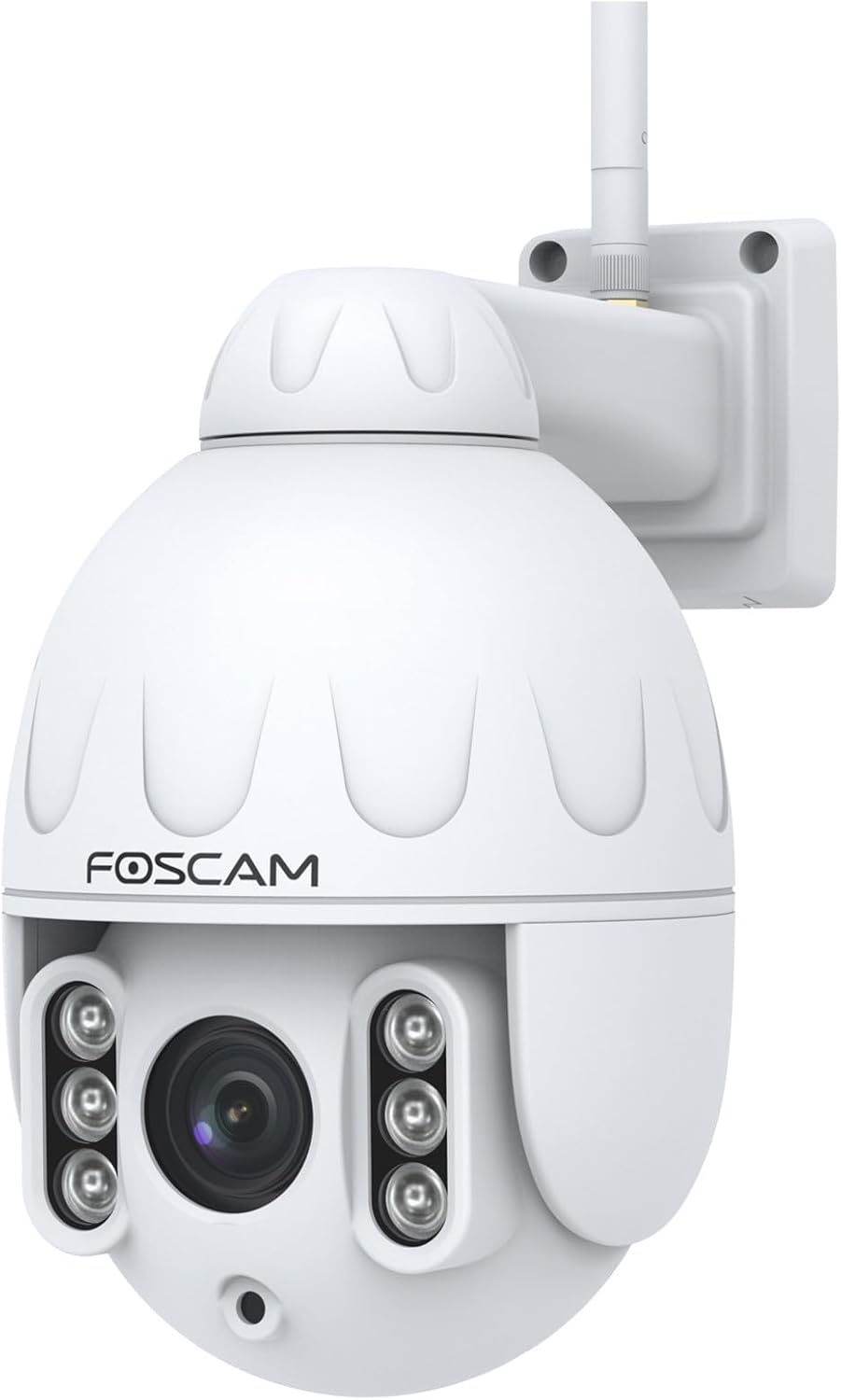
Rycina 4.1: Przód view of the Foscam SD2 PTZ Dome IP Camera. This image shows the camera's main lens, infrared LEDs, and the Foscam logo on its white dome housing.

Rysunek 4.2: Strona view of the Foscam SD2 camera, illustrating the integrated mounting arm for wall installation. The antenna for Wi-Fi connectivity is visible at the top.

Rysunek 4.3: Tył view of the Foscam SD2 camera, showing the power and Ethernet cable connections. These cables are essential for providing power and network access to the device.
5. Konfiguracja
5.1 Fizyczna instalacja
The Foscam SD2 camera is designed for both indoor and outdoor use and can be wall-mounted.
- Wybierz lokalizację: Wybierz odpowiednią lokalizację, która zapewni pożądane viewing angle and is within range of your Wi-Fi network or an Ethernet connection. Ensure the mounting surface is sturdy enough to support the camera.
- Zamontuj wspornik: Use the provided mounting bracket as a template to mark drill holes on the wall. Drill the holes, insert wall anchors if necessary, and secure the bracket with the screws.
- Zamocuj kamerę: Zamontuj kamerę stabilnie w uchwycie.
- Podłącz zasilanie: Podłącz zasilacz do aparatu i podłącz go do gniazdka elektrycznego.

Figure 5.1: The Foscam SD2 camera shown mounted on an exterior white wall, demonstrating a typical installation scenario. The camera's antenna is visible, indicating Wi-Fi connectivity.
5.2 Połączenie sieciowe
The Foscam SD2 supports dual-band Wi-Fi (2.4GHz/5GHz) or a wired Ethernet connection.
- Połączenie przewodowe (opcjonalnie): Connect an Ethernet cable from your router to the camera's Ethernet port.
- Połączenie Wi-Fi: For wireless setup, proceed to install the Foscam app.
5.3 Instalacja aplikacji i konfiguracja początkowa
To configure and control your camera, download the Foscam app on your smartphone or tablet.
- Pobierz aplikację: Szukaj "Foscam" in the App Store (iOS) or Google Play Store (Android) and install the official Foscam app.
- Utwórz konto: Otwórz aplikację i postępuj zgodnie z instrukcjami wyświetlanymi na ekranie, aby utworzyć nowe konto Foscam lub zaloguj się, jeśli już je posiadasz.
- Dodaj kamerę: Tap the "+" icon to add a new device. Follow the in-app wizard to connect your camera to your Wi-Fi network. This typically involves scanning a QR code on the camera or manually entering its details.
- Pełna konfiguracja: Po nawiązaniu połączenia możesz nadać nazwę kamerze i dostosować ustawienia początkowe.
6. Instrukcja obsługi
6.1 Remote Access and Live View
Access your camera's live feed and controls from anywhere using the Foscam app or web interfejs.
- Aplikacja Foscam: Open the Foscam app, select your camera from the device list, and tap to view strumień na żywo.
- Web Interface/Foscam VMS: For PC access, open a web browser and navigate to the camera's IP address or use the Foscam VMS software.
6.2 Sterowanie PTZ i zoom optyczny
The SD2 camera offers Pan, Tilt, and Zoom functionalities.
- Panoramowanie/pochylanie: Na żywo view, swipe your finger across the screen (or use directional controls in the app/web interface) to pan (rotate horizontally up to 350°) and tilt the camera.
- Zoom optyczny: Use the zoom controls within the app or web interface to activate the 4x optical zoom, allowing you to magnify specific areas without losing image quality.
6.3 Smart Motion Detection (Human Detection)
The camera features intelligent motion detection that distinguishes human shapes from other objects, reducing false alarms.
- Włącz wykrywanie: Navigate to the camera settings in the Foscam app. Locate the "Alarm" or "Detection" section.
- Configure Human Detection: Enable "Human Detection" and adjust sensitivity levels as needed.
- Skonfiguruj powiadomienia: Configure push notifications to receive alerts on your smartphone when human motion is detected.
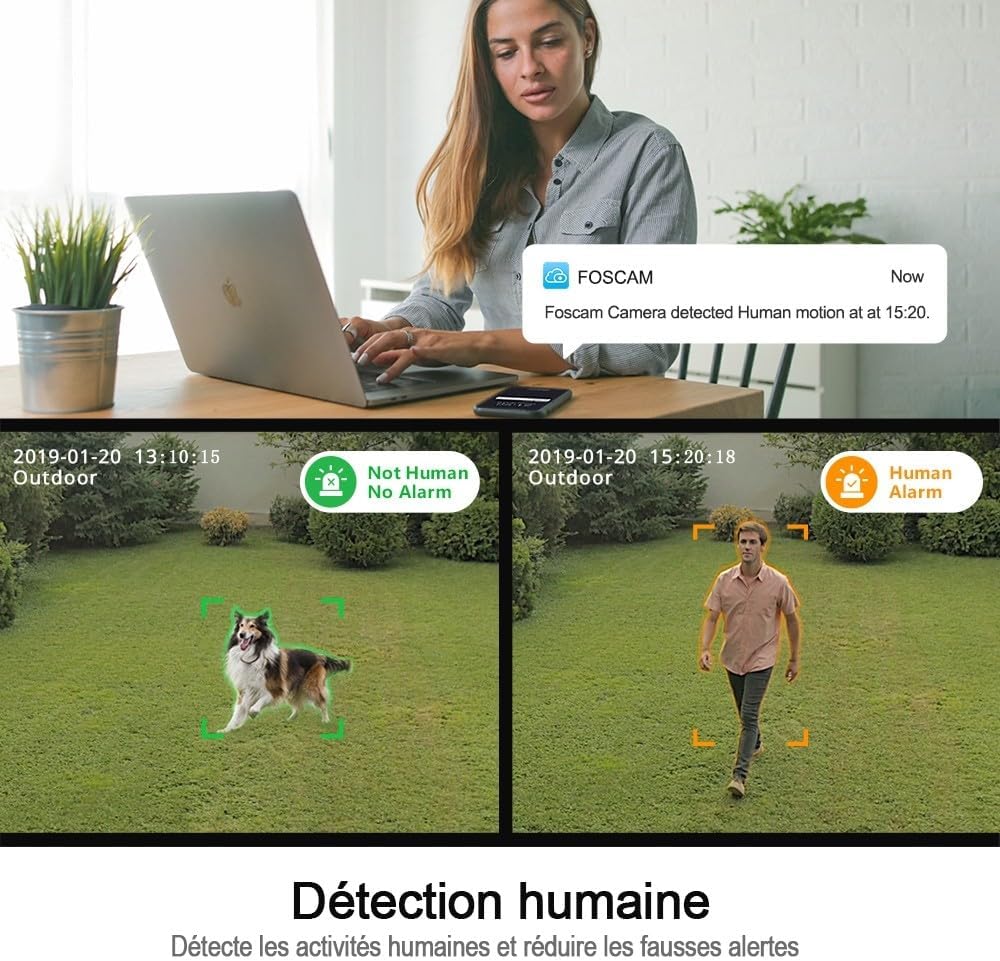
Figure 6.1: An illustration of the Foscam SD2's human detection feature. The image displays two scenarios: one where a dog is detected but not flagged as human, and another where a person is detected and triggers a human alarm, demonstrating the camera's ability to differentiate subjects.
6.4 Integracja sterowania głosowego
The Foscam SD2 is compatible with Amazon Alexa and Google Assistant for convenient voice control.
- Połącz konta: In your Alexa or Google Home app, search for the Foscam skill/action and link your Foscam account.
- Odkryj urządzenia: Allow the assistant to discover your camera.
- Polecenia głosowe: Use commands like "Alexa, show me the [camera name]" or "Hey Google, show [camera name] on [display device]" to view transmisja na żywo na kompatybilnych inteligentnych wyświetlaczach.

Figure 6.2: This image demonstrates the Foscam SD2's compatibility with voice assistants like Google Assistant and Amazon Alexa. A smart display shows the camera's live feed, controlled by voice commands from a smart speaker.
6.5 Opcje przechowywania
The camera supports multiple storage methods for recorded footage.
- Przechowywanie w chmurze Foscam: Subscribe to Foscam Cloud for secure off-site storage of your recordings.
- Pamięć karty SD: Insert a microSD card (up to 128GB, sold separately) into the camera's SD card slot for local storage.
7. Konserwacja
Regular maintenance ensures optimal performance and longevity of your Foscam SD2 camera.
- Czyszczenie: Delikatnie przetrzyj obiektyw i obudowę aparatu miękką, suchą ściereczką. Nie używaj silnych środków chemicznych ani ściernych środków czyszczących.
- Aktualizacje oprogramowania układowego: Periodically check for and install firmware updates via the Foscam app to ensure your camera has the latest features and security enhancements.
- Kontrola sieci: Ensure your Wi-Fi signal is strong and stable, especially for outdoor installations.
8. Rozwiązywanie Problemów
If you encounter issues with your Foscam SD2 camera, refer to the following common solutions:
- Kamera offline: Check power connection, Wi-Fi signal strength, and router status. Restart the camera and your router.
- Nie na żywo View: Ensure your internet connection is active. Check app permissions and camera settings.
- Słaba jakość obrazu: Clean the camera lens. Ensure adequate lighting. Check network bandwidth.
- Alerty o fałszywym ruchu: Adjust motion detection sensitivity in the app. Ensure human detection is enabled if desired.
- Nie można połączyć się z Wi-Fi: Verify correct Wi-Fi password. Ensure camera is within router range. Try connecting to the 2.4GHz band if experiencing issues with 5GHz.
9. Specyfikacje
| Numer modelu | SD2 |
| Marka | Foscam |
| Technologia łączności | Wireless (Wi-Fi 2.4GHz/5GHz) |
| Cechy specjalne | Night Vision, PTZ (Pan-Tilt-Zoom), 4x Optical Zoom, Human Detection, Voice Control (Alexa/Google Assistant), IP66 Weatherproof |
| Rezolucja | 2 megapikseli (1920 x 1080 pikseli) |
| Viewing kąt | 118° |
| Obrót Panoramy | 350° |
| Moc | 12 woltów, 24 wata |
| Tworzywo | Akryl |
| Wymiary (dł. x szer. x wys.) | Wymiary 10 x 5 x 1.27 cm |
| Waga | 1 kilogram |
| Opcje przechowywania | Foscam Cloud, MicroSD Card (up to 128GB) |
| Kompresja wideo | H.264 |
10. Gwarancja
The Foscam SD2 camera comes with a 2-letnia gwarancja producenta. This warranty covers defects in materials and workmanship under normal use. Please retain your proof of purchase for warranty claims. The warranty does not cover damage caused by misuse, accidents, unauthorized modifications, or natural disasters.
11. Wsparcie
For technical assistance, troubleshooting, or further information, please visit the official Foscam support website or contact their customer service. Refer to the Foscam webwitryna zawierająca najnowsze informacje kontaktowe i zasoby pomocy technicznej.
Zasoby internetowe: www.foscam.com


