Wstęp
Thank you for choosing the LAMAX T10 Real 4K Dashcam. This manual provides detailed instructions on how to set up, operate, and maintain your dashcam to ensure optimal performance and longevity. The LAMAX T10 is designed to capture high-quality video footage of your journeys, offering features such as 4K resolution, GPS tracking, speed camera alerts, Wi-Fi connectivity, and a magnetic holder for easy installation.
Produkt ponadview
Familiarize yourself with the components and key features of your LAMAX T10 Dashcam.
Dashcam Front and Rear View

The main unit of the LAMAX T10 Dashcam, featuring the front lens, 2.45-inch display, and the magnetic GPS module attached to the top.
Najważniejsze cechy

Ponadview of the dashcam's primary features, including 4K video, Full HD at 60 FPS, support for up to 128GB microSD, 170° wide-angle lens, GPS with speed camera alerts, Wide Dynamic Range (WDR), parking mode, and Wi-Fi connectivity for app control.
Schemat komponentów

Detailed diagram showing the various ports, buttons, and indicators on the LAMAX T10 Dashcam, including the magnetic power connection, USB port, control buttons, microphone, and microSD card slot.
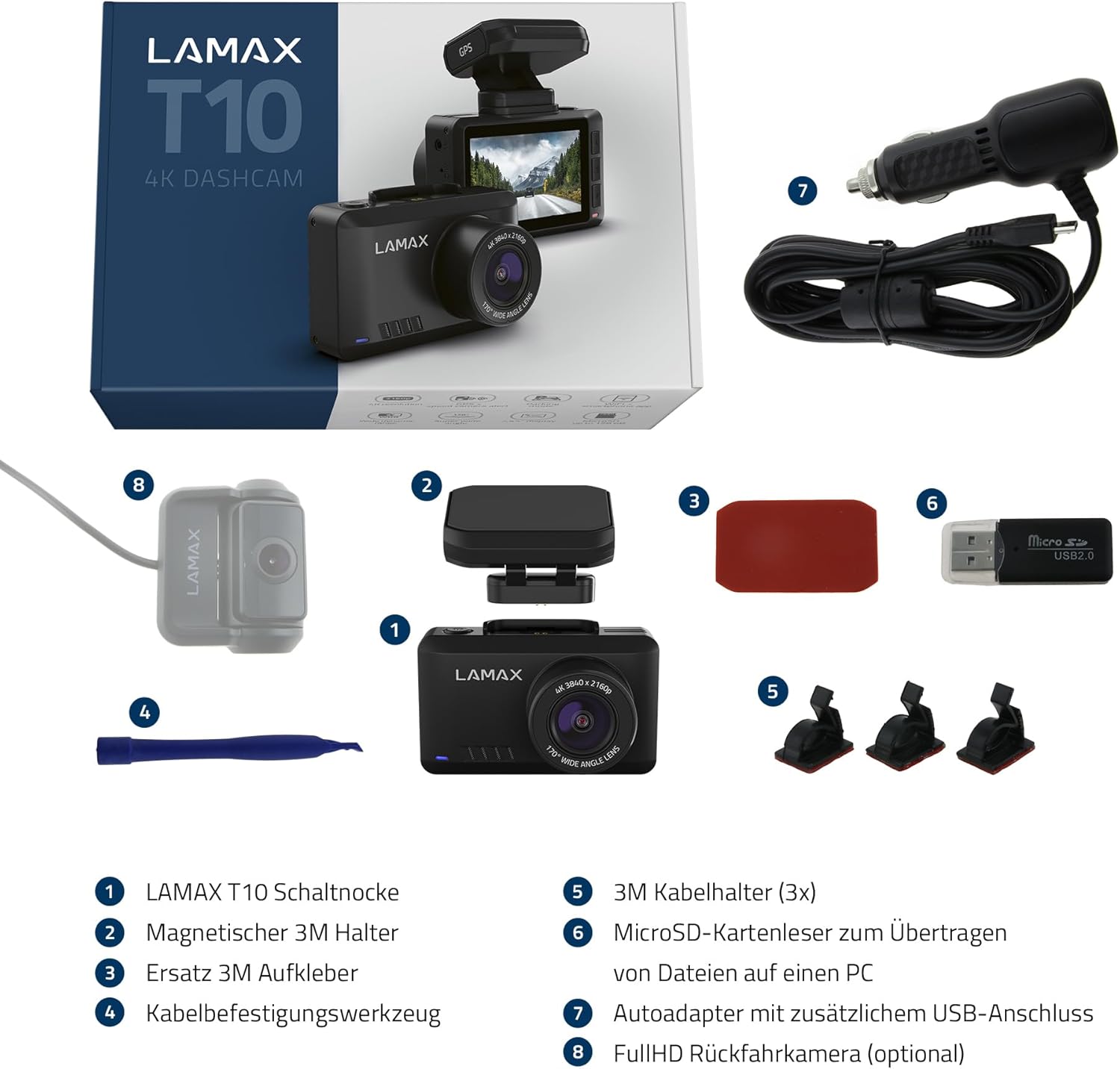
Zawartość opakowania

Illustration of all items included in the LAMAX T10 Dashcam package, such as the dashcam unit, magnetic mount, power cable, and other accessories.
Organizować coś
1. Wkładanie karty MicroSD
Before first use, insert a high-speed MicroSD card (Class 10 or higher, up to 128GB) into the designated slot on the side of the dashcam. Ensure the card is inserted correctly until it clicks into place.
2. Montaż kamery samochodowej
The LAMAX T10 uses a magnetic holder for easy installation and removal.
- Wyczyść obszar na przedniej szybie samochodu, w którym zamierzasz zamontować kamerę samochodową.
- Attach the magnetic holder to the windshield using the adhesive pad. Ensure it is placed in a position that does not obstruct your view.
- Connect the dashcam to the magnetic holder. The strong magnets will secure it in place.
Dashcam Mounted on Windshield

The LAMAX T10 Dashcam securely mounted on the car's windshield, providing an optimal view drogi przed nami.
3. Podłączenie zasilania
Connect the included car charger to your vehicle's 12V power outlet and then to the MicroUSB port on the magnetic holder. The dashcam will automatically power on and begin recording when the vehicle's ignition is turned on.
Instrukcja obsługi
Podstawowa obsługa
- Włączanie/wyłączanie: The dashcam powers on automatically with vehicle ignition. To manually power off, press and hold the power button.
- Nagranie: Recording starts automatically when the device is powered on. A flashing red indicator usually signifies active recording.
- Wyświetlacz: The 2.45-inch display shows the live view, recording status, and various settings.
Zaawansowane funkcje
- GPS Tracking and Speed Camera Alerts:
The built-in GPS module tracks your location and speed. The dashcam also features a regularly updated database of speed cameras and sections where fines are imposed across 50 countries. You will receive visual and audible warnings when approaching these locations. Ensure the GPS module is properly connected and has a clear view nieba w celu dokładnego określenia pozycji.
Display with Speed and Distance Information

The dashcam display indicating an approaching speed camera (179 meters away) with a speed limit of 80 km/h, while the vehicle's current speed is 41 km/h.
- Wi-Fi and Mobile App:
Connect your dashcam to your smartphone via Wi-Fi using the dedicated mobile app. This allows you to view żyćtage, download recordings, change settings, and update firmware directly from your phone. Refer to the app's instructions for detailed pairing steps.
- Video Quality (4K / Full HD 60 FPS):
The LAMAX T10 records in stunning 4K resolution at 30 frames per second or Full HD at 60 frames per second. The high resolution ensures clear and detailed footage, crucial for capturing license plates and other important details. Wide Dynamic Range (WDR) technology helps prevent glare and reflections, ensuring clear images even in challenging lighting conditions.
4K vs. Full HD Video Comparison
A visual comparison demonstrating the superior detail captured by the 4K resolution compared to Full HD, particularly evident when examining fine details like vehicle license plates.
- Parking Monitoring and G-Sensor:
The G-sensor detects sudden impacts or movements and automatically locks the current recording to prevent it from being overwritten. When the vehicle is parked, the parking monitoring feature can detect impacts and automatically start recording, providing security even when you're away from your car.
- Opcjonalna kamera tylna:
The dashcam supports an optional Full HD rear camera for simultaneous recording of the rear view. Connect it to the designated port on the main unit.
Optional Full HD Rear Camera

The optional Full HD rear camera, designed to integrate with the LAMAX T10 for comprehensive front and rear vehicle coverage.
Konserwacja
- Zarządzanie kartami MicroSD: Regularly format your MicroSD card (at least once a month) to ensure optimal performance and prevent data corruption. Back up important videos before formatting.
- Czyszczenie: Do czyszczenia obiektywu i ekranu kamery samochodowej używaj miękkiej, suchej ściereczki. Unikaj stosowania środków czyszczących o właściwościach ściernych i rozpuszczalników.
- Aktualizacje oprogramowania układowego: Check the LAMAX website or mobile app periodically for firmware updates to ensure your dashcam has the latest features and bug fixes.
Rozwiązywanie problemów
| Problem | Możliwa przyczyna | Rozwiązanie |
|---|---|---|
| Kamera samochodowa nie włącza się. | Brak zasilania, uszkodzony kabel, niedziałające gniazdo 12 V w pojeździe. | Check power connection; try a different cable or outlet; ensure vehicle ignition is on. |
| Nagrywanie zostaje nieoczekiwanie przerwane. | MicroSD card full or corrupted; low power. | Format the MicroSD card; ensure continuous power supply. |
| Speed camera alerts not working. | GPS signal lost; database outdated; feature disabled. | Upewnij się, że jasne view of sky for GPS; update firmware/database via app; check settings to enable alerts. |
| Problemy z połączeniem Wi-Fi w aplikacji. | Nieprawidłowe hasło Wi-Fi; aplikacja nie została zaktualizowana; zakłócenia. | Verify Wi-Fi password; update the mobile app; try connecting in a different location. |
| Settings revert to default. | Power interruption during saving; internal battery issue. | Ensure stable power; contact support if persistent. |
Specyfikacje
| Funkcja | Szczegół |
|---|---|
| Nazwa modelu | LAMAX T10 |
| Rozdzielczość przechwytywania wideo | 4K (3840x2160) at 30 FPS, Full HD (1920x1080) at 60 FPS |
| Obiektyw szerokokątny | 170° |
| Rozmiar wyświetlacza | 2.45 cali |
| Składowanie | Karta MicroSD do 128 GB (zalecana klasa 10 lub wyższa) |
| Łączność | Wi-Fi, GPS |
| Cechy specjalne | Built-In WiFi, Night Vision, App Control, G-Sensor, Parking Monitoring, WDR |
| Typ montażu | Magnetic Dashcam Mount |
| Źródło zasilania | 1 Lithium Polymer battery (included), Car charger (12V) |
| Wymiary produktu | 16 x 11 x 7 cm; 320 g |
Gwarancja i wsparcie
LAMAX products are designed for reliability and performance. For warranty information, technical support, or service inquiries, please refer to the official LAMAX webOdwiedź stronę internetową lub skontaktuj się bezpośrednio z działem obsługi klienta. Zachowaj dowód zakupu na wypadek reklamacji.
Aby uzyskać dalszą pomoc, odwiedź stronę LAMAX Store on Amazon or the official LAMAX support channels.


