1. Wprowadzenie
This manual provides detailed instructions for the proper installation, operation, and maintenance of your SmallRig Adjustable Sling Handgrip (Model 3028-SR). This accessory is designed to enhance the usability of your DJI RS series gimbal by reducing arm fatigue and improving stability for low-angle shots. Please read this manual thoroughly before use to ensure optimal performance and longevity of the product.

Figure 1.1: SmallRig Adjustable Sling Handgrip attached to a DJI gimbal.
2. Koniec produktuview
2.1 Główne cechy
- Ergonomiczna konstrukcja: Features a curved grip with increased length and finger stops for a comfortable and secure hold, constructed from a combination of silicone and aluminum alloy.
- Szybkie wydanie: Attaches securely to your gimbal via a NATO clamp with an anti-removal stud for safe and rapid operation.
- 180-Degree Adjustment: Allows for flexible shooting angles and reduced arm strain through its built-in rosette joint, which can also be detached for standalone use.
- Abundant Mounting Points: Includes multiple 1/4"-20 and 3/8"-16 threads (ARRI standard) and two cold shoe mounts for attaching accessories like magic arms, monitors, wireless microphones, or video transmitters.
- Wysoka ładowność: Supports up to 8 kg (17.6 lbs), suitable for various camera setups.
- Integrated QD Socket: Provides an option to mount a QD neck or shoulder strap for additional support.
2.2 Zgodność
The SmallRig Sling Handgrip (Model 3028-SR) is specifically designed for the following DJI RS series gimbals:
- DJI RS 4 Mini
- DJIRS4
- DJI RS 4 Pro
- DJI RS 3 Mini
- DJIRS3
- DJI RS 3 Pro
- DJIRS2
- DJI RSC 2

Figure 2.1: Compatible DJI RS series gimbals.

Rysunek 2.2: Koniecview kluczowych cech produktu.
3. Zawartość opakowania
The package for the SmallRig Adjustable Sling Handgrip (Model 3028-SR) includes:
- Gimbal Sling Handle × 1

Rysunek 3.1: Zawartość opakowania.
4. Konfiguracja i instalacja
Follow these steps to properly attach the SmallRig Sling Handgrip to your DJI RS series gimbal:
- Zidentyfikuj punkt montażowy: The sling handgrip is designed to mount exclusively on the lewa strona of your DJI RS series gimbal. Attempting to mount it on the right side is not supported.
- Attach NATO Clamp: Locate the NATO rail on the left side of your gimbal. Align the NATO clamp on the sling handgrip with this rail.
- Zabezpiecz Clamp: Slide the handgrip onto the NATO rail until it is fully seated. Tighten the locking lever on the NATO clamp to secure the handgrip firmly in place. Ensure the anti-removal stud is engaged for added security.
- Sprawdź stabilność: Gently test the attachment to ensure there is no wobble or looseness before attaching your camera setup.
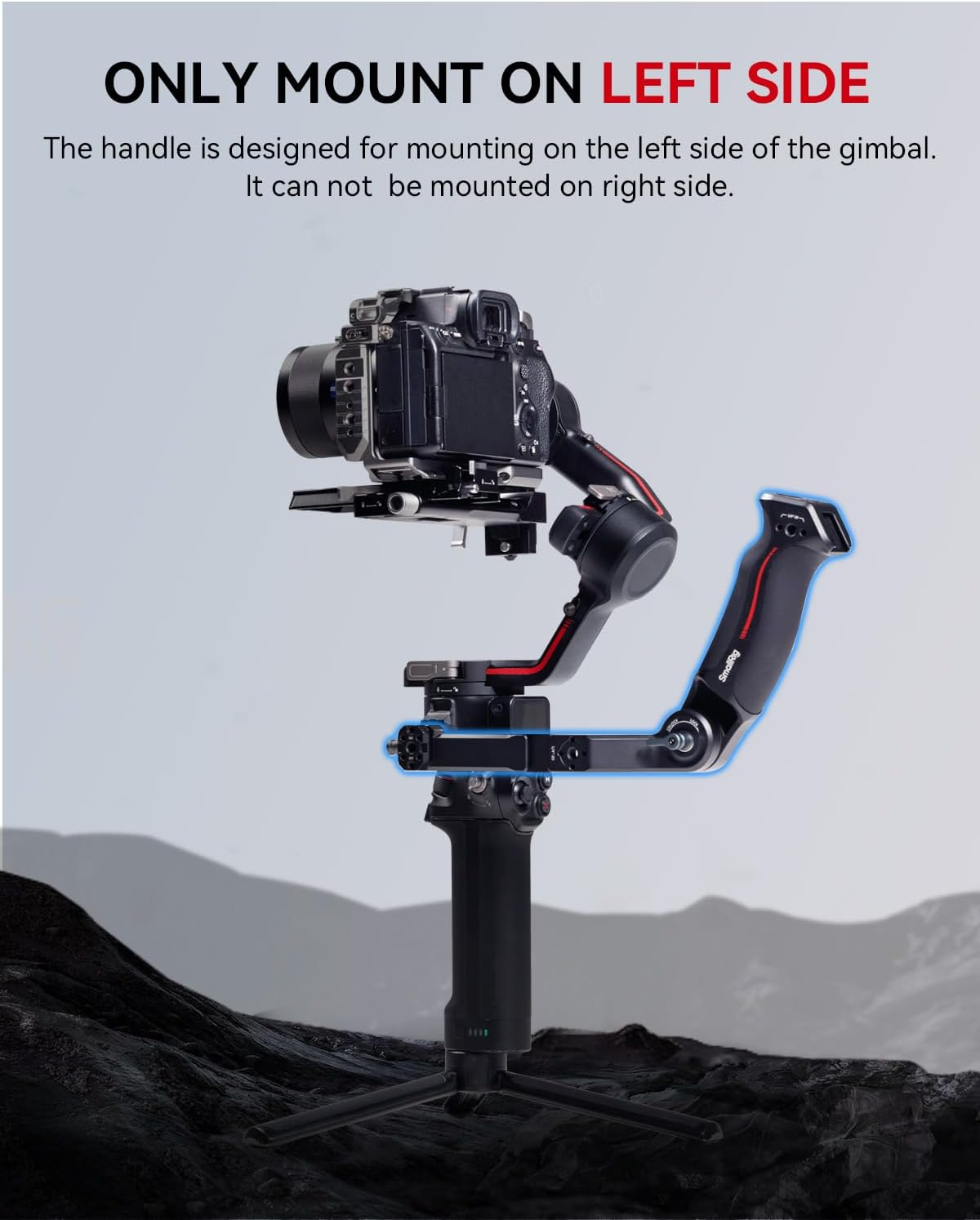
Figure 4.1: Proper left-side mounting of the sling handgrip.

Figure 4.2: Reinforced structure and installation location.
5. Instrukcja obsługi
5.1 Ergonomic Grip and Low-Angle Shots
The ergonomic design of the sling handgrip provides a comfortable and secure hold, significantly reducing arm fatigue during extended shooting sessions. It is particularly effective for achieving stable low-angle shots, allowing you to position your gimbal closer to the ground or subject with greater control.

Figure 5.1: Ergonomic grip detail.
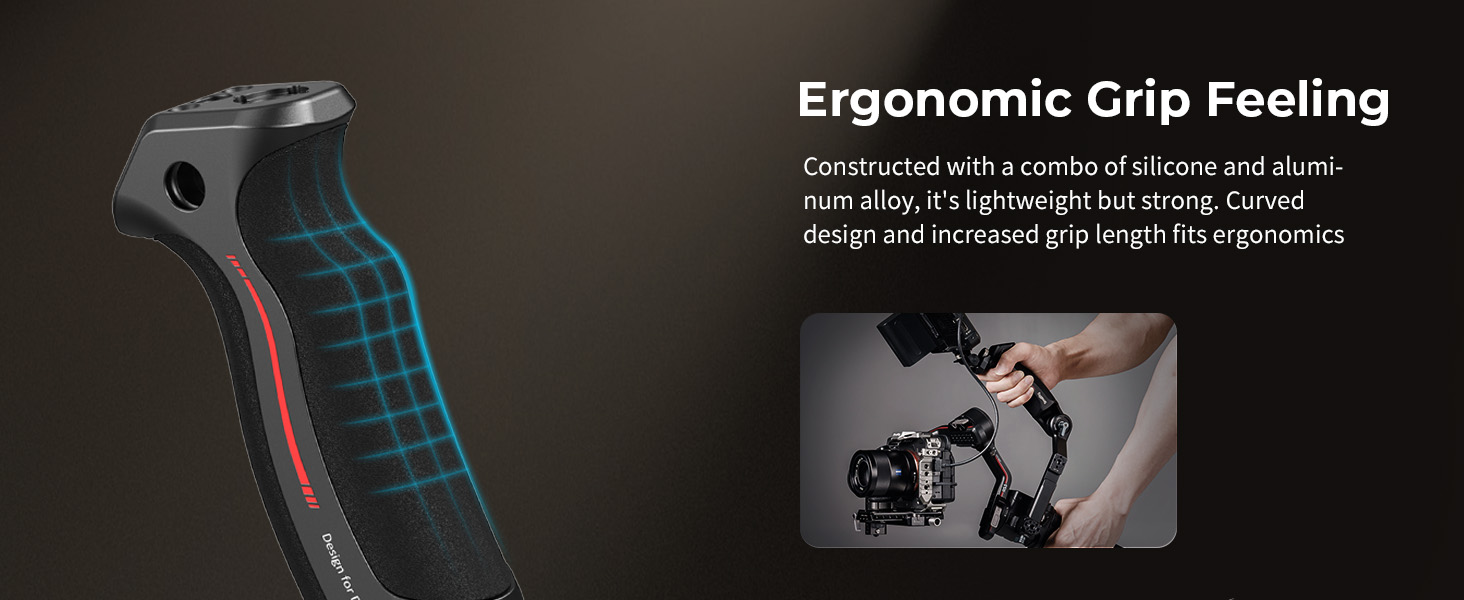
Figure 5.2: Comfortable grip for enhanced control.

Figure 5.3: Reduced arm fatigue and load capacity.
5.2 Regulacja kąta
The integrated rosette joint allows for 180-degree angle adjustment. To adjust the angle:
- Loosen the ratchet knob on the rosette joint.
- Adjust the handgrip to your desired angle.
- Tighten the ratchet knob to secure the angle.

Figure 5.4: 180-degree quick angle adjustment.
5.3 Mocowanie akcesoriów
The sling handgrip features multiple mounting points for various accessories:
- 1/4"-20 and 3/8"-16 ARRI Threads: Use these threads to attach magic arms (e.g., SmallRig 3874) or monitor mounts (e.g., SmallRig 2903B).
- Mocowania na stopce zimnej: Two cold shoe mounts (one on top, one on the side) allow for the attachment of wireless microphones, video transmitters, or other cold shoe compatible accessories.
- Gniazdo QD: An integrated QD socket provides a quick-release point for attaching a QD neck strap or shoulder strap (not included) for additional support and carrying options.

Figure 5.5: Additional features and mounting points.

Figure 5.6: Expandable mounting options.

Rysunek 5.7: Wiele scenariuszy zastosowań.
6. Konserwacja
To ensure the longevity and proper functioning of your SmallRig Sling Handgrip, follow these maintenance guidelines:
- Czyszczenie: Wipe the handgrip with a soft, dry cloth after each use to remove dust and debris. For stubborn dirt, use a slightly damp ściereczką i łagodnym mydłem, a następnie dokładnie wysuszyć. Unikać silnych środków chemicznych i materiałów ściernych.
- Składowanie: Store the handgrip in a clean, dry environment away from extreme temperatures and direct sunlight.
- Kontrola: Okresowo sprawdzaj wszystkie śruby i połączenia, aby upewnić się, że są dobrze dokręcone. Nie dokręcaj ich zbyt mocno.
7. Rozwiązywanie Problemów
- Handgrip feels loose after attachment: Zapewnić, że NATOamp's locking lever is fully tightened. Verify that the handgrip is correctly seated on the gimbal's NATO rail and that the anti-removal stud is engaged.
- Cannot attach handgrip: Confirm you are attempting to mount the handgrip on the lewa strona of the gimbal. The design is specific to the left side only.
- Trudności z regulacją kąta: Loosen the ratchet knob on the rosette joint sufficiently before attempting to adjust the angle. If the joint is stiff, ensure it is clean and free of debris.
8. Specyfikacje
| Funkcja | Szczegół |
|---|---|
| Wymiary produktu | 5.28 x 1.65 x 2.09 cala (199.0 x 68.3 x 54.5 mm) |
| Waga przedmiotu | 11.8 uncji (335 grama) |
| Materiały) | Stop aluminium, silikon |
| Nośność | 8 kg / 17.6 funta |
| Numer modelu | 3028-SR |
| Compatible Gimbals | DJI RS 4 Mini, RS 4, RS 4 Pro, RS 3 Mini, RS 3, RS 3 Pro, RS 2, RSC 2 |
9. Gwarancja i wsparcie
Produkty SmallRig są wytwarzane zgodnie z wysokimi standardami jakości. Aby uzyskać informacje dotyczące gwarancji, wsparcia technicznego lub zapytań serwisowych, prosimy o zapoznanie się z oficjalną stroną SmallRig. webOdwiedź stronę internetową lub skontaktuj się bezpośrednio z działem obsługi klienta. Zachowaj paragon jako dowód zakupu na wypadek ewentualnych roszczeń gwarancyjnych.


