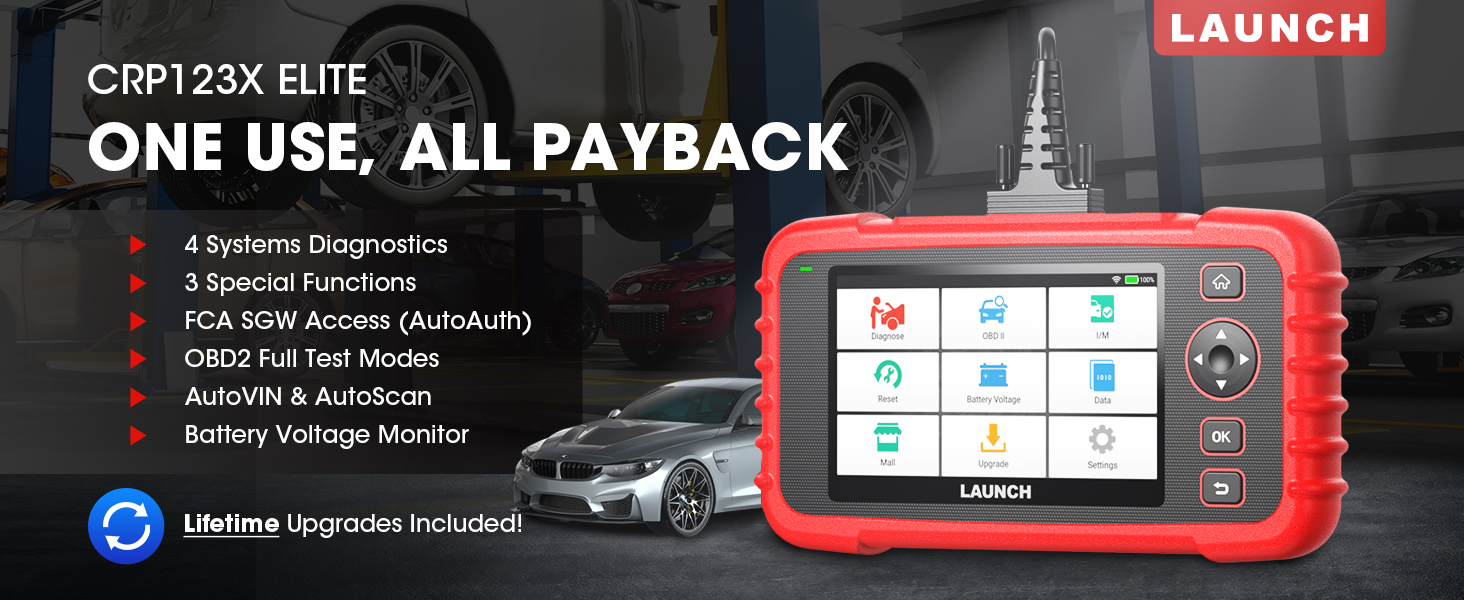
The LAUNCH CRP123X Elite is an advanced OBD2 diagnostic scan tool designed for comprehensive vehicle system analysis. It offers a wide range of functions including 4-system diagnostics (Engine, Transmission, ABS, SRS), 3 special reset services (Oil Reset, Electronic Throttle Relearn, Steering Angle Sensor Calibration), full OBD2 functions, AutoVIN technology, and lifetime free software updates via Wi-Fi. This manual provides detailed instructions for setting up, operating, and maintaining your CRP123X Elite scanner.
2. Główne cechy
Bezpłatne aktualizacje oprogramowania na całe życie: Ensures compatibility with future vehicles and systems, updated wirelessly via Wi-Fi.
3 Hottest Special Functions: Includes Oil Reset, Electronic Throttle Relearn (ETC Reset), and Steering Angle Sensor Calibration (SAS Reset).
4-Diagnostyka systemu: Comprehensive diagnostics for Engine, Anti-lock Braking System (ABS), Supplemental Restraint System (SRS), and Transmission Control Module (TCM). Read and clear DTCs, view live data, and read ECU information.
Szeroki zakres pojazdów: Supports over 72 car brands across US, EU, and Asia, including 2018+ FCA SGW (AutoAuth required).
AutoVIN i AutoScan: Automatically identifies vehicle information and quickly scans all modules in all systems for 2006+ vehicles.
All 10 OBD2 Test Modes: Supports all standard OBD2 functions for basic car issue diagnosis, including reading/clearing codes, live data, freeze frame, I/M readiness, O2 sensor test, EVAP system test, on-board monitor test, component test, and vehicle information retrieval.
Objętość w czasie rzeczywistymtagMonitoruj: Displays dynamic graphic representation of the car's battery voltage.
4 w 1 graficzne dane na żywo: Allows merging up to 4 PIDs data on one screen for easier analysis.
Udostępnianie raportów diagnostycznych: Save and share diagnostic reports for further analysis or record-keeping.
Przyjazny dla użytkownika projekt: Features a 5-inch HD touchscreen, Android 7.0 OS, 16GB memory, and anti-slip, shock-resistant casing.
3. Zawartość opakowania
Sprawdź, czy w przesyłce znajdują się wszystkie elementy:
LAUNCH CRP123X Elite Scanner (Red unit with 5-inch touchscreen)
DC 5V Charging Cable (USB cable)
OBD2 Cable (DB-15 diagnostic connector)
Carrying Bag (Black zippered case)
User Manual (Printed document)
Figure 3.1: LAUNCH CRP123X Elite Package Contents. This image displays the main scanner unit, a USB charging cable, an OBD2 diagnostic cable, a black carrying bag, and the printed user manual.
4. Przewodnik konfiguracji
4.1 Pierwsze włączenie i ładowanie
Before first use, ensure the device is fully charged. Connect the provided DC 5V Charging Cable to the scanner's charging port and a suitable USB power adapter (not included) or computer USB port. The device will power on automatically or can be powered on by pressing the power button.
Figure 4.1: Scanner Ports and Buttons. This image highlights the 5V charging port, the DB-15 diagnostic connector, and the power button on the top side of the scanner.
4.2 Połączenie Wi-Fi
W menu głównym kliknij „Ustawienia”.
Wybierz „Wi-Fi” i włącz.
Wybierz żądaną sieć Wi-Fi z listy i wpisz hasło, jeśli zostaniesz o to poproszony.
Po nawiązaniu połączenia na pasku stanu pojawi się ikona Wi-Fi.
4.3 Początkowa aktualizacja oprogramowania
It is recommended to perform a software update after connecting to Wi-Fi to ensure you have the latest vehicle coverage and functions.
W menu głównym kliknij „Uaktualnij”.
The system will check for available updates. Select all necessary updates and tap "Download".
Allow the updates to complete. The device may restart during this process.
Figure 4.2: One-Click Wi-Fi Update. This image illustrates the simple process of updating the scanner's software via a Wi-Fi connection, highlighting its ease of use compared to other methods.
5. Instrukcja obsługi
5.1 Łączenie z pojazdem
Locate the vehicle's OBD2 port, usually under the dashboard on the driver's side. Connect the provided OBD2 cable to the scanner and then to the vehicle's OBD2 port. Turn the vehicle's ignition to the "ON" position (engine off or running, depending on the test).
Figure 5.1: Scanner Connected to Vehicle. This image shows the LAUNCH CRP123X Elite scanner connected to a vehicle's diagnostic port, ready for operation.
5.2 Diagnostyka systemu (silnik, ABS, SRS, skrzynia biegów)
The CRP123X Elite can diagnose four core vehicle systems:
Układ silnika: Odczyt i kasowanie kodów błędów silnika, view live data streams, and check engine light status.
Układ zapobiegający blokowaniu kół (ABS): Diagnose ABS issues, read and clear ABS fault codes, and view ABS sensor data.
Dodatkowy system bezpieczeństwa (SRS/poduszka powietrzna): Read and clear airbag fault codes. Note: Crash data cannot be cleared from memory even with a new airbag.
Moduł sterowania skrzynią biegów (TCM): Diagnose transmission problems, read and clear transmission fault codes, and view transmission live data.
Aby wykonać diagnostykę systemu:
W menu głównym kliknij „Diagnozuj”.
Select the vehicle make and model. The AutoVIN feature (for 2006+ vehicles) can automatically detect this.
Choose the system you wish to diagnose (e.g., "Engine", "ABS").
Wybierz „Odczytaj kody”, aby view Diagnostic Trouble Codes (DTCs) or "Clear Codes" to erase them.
Wybierać "View Data Stream" to monitor real-time sensor data.
Figure 5.2: 4 Systems Diagnostic Overview. This image visually explains the diagnostic capabilities for Engine, Transmission, SRS, and ABS systems, including reading/clearing codes and viewing data streams.Video 5.1: LAUNCH Code Reader - CRP123X OBD2 Scanner for Engine Transmission ABS SRS. This video demonstrates the diagnostic capabilities of the CRP123X scanner across engine, transmission, ABS, and SRS systems, showing how to read and clear codes and view dane na żywo.
5.3 Reset Functions (Oil, ETC, SAS)
The scanner supports three common reset services:
Reset oleju: Resets the oil life reminder after an oil change or maintenance service.
Ponowne zaprogramowanie przepustnicy elektronicznej (reset ETC): Relearns the electronic throttle body for optimal engine performance and smooth idle.
Steering Angle Sensor Calibration (SAS Reset): Calibrates the steering angle sensor after alignment or component replacement.
To perform a reset function:
W menu głównym kliknij „Resetuj”.
Select the desired reset function (e.g., "Oil Reset").
Aby dokończyć procedurę, postępuj zgodnie z instrukcjami wyświetlanymi na ekranie.
Figure 5.3: 3 Hottest Reset Functions. This image illustrates the three primary reset functions: Oil Reset, Electronic Throttle Control (ETC) Reset, and Steering Angle Sensor (SAS) Reset, which are crucial for vehicle maintenance.
5.4 All 10 OBD2 Test Modes
The CRP123X Elite supports all 10 modes of OBD2 testing, providing comprehensive diagnostic capabilities for emissions-related issues and general vehicle health:
Przeczytaj kody: Wyświetla aktualne, oczekujące i stałe kody błędów diagnostycznych (DTC).
Usuń kody: Usuwa kody DTC z komputera pojazdu i wyłącza kontrolkę awarii Lamp (TYSIĄC).
Transmisja danych na żywo: Wyświetla dane z czujników pojazdu w czasie rzeczywistym w formie tekstu lub wykresu.
Zatrzymaj dane ramki: Pokazuje migawkę warunków pracy w momencie wystąpienia usterki związanej z emisją.
Gotowość I/M: Sprawdza gotowość systemów monitorowania emisji.
Test czujnika O2: Retrieves and displays O2 sensor monitoring test results.
Test monitora pokładowego: Pobiera wyniki testów komponentów i układów układu napędowego związanych z emisją, które nie są monitorowane w sposób ciągły.
Test układu EVAP: Rozpoczyna test układu kontroli emisji par paliwa.
Test komponentów: Umożliwia przeprowadzenie testu szczelności układu EVAP pojazdu.
Informacje o pojeździe: Pobiera numer identyfikacyjny pojazdu (VIN), identyfikator kalibracji (CID) i numer weryfikacyjny kalibracji (CVN).
Figure 5.4: Complete OBD2 Test Modes. This image displays icons and brief descriptions for each of the 10 OBD2 test modes, including Read Codes, Erase Codes, Live Data Stream, Freeze Frame, I/M Readiness, On-Board Monitor Test, O2 Sensor Test, EVAP System Test, Vehicle Information, and DTC Library.
5.5 Live Data Stream & Recording
The scanner can display live sensor data in various formats. You can select up to four data parameters to view simultaneously in a graphical format for easier comparison and analysis.
From the main menu, tap "Data".
Select "Live Data" and choose the parameters you wish to monitor.
Tap the "Record" icon to begin recording the data for later review.
Figure 5.5: 4-in-1 Live Data Stream. This image shows the scanner's ability to display multiple live data parameters simultaneously in a graphical format, along with options for data recording and playback.
5.6 Raport diagnostyczny
After completing a diagnostic session, you can generate and save a diagnostic report. This report can be printed via PC or emailed for record-keeping or sharing with a mechanic.
After a scan, navigate to "Data" and then "Diagnostic Report".
Możesz view, playback, or share the report via email (requires Wi-Fi connection).
Figure 5.6: Diagnostic Report Generation and Sharing. This image highlights the scanner's capability to generate detailed diagnostic reports and offers options to print them via PC or share them electronically.
5.7 Czas rzeczywisty, tomtagMonitoruj
The scanner includes a feature to monitor the vehicle's battery voltage in real-time, displayed graphically.
Z menu głównego wybierz „Pojemność baterii”tagmi".
Obserwuj wolumen w czasie rzeczywistymtage readings and dynamic graphic.
Figure 5.7: Real-Time Voltage Monitor. This image demonstrates the scanner's ability to display the vehicle's battery voltage in real-time, including a dynamic graphical representation.
6. Konserwacja
Czyszczenie: Użyj miękkiego, damp Do czyszczenia zewnętrznej powierzchni skanera należy używać ściereczki. Nie należy używać środków czyszczących o właściwościach ściernych ani rozpuszczalników.
Składowanie: Store the device in its carrying bag in a dry, cool place away from direct sunlight and extreme temperatures.
Aktualizacje oprogramowania: Regularly connect the device to Wi-Fi and perform software updates to ensure optimal performance and access to the latest vehicle data and features.
Pielęgnacja baterii: Regularnie ładuj urządzenie, nawet jeśli nie jest używane często, aby utrzymać baterię w dobrym stanie. Unikaj całkowitego rozładowywania baterii przez dłuższy czas.
7. Rozwiązywanie Problemów
Problem
Możliwa przyczyna
Rozwiązanie
Urządzenie nie włącza się.
Niski poziom naładowania baterii; wadliwe połączenie.
Charge the device fully. Ensure OBD2 cable is securely connected to vehicle and scanner.
Błąd komunikacji z pojazdem.
Loose connection; vehicle not OBD2 compliant; ignition off; blown fuse in vehicle.
Check all connections. Verify vehicle is OBD2 compliant (1996 and newer for US). Turn ignition ON. Check vehicle's fuse for the OBD2 port.
Ekran zawiesza się lub urządzenie nie reaguje.
Błąd oprogramowania; tymczasowy błąd systemu.
Press and hold the power button to force a restart. If issue persists, perform a factory reset (data will be lost).
Nie można połączyć się z siecią Wi-Fi.
Nieprawidłowe hasło; poza zasięgiem; problem z siecią.
Zweryfikuj hasło Wi-Fi. Podejdź bliżej routera Wi-Fi. Uruchom ponownie router.
For further assistance, please contact LAUNCH customer support.
8. Specyfikacje
Funkcja
Szczegół
Numer modelu
launch crp123x
System operacyjny
Android 7.0
Wyświetlacz
5-inch HD Touch Screen (LCD touch screen)
Pamięć
16 GB pamięci ROM, 2 GB pamięci RAM
Procesor
1.5 GHz
Łączność
Wi-Fi
Wymiary produktu
10.24 x 3.15 x 7.48 cala (7.48" dł. x 3.15" szer. x 10.24" wys.)
Waga
2.36 funtów
Język
English (and 9 other languages)
Pierwsza dostępna data
16 listopada 2020 r.
Figure 8.1: Feature Comparison. This table compares the specifications of the CRP123X with other models, emphasizing its advantages in reset functions, wider coverage, Android OS, screen size, battery, memory, Wi-Fi update, AutoVIN, touchscreen, vehicle coverage, languages, system diagnosis, code search, online feedback, and battery voltagtest.Figure 8.2: Wide Car Compatibility & Language Options. This image illustrates the extensive vehicle compatibility of the scanner, covering American, European, and Asian car brands, along with the availability of 10 language options.
9. Gwarancja i pomoc techniczna
LAUNCH stands behind the quality of the CRP123X Elite scanner with an extended 5-year product quality backup. Enjoy free lifetime software updates to ensure compatibility with future vehicles and systems.
For technical assistance or any inquiries, please contact LAUNCH Support:
Numer bezpłatny: 1-888-756-2936
Godziny otwarcia: Poniedziałek - Piątek, 9:00 - 6:00 czasu wschodniego
E-mail: Tech_Launchoriginal@outlook.com
LAUNCH also offers a 30-day money-back policy.
Figure 9.1: 24/7/365 Service & Multi-Language Menu. This image highlights the comprehensive customer support offered by LAUNCH, including one-on-one technical assistance, 100% original LAUNCH products, 5-year quality backup, and lifetime update included, along with support for multiple languages.
Skaner OBD2 LAUNCH CRP123X: najważniejsze informacje przed zakupem Niezbędny przewodnik obejmujący 10 kluczowych punktów dla użytkowników skanera OBD2 LAUNCH CRP123X, w tym kompatybilność, aktualizacje, gwarancję, wskazówki dotyczące użytkowania i dołączone akcesoria. Dowiedz się więcej o funkcjach produktu, wsparciu i zasadach zwrotów.
URUCHOM CRP123E – FAQ: Rozwiązywanie problemów i pomoc techniczna Najczęściej zadawane pytania dotyczące narzędzia diagnostycznego LAUNCH CRP123E, obejmujące aktualizacje, rejestrację, obsługę języków, funkcje, zawartość opakowania, rozwiązywanie problemów i wiele więcej.
Przewodnik po procesie aktualizacji LAUNCH CReader VII+ Przewodnik krok po kroku, jak zaktualizować narzędzie diagnostyczne LAUNCH CReader VII+ za pomocą karty TF lub kabla USB. Zawiera instrukcje dotyczące pobierania, instalacji i rejestracji oprogramowania.