Wstęp
Welcome to the world of Bitty Boomers! This mini Bluetooth speaker combines iconic pop culture characters with powerful sound in a compact design. This manual provides essential information for setting up, operating, and maintaining your Jack Skellington Mini Bluetooth Speaker to ensure optimal performance and enjoyment.
Co jest w pudełku
- Jack Skellington Mini Bluetooth Speaker
- Kabel ładujący Micro USB
- Smycz/pasek

The Jack Skellington Bitty Boomer speaker is packaged in a black retail box, clearly displaying the character and product features.
Główne cechy
- Ultraprzenośna konstrukcja: Compact 2-inch tall speaker, ideal for on-the-go use.
- Technologia Bluetooth 5.0: Ensures stable and efficient wireless connection to all Bluetooth-enabled devices.
- Rozszerzony zasięg sieci bezprzewodowej: Connects up to 30 feet away from your device.
- Długa żywotność baterii: Provides over 4 hours of music playback on a single charge.
- Możliwość ładowania: Conveniently recharges via the included Micro USB cable.
- Możliwość korzystania z prawdziwego bezprzewodowego dźwięku stereo (TWS): Easily connect two Bitty Boomers together for an enhanced stereo sound experience.
- Selfie Remote Function: Can be used as a remote shutter for your phone's camera.
- Included Lanyard: For securing the speaker to backpacks or bags.

Przód view of the Jack Skellington Bitty Boomer speaker, showcasing its iconic design.
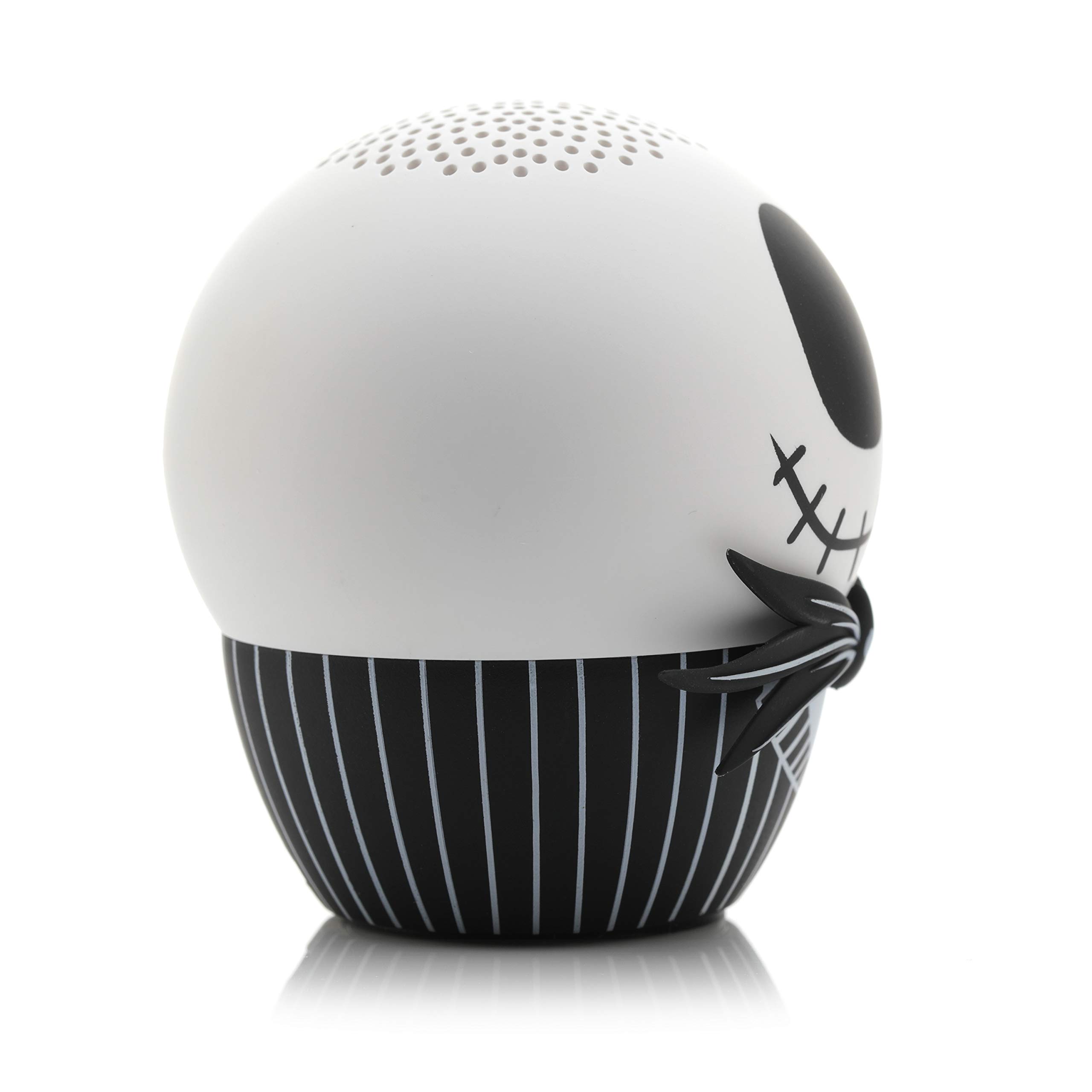
Na bok view of the Jack Skellington Bitty Boomer speaker, highlighting its compact size.
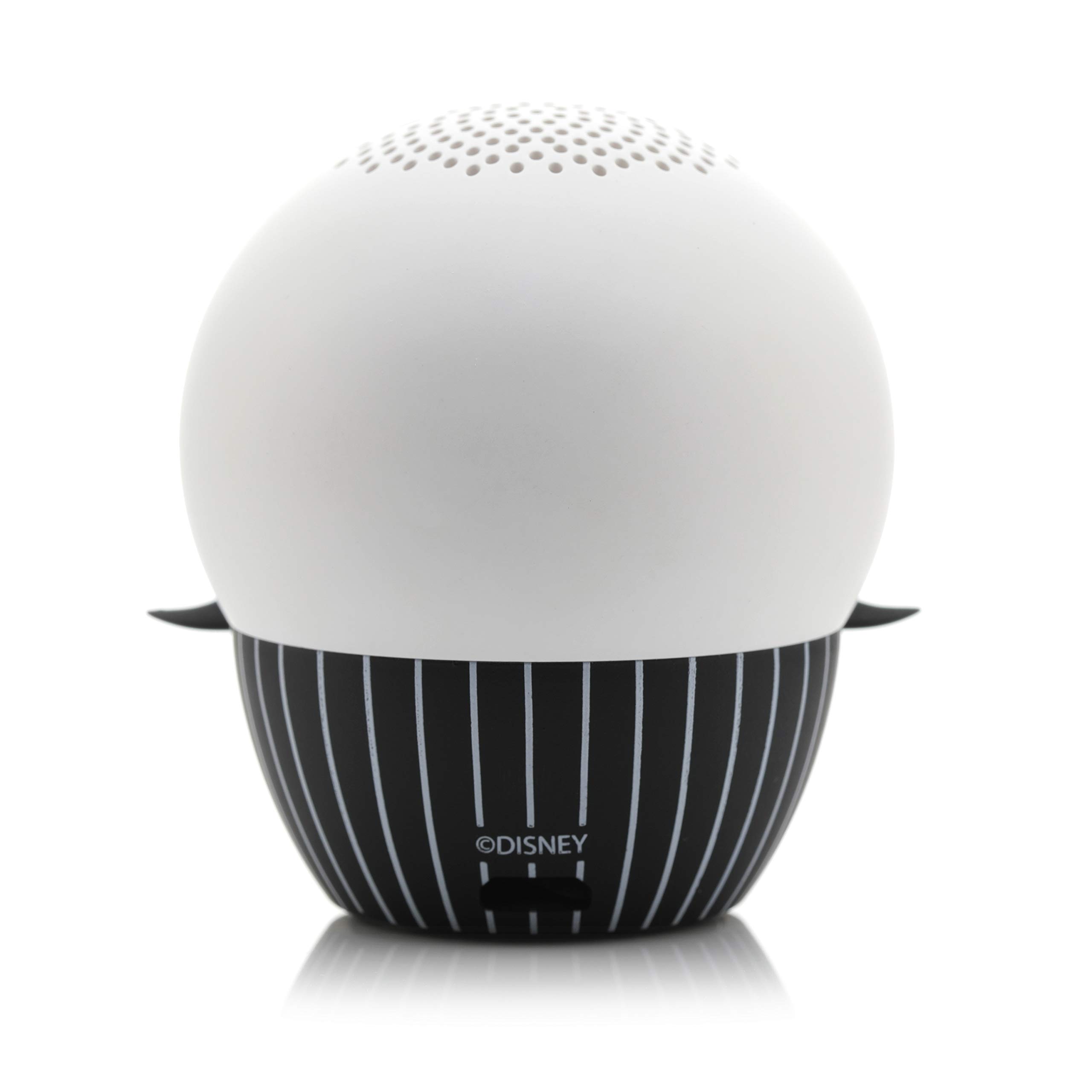
The back of the Jack Skellington Bitty Boomer speaker, showing the charging port and lanyard attachment point.

The Jack Skellington Bitty Boomer speaker held in an adult's hand, demonstrating its small, ultra-portable size.

The Jack Skellington Bitty Boomer speaker illuminated with a green glow in a dark setting, showcasing its glow-in-the-dark feature.
Instrukcje konfiguracji
Ładowanie głośnika
- Locate the Micro USB charging port on the back of the speaker.
- Connect the smaller end of the included Micro USB cable to the speaker's charging port.
- Connect the larger USB end of the cable to a USB power source (e.g., computer USB port, USB wall adapter).
- The LED indicator light on the speaker will illuminate during charging and turn off when fully charged.
- Pełne naładowanie trwa zazwyczaj około 1 godziny.
Wstępne parowanie Bluetooth
- Przed pierwszym użyciem upewnij się, że głośnik jest w pełni naładowany.
- Press and hold the power button (usually located on the bottom or back of the speaker) for 2-3 seconds until you hear a power-on sound and the LED indicator light begins to flash rapidly, indicating it's in pairing mode.
- Na urządzeniu z włączoną funkcją Bluetooth (smartfon, tablet, komputer) przejdź do ustawień Bluetooth.
- Szukaj available devices. The speaker will appear as "Bitty Boomer" or a similar name.
- Aby rozpocząć parowanie, wybierz głośnik z listy.
- Once successfully paired, you will hear a confirmation sound, and the LED indicator light will stop flashing and remain solid.
Instrukcja obsługi
Włączanie/wyłączanie zasilania
- To power on: Press and hold the power button for 2-3 seconds.
- Aby wyłączyć: Naciśnij i przytrzymaj przycisk zasilania przez 2–3 sekundy.
Odtwarzanie dźwięku
- Once paired, simply play audio from your connected device. The sound will be routed through the Bitty Boomer speaker.
- Reguluj głośność bezpośrednio z podłączonego urządzenia.
True Wireless Stereo (TWS) Pairing (Connecting Two Bitty Boomers)
For an enhanced stereo sound experience, you can pair two Bitty Boomers together.
- Ensure both Bitty Boomers are powered off.
- Power on both speakers simultaneously. They will automatically enter pairing mode.
- Wait a few seconds. The two speakers will automatically connect to each other. You will hear a confirmation sound.
- Once connected to each other, one speaker will act as the master and enter Bluetooth pairing mode (LED flashing).
- On your device, search for and connect to the master Bitty Boomer as described in the "Initial Bluetooth Pairing" section.
- Dźwięk będzie teraz odtwarzany w stereo przez oba głośniki.

Two Bitty Boomer speakers, Jack Skellington and Sally, are shown side-by-side, illustrating the True Wireless Stereo (TWS) capability.
Selfie Remote Function
The Bitty Boomer can also function as a remote shutter for your smartphone camera.
- Ensure the Bitty Boomer is paired with your smartphone.
- Otwórz aplikację aparatu w telefonie.
- Press the power button on the Bitty Boomer once to trigger the camera shutter.
Konserwacja
- Czyszczenie: Do czyszczenia głośnika należy używać miękkiej, suchej ściereczki. Nie należy używać środków czyszczących o właściwościach ściernych ani rozpuszczalników.
- Składowanie: Przechowuj głośnik w chłodnym, suchym miejscu, z dala od bezpośredniego światła słonecznego i ekstremalnych temperatur.
- Pielęgnacja baterii: To prolong battery life, avoid fully discharging the speaker frequently. Recharge it regularly, even if not in use for extended periods.
- Wodoodporność: Ten głośnik nie jest wodoodporny. Unikaj narażenia na działanie wody i nadmiernej wilgoci.
Rozwiązywanie problemów
| Problem | Możliwa przyczyna | Rozwiązanie |
|---|---|---|
| Głośnik nie włącza się. | Niski poziom naładowania baterii. | Naładuj głośnik za pomocą dołączonego kabla Micro USB. |
| Nie można sparować z urządzeniem. | Głośnik nie jest w trybie parowania. Bluetooth w urządzeniu jest wyłączony. Too far from device. | Ensure speaker LED is flashing rapidly. Włącz Bluetooth w swoim urządzeniu. Move speaker closer to your device (within 30 ft). |
| Brak dźwięku lub niski poziom głośności. | Volume on device is too low. Speaker not connected. | Zwiększ głośność podłączonego urządzenia. Sprawdź połączenie Bluetooth. |
| Nie można podłączyć dwóch głośników do funkcji TWS. | Incorrect pairing sequence. | Ensure both speakers are off before attempting TWS pairing. Follow TWS pairing instructions carefully. |
Specyfikacje
- Marka: Malutkie boomery
- Maksymalna moc wyjściowa głośnika: 3 watów
- Pasmo przenoszenia: 20 Hz
- Technologia łączności: Bluetooth, USB
- Tryb wyjścia audio: Mono (Stereo z parowaniem TWS)
Gwarancja i wsparcie
For warranty information and customer support, please refer to the official Bitty Boomers webOdwiedź stronę internetową lub skontaktuj się bezpośrednio z działem obsługi klienta. Zachowaj dowód zakupu na wypadek roszczeń gwarancyjnych.
Wsparcie online: Visit the Bitty Boomers Store on Amazon


