Wstęp
This manual provides comprehensive instructions for the Elekpia Universal Remote Control, model CT-RC1US-18. This remote is designed for seamless compatibility with a wide range of Toshiba LED LCD HDTV models, including but not limited to CT-90325, CT-90326, CT-90329, CT-8037, CT-90302, CT-90275, CT-90, CT-90366, and CT-RC1US-18. Please read this manual carefully to ensure proper setup and operation of your new remote control.
Organizować coś
Instalacja baterii
The Elekpia Universal Remote Control requires two (2) 1.5V AA batteries for operation. No programming is needed; simply install the batteries, and the remote will be ready to use with your compatible Toshiba TV.
- Znajdź pokrywę komory baterii z tyłu pilota.
- Aby otworzyć komorę, naciśnij zakładkę i przesuń pokrywę w dół.
- Włóż dwie (2) baterie AA, upewniając się, że bieguny dodatni (+) i ujemny (-) są prawidłowo ustawione względem oznaczeń wewnątrz komory.
- Przesuń pokrywę komory baterii z powrotem na miejsce, aż zatrzaśnie się pewnie.

Rysunek 1: Przód i tył view of the Elekpia Universal Remote Control, highlighting the battery compartment on the rear.
Once batteries are installed, the remote is ready for immediate use with your Toshiba TV. No additional setup or code entry is required.
Instrukcja obsługi
This universal remote control is designed to replicate the functions of your original Toshiba TV remote. Point the remote directly at your television's infrared receiver for optimal performance.
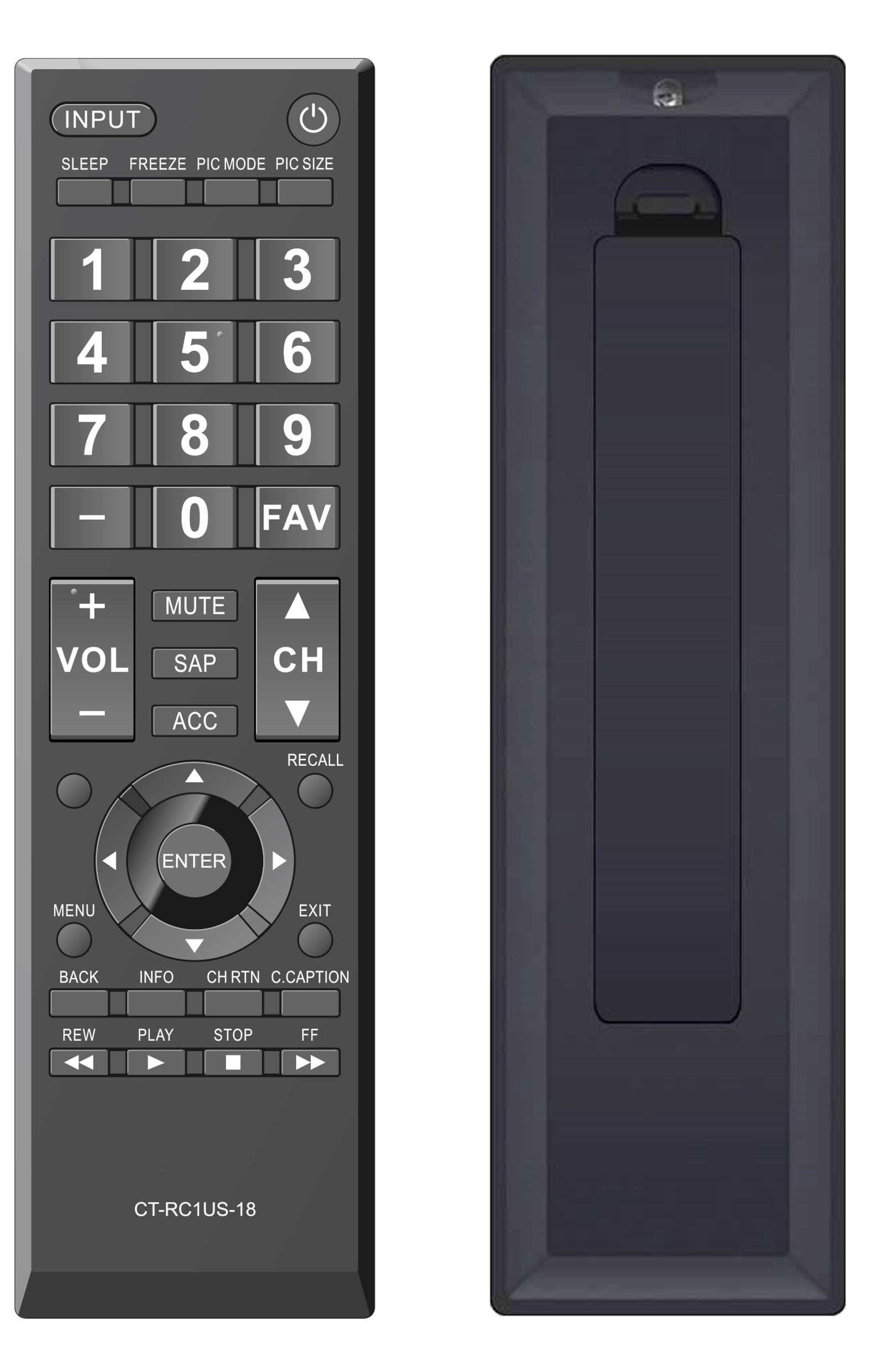
Rycina 2: Przód view of the Elekpia Universal Remote Control, displaying the layout of all buttons.
Funkcje przycisków
- MOC (⏻): Turns the television on or off.
- WEJŚCIE: Cycles through available input sources (HDMI 1, HDMI 2, AV, etc.).
- SPAĆ: Activates or adjusts the TV's sleep timer function.
- ZAMRAŻAĆ: Pauses the current image on the screen (functionality may vary by TV model).
- TRYB OBRAZU: Adjusts picture modes (e.g., Standard, Movie, Dynamic).
- PIC SIZE: Changes the aspect ratio or picture size.
- Klawiatura numeryczna (0-9):Bezpośrednio wprowadza numery kanałów.
- - (Dash): Służy do wprowadzania podkanałów (np. 7-1).
- ULUBIONY: Dostęp do listy ulubionych kanałów.
- GŁOŚNOŚĆ (+/-): Zwiększa lub zmniejsza poziom głośności.
- NIEMY: Silences the television audio.
- SOK ROŚLINNY: Selects Secondary Audio Program (SAP) or alternate audio tracks.
- ACC: Accesses accessibility features or audio settings.
- CH (góra/dół): Changes the television channel up or down.
- PRZYPOMNIENIE SOBIE CZEGOŚ: Switches between the current and previously viewed kanał.
- Panel nawigacyjny (góra, dół, lewo, prawo, ENTER): Navigates through on-screen menus and confirms selections.
- MENU: Opens the main menu of the television.
- EXIT: Closes the current menu or returns to the previous screen.
- Z POWROTEM: Powrót do poprzedniego menu lub ekranu.
- INFORMACJE: Wyświetla informacje o bieżącym programie lub wejściu.
- CH RTN (Channel Return): Similar to RECALL, returns to the previous channel.
- C.CAPTION (Closed Caption): Włącza lub wyłącza napisy.
- REW (Rewind), PLAY, STOP, FF (Fast Forward): Controls for media playback (e.g., when using a connected USB device or smart TV apps, if supported by the TV).
Konserwacja
Czyszczenie pilota
Aby zachować wygląd i funkcjonalność pilota, należy go regularnie czyścić:
- Do przecierania powierzchni pilota należy używać miękkiej, suchej ściereczki.
- W przypadku uporczywych zabrudzeń, delikatnieampPrzetrzyj szmatkę wodą lub delikatnym, nieściernym środkiem czyszczącym. Unikaj nadmiernej wilgoci.
- Nie należy używać silnych środków chemicznych, rozpuszczalników ani ściernych gąbek czyszczących, gdyż mogą one uszkodzić wykończenie pilota lub jego wewnętrzne podzespoły.
Wymiana baterii
Replace batteries when the remote's response becomes sluggish or stops working. Always replace both AA batteries at the same time with new ones. Do not mix old and new batteries, or different types of batteries, as this can lead to leakage or damage.
Składowanie
Jeśli pilot nie będzie używany przez dłuższy czas, należy wyjąć baterie, aby zapobiec wyciekowi elektrolitu i uszkodzeniu urządzenia.
Rozwiązywanie problemów
If you encounter issues with your Elekpia Universal Remote Control, please refer to the following common solutions:
- Pilot nie odpowiada:
- Ensure the batteries are correctly installed with the proper polarity (+/-).
- Wymień baterie na nowe baterie AA.
- Sprawdź, czy między pilotem zdalnego sterowania a czujnikiem podczerwieni telewizora nie znajdują się żadne przeszkody.
- Upewnij się, że kierujesz pilota bezpośrednio na telewizor.
- Niektóre przyciski nie działają:
- This remote is pre-programmed for Toshiba TVs. Verify your TV model is compatible.
- Clean the remote's surface, especially around the unresponsive buttons, to remove any dirt or debris that might be interfering with button presses.
- Telewizor nie włącza się/wyłącza:
- Confirm the TV is plugged into a working power outlet.
- Try using the power button directly on the TV to confirm it is operational.
If these steps do not resolve the issue, please refer to the customer support section.
Specyfikacje
| Numer modelu | CT-RC1US-18 |
| Marka | Elekpia |
| Wymiary produktu | 7 x 2 x 0.6 cala |
| Waga przedmiotu | 3 uncji |
| Źródło zasilania | 2 baterie AA 1.5 V (brak w zestawie) |
| Kompatybilne urządzenia | Toshiba LED LCD HDTVs |
| Maksymalna liczba obsługiwanych urządzeń | 1 |
| Kolor | Czarny |
Informacje o gwarancji
Specific warranty details for the Elekpia Universal Remote Control CT-RC1US-18 are not provided in this manual. Please refer to the product packaging, the retailer's return policy, or the manufacturer's official webStrona zawierająca informacje dotyczące zakresu gwarancji i jej warunków.
Obsługa klienta
For further assistance or inquiries regarding your Elekpia Universal Remote Control, please contact the retailer from whom you purchased the product. You may also visit the official Elekpia webwitryna zawierająca potencjalne zasoby pomocy lub informacje kontaktowe.


