Wstęp
The Amazon Fire TV Stick 4K Max is a powerful streaming device designed to transform your television into a smart entertainment hub. It offers vibrant 4K Ultra HD streaming, supports next-generation Wi-Fi 6 for smoother performance, and comes with an Alexa Voice Remote for intuitive control. This manual provides essential information for setting up, operating, and maintaining your device.
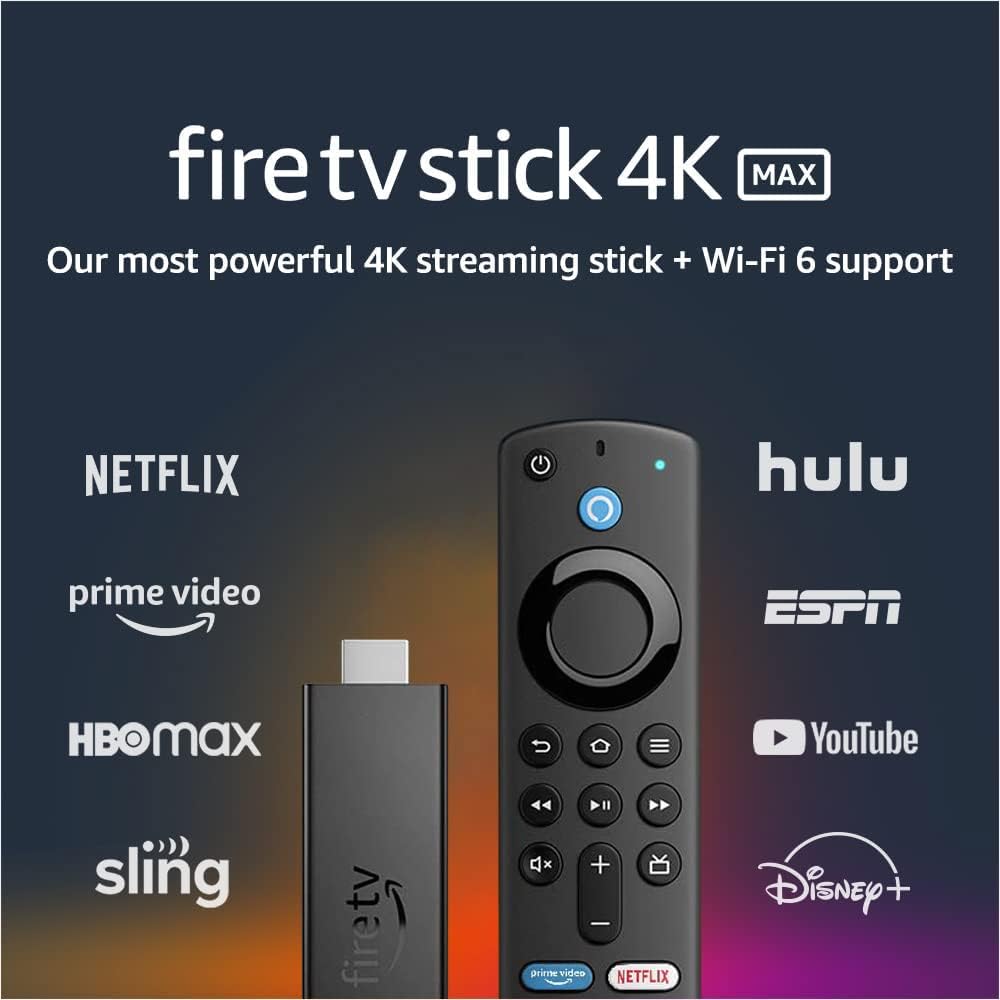
Image: The Fire TV Stick 4K Max and its Alexa Voice Remote, surrounded by logos of popular streaming services like Netflix, Prime Video, Hulu, and Disney+.
Co jest w pudełku
Sprawdź, czy w pakiecie znajdują się wszystkie komponenty:
- Fire TV Stick 4K Max
- Pilot głosowy Alexa (3. generacji)
- USB cable and power adapter
- HDMI extender cable for Fire TV Stick 4K Max
- 2 baterie AAA
- Szybki przewodnik

Image: A flat lay of all items included in the Fire TV Stick 4K Max package: the Fire TV Stick, Alexa Voice Remote, USB cable, power adapter, HDMI extender, and two AAA batteries.
Organizować coś
- Podłącz Fire TV Stick: Plug the Fire TV Stick 4K Max directly into an available HDMI port on your television. If space is limited, use the included HDMI extender cable.
- Włącz urządzenie: Connect the USB cable to the Fire TV Stick and the power adapter, then plug the adapter into a wall outlet.
- Włóż baterie do pilota: Open the battery compartment on the back of the Alexa Voice Remote and insert the two included AAA batteries, observing the correct polarity.
- Sparuj pilota: Once the Fire TV Stick powers on, follow the on-screen instructions to pair your Alexa Voice Remote. Typically, you press and hold the Home button for about 10 seconds until the remote pairs.
- Połącz się z Wi-Fi: Select your Wi-Fi network from the list and enter your password. For optimal performance, connect to a Wi-Fi 6 compatible router if available.
- Zalogować się: Zaloguj się na swoje konto Amazon. Jeśli go nie masz, zostaniesz poproszony o jego utworzenie.
- Pełna konfiguracja: Follow any remaining on-screen prompts to customize settings, download essential apps, and complete the initial setup.

Image: The Fire TV Stick 4K Max streaming device and its accompanying Alexa Voice Remote, shown side-by-side.
Instrukcja obsługi
Podstawowa nawigacja
- Use the circular navigation pad on the Alexa Voice Remote to move through menus and select items.
- Przycisk Początek (house icon) returns you to the main Fire TV home screen.
- The Back button (arrow icon) goes back to the previous screen.
- The Menu button (three horizontal lines) provides contextual options.
Wydajność i funkcje
The Fire TV Stick 4K Max is designed for powerful and smooth streaming, especially with Wi-Fi 6 networks.

Image: The Alexa Voice Remote resting on a couch, with text emphasizing smoother 4K streaming with next-gen Wi-Fi 6.
Korzystanie z pilota głosowego Alexa
The Alexa Voice Remote allows for voice commands and direct control of your TV and soundbar.
- Sterowanie głosowe: Press and hold the Alexa button (blue circle with Alexa logo) and speak your command. You can search for movies, launch apps, check weather, or control smart home devices.
- Zaprogramowane przyciski: Quickly access popular streaming services like Netflix, Prime Video, Disney+, and Hulu using the dedicated preset buttons.
- Sterowanie telewizorem: Use the Power button to turn your TV on/off and the Volume Up/Down buttons to adjust audio.

Image: The Alexa Voice Remote on a table, with a speech bubble above a TV screen showing the command "Alexa, play 'Obi-Wan Kenobi' on Disney+."
Przesyłanie strumieniowe treści
- Access a vast library of movies and TV episodes from various streaming services. Subscription fees may apply for certain services.
- Enjoy live TV, news, and sports through supported apps.
- The device supports 4K Ultra HD with Dolby Vision, HDR, HDR10+, and immersive Dolby Atmos audio for a cinematic experience.

Image: A collage of logos from various streaming services, including Apple TV, Prime Video, HBO Max, Disney+, and YouTube, indicating the wide range of content available.
Integracja inteligentnego domu
- View live camera feeds from compatible smart home cameras directly on your TV using Live View Obrazek w obrazku.
- Ask Alexa to control smart home devices like lights or thermostats.

Image: A television screen showing a main video of a person exercising, with a smaller picture-in-picture window displaying a live feed from a front door camera.
Konserwacja
- Czyszczenie: Use a soft, dry, lint-free cloth to clean the device and remote. Do not use liquid cleaners or aerosols.
- Aktualizacje oprogramowania: The Fire TV Stick 4K Max receives automatic software security updates. Ensure your device is connected to the internet to receive these updates.
- Zarządzanie pamięcią masową: The device has 8 GB of storage. Periodically check and manage your installed apps to free up space if needed, which can improve performance.
- Cykl zasilania: If you experience issues, try unplugging the power adapter from the wall outlet for a few seconds and then plugging it back in.
Rozwiązywanie problemów
| Wydanie | Możliwe rozwiązanie |
|---|---|
| Brak zasilania/brak wyświetlacza |
|
| Pilot nie odpowiada |
|
| Buforowanie lub słaba jakość przesyłania strumieniowego |
|
| Aplikacje ulegają awarii lub działają wolno |
|
Specyfikacje
| Funkcja | Szczegół |
|---|---|
| Device Dimensions (Housing) | Wymiary: 99mm x 30mm x 14mm |
| Device Dimensions (with connector) | Wymiary: 108mm x 30mm x 14mm |
| Waga urządzenia | 48.4 gramów |
| Edytor | Quad-core 1.8GHz MT8696 |
| Procesor graficzny | IMG GE9215, 750MHz |
| Pamięć wewnętrzna | 8 GB |
| Łączność Wi-Fi | MT7921LS. Supports 802.11a/b/g/n/ac/ax (Wi-Fi 6) networks. |
| Bluetooth | Bluetooth 5.0 + LE |
| Wsparcie głosowe | Yes, with Alexa Voice Remote (included) or free Fire TV app |
| Sterowanie urządzeniem IR | Controls Fire TV Stick 4K Max and certain TV/soundbar functions (power, volume) |
| Przechowywanie w chmurze | Free for digital content purchased from Amazon |
| Porty | HDMI ARC output, micro USB (power only) |
| Wsparcie audio | Dolby Atmos, dźwięk przestrzenny 7.1, 2-kanałowy stereo, przepustowość audio HDMI do 5.1 |
| Obsługa 4K | Requires compatible Ultra HD TV. Services and availability may vary. |
| Obsługiwane formaty treści | Video: Dolby Vision, HDR 10, HDR10+, HLG, H.265, H.264, VP9, AV1. Audio: AAC-LC, AC3, eAC3, FLAC, MP3, PCM/Wave, Vorbis, Dolby Atmos. Photo: JPEG, PNG, GIF, BMP. |
| Obsługiwana rozdzielczość wyjściowa | 2160p, 1080p i 720p do 60 kl./s |
| Wymagania systemowe | High-definition television with HDMI input, high-speed internet connection via Wi-Fi. Wi-Fi 6 router needed for Wi-Fi 6 support. |
| Zgodność z telewizorem | 4K UHD TVs with HDMI (2160p @ 24/25/30/50/60 Hz, HDCP 2.2) or HDTVs with HDMI (1080p or 720p @ 50/60 Hz). |
| Funkcje ułatwień dostępu | GłosView screen reader, closed captioning, Bluetooth headphone support. |
| Aktualizacje zabezpieczeń oprogramowania | Guaranteed until at least four years after last purchase availability. |
| Zdalne wymiary | Wymiary: 38mm x 142mm x 16mm |
| Remote Weight (without batteries) | 43.4 gramów |
| Baterie do pilota | 2 AAA (w zestawie) |
| Technologia zdalna | Bluetooth |
| Zdalna kompatybilność | Fire TV Stick (3rd Gen), Fire TV Stick 4K, Fire TV Stick 4K Max |
Gwarancja i wsparcie
Your Amazon Fire TV Stick 4K Max comes with a 1-letnia ograniczona gwarancja i serwis. Extended warranty options (2-year and 3-year) are available for purchase separately for U.S. customers.
For detailed warranty terms and conditions, please refer to the official Amazon Fire TV terms of use. For further assistance or technical support, visit the Amazon support webodwiedź witrynę lub skontaktuj się z obsługą klienta.


