1. Wprowadzenie
This manual provides detailed instructions for the installation, operation, and maintenance of your Fractal Design Pop Silent Black Solid ATX Silent PC Case. Designed for optimal noise reduction and efficient component housing, this case offers a clean aesthetic and practical features for building a high-performance, quiet computer system.

Rysunek 1.1: Widok z przodu view of the Fractal Design Pop Silent Black Solid ATX PC Case.
2. Informacje dotyczące bezpieczeństwa
Please read and understand all safety instructions before installing or operating your PC case. Failure to do so may result in personal injury or damage to your equipment.
- Always disconnect the power supply from the wall outlet before performing any installation, maintenance, or troubleshooting.
- Aby zapobiec uszkodzeniom, należy obchodzić się ostrożnie ze wszystkimi elementami.
- Unikaj wystawiania obudowy na działanie wilgoci i ekstremalnych temperatur.
- Małe części i narzędzia należy trzymać z dala od dzieci.
- Należy zadbać o prawidłowe uziemienie, aby zapobiec uszkodzeniom wrażliwych podzespołów spowodowanym wyładowaniami elektrostatycznymi (ESD).
3. Zawartość opakowania
Sprawdź, czy w przesyłce znajdują się wszystkie elementy. Jeśli brakuje któregokolwiek z nich lub jest on uszkodzony, skontaktuj się ze sprzedawcą lub działem wsparcia Fractal Design.
- Fractal Design Pop Silent Black Solid ATX PC Case
- Accessory box with screws, zip ties, and mounting hardware
- Three (3) pre-installed 120mm Aspect fans
- Instrukcja obsługi (ten dokument)
4. Konfiguracja i instalacja
Follow these steps to install your computer components into the Fractal Design Pop Silent case.
4.1. Przygotowanie sprawy
- Remove the side panels. For the solid side panel, unscrew the thumbscrews at the rear and slide the panel backward.
- Identify the accessory box containing all necessary screws and mounting hardware.

Rysunek 4.1: Wewnętrzne view of the case with side panels removed, showing fan mounts and internal structure. (Image shows white variant for illustration)
4.2. Instalacja płyty głównej
- The Pop Silent case accommodates ATX, mATX, and Mini ITX motherboards.
- Install the I/O shield (if not pre-attached to your motherboard).
- Align your motherboard with the pre-installed standoffs. Additional standoffs may be required for smaller form factors; install them as needed.
- Zabezpiecz płytę główną za pomocą odpowiednich śrubek znajdujących się w pudełku z akcesoriami.
4.3. Instalacja urządzenia pamięci masowej
Obudowa obsługuje maksymalnie trzy dyski twarde 3.5" i sześć dysków SSD 2.5" (lub dwa dyski twarde 3.5" i pięć dysków SSD 2.5" przy użyciu jednej zatoki optycznej).
- 3.5" HDD Installation: Locate the HDD cage beneath the PSU shroud. Slide the HDDs into the trays and secure them with screws.
- 2.5" SSD Installation: Mount SSDs to the dedicated brackets behind the motherboard tray.
- 5.25" Optical Drive Bays: The case features two neatly concealed 5.25" bays. Remove the magnetic cover and storage drawer to access them.
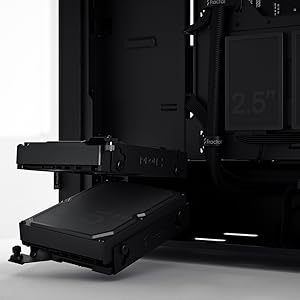
Figure 4.2: Illustrates the mounting points for 2.5" SSDs and 3.5" HDDs.

Figure 4.3: The accessible 5.25" bay with its removable storage drawer and magnetic cover.
4.4. Instalacja zasilacza (PSU)
The PSU mounts from the rear of the case, at the bottom. Slide the PSU into its designated compartment and secure it with screws from the rear.
4.5. Fan Installation and Airflow
The Pop Silent case comes with three 120mm Aspect fans pre-installed for optimal silent operation. Additional fan mounts are available for customization.
- Ensure fans are oriented correctly for intake and exhaust to maintain positive airflow and minimize dust buildup.
- The "Silent" variant features a closed front and top panel design, along with bitumen side panels and sound-damping foam, to reduce noise output.

Rysunek 4.4: Wewnętrzne view highlighting fan placement and component layout. (Image shows white variant for illustration)
4.6. Zarządzanie kablami
Utilize the cable routing channels and tie-down points behind the motherboard tray to organize cables. This improves airflow and maintains a clean interior.

Figure 4.5: Dedicated channels and Velcro straps for efficient cable routing.
4.7. Przednie złącza I/O
Connect the front panel cables (power switch, reset switch, USB-A, audio jacks) to the corresponding headers on your motherboard. Note that the USB-C port is an optional accessory and not natively active on all models.
4.8 Zamknięcie sprawy
Once all components are installed and cables are managed, reattach the side panels. Ensure they are securely fastened with the thumbscrews.
5. Obsługa obudowy komputera
The Fractal Design Pop Silent case is designed for quiet operation. Its features contribute to a low-noise computing environment.
- Włączanie/wyłączanie: Use the power button on the top I/O panel to turn your system on or off.
- Redukcja hałasu: The solid front and top panels, combined with sound-damping materials on the side panels, effectively absorb internal noise.
- Przepływ powietrza: While designed for silence, the case maintains adequate airflow through strategically placed vents and the pre-installed Aspect fans.

Figure 5.1: The Pop Silent case integrated into a typical desk environment. (Image shows white variant for illustration)
6. Konserwacja
Regularna konserwacja pomaga zapewnić optymalną wydajność i długowieczność podzespołów komputera.
- Filtry przeciwpyłowe: Periodically clean the removable dust filters located at the front, top, and bottom of the case. This prevents dust buildup inside the system, which can impede cooling.
- Czyszczenie zewnętrzne: Przetrzyj zewnętrzne powierzchnie miękką, damp szmatką. Unikaj środków czyszczących o działaniu ściernym i rozpuszczalników.
- Czyszczenie wnętrza: Po wyłączeniu systemu i odłączeniu go od zasilania usuń kurz z wewnętrznych podzespołów i łopatek wentylatora za pomocą sprężonego powietrza.
7. Rozwiązywanie Problemów
If you encounter issues with your PC case, refer to the following common solutions:
| Problem | Możliwa przyczyna | Rozwiązanie |
|---|---|---|
| System nie włącza się. | Luźne połączenia zasilania, uszkodzony zasilacz, nieprawidłowe okablowanie panelu przedniego. | Check all power cables (PSU to wall, PSU to motherboard/components). Verify front panel power switch connection to motherboard. Test PSU if possible. |
| Excessive noise from case fans. | Dust buildup, loose fan screws, fan speed settings. | Clean fan blades and dust filters. Ensure fans are securely mounted. Adjust fan curves in BIOS/UEFI or software. |
| Porty USB na przednim panelu nie działają. | Loose internal USB cable connection to motherboard. | Verify the USB header cable from the front panel is securely connected to the motherboard. |
Aby uzyskać dalszą pomoc, zapoznaj się z Wsparcie Fractal Design webstrona.
8. Specyfikacje
| Funkcja | Szczegół |
|---|---|
| Nazwa modelu | Pop Silent Black - Solid |
| Numer modelu przedmiotu | FD-C-POS1A-01 |
| Zgodność płyty głównej | ATX, mATX, Mini ITX |
| Typ sprawy | Mid Tower |
| Kolor | Czarny stały |
| Tworzywo | Steel (Solid side panel) |
| Waga przedmiotu | 19.36 funta (ok. 8.78 kg) |
| Wymiary produktu (dł. x szer. x wys.) | 21.65 x 21.65 x 11.81 cala (ok. 550 x 550 x 300 mm) |
| Metoda chłodzenia | Powietrze |
| Fabrycznie zainstalowane wentylatory | 3x 120mm Aspect Fans |
| Zatoki napędowe | Up to 3x 3.5" HDD, 6x 2.5" SSD (or 2x 3.5" HDD, 5x 2.5" SSD with 1x 5.25" ODD) |
| Zatoki 5.25" | 2 (concealed with storage drawer) |
| Przednie wejście/wyjście | 2x USB 3.0, Audio In/Out, Power Button (Optional USB-C) |
9. Gwarancja i wsparcie
Fractal Design products are covered by a limited warranty. For detailed warranty terms and conditions, please visit the official Fractal Design webstrona.
For technical support, FAQs, and driver downloads, please visit:
www.fractal-design.com/support/
You can also contact Fractal Design customer service directly through their webwitryna oferująca spersonalizowaną pomoc.


