1. Wprowadzenie
The PeakTech P 8005 is a high-precision Class 2 sound level meter designed for accurate noise measurement and data logging. It is suitable for a wide range of applications including noise projects, quality control, disease prevention, and environmental sound measurements in factories, schools, offices, traffic, and households. This device features a 4-digit 20mm LCD multi-function display with a bargraph and backlight, a USB interface for continuous measurements, and AC/DC outputs for connection to frequency analyzers or X-Y wave recorders. This manual provides detailed instructions for the proper use, maintenance, and troubleshooting of your PeakTech P 8005.
2. Informacje dotyczące bezpieczeństwa
Please read all safety instructions carefully before operating the device. Failure to follow these instructions may result in damage to the device or personal injury.
- Nie wystawiaj urządzenia na działanie ekstremalnych temperatur, wilgoci ani bezpośredniego światła słonecznego.
- Unikaj silnych wibracji i uderzeń.
- Nie należy podejmować prób otwierania ani modyfikowania urządzenia. Naprawy powinny być wykonywane wyłącznie przez wykwalifikowany personel.
- Trzymaj urządzenie z dala od silnych pól elektromagnetycznych.
- Ensure proper ventilation when using the AC adapter for extended periods.
- Zutylizuj baterie zgodnie z lokalnymi przepisami.
3. Zawartość opakowania
Sprawdź, czy w przesyłce znajdują się wszystkie elementy wymienione poniżej:
- PeakTech P 8005 Sound Level Meter
- Etui transportowe
- 3m Additional Microphone Cable
- Kabel interfejsu USB
- Software for Windows (on CD-ROM)
- Miniaturowy statyw
- Zasilacz sieciowy 9 V AC
- Bateria 9V
- Instrukcja obsługi

4. Koniec produktuview
The PeakTech P 8005 is designed for user-friendly operation while providing professional-grade accuracy. Familiarize yourself with the main components and controls.
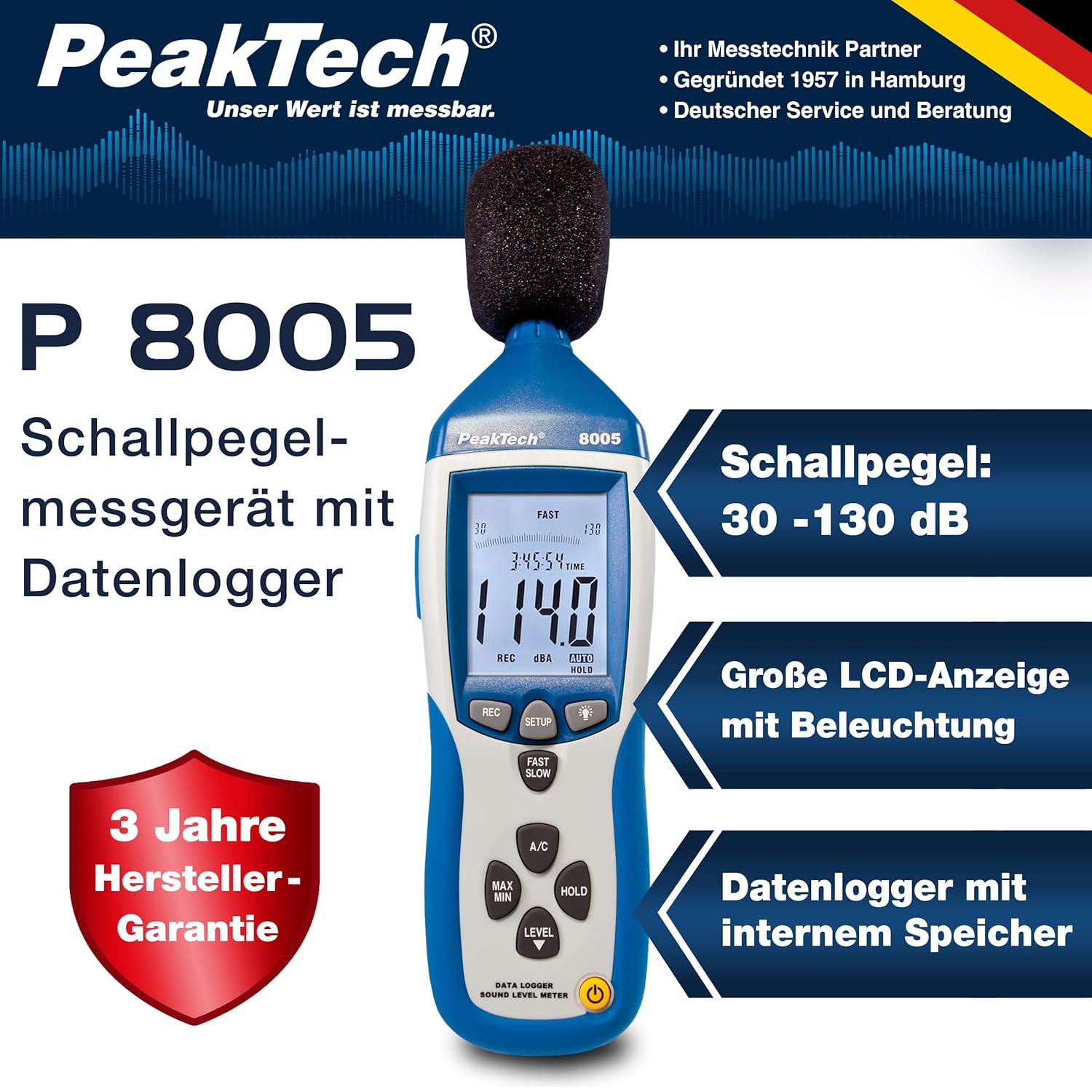
4.1. Główne cechy
- Pomiar precyzji: Class 2 sound level meter (IEC-61672-1 compliant) for accurate readings even in noisy environments.
- Szeroki zakres pomiarowy: 30 to 130 dB across 4 ranges with 0.1 dB resolution.
- Rejestrowanie danych: Internal memory for up to 32,000 readings (1x/sec to 1x/min).
- Łączność: USB 2.0 interface for PC connection and data transfer.
- Wyjścia analogowe: AC/DC outputs for connecting to frequency analyzers or X-Y wave recorders.
- Wyświetlacz: 4-digit 20mm LCD with bargraph and backlight.
- Tryby pomiaru: Fast (125 ms) and Slow (1 s) response times, A and C weighting.
- Funkcje dodatkowe: MIN/MAX measurements, over-range/under-range indication.

5. Konfiguracja
5.1. Instalacja baterii
The PeakTech P 8005 operates on a 9V battery or via the included 9V AC power adapter.
- Znajdź komorę baterii z tyłu urządzenia.
- Otwórz pokrywę baterii.
- Włóż baterię 9V, zwracając uwagę na prawidłową biegunowość.
- Dokładnie zamknij pokrywę baterii.
5.2. Włączanie urządzenia
- Aby włączyć, naciśnij MOC przycisk.
- Aby wyłączyć, naciśnij i przytrzymaj MOC przycisk, aż wyświetlacz się wyłączy.
- For continuous operation, connect the 9V AC power adapter to the DC 9V input port on the side of the device.
5.3. Podłączenie mikrofonu
The device comes with a built-in microphone. For remote measurements or specific setups, you can use the included 3m additional microphone cable.
- Unscrew the microphone cap from the top of the device.
- Connect the 3m microphone cable to the microphone input.
- Attach the external microphone to the other end of the cable.
- For stable measurements, attach the device to the mini tripod using the threaded mount at the bottom.

Wideo 5.1: Overview of the PeakTech 8005 Sound Level Meter, demonstrating its features and setup, including the use of the external microphone and power adapter.
6. Instrukcja obsługi
6.1. Pomiar podstawowy
After powering on, the device will immediately begin measuring sound levels.
- The current sound level in dB is displayed on the LCD.
- Użyj POZIOM button to cycle through the four measurement ranges (30-80 dB, 50-100 dB, 80-130 dB, Auto 30-130 dB).
- Naciskać SZYBKO/WOLNO to switch between fast (125 ms) and slow (1 s) response times. Fast is suitable for sudden noise changes, while slow is for average noise levels.
- Naciskać Klimatyzacja to select A-weighting (dBA) or C-weighting (dBC). A-weighting mimics human ear response, C-weighting is for mechanical noise.

6.2. Data Logging and PC Connection
The P 8005 can record up to 32,000 measurement values internally. To access and analyze this data, use the included Windows software.
- Install the software from the provided CD-ROM onto a Windows PC (Windows 95/98/NT/2000/XP/VISTA/7/8/10 supported).
- Connect the sound level meter to your PC using the USB interface cable.
- Open the software. The software allows for real-time data display, data import from the device's internal memory, and export to formats like Excel for further analysis.
- Refer to the software's help documentation for detailed instructions on data logging setup and analysis.

7. Konserwacja
7.1. Czyszczenie
Clean the device regularly to ensure optimal performance.
- Wytrzyj obudowę miękką, suchą szmatką.
- Nie należy używać środków czyszczących o właściwościach ściernych ani rozpuszczalników.
- Keep the microphone free from dust and debris.
7.2. Przechowywanie
When not in use, store the device in its carrying case in a cool, dry place, away from direct sunlight and extreme temperatures.
7.3. Kalibracja
The PeakTech P 8005 is a precision instrument. Regular calibration is recommended to maintain accuracy, especially for professional applications. Refer to the included test report for the last calibration date. Contact PeakTech support for calibration services.
8. Rozwiązywanie Problemów
| Problem | Możliwa przyczyna | Rozwiązanie |
|---|---|---|
| Urządzenie nie włącza się. | Low or dead battery; AC adapter not connected or faulty. | Replace the 9V battery or connect the AC adapter. Ensure the adapter is working. |
| Niedokładne odczyty. | Incorrect measurement range; microphone obstructed; device needs calibration. | Adjust the measurement range using the POZIOM button. Clear any obstructions from the microphone. Consider professional calibration. |
| Oprogramowanie nie rozpoznaje urządzenia. | USB cable faulty; driver issue; software compatibility. | Try a different USB port or cable. Reinstall the software and drivers. Check software compatibility settings (e.g., Windows 98 compatibility mode for older systems). |
| Data logging issues. | Memory full; incorrect logging settings. | Download and clear data from the device. Review data logging settings in the software. |
9. Specyfikacje
| Parametr | Wartość |
|---|---|
| Zastosowany standard | IEC-61672-1 Type 2, ANSI S1.4 Type 2 |
| Accuracy (1 kHz Sine; A, C) | ± 1.4 dB |
| Dokładność (zakres częstotliwości) | According to EN-61672-1 Class 2, max. ± 5.6 dB |
| Zakres częstotliwości | 31.5 Hz - 8 kHz |
| Zakres dynamiczny | 50dB |
| Zakresy poziomów | Low: 30 dB ~ 80 dB, Med: 50 dB ~ 100 dB, High: 80 dB ~ 130 dB, Auto: 30 dB ~ 130 dB |
| Czas reakcji | Fast: 125 ms / Slow: 1 s |
| Mikrofon | ½-inch Electret Condenser Microphone |
| Rezolucja | 0.1dB |
| Wyświetl aktualizację | 2 razy / sek. |
| Wyjście analogowe | AC/DC Outputs, AC: 1 Veff = 10 mV/dB |
| Objętość operacyjnatage | 9V Battery or 9V AC Power Adapter |
| Wymiary (szer. x wys. x gł.) | Wymiary: 80 x 280 x 50 mm |
| Waga | 350 gramów |
| Data Logger Memory | Odczyty do 32,000 |
10. Gwarancja i wsparcie
PeakTech products are designed for reliability and performance. For warranty information and technical support, please refer to the documentation included with your product or visit the official PeakTech webZachowaj paragon jako dowód zakupu na wypadek reklamacji.
Producent: PeakTech
Webstrona: PeakTech Official Store


