1. Wprowadzenie
This manual provides detailed instructions for the installation, operation, and maintenance of your MoesGo Smart RF433 WiFi Wall Switch. This smart switch is designed for convenient control of your lighting, offering multiple control methods including touch, app, voice, and RF433 remote.
Główne cechy:
- No neutral wire required for installation.
- Supports 2.4GHz WiFi connectivity for Smart Life/Tuya App control.
- Compatible with Alexa and Google Home for hands-free voice control.
- RF433 frequency support for remote control (remote not included).
- Programmable timing schedules and countdowns.
- Relay status memory and backlight preferences.

Image 1.1: MoesGo Smart RF433 WiFi Wall Switch, showcasing its sleek design and "No neutral" indicator.
2. Informacje dotyczące bezpieczeństwa
WARNING: Electrical installation should only be performed by a qualified electrician. Always turn off power at the circuit breaker before installation or maintenance.
- Przed przystąpieniem do prac związanych z okablowaniem należy upewnić się, że zasilanie jest odłączone.
- This device is designed for 2.4GHz Wi-Fi networks only. It is not compatible with 5.0GHz Wi-Fi.
- A capacitor is required for proper operation and must be connected to both ends of the bulb.
- Only use with certified bulbs that have a rated power of 5W or higher.
- This switch is not designed for use as a 3-way switch.
- The capacitor may produce a faint humming sound during operation. This is normal.
3. Zawartość opakowania
Proszę sprawdzić, czy w paczce znajdują się następujące elementy:
- MoesGo Smart RF433 WiFi Wall Switch (1 unit)
- Capacitor (1 unit)
- Śruby montażowe (2 sztuki)
- Instrukcja obsługi (ten dokument)
4. Specyfikacje
| Funkcja | Szczegół |
|---|---|
| Marka | MoesGo |
| Numer modelu | WS-EU1-LB-N-MG |
| Tryb pracy | WŁ-WYŁ |
| Typ kontaktu | Normalnie zamknięty |
| Tworzywo | Szkło |
| Typ montażu | Montaż ścienny |
| Międzynarodowa Ocena Ochrony | IP65 |
| Kolor | Czarny |
| Wymiary (pakiet) | Wymiary 11 x 10.2 x 5.1 cm |
| Waga (opakowanie) | 193 gramów |

Image 4.1: Detailed dimensions of the MoesGo Smart Switch and a basic wiring diagram for single-wire installation with capacitor.
5. Instalacja i konfiguracja
5.1 Lista kontrolna przed instalacją
- Sprawdź, czy Twoja sieć Wi-Fi obsługuje częstotliwość 2.4 GHz. Sieci 5 GHz nie są obsługiwane.
- Ensure the bulbs connected to the switch have a rated power of 5W or higher.
- Confirm you are not attempting to install this as a 3-way switch.
- Have the included capacitor ready.
5.2 instrukcje okablowania
- Wyłącz zasilanie: Znajdź wyłącznik i wyłącz zasilanie przełącznika, który wymieniasz. Sprawdź, czy zasilanie jest wyłączone, używając przełącznika woltomierzem.tagtester.
- Usuń stary przełącznik: Ostrożnie wyjmij istniejący przełącznik ścienny z puszki ściennej.
- Connect Capacitor: The included capacitor is essential for stable operation with no neutral wire. Connect the capacitor across the two terminals of the light bulb (in parallel with the load). This helps prevent flickering and ensures proper functionality.
- Podłącz inteligentny przełącznik:
- Connect the live wire (L) from your electrical box to the 'L IN' terminal on the MoesGo switch.
- Connect the load wire (L1) going to your light fixture to the 'L OUT' terminal on the MoesGo switch.
- Sprawdź, czy wszystkie połączenia są bezpieczne.
- Zamontuj przełącznik: Delikatnie wsuń przełącznik przewodowy do puszki ściennej i przymocuj go dołączonymi śrubami. Zamontuj panel szklany.
- Przywróć zasilanie: Włącz ponownie zasilanie za pomocą wyłącznika obwodu.

Image 5.1: Visual guide highlighting critical installation requirements: 2.4GHz Wi-Fi, minimum 5W bulb power, not for 3-way use, and no neutral wire needed.

Image 5.2: Illustration showing the capacitor and its importance for the MoesGo Smart Switch, indicating it should be connected to the bulb.
5.3 App Pairing (Smart Life/Tuya)
- Pobierz aplikację: Pobierz aplikację „Smart Life” lub „Tuya Smart” ze sklepu z aplikacjami na swoim smartfonie (iOS lub Android).
- Zarejestruj się/Zaloguj: Otwórz aplikację i zarejestruj nowe konto lub zaloguj się, używając istniejącego konta.
- Wejdź w tryb parowania: On the MoesGo switch, press and hold the touch button for approximately 5-10 seconds until the indicator light starts blinking rapidly. This indicates it's in pairing mode.
- Dodaj urządzenie: In the app, tap the "+" icon (usually in the top right corner) to add a device. Select "Switch (Wi-Fi)" or "Wall Switch".
- Potwierdź miganie: Sprawdź w aplikacji, czy kontrolka na przełączniku miga szybko.
- Wprowadź dane Wi-Fi: Wprowadź nazwę i hasło swojej sieci Wi-Fi 2.4 GHz.
- Łączyć: The app will begin connecting to the switch. Once connected, the indicator light on the switch will stop blinking and remain solid.
- Zmień nazwę urządzenia: Możesz zmienić nazwę przełącznika w aplikacji, aby ułatwić jego identyfikację (np. „Światło w salonie”).
6. Działanie
The MoesGo Smart Switch offers multiple ways to control your lighting:
6.1 Sterowanie dotykowe
Simply touch the designated area on the glass panel of the switch to turn the light ON or OFF. The touch control functions independently of app or voice commands.

Image 6.1: A hand touching the MoesGo Smart Switch, illustrating the touch control functionality.
6.2 Kontrola aplikacji (Smart Life/Tuya)
Once paired with the Smart Life or Tuya Smart app, you can control your switch from anywhere with an internet connection.
- Zdalne włączanie/wyłączanie: Tap the switch icon in the app to turn the light ON or OFF.
- Relay Status Settings: Access the switch settings in the app to configure the relay status after a power outage (ON/OFF/Remember last status). You can also adjust backlight preferences.
- Kontrola udostępniania: Share control of the switch with family members or friends through the app, allowing multiple users to manage the device.
- Kontrola grupy: Create groups within the app to control multiple smart switches simultaneously.

Image 6.2: Screenshot of the Smart Life/Tuya app interface showing options for setting relay status and backlight preferences for the MoesGo Smart Switch.
6.3 Sterowanie głosowe (Alexa i Google Home)
Integrate your MoesGo Smart Switch with Amazon Alexa or Google Home for convenient hands-free voice control.
- Połącz konto: W aplikacji Alexa lub Google Home włącz umiejętność/usługę „Smart Life” lub „Tuya Smart” i połącz swoje konto.
- Odkryj urządzenia: Poproś Alexę lub Google Home o odkrycie nowych urządzeń.
- Polecenia głosowe: Użyj poleceń takich jak:
- „Alexa, włącz [Nazwa przełącznika]”
- „Hej Google, wyłącz [Nazwa przełącznika]”
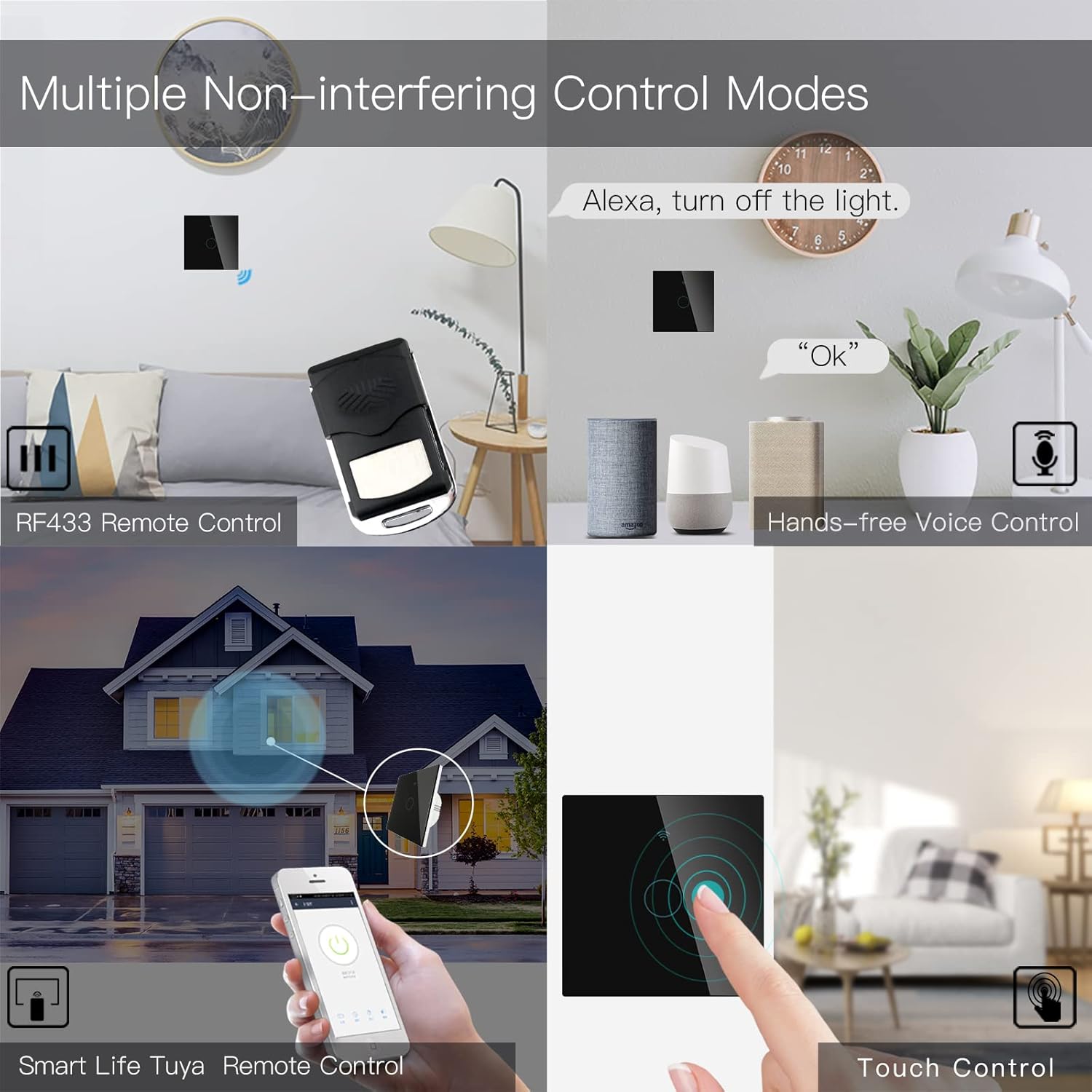
Image 6.3: Depiction of the MoesGo Smart Switch being controlled via voice commands using Amazon Alexa and Google Home devices.
6.4 Pilot zdalnego sterowania RF433
The switch supports RF433 frequency for remote control. An RF433 remote (not included) with 1527 encoding can be paired with the switch.
- Wejdź w tryb parowania RF: In the Smart Life/Tuya app, navigate to the switch settings and find the "RF area" to enter pairing mode.
- Sparuj pilota: Press a button on your RF433 remote. Ensure a one-second delay between presses to avoid errors. The switch will confirm successful pairing.
6.5 Timing Schedules and Countdown
Utilize the Smart Life/Tuya app to set up automated schedules for your lights.
- Harmonogramy: Program specific times for the light to turn ON or OFF daily or on selected days of the week.
- Odliczanie: Set a countdown timer for the light to turn OFF after a specified duration (e.g., 1, 5, 30 minutes, 1 hour).

Obraz 6.4: Byłyample of setting a timing schedule in the Smart Life/Tuya app, showing lights turning on at 7:00 AM and off at 10:00 PM.
7. Konserwacja
To maintain your MoesGo Smart Switch:
- Czyszczenie: Delikatnie przetrzyj szklany panel miękką, suchą ściereczką. Unikaj środków czyszczących o właściwościach ściernych i rozpuszczalników.
- Aktualizacje oprogramowania układowego: Regularnie sprawdzaj aplikację Smart Life/Tuya pod kątem dostępnych aktualizacji oprogramowania sprzętowego, aby zapewnić optymalną wydajność i bezpieczeństwo.
8. Rozwiązywanie Problemów
- Przełącznik nie odpowiada:
- Sprawdź czy wyłącznik jest włączony.
- Ensure the wiring is correct and secure.
- Verify the capacitor is properly installed across the bulb terminals.
- Migotanie światła:
- This often indicates an issue with the capacitor installation or an incompatible bulb. Ensure the capacitor is correctly wired and the bulb meets the 5W minimum power requirement.
- Nie można połączyć się z Wi-Fi:
- Sprawdź, czy Twoja sieć Wi-Fi obsługuje częstotliwość 2.4 GHz.
- Ensure the switch is in pairing mode (rapidly blinking indicator light).
- Sprawdź poprawność swojego hasła Wi-Fi.
- Move the switch closer to your Wi-Fi router during pairing.
- Faint Humming Sound:
- A faint humming sound from the capacitor is normal for no-neutral switches. If the sound is loud or concerning, recheck the capacitor installation and bulb compatibility.
- RF433 Remote Pairing Issues:
- Ensure the switch is in RF pairing mode via the app.
- Press remote buttons with a one-second delay between presses.
- Verify the remote uses 1527 encoding.
9. Gwarancja i wsparcie
For warranty information and technical support, please refer to the official MoesGo website or contact their customer service directly. Details are typically provided on the product packaging or the manufacturer's official online resources.


