1. Wprowadzenie
This manual provides comprehensive instructions for the setup, operation, maintenance, and troubleshooting of the Fujitsu USB Type-C Port Replicator 2. This device is designed to expand the connectivity options of compatible Fujitsu mobile clients, including LIFEBOOK and STYLISTIC devices from the 9th generation and later.
Główne cechy:
- Power delivery to Fujitsu mobile clients.
- Multiple display outputs: DisplayPort, HDMI, and VGA.
- Integrated On/Off button with resume support.
- Various USB interfaces: USB Type-C and USB Type-A.
- Ethernet LAN data rates: 10, 100, 1000 Mbit/s.

Rysunek 1: Widok z góry na dół view of the Fujitsu USB Type-C Port Replicator 2.
2. Instrukcje konfiguracji
Follow these steps to set up your Fujitsu USB Type-C Port Replicator 2:
- Connect Power (Optional, but recommended for power delivery): Connect a compatible AC adapter (not included with this specific model) to the power input port on the port replicator. Ensure the adapter meets the power requirements of your connected devices.
- Połącz z urządzeniem hosta: Use the integrated USB Type-C cable to connect the port replicator to a USB Type-C port on your Fujitsu LIFEBOOK or STYLISTIC device.
- Podłącz urządzenia peryferyjne:
- Wyświetla: Connect external monitors using HDMI, DisplayPort, or VGA cables to the corresponding ports on the replicator.
- Urządzenia USB: Plug in USB peripherals such as keyboards, mice, external hard drives, or USB flash drives into the available USB Type-A or USB Type-C ports.
- Sieć: For a wired network connection, connect an Ethernet cable to the RJ-45 port.
- Audio: Podłącz słuchawki lub głośniki do gniazda audio.
- Włączanie: Press the power button on the port replicator to turn it on. The device should automatically be recognized by your host computer.

Rysunek 2: Tył view illustrating the various connectivity ports including VGA, HDMI, DisplayPort, Ethernet, USB Type-A, and USB Type-C.
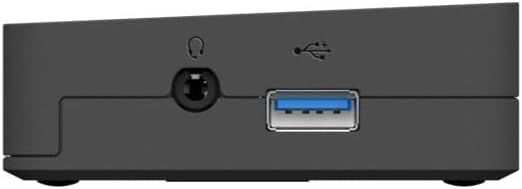
Rysunek 3: Strona view showing the power input port and the integrated USB Type-C host cable connection.
3. Działanie
Once connected, the Fujitsu USB Type-C Port Replicator 2 functions as an extension of your laptop's ports.
- Wyjście wyświetlacza: Your operating system should automatically detect connected external displays. You can configure display settings (e.g., extend, duplicate) through your computer's display settings. The replicator supports DisplayPort, HDMI, and VGA outputs.
- Łączność USB: All connected USB devices will be accessible through your host computer. The USB Type-A ports support data transfer, and some may offer charging capabilities.
- Połączenie internetowe: The Ethernet port provides a stable wired network connection, ideal for environments where Wi-Fi is unreliable or unavailable.
- Przycisk zasilania: The power button on the replicator can be used to turn the device on or off. It also supports resume functionality, allowing your connected laptop to wake from sleep.
- Wtyczka dźwiękowa: Connect standard 3.5mm audio devices for sound output.

Rycina 4: Przód view highlighting the power button and an accessible USB port.
4. Konserwacja
To ensure optimal performance and longevity of your port replicator, follow these simple maintenance guidelines:
- Czyszczenie: Use a soft, dry, lint-free cloth to clean the exterior of the device. Do not use liquid cleaners, aerosols, or solvents.
- Składowanie: Jeśli urządzenie nie będzie używane przez dłuższy czas, należy je przechowywać w chłodnym i suchym miejscu, z dala od bezpośredniego światła słonecznego i ekstremalnych temperatur.
- Obsługiwanie: Unikaj upuszczania urządzenia i narażania go na silne uderzenia. Nie próbuj demontować urządzenia.
5. Rozwiązywanie Problemów
If you encounter issues with your Fujitsu USB Type-C Port Replicator 2, refer to the following common problems and solutions:
| Problem | Możliwa przyczyna / rozwiązanie |
|---|---|
| No power or device not turning on. |
|
| External display not detected or flickering. |
|
| Urządzenia USB nie zostały rozpoznane. |
|
| Problemy z połączeniem sieciowym. |
|
| Laptop not charging via replicator. |
|
6. Specyfikacje
Below are the technical specifications for the Fujitsu USB Type-C Port Replicator 2 (Model S26391-F3327-L100):
| Funkcja | Szczegół |
|---|---|
| Marka | Fujitsu |
| Numer modelu | S26391-F3327-L100 |
| Technologia łączności | Przewodowy |
| Interfejs hosta | USB 3.2 Gen 1 (3.1 Gen 1) typu C |
| Szybkość transmisji danych w sieci Ethernet | 10, 100, 1000 Mbit/s |
| Kolor produktu | Czarny |
| Wymiary (dł. x szer. x wys.) | 1.1 x 9.7 x 6.5 cala (26 x 219 x 75 mm) |
| Waga przedmiotu | 11.8 uncji (334 grama) |
| Interfejs sprzętowy | USB Type C, HDMI, DisplayPort, VGA, Ethernet |
| Łączna liczba portów USB | 2 (Type-A) + 1 (Type-C for host) |
| Wszystkie porty HDMI | 1 |
| Kompatybilne urządzenia | Fujitsu LIFEBOOK (9th generation and later), Fujitsu STYLISTIC (9th generation and later) |
| Tomtage | 1 V (objętość wejściowa)tage: 25.7 woltów) |
| Cotage | 25.7 watów |
7. Gwarancja i wsparcie
For warranty information and technical support, please refer to the official Fujitsu website or contact Fujitsu customer service directly. Keep your purchase receipt as proof of purchase for warranty claims.
Zasoby internetowe:
- Oficjalny Fujitsu Webstrona: www.fujitsu.com
- Strona pomocy technicznej produktu (jeśli dostępna): Szukaj "Fujitsu USB Type-C Port Replicator 2" on the Fujitsu support portal.


