1. Wprowadzenie
The LogiLink UA0363 is a USB-C to 3.5mm audio adapter designed to provide audio output for smartphones, tablets, and laptops that lack a dedicated 3.5mm audio jack. This adapter integrates a high-quality Digital-to-Analog Converter (DAC) and a hardware equalizer to deliver enhanced audio performance. It supports standard 3.5mm headphones and headsets with microphone functionality.
2. Funkcje produktu
- Supports most mobile phones and laptops with a USB-C interface.
- Integrated 3-level hardware equalizer (EQ), selectable via a control button.
- Integrated microphone support.
- LED display for sampling rate and EQ modes.
- Supports most 3.5mm 3-pin headphones with 16-600 ohms impedance.
- Słuchawki Amplifier: Maxim MAX97220AA.
- DAC: BES Technik BES3100.
- Obsługuje sampling frequencies of 44, 48, and 96 kHz with 24-bit resolution.
- USB powered, no external power supply required.
- Compliant with USB 2.0 specifications.
- Signal-to-Noise Ratio (SNR): Approximately 100 dB (A).
3. Konfiguracja
- Connect the LogiLink UA0363 adapter to the USB-C port of your smartphone, tablet, or laptop. Ensure it is fully inserted.
- Plug your 3.5mm headphones or headset into the 3.5mm jack on the adapter.
- The device is plug-and-play and should be recognized automatically by most operating systems.

Image: The LogiLink UA0363 adapter connected to a smartphone, ready for headphone use.
4. Instrukcja obsługi
4.1 Podstawowe odtwarzanie dźwięku
Once connected, audio from your device will be routed through the UA0363 adapter to your headphones. Use your connected device's volume controls to adjust the audio output level.
4.2 Equalizer (EQ) Function
The adapter features a built-in 3-level hardware equalizer. To cycle through the available EQ modes, press the control button located on the adapter. An LED display on the adapter indicates the currently active EQ mode and the sampstawka lingwistyczna.
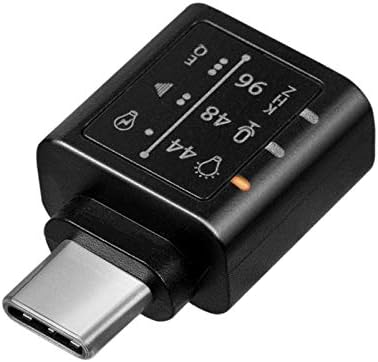
Obraz: Szczegółowy view of the adapter's indicators for sampling frequency and equalizer settings.
4.3 Funkcja mikrofonu
If your connected headphones or headset include a microphone, its functionality will be supported through the UA0363 adapter. Ensure your device's audio input settings are configured to use the USB audio device's microphone.
5. Konserwacja
- Keep the adapter clean and dry. Use a soft, dry cloth for cleaning.
- Unikaj wystawiania adaptera na działanie ekstremalnych temperatur, wilgoci lub bezpośredniego światła słonecznego.
- Do not attempt to disassemble or modify the adapter, as this will void the warranty.
- Gdy nie używasz adaptera, przechowuj go w bezpiecznym miejscu, aby zapobiec jego uszkodzeniu fizycznemu.
6. Rozwiązywanie Problemów
6.1 Brak dźwięku
- Ensure the UA0363 adapter is fully and securely inserted into your device's USB-C port.
- Verify that your headphones are fully plugged into the adapter's 3.5mm jack.
- Check your device's audio output settings to confirm that the USB audio device is selected as the primary output.
- Test the adapter with a different pair of headphones or another compatible USB-C device to isolate the issue.
- Sprawdź, czy głośność podłączonego urządzenia nie jest wyciszona lub ustawiona zbyt nisko.
6.2 Poor Audio Quality or Distortion
- Upewnij się, że źródło dźwięku (np. muzyka) file(usługa przesyłania strumieniowego) jest wysokiej jakości.
- Try cycling through the different EQ settings on the adapter to see if a different profile improves the sound.
- Check for any loose connections between the adapter, device, and headphones.
- Avoid using the adapter near sources of strong electromagnetic interference.
6.3 Mikrofon nie działa
- Confirm that your headphones or headset are equipped with a working microphone.
- Check your device's audio input settings to ensure the USB audio device's microphone is selected as the input source.
- Ensure the microphone on your headset is not muted.
7. Specyfikacje
| Funkcja | Specyfikacja |
|---|---|
| Numer modelu | UA0363 |
| Złącza | USB-C Male, 3.5mm Jack Female |
| Układ DAC | BES Technik BES3100 |
| Słuchawki Ampżywsze | Maxim MAX97220AA |
| Obsługiwane Sampling ceny | 44 kHz, 48 kHz, 96 kHz |
| Rezolucja | 24-bit |
| Impedance Support | 16-600 omów |
| Stosunek sygnału do szumu (SNR) | Około. 100 dB (A) |
| Źródło zasilania | zasilana przez USB |
| Zgodność USB | USB 2.0 |
| Cechy specjalne | Integrated Microphone Support, 3-level Hardware Equalizer, LED Indicators |
| Wymiary (dł. x szer. x wys.) | Wymiary: 17 x 10 x 26 mm |
| Kolor | Czarny |
8. Gwarancja i wsparcie
For warranty information, technical support, and further assistance, please refer to the official LogiLink webOdwiedź witrynę lub skontaktuj się z autoryzowanym sprzedawcą. Zachowaj paragon zakupu na wypadek reklamacji.


