1. Wprowadzenie
The YABER V3 Mini Bluetooth Projector is designed to provide a versatile and high-quality viewing experience for home entertainment and outdoor use. Featuring native 1280x720p resolution with 1080P support, a 6000:1 contrast ratio, and an advanced German LED light source, it delivers clear and accurate images. This projector also includes Bluetooth 5.0 for wireless audio connectivity and supports wireless screen mirroring via Anycast or Chromecast (adapters sold separately).
2. Co znajduje się w pudełku
- YABER V3 Mini Bluetooth Projector
- Kabel HDMI
- Przewód zasilający
- Instrukcja obsługi
- Kabel AV
- Ściereczka do czyszczenia soczewek
- Pilot zdalnego sterowania (baterie nie są dołączone)
3. Funkcje produktu
- Native 720P & 1080P Supported: Offers a native resolution of 1280x720 pixels, supporting up to 1080P input for clear images.
- Wysoki współczynnik kontrastu: Features a 6000:1 contrast ratio for enhanced image depth and detail.
- Łączność Bluetooth 5.0: Allows wireless connection to Bluetooth headsets, speakers, and Airpods for enhanced audio.
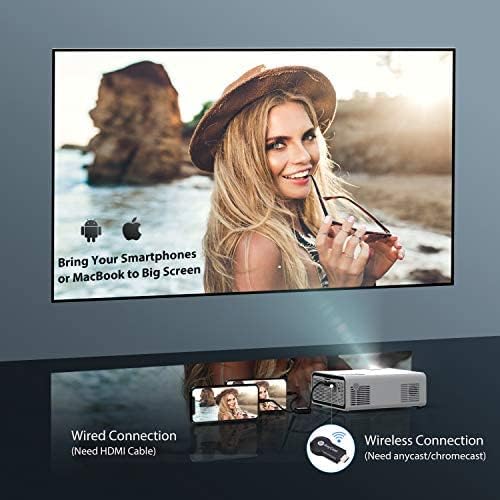
- Bezprzewodowe kopiowanie ekranu: Supports Anycast and Chromecast for mirroring content from smartphones and other devices (adapters required).
- Funkcja powiększania: Adjusts image size from 100% to 50% using the remote control without moving the projector.
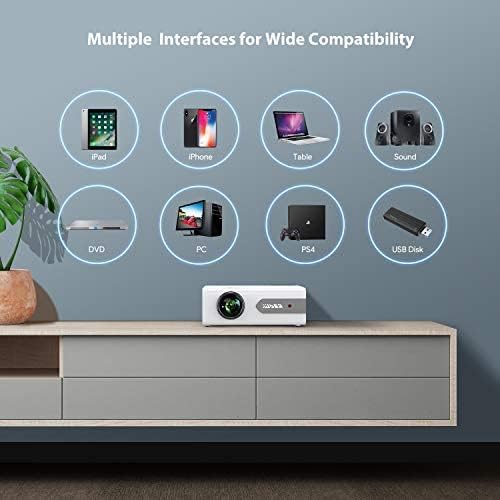
- Wiele interfejsów: Equipped with HDMI, USB, VGA, AV, and Audio ports for wide compatibility with various devices.
- Dźwięk stereo HIFI: Built-in dual stereo speakers with an SRS sound system provide a good auditory experience.
- Zaawansowany system chłodzenia: Designed to minimize lamp power consumption and extend lamp żywotność do 100,000 XNUMX godzin.


4. Konfiguracja
4.1 Początkowe umiejscowienie
Place the projector on a stable, flat surface or mount it to the ceiling. Ensure there is adequate ventilation around the projector to prevent overheating. The projection distance and screen size can be adjusted based on your viewśrodowiska.

4.2 Połączenie zasilania
Connect the power cord to the projector's power input and then plug it into a power outlet.
4.3 Włączanie/wyłączanie zasilania
Naciśnij przycisk zasilania na projektorze lub pilocie, aby włączyć lub wyłączyć urządzenie.
5. Instrukcja obsługi
5.1 Korekcja ostrości i zniekształceń trapezowych
Adjust the focus ring on the projector lens until the image is clear. Use the keystone correction feature (manual or digital, if available) to correct any trapezoidal distortion of the image.
5.2 Wybór źródła sygnału wejściowego
Use the 'Source' button on the remote or projector to select the desired input source (HDMI, USB, VGA, AV).
5.3 Połączenie Bluetooth
Aby połączyć się z urządzeniem audio Bluetooth:
- Ensure your Bluetooth speaker or headset is in pairing mode.
- Przejdź do ustawień Bluetooth w projektorze.
- Wybierz urządzenie z listy dostępnych urządzeń, które chcesz sparować.
- Po nawiązaniu połączenia dźwięk będzie odtwarzany przez urządzenie Bluetooth.
Notatka: The V3 mini projector supports Bluetooth output devices (speakers, headphones) but does not connect to phones/pads via Bluetooth for mirroring. Turn off Bluetooth when not in use to avoid potential issues.
5.4 Bezprzewodowe przesyłanie obrazu z ekranu
The YABER V3 supports wireless screen mirroring from iOS and Android devices using an external Anycast or Chromecast dongle (purchased separately). Connect the dongle to an HDMI port and follow the dongle's instructions for mirroring.
5.5 Funkcja zoomu
To adjust the image size without moving the projector, use the zoom function via the remote control. This allows you to shrink the image from 100% down to 50%.
5.6 Scenariusze użycia
The YABER V3 projector is suitable for various applications:
- Kino domowe: Enjoy movies and shows on a large screen.
- Hazard: Podłącz konsole do gier, aby uzyskać wciągające wrażenia.
- Outdoor Movies: Perfect for backyard movie nights in dark environments.

6. Konserwacja
6.1 Czyszczenie soczewek
Regularly clean the projector lens using the provided lens cleaning cloth or a soft, lint-free cloth. Avoid using abrasive cleaners or harsh chemicals.
6.2 Czyszczenie filtra powietrza
Check and clean the air filter periodically to ensure proper airflow and prevent dust buildup, which can affect performance and lamp życie.
6.3 Łamp Życie
Dioda LED projektora lamp has a lifespan of up to 100,000 hours. Proper maintenance, including adequate ventilation and cleaning, helps maximize its longevity.
7. Rozwiązywanie Problemów
- Brak obrazka:
- Sprawdź, czy kabel zasilający jest dobrze podłączony.
- Sprawdź, czy wybrano właściwe źródło sygnału wejściowego.
- Verify that the connected device (e.g., TV Stick, PC) is powered on and outputting a signal.
- Dostosuj ostrość i trapez.
- Brak dźwięku:
- Sprawdź ustawienia głośności zarówno w projektorze, jak i podłączonym urządzeniu.
- Jeśli używasz technologii Bluetooth, upewnij się, że urządzenie jest prawidłowo sparowane i połączone.
- If using an external speaker via AUX, ensure the cable is fully inserted.
- Some content (e.g., certain streaming services) may have audio format incompatibilities; try a different source or content.
- Zamazany obraz:
- Wyreguluj pierścień ostrości na obiektywie.
- Upewnij się, że powierzchnia projekcyjna jest płaska i projektor stoi stabilnie.
- Wyczyść soczewkę projektora.
- Pilot nie działa:
- Wymień baterie w pilocie.
- Upewnij się, że nie ma żadnych przeszkód między pilotem a odbiornikiem podczerwieni projektora.
- Przegrzanie:
- Należy zapewnić odpowiednią wentylację wokół projektora.
- Clean the air filter and vents to remove dust.
- Avoid operating in excessively hot environments.
8. Specyfikacje
| Numer modelu | V3 |
| Rozdzielczość wyświetlacza | Native 1280 x 720 (Supports 1080P) |
| Współczynnik kontrastu | 6000:1 |
| Proporcje obrazu | 16:9 / 4:3 |
| Źródło światła | PROWADZONY |
| Lamp Życie | Do 100,000 godzin |
| Technologia łączności | 3.5mm Jack, Bluetooth, HDMI, USB, VGA, AV |
| Wersja Bluetooth | 5.0 |
| Wymiary produktu | 8.19 x 6.61 x 3.07 cala |
| Waga przedmiotu | 2.2 funta |
| Zalecane zastosowania | Home Cinema, Gaming, Business (not recommended for professional presentations) |
9. Gwarancja i wsparcie
YABER provides a 6-month return policy and 3-year repair service for the V3 Mini Bluetooth Projector. Lifetime professional technical support is also available. For any issues or inquiries, please contact YABER customer service.


