1. Wprowadzenie
This manual provides essential information for setting up, operating, and maintaining your Acer Predator Triton 500 PT515-52-73L3 Gaming Laptop. Please read it thoroughly to ensure optimal performance and longevity of your device.
The Acer Predator Triton 500 PT515-52-73L3 is a high-performance gaming laptop designed for demanding tasks and immersive gaming experiences. It features a 10th Generation Intel Core i7-10750H processor, NVIDIA GeForce RTX 2070 SUPER graphics, a 15.6-inch Full HD display with a 300Hz refresh rate and NVIDIA G-SYNC technology, 16GB of DDR4 RAM, and a 512GB NVMe SSD.
2. Informacje dotyczące bezpieczeństwa
- Nie wystawiaj laptopa na działanie ekstremalnych temperatur, bezpośredniego światła słonecznego i wysokiej wilgotności.
- Unikaj umieszczania ciężkich przedmiotów na laptopie.
- Należy używać wyłącznie dołączonego zasilacza sieciowego i przewodu zasilającego.
- Trzymaj urządzenie z dala od płynów. W przypadku rozlania natychmiast wyłącz urządzenie i odłącz adapter.
- Nie próbuj samodzielnie demontować ani naprawiać laptopa. Skontaktuj się z wykwalifikowanym personelem serwisowym.
- Aby zapobiec przegrzaniu, zwłaszcza podczas intensywnego użytkowania, należy zadbać o odpowiednią wentylację.
3. Zawartość opakowania
Sprawdź, czy w opakowaniu znajdują się wszystkie elementy:
- Acer Predator Triton 500 PT515-52-73L3 Gaming Laptop
- Zasilacz sieciowy
- Przewód zasilający
4. Przekroczenie fizyczneview
4.1. Przód View
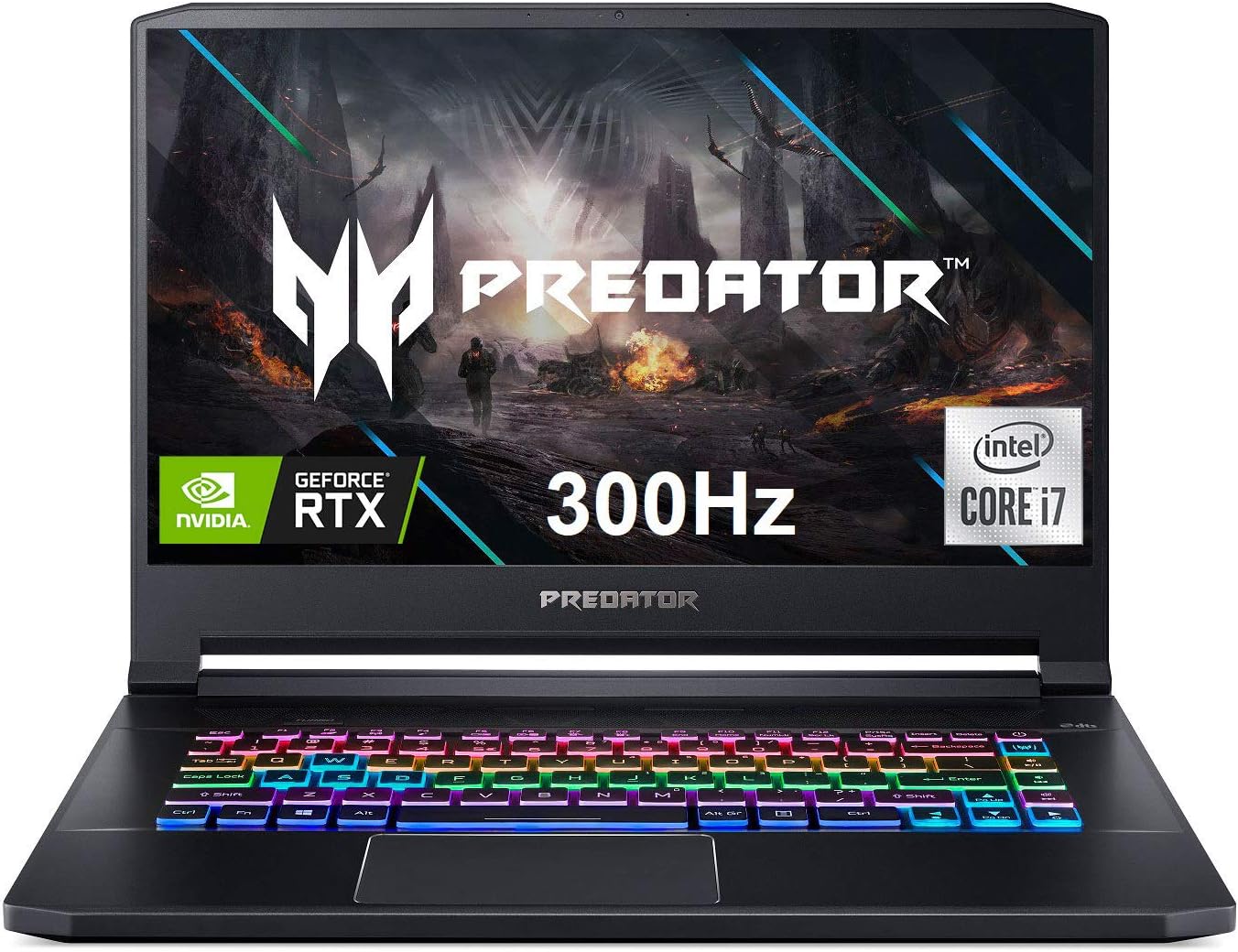
Rycina 4.1: Przód view of the Acer Predator Triton 500, showcasing the display with Predator branding, RGB backlit keyboard, and thin bezels.
4.2. Funkcje wyświetlacza

Figure 4.2: The 15.6-inch Full HD (1920 x 1080) display features a 300Hz refresh rate and 3ms Overdrive Response Time, enhanced by NVIDIA G-SYNC technology for tear-free gameplay.
4.3. Klawiatura i touchpad

Figure 4.3: The laptop features a per-key RGB backlit keyboard with customizable lighting and a dedicated 'Turbo' key for instant overclocking. The touchpad is located below the keyboard.
4.4. Porty i złącza

Figure 4.4: The laptop is equipped with a comprehensive selection of ports, including Power (DC-In), Ethernet (RJ-45), multiple USB 3.2 Gen 2 ports, HDMI, Mic-in, Headset/speaker, Thunderbolt 3 / USB Type-C, Mini DisplayPort, and a Kensington lock slot.
5. Konfiguracja
5.1. Pierwsze włączenie zasilania
- Podłącz zasilacz sieciowy do portu zasilania laptopa, a następnie do gniazdka elektrycznego.
- Otwórz pokrywę laptopa.
- Naciśnij przycisk zasilania, który zazwyczaj znajduje się nad klawiaturą lub z boku urządzenia.
- Follow the on-screen instructions to complete the initial Windows 10 Home setup.
5.2. Podłączanie urządzeń peryferyjnych
Connect your mouse, external keyboard, or other USB devices to the available USB 3.2 Gen 2 ports. For external displays, use the HDMI or Mini DisplayPort 1.4. The Thunderbolt 3 port supports full USB 3.1 Type-C functionality.
6. Obsługa
6.1. Włączanie/wyłączanie zasilania
- Włączanie: Naciśnij przycisk zasilania.
- Wyłączone: Kliknij przycisk Start, następnie Zasilanie > Wyłącz.
- Tryb uśpienia: Zamknij pokrywę lub kliknij przycisk Start, następnie Zasilanie > Uśpienie.
6.2. Funkcje wyświetlacza
The 15.6-inch Full HD (1920 x 1080) IPS display offers a 300Hz refresh rate and 3ms Overdrive Response Time. NVIDIA G-SYNC technology synchronizes the display's refresh rate with the GPU, eliminating screen tearing and minimizing display stutter and input lag.
6.3. Funkcje klawiatury
The per-key RGB backlit keyboard allows for customizable lighting effects. Use the PredatorSense software to personalize the lighting zones and effects. The 'Turbo' key can be used for instant CPU/GPU overclocking.
6.4. Performance Management with PredatorSense

Figure 6.4: The PredatorSense software provides comprehensive control over your laptop's performance, including fan speed adjustments (Auto, Max, Custom), monitoring CPU and GPU temperatures, and managing RGB lighting.
PredatorSense allows you to monitor system performance, adjust fan speeds, customize RGB lighting, and manage overclocking settings for optimal gaming and productivity. You can switch between different performance modes (e.g., Quiet, Default, Extreme) based on your needs.
6.5. Łączność
- Bezprzewodowy: Killer Double Shot Pro Wireless-AX 1650i 802.11ax Wi-Fi 6 for high-speed wireless internet.
- wired: Killer Gaming Network E3100G 10/100/1000 Gigabit Ethernet LAN for stable wired connections.
- Bluetooth: Zintegrowany moduł Bluetooth umożliwiający podłączanie urządzeń peryferyjnych bezprzewodowo.
6.6. audio
The laptop features DTS X: Ultra-Audio with optimized Bass, Loudness, and Speaker Protection, along with Acer True Harmony Technology and two built-in stereo speakers. Acer Purified.Voice technology with two built-in microphones enhances voice clarity for communication.
7. Konserwacja
7.1. Czyszczenie
- Do czyszczenia ekranu i zewnętrznej części należy używać miękkiej, niepozostawiającej włókien ściereczki.
- W przypadku uporczywych plam delikatnieampWyczyść szmatkę wodą lub płynem do czyszczenia ekranów.
- Wyczyść kurz z klawiszy klawiatury i kratek wentylacyjnych za pomocą sprężonego powietrza.
7.2. Aktualizacje oprogramowania
Regularly update your operating system (Windows 10 Home), graphics drivers (NVIDIA), and Acer-specific software (PredatorSense) to ensure optimal performance and security.
7.3. Zarządzanie magazynem
The laptop comes with a 512GB PCIe NVMe SSD. It includes two PCIe M.2 slots, with one slot available for easy storage upgrades. Regularly back up important data and manage disk space to maintain performance.
7.4. Pielęgnacja baterii
To prolong battery life, avoid fully discharging the battery frequently. It is recommended to keep the laptop plugged in during intensive gaming sessions to ensure consistent power delivery and prevent performance throttling.
8. Rozwiązywanie Problemów
- Laptop się nie włącza: Upewnij się, że zasilacz sieciowy jest prawidłowo podłączony, a gniazdko elektryczne działa. Spróbuj użyć innego gniazdka.
- Przegrzanie: Ensure ventilation grilles are clear of obstructions. Use PredatorSense to increase fan speeds. Consider using a cooling pad for extended heavy use.
- Display issues (tearing/stuttering): Verify NVIDIA G-SYNC is enabled in NVIDIA Control Panel and PredatorSense. Ensure graphics drivers are up to date.
- Słaba żywotność baterii: Adjust power settings in Windows to a more power-efficient mode. Reduce screen brightness. Close unnecessary background applications.
- Brak dźwięku: Check volume levels in Windows and ensure speakers/headphones are properly connected. Update audio drivers.
9. Specyfikacje
| Funkcja | Szczegół |
|---|---|
| Edytor | 10th Generation Intel Core i7-10750H 6-Core (Up to 5.0GHz) |
| Grafika | Overclockable NVIDIA GeForce RTX 2070 SUPER with Max-Q Design & 8GB GDDR6 VRAM |
| Wyświetlacz | 15.6" Full HD (1920 x 1080) IPS, 300Hz Refresh Rate, 3ms Overdrive, NVIDIA G-SYNC, 300nit Brightness, 100% sRGB |
| BARAN | 16 GB DDR4 2933 MHz |
| Składowanie | 512GB PCIe NVMe SSD (2 x PCIe M.2 Slots, 1 Slot Available) |
| System operacyjny | Windows 10 Home |
| Klawiatura | Per-key RGB Backlit Keyboard with Customizable Lighting |
| Łączność bezprzewodowa | Killer Double Shot Pro Wireless-AX 1650i 802.11ax Wi-Fi 6 |
| Łączność przewodowa | Killer Gaming Network E3100G 10/100/1000 Gigabit Ethernet LAN |
| Porty | 1x Thunderbolt 3 (Full USB 3.1 Type C), 3x USB 3.2 Gen 2 (1 with Power-off Charging), 1x HDMI 2.0, 1x Mini Display Port 1.4 |
| Audio | DTS X: Ultra-Audio, Acer True Harmony Technology, Dual Stereo Speakers, Acer Purified.Voice |
| Żywotność baterii | Do 5.5 godzin (średnio) |
| Waga | 4.63 funta (2.1 kg) |
| Wymiary (dł. x szer. x wys.) | 14.11 x 10.04 x 0.7 cala |
10. Oficjalne filmy o produktach
10.1. Predator Triton 500 PT515-52 360 Degree View
This video provides a brief 360-degree view of the Acer Predator Triton 500 PT515-52, showcasing its design and various angles.
10.2. Full-Featured Gaming Laptop with RGB Keyboard
This video highlights the full features of the Acer Predator Triton 500, emphasizing its RGB keyboard and overall gaming capabilities.
11. Informacje o gwarancji
Your Acer Predator Triton 500 PT515-52-73L3 Gaming Laptop is covered by a manufacturer's warranty. Please refer to the warranty card included in your package or visit the official Acer support webna stronie szczegółowe warunki.
- 2-Year Protection Plan (Optional)
- 4-Year Protection Plan (Optional)
12. Wsparcie
Aby uzyskać dalszą pomoc, wsparcie techniczne lub pobrać najnowsze sterowniki i instrukcje, odwiedź oficjalną stronę pomocy technicznej firmy Acer webstrona:
You can also find additional resources and contact information on the Acer brand store:


