1. Koniec produktuview
The VIMAR K40930 is a single-family video intercom set designed for secure and convenient home entry management. This kit includes a 7-inch LCD hands-free video indoor unit with a capacitive keyboard and a 1-button audio/video bell pad for outdoor installation. It provides clear video and audio communication with visitors at your door.

Rysunek 1: VIMAR K40930 Video Intercom Set components, including the indoor monitor, outdoor bell pad, and power supply.
Główne cechy obejmują:
- 7-inch LCD hands-free video unit with capacitive keyboard.
- 1-button audio/video bell pad with rain cover.
- Expandable system: each call button can support up to 3 monitors.
- Internal call function between multiple indoor units (if expanded).
- Obsługa wielu języków interfejsu użytkownika.
2. Instalacja i konfiguracja
This section provides instructions for the physical installation and initial setup of your VIMAR K40930 Video Intercom Set. It is recommended to consult a qualified electrician for installation if you are unfamiliar with electrical wiring.
2.1 Zawartość opakowania
Przed rozpoczęciem instalacji należy sprawdzić, czy wszystkie komponenty są obecne:
- 1 x 7-inch LCD Hands-Free Video Unit
- 1 x Audio/Video Bell Pad with 1 Button and Rain Cover
- 1 x Power Supply (Model 40103)
- Mounting Brackets and Accessories for AP Installation
2.2 Mounting the Outdoor Bell Pad
Select a suitable location for the outdoor bell pad, typically near your main entrance. Ensure it is at an appropriate height for visitors and protected from direct weather exposure, although it comes with a rain cover.

Rysunek 2: Example of the outdoor bell pad installed on an exterior wall.
Use the provided mounting bracket to secure the bell pad to the wall. Refer to the dimensions diagram for precise measurements.

Rysunek 3: Dimensional drawing of the outdoor bell pad (approx. 162.4mm height, 94.4mm width, 34.3mm depth).
2.3 Montaż monitora wewnętrznego
Choose an accessible location inside your home for the 7-inch LCD monitor, such as a hallway or living area. Mount the indoor unit using its dedicated bracket.

Rysunek 4: Example of the indoor monitor installed on an interior wall.
Ensure the mounting height is convenient for viewing and operation. Refer to the dimensions diagram for precise measurements.

Rysunek 5: Dimensional drawing of the indoor monitor (approx. 128.1mm height, 205.2mm width, 20.9mm depth).
2.4 połączeń przewodów
The VIMAR K40930 system uses a 2-wire bus connection. Connect the outdoor bell pad, indoor monitor, and power supply according to the wiring diagram. The maximum distance between the bell pad and the last monitor is up to 100 meters when using 1 mm² wiring.
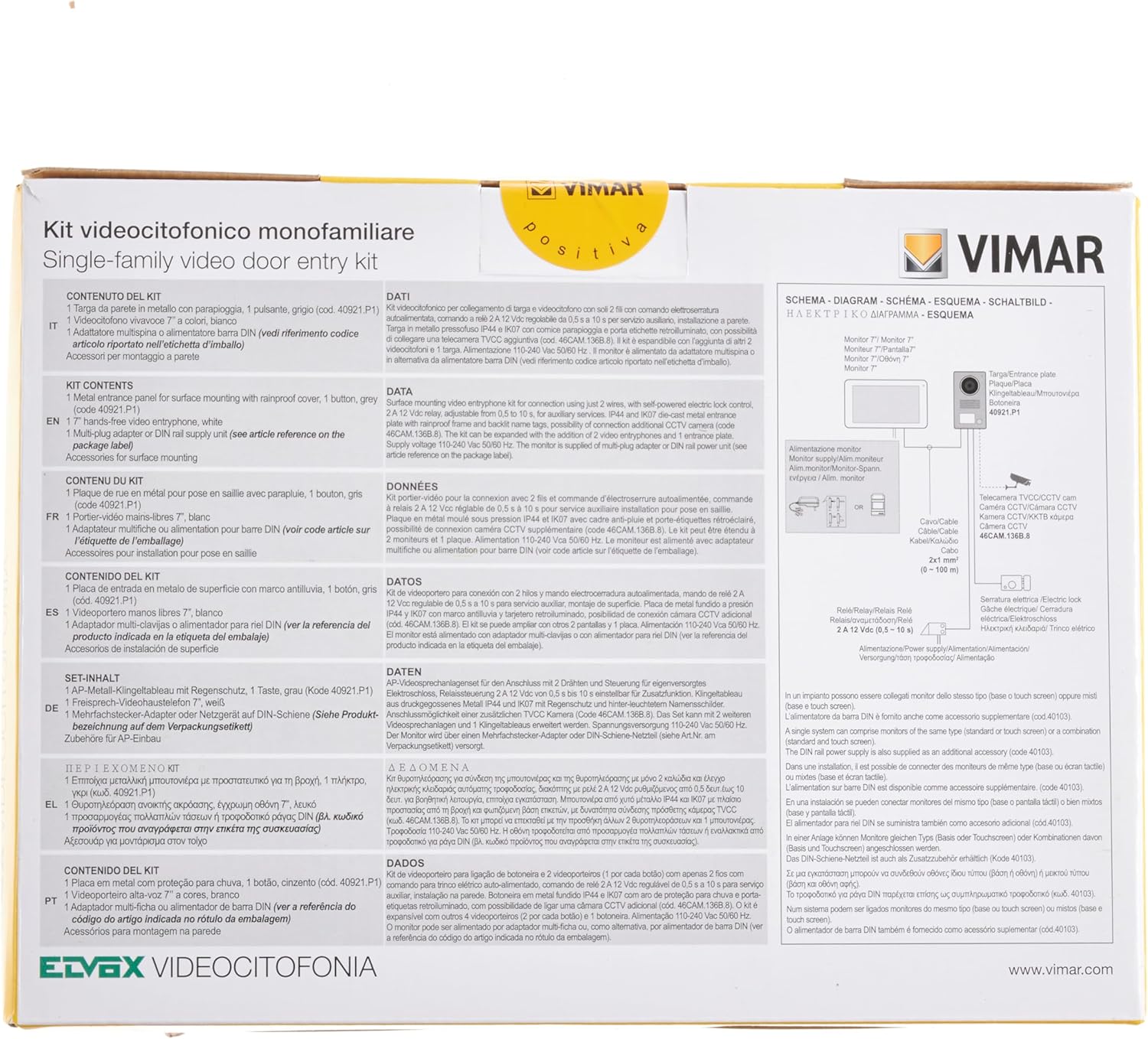
Rysunek 6: Wiring diagram illustrating connections between the outdoor unit, indoor monitor, and power supply. Consult this diagram for correct BUS+ and BUS- connections.
The power supply (Model 40103) is designed for DIN rail mounting. Ensure proper polarity when connecting the wires.
2.5 Początkowe włączenie zasilania
Once all connections are securely made, apply power to the system. The VIMAR K40930 sets are designed to be ready to use and typically do not require special programming for basic operation. The indoor monitor should power on and display the standby screen.
3. Instrukcja obsługi
This section details the daily operation of your VIMAR K40930 Video Intercom Set.
3.1 Odbieranie połączenia
- When a visitor presses the bell button on the outdoor unit, the indoor monitor will ring and display the visitor's video feed.
- To answer the call, touch the designated answer button on the capacitive keyboard of the indoor monitor. This will establish two-way audio communication.
- To end the call, touch the hang-up button.
3.2 Funkcja otwierania drzwi
During an active call, you can release an electric door lock (if connected) by touching the door release button on the indoor monitor's capacitive keyboard.
3.3 Monitoring Outdoor Area
You can manually activate the outdoor camera to view the entrance area at any time without a visitor pressing the bell. Touch the monitor button on the indoor unit to activate the camera feed.
3.4 Internal Call Function (for multiple monitors)
If you have multiple indoor monitors installed within the same family unit, you can use the internal call function to communicate between them. Refer to the monitor's on-screen menu for specific instructions on initiating an internal call.
3.5 Ustawienia językowe
The system supports multiple languages, including Italian, English, French, German, Spanish, Portuguese, Greek, and Dutch. You can change the display language through the indoor monitor's settings menu.
4. Konserwacja
Regularna konserwacja gwarantuje długowieczność i optymalną wydajność Twojego systemu wideodomofonowego.
- Czyszczenie: Użyj miękkiego, damp cloth to clean the indoor monitor screen and the outdoor bell pad. Avoid abrasive cleaners or solvents that could damage the surfaces.
- Jednostka zewnętrzna: Periodically check the outdoor bell pad for any obstructions to the camera lens or microphone/speaker. Ensure the rain cover is securely in place.
- Okablowanie: Ensure all wiring connections remain secure. If you notice any loose connections or damage, consult a qualified technician.
5. Rozwiązywanie Problemów
If you encounter issues with your VIMAR K40930 Video Intercom Set, refer to the following common troubleshooting steps. For more detailed assistance, please visit the Vimar webodwiedź witrynę lub skontaktuj się z działem obsługi klienta.
| Problem | Możliwa przyczyna | Rozwiązanie |
|---|---|---|
| Brak zasilania monitora wewnętrznego. | Odłączone lub uszkodzone zasilanie. | Check power supply connection and ensure it is receiving power. Verify wiring. |
| No video feed from outdoor unit. | Loose wiring, camera obstruction, or faulty outdoor unit. | Check BUS wiring connections. Ensure camera lens is clear. |
| Brak dźwięku podczas komunikacji. | Microphone/speaker obstruction, loose wiring, or volume settings. | Check for obstructions. Verify wiring. Adjust volume settings on the indoor monitor. |
| Otwieranie drzwi nie działa. | Incorrect wiring to electric lock, faulty lock, or system malfunction. | Verify wiring to the electric lock. Ensure the lock is functional independently. |
6. Specyfikacje
| Funkcja | Szczegół |
|---|---|
| Numer modelu | K40930 |
| Marka | VIMAR |
| Monitor wewnętrzny | 7-inch LCD, Hands-Free, Capacitive Keyboard |
| Outdoor Bell Pad | 1-Button, Audio/Video, Rain Cover, Metal Panel (IP44 and IK07 rated) |
| Kamera | Szerokokątny aparat 120 ° |
| Łączność | 2-wire bus system |
| Maksymalna odległość | 100 m (with 1 mm² wiring) |
| Możliwość rozbudowy | Up to 3 monitors per call button |
| Zasilacz | Model 40103 (DIN rail mountable) |
| Wymiary produktu (monitor wewnętrzny) | 20.52 x 2.09 x 12.8 cm (w przybliżeniu) |
| Wymiary produktu (jednostka zewnętrzna) | 9.44 x 3.43 x 16.24 cm (w przybliżeniu) |
| Waga | 1.32 kg (total package approx.) |
| Wsparcie wielojęzyczne | Italian, English, French, German, Spanish, Portuguese, Greek, Dutch |
7. Gwarancja i wsparcie
For detailed warranty information, additional instructions, and tutorials, please visit the official Vimar website. The product is manufactured by Vimar.
For customer assistance in Italy, you may contact: 0424 488 500.
Producent: Vimar S.p.A. - Viale Vicenza 14, 36063 Marostica VI, Italy.
Kod UPC: 8013406306302


