Wstęp
The REXING V5 Dash Cam is a state-of-the-art 4K Ultra HD car camera system designed to provide comprehensive recording of your driving experience. Featuring modular capabilities, built-in GPS, Wi-Fi connectivity, voice control, and advanced safety features like G-Sensor and Parking Monitor, the V5 ensures reliable and high-quality video evidence for your peace of mind. This manual will guide you through the setup, operation, and maintenance of your new dash cam.
Przewodnik po konfiguracji
1. Zawartość opakowania
Zanim zaczniesz, upewnij się, że w przesyłce znajdują się wszystkie elementy:
- REXING V5 Dash Cam Unit
- Kabel zasilający samochodu
- Mocowania samoprzylepne 3M
- Narzędzie do zarządzania kablami
- Karta pamięci (w zestawie)
- Quick Start Guide & Safety Guide

Figure 1: REXING V5 Package Contents. Includes the dash cam, power cable, mounting accessories, and user guides.
2. Montaż kamery samochodowej
Mount the main camera unit to the windshield, ideally behind the rearview lustro, aby zapewnić przejrzystość view of the road without obstructing your driving vision. Use the provided 3M adhesive mounts for secure attachment.
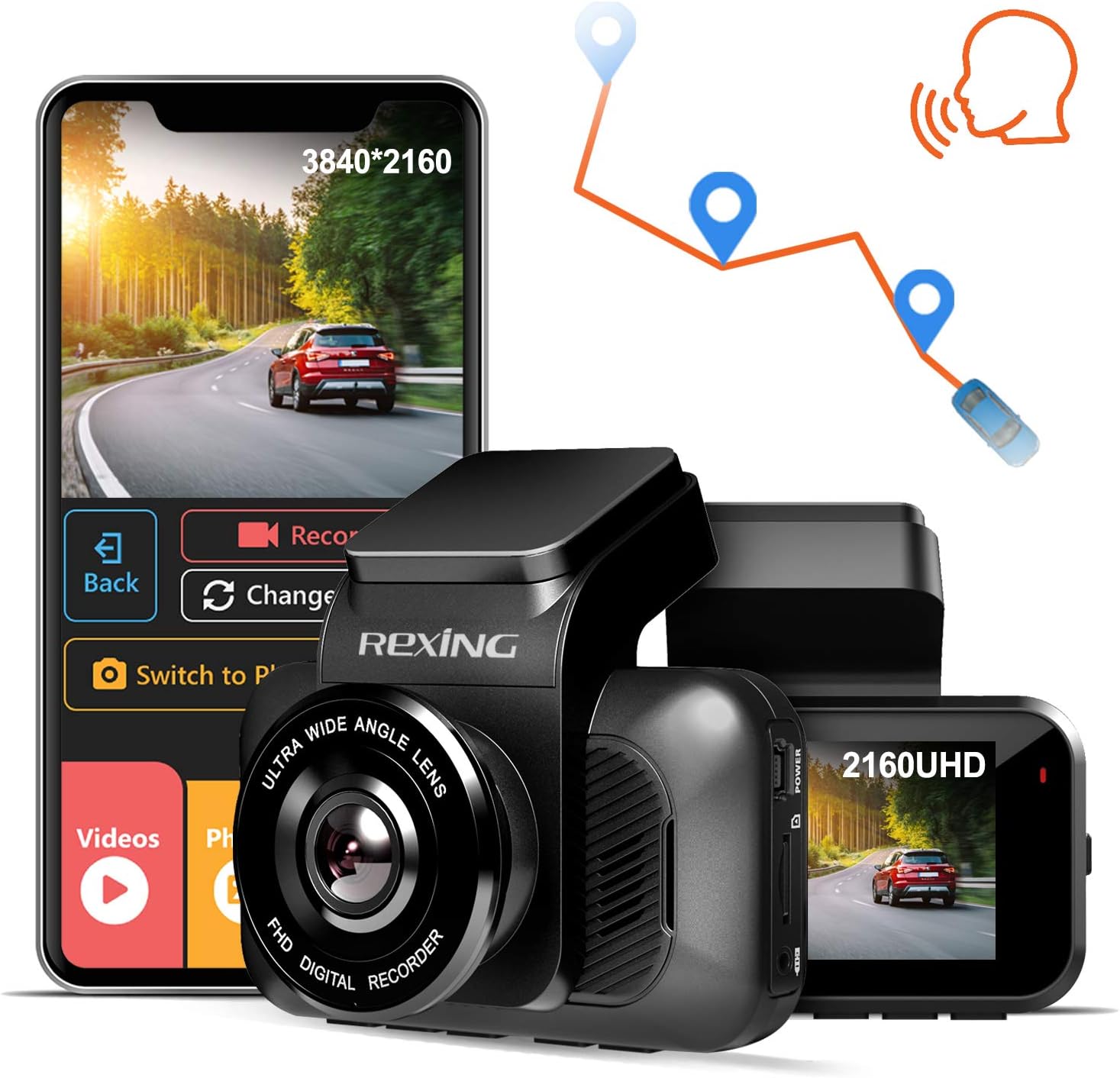
Figure 2: REXING V5 Dash Cam mounted on the windshield, capturing a wide-angle view drogi.
For optimal recording, ensure the lens is clean and free from obstructions. The 170-degree ultra-wide-angle lens captures broad views of surroundings, reducing blind spots.
3. Connecting Power and Optional Modules
Connect the car power cable to the dash cam and route it discreetly along the windshield and dashboard to your vehicle's 12V power outlet. The V5 supports modular camera attachments for expanded viewing areas, including cabin view iz tyłu view (sprzedawane oddzielnie).

Figure 3: Modular Capabilities of the REXING V5. Additional cameras can be connected for multi-channel recording.
If using optional cabin or rear cameras, connect them to the main unit as per their respective instructions. The rear camera can be mounted inside or outside the vehicle, depending on the model.
Video 1: Official REXING V5 Dash Cam overview, demonstrating setup and features. This video highlights the modular design and ease of installation.
Instrukcja obsługi
1. Włączanie i nagrywanie
The REXING V5 Dash Cam automatically powers on and begins recording when connected to your vehicle's power source and the ignition is turned on. Videos are recorded in 1, 2, or 3-minute intervals. When the memory card storage limit is reached, loop recording automatically overwrites the oldest unlocked recordings.

Figure 4: The V5 records in stunning 4K Ultra HD, providing clear footage even in low-light conditions thanks to its SONY IMX335 sensor and Wide Dynamic Range technology.
2. Aplikacja mobilna i sterowanie głosowe
Utilize the REXING mobile app (available for iOS and Android) to view and manage dash cam recordings instantly. You can download recorded 4K videos directly to your smartphone and easily share them. The built-in GPS accurately records your driving location and speed, viewable via the Rexing GPS Player.

Figure 5: Seamless connectivity with the REXING mobile app for easy video management and sharing.
The V5 also supports voice control, allowing for hands-free operation to initiate photo/video recording and other tasks.
3. G-Sensor and Parking Monitor
The G-Sensor detects sudden impacts or collisions while driving and automatically locks the current video segment to prevent it from being overwritten. The Parking Monitor feature ensures 24/7 surveillance: the dash camera will automatically turn on and record a 20-second video if it detects vibration, even when the car is parked and turned off.

Figure 6: Key safety features including G-Sensor for impact detection, continuous loop recording, and 24-hour parking monitoring.
Konserwacja
To ensure the longevity and optimal performance of your REXING V5 Dash Cam, regular maintenance is recommended:
- Zarządzanie kartami pamięci: Periodically format your memory card (at least once a month) to prevent data corruption and ensure smooth loop recording. Use a high-quality, high-speed microSD card (up to 256GB recommended).
- Czyszczenie soczewek: Gently clean the camera lens with a soft, lint-free cloth to ensure clear video quality. Avoid abrasive materials that could scratch the lens.
- Aktualizacje oprogramowania układowego: Check the REXING website regularly for firmware updates. Keeping your dash cam's firmware up-to-date can improve performance, add new features, and fix bugs.
- Zagadnienia dotyczące temperatury: While the V5 is built with a supercapacitor for enhanced temperature resistance, avoid prolonged exposure to extreme temperatures when possible to prolong its lifespan.
Rozwiązywanie problemów
If you encounter issues with your REXING V5 Dash Cam, try the following common troubleshooting steps:
- Kamera nie włącza się: Ensure the power cable is securely connected to both the dash cam and the vehicle's 12V outlet. Check the vehicle's fuse for the power outlet.
- Problemy z nagrywaniem: Format the microSD card. Ensure the card is not full or corrupted. Try a different high-speed microSD card.
- GPS nie działa: Ensure the GPS module (if external) is properly connected and has a clear view of the sky. Allow several minutes for the GPS signal to acquire.
- Problemy z łącznością Wi-Fi: Ensure the REXING app is updated to the latest version. Restart both the dash cam and your mobile device.
- Sterowanie głosowe nie odpowiada: Speak clearly and ensure there is minimal background noise. Check the dash cam's settings to ensure voice control is enabled.
For more detailed troubleshooting or persistent issues, please refer to the official REXING support resources.
Specyfikacje
| Funkcja | Szczegół |
|---|---|
| Wymiary produktu | 2 x 3.75 x 1.25 cala |
| Waga przedmiotu | 15 uncji |
| Numer modelu | V5 |
| Rozdzielczość przechwytywania wideo | 2160p (4K Ultra HD) |
| Technologia łączności | Wi-Fi |
| Cechy specjalne | Loop Recording, G-Sensor, Night Vision, Parking Monitor, Voice Control |
| Typ montażu | Przyssawka |
| Zawarte komponenty | Karta pamięci |
Gwarancja i wsparcie
REXING stands behind its products with a 18 miesięcy gwarancji. For any inquiries, technical assistance, or warranty claims, please contact REXING's personal LIVE CUSTOMER SUPPORT via email or phone. You can also visit the official REXING website for FAQs, troubleshooting guides, and to register your product for warranty extension.
Więcej informacji znajdziesz na stronie: www.rexingusa.com


