Produkt ponadview
The Chacon IP Wi-Fi HD Outdoor Camera is designed to provide remote surveillance of your home and its surroundings, day and night. It features high-resolution video (1920x1080p) and a wide 110° viewing angle, ensuring clear images. With night vision capabilities up to 10 meters, it offers reliable monitoring even in low-light conditions.
This camera is built to withstand various weather conditions, making it suitable for both indoor and outdoor installation. It supports manual or automatic recording triggered by motion detection, saving footage to a micro-SD card (up to 128GB, not included). Live viewing and recorded footage can be accessed remotely via the free Chacon Cam+ application on your smartphone or tablet.
Główne cechy obejmują:
- Remote surveillance with 10m night vision.
- Motion detection recording to micro-SD card (up to 128GB).
- Na żywo viewing and playback via Chacon Cam+ app (iOS & Android).
- High resolution (1920x1080p) and 110° wide viewkąt.
- Konstrukcja odporna na warunki atmosferyczne do użytku na zewnątrz.
- Two-way audio communication (intercom function).

Rycina 1: Przód view of the Chacon IP Wi-Fi HD Outdoor Camera. This image displays the camera's lens and the main cylindrical body, highlighting its sleek design.
Konfiguracja i instalacja
Setting up your Chacon IP Wi-Fi HD Outdoor Camera is a straightforward process that requires no advanced technical knowledge. Follow these steps for quick installation:
- Podłączenie zasilania: Connect the camera to a power source using the provided power adapter. Ensure the adapter is securely plugged in.
- Pobieranie aplikacji: Download the "Chacon Cam+" application from your smartphone's app store (available for iOS 8.0+ and Android 4.1+).
- Parowanie aparatu: Open the Chacon Cam+ app and follow the on-screen instructions to pair your camera with your smartphone. This process typically takes only a few seconds.
- Micro-SD Card Installation (Optional): For local recording, install a micro-SD card (up to 128GB, not included). To locate the micro-SD card slot, gently lift the small grey rubber cover near where the indicator light illuminates. Beneath this cover, you will find the SD card reader and a small reset pinhole. Insert the micro-SD card into the slot until it clicks into place.
- Montowanie: Use the included fixation accessories to mount the camera in your desired location. The camera can be placed on a window sill, or securely fixed to a wall or under an awning.

Rysunek 2: Strona view of the Chacon IP Wi-Fi HD Outdoor Camera. This image provides a clear view of the camera's cylindrical body and the robust mounting base, indicating its design for secure installation.
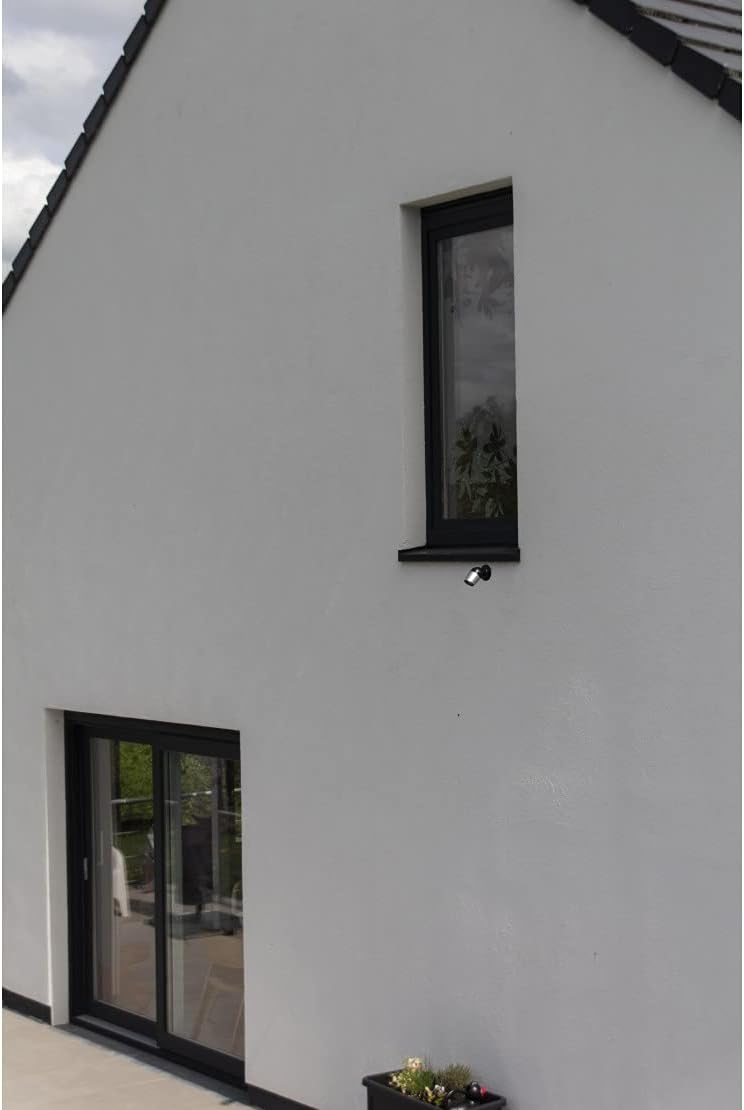
Figure 3: Chacon IP Wi-Fi HD Outdoor Camera installed on a house exterior. The camera is discreetly mounted below a window, demonstrating a typical outdoor placement for surveillance.
Instrukcja obsługi
Once installed, your Chacon camera offers various functionalities accessible through the Chacon Cam+ app:
- Na żywo View: Otwórz aplikację, aby view live video feed from your camera at any time, from anywhere.
- Alerty wykrycia ruchu: The camera will notify you directly on your smartphone in case of motion detection. You can then view and listen to what is happening in real-time.
- Dwukierunkowy dźwięk: Utilize the intercom function to speak through the camera and listen to responses, allowing for direct communication with visitors or deterring intruders.
- Nagranie:
- Nagrywanie ręczne: Initiate recording directly from the app.
- Automatyczne nagrywanie: Configure the camera to record automatically upon motion detection. Clips can be set to 1, 3, or 5 minutes in length.
- Ciągłe nagrywanie: The app also allows for continuous recording, with a 16GB micro-SD card providing approximately 72 hours of continuous video.
- Odtwarzanie nagranego dźwięku: Access recorded clips stored on your micro-SD card remotely via the app at any time.
- Udostępnianie dostępu: Easily share access to your camera's feed with family members or friends through the app, allowing multiple users to view obrazy.
Konserwacja
The Chacon IP Wi-Fi HD Outdoor Camera is designed for durability and minimal maintenance. Its weather-resistant construction protects it from humidity, water, and dust.
- Czyszczenie: Periodically wipe the camera lens with a soft, clean, damp szmatką, aby zapewnić wysoką jakość obrazu. Unikaj stosowania silnych środków chemicznych i materiałów ściernych.
- Ochrona środowiska: While the camera is weather-resistant, ensure it is installed in a location that minimizes direct exposure to extreme weather conditions for optimal longevity.
- Aktualizacje oprogramowania układowego: Check the Chacon Cam+ app periodically for any available firmware updates for your camera. Keeping the firmware updated ensures optimal performance and security.
Rozwiązywanie problemów
If you encounter issues with your Chacon IP Wi-Fi HD Outdoor Camera, refer to the following common troubleshooting tips:
| Problem | Możliwa przyczyna / rozwiązanie |
|---|---|
| Camera not connecting to Wi-Fi / App pairing issues. |
|
| Cannot find or install Micro-SD card. | The micro-SD card slot is located under a small grey rubber cover. Gently lift this cover, which is typically found near the camera's indicator light. Beneath it, you will find the SD card reader and a small pinhole for resetting the network with the provided needle. |
| Poor image quality or night vision. |
|
| Camera not functioning after installation. |
|
Specyfikacje
| Funkcja | Szczegół |
|---|---|
| Numer modelu | IPCAM-FE02 |
| Rozdzielczość nagrywania wideo | 1080p (1920x1080) |
| Viewing kąt | 110 stopnia |
| Wizja nocna | Tak, do 10 metrów |
| Technologia łączności | Bezprzewodowy (Wi-Fi) |
| Protokół Wi-Fi | 2.4 GHz (5 GHz nie jest obsługiwane) |
| Wsparcie magazynowania | Karta Micro-SD do 128 GB (brak w zestawie) |
| Źródło zasilania | Electric Cable (5V) |
| Tworzywo | Metal |
| Wymiary (dł. x szer. x wys.) | 19 x 9 x 9.5 cm (7.48 x 3.54 x 3.74 cala) |
| Waga | 380 gramów (0.84 funta) |
| Środowisko użytkowania | Wewnątrz/na zewnątrz |
| Zawarte komponenty | 1 Camera, fixation accessories, 1 power supply, manual |
| Zgodność aplikacji | Chacon Cam+ (iOS 8.0+, Android 4.1+) |
Gwarancja i wsparcie
Your Chacon IP Wi-Fi HD Outdoor Camera comes with a 2-letnia gwarancja od daty zakupu.
For technical support, warranty claims, or further assistance, please refer to the support section within the Chacon Cam+ application or visit the official Chacon website. Ensure you have your product model number (IPCAM-FE02) and proof of purchase ready when contacting support.


