1. Ważne informacje dotyczące bezpieczeństwa
Please read this entire manual carefully before assembling or operating the Tunturi T20 Treadmill. Retain this manual for future reference.
- Zawsze skonsultuj się z lekarzem przed rozpoczęciem jakiegokolwiek programu ćwiczeń.
- Sprzęt przeznaczony jest wyłącznie do użytku domowego.
- Trzymaj dzieci i zwierzęta z dala od bieżni podczas pracy.
- Upewnij się, że bieżnia jest umieszczona na płaskiej i stabilnej powierzchni, a wokół niej jest wystarczająco dużo wolnej przestrzeni.
- Noś odpowiedni strój sportowy i obuwie sportowe.
- Use the safety key at all times. In an emergency, pulling the safety key will immediately stop the treadmill.
- Nie używaj bieżni, jeśli jest uszkodzona lub działa nieprawidłowo.
- Maksymalna waga użytkownika: 120 kg (264 funta).
2. Instalacja i montaż
2.1 Rozpakowanie
Carefully remove all components from the packaging. Verify that all parts listed in the 'Included Components' section (see Specifications) are present. Keep packaging materials until assembly is complete.
2.2 Montaż
The Tunturi T20 treadmill requires some assembly. Follow the detailed instructions provided in the separate assembly guide included with your product. Ensure all bolts and nuts are securely tightened before use.
2.3 Umiejscowienie i podłączenie zasilania
Place the treadmill on a level surface, ensuring at least 2 meters (6.5 feet) of clear space behind it and 0.5 meters (1.6 feet) on each side. Connect the power cord to a grounded electrical outlet. Ensure the power switch is in the OFF position before plugging in.

Obraz: Demonstrating the folding mechanism of the Tunturi T20 treadmill. The treadmill can be folded vertically for compact storage, making it suitable for home environments with limited space.
3. Instrukcja obsługi
3.1 Włączanie/wyłączanie zasilania
To power on, plug in the treadmill and flip the main power switch located near the front base to the 'ON' position. The console display will illuminate. To power off, flip the switch to 'OFF' and unplug the unit.
3.2 Konsola Overview

Obraz: The Tunturi T20 treadmill console. This display shows key workout metrics such as time, distance, incline level, and current speed. It also features a visual 400-meter track and indicators for Bluetooth and heart rate connectivity.
The console features an LED or LCD display showing time, distance, incline, calories burned, and steps. Control buttons for speed, incline, program selection, start, stop, and mode are located below the display.
3.3 Klucz bezpieczeństwa
Attach the safety key clip to your clothing before starting any workout. Insert the magnetic end of the safety key into the designated slot on the console. The treadmill will not operate without the safety key in place. Removing the safety key will immediately stop the treadmill.
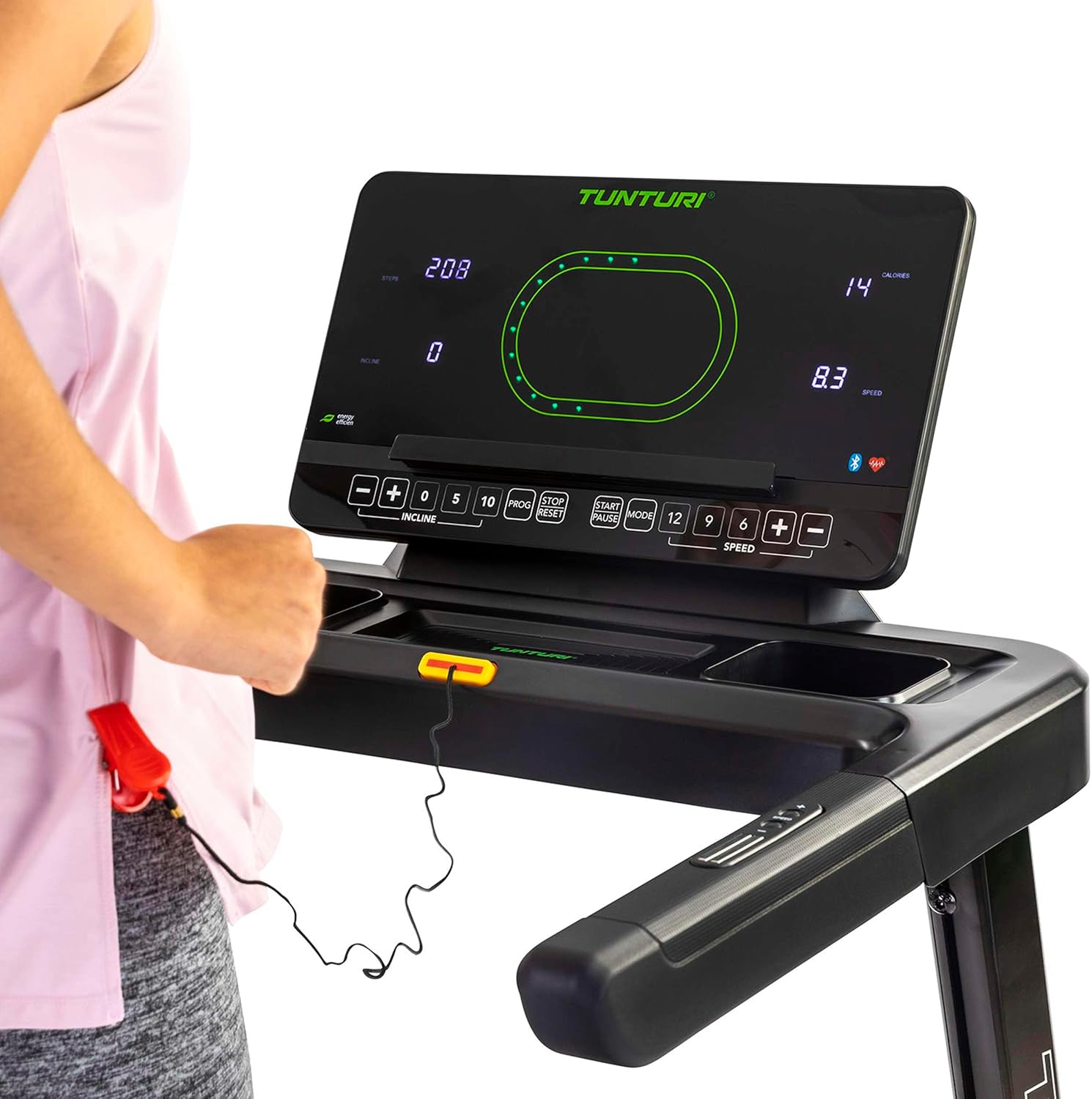
Obraz: Close-up of the Tunturi T20 console, showing the red safety key attached. The safety key is a crucial safety feature that must be engaged for the treadmill to operate.
3.4 Rozpoczęcie treningu
- Ensure the safety key is properly inserted and clipped to your clothing.
- Stań na bocznych poręczach bieżni.
- Press the 'START' button. The belt will begin moving at a low speed.
- Carefully step onto the moving belt and adjust your speed using the '+' and '-' buttons or quick speed buttons (e.g., 5, 10 km/h).
3.5 Regulacja prędkości i nachylenia
- Prędkość: Use the 'SPEED +' and '-' buttons to increase or decrease the belt speed. Quick speed buttons (e.g., 5, 10, 12 km/h) allow for rapid adjustments. The maximum speed is 16 km/h.
- Skłonić: Use the 'INCLINE +' and '-' buttons to adjust the electronic incline level. The treadmill offers 12 incline options. Quick incline buttons (e.g., 0, 5, 10) are also available.
3.6 Programy szkoleniowe
The Tunturi T20 offers 47 pre-set training programs. To select a program, press the 'PROG' button repeatedly until your desired program number is displayed. Follow the on-screen prompts to start the program. Each program automatically adjusts speed and incline according to its profile.
3.7 Łączność Bluetooth i aplikacje
The treadmill features Bluetooth connectivity, allowing you to connect to various fitness applications for an enhanced training experience.
- Trasy Tunturi: Connect to the Tunturi Routes app to experience virtual routes from around the world. The treadmill automatically adjusts incline to match the terrain of the chosen route.
- AnyRun & Kinomap: The treadmill is also compatible with AnyRun and Kinomap applications, offering additional training videos and interactive experiences.

Obraz: A tablet displaying the Tunturi Routes application on the treadmill console. This illustrates the integration of smart fitness apps with the Tunturi T20 for interactive workouts.

Obraz: A user interacting with the Tunturi Routes app on a tablet mounted on the treadmill console. This demonstrates the ease of controlling and monitoring virtual routes during a workout.
3.8 Monitorowanie tętna
The Tunturi T20 treadmill supports heart rate monitoring, typically via a compatible chest strap (not always included, check product contents). Connect your chest strap via Bluetooth to the treadmill console to display your heart rate during your workout.
3.9 Zatrzymanie treningu
To stop the treadmill, press the 'STOP' button. The belt will gradually slow down and come to a complete stop. Alternatively, pull the safety key to immediately stop the treadmill in an emergency.
4. Konserwacja
Regular maintenance ensures the longevity and safe operation of your Tunturi T20 Treadmill.
- Czyszczenie: Po każdym użyciu przetrzyj bieżnię wodą.amp Ściereczką usuń pot i kurz. Nie używaj środków czyszczących o działaniu ściernym.
- Smarowanie: The running belt requires periodic lubrication. Refer to the separate lubrication instructions provided with the included lubrication tool. Frequency depends on usage.
- Regulacja paska: Over time, the running belt may become misaligned or loose. Consult the assembly guide for instructions on how to adjust the belt tension and centering.
- Kontrola: Regularnie sprawdzaj wszystkie śruby, nakrętki i części ruchome pod kątem dokręcenia i zużycia. Dokręć wszystkie luźne elementy mocujące.
5. Rozwiązywanie Problemów
If you encounter issues with your Tunturi T20 Treadmill, refer to the following common solutions:
- Bieżnia nie uruchamia się:
- Upewnij się, że przewód zasilający jest prawidłowo podłączony do uziemionego gniazdka.
- Check that the main power switch is in the 'ON' position.
- Sprawdź, czy klucz bezpieczeństwa jest prawidłowo włożony do konsoli.
- Belt Slipping or Hesitating:
- The running belt may require tension adjustment. Refer to the maintenance section or assembly guide.
- The belt may need lubrication. Follow the lubrication instructions.
- Nietypowe dźwięki:
- Sprawdź, czy nie ma luźnych elementów i dokręć, jeśli to konieczne.
- Upewnij się, że bieżnia jest ustawiona na równej powierzchni.
- Lubricate the running belt if a squeaking noise is heard from the belt area.
- Wyświetlacz konsoli nie działa:
- Sprawdź, czy wszystkie połączenia zasilania są bezpieczne.
- Jeśli problem będzie się powtarzał, skontaktuj się z obsługą klienta.
For issues not covered here, please contact Tunturi customer support.
6. Specyfikacje produktu
| Funkcja | Specyfikacja |
|---|---|
| Model | T20 (22TRN20000) |
| Marka | Tunturi |
| Moc silnika | 1.5 KM |
| Zakres prędkości | 1 - 16 kilometrów na godzinę |
| Opcje nachylenia | 12 (Electronic Adjustment) |
| Programy szkoleniowe | 47 |
| Powierzchnia do biegania | Wymiary: 125x45 cm |
| Maksymalna waga użytkownika | 120 kilogramów |
| Wymiary po złożeniu (dł. x szer. x wys.) | Wymiary 155 x 74 x 137 cm |
| Wymiary po złożeniu (dł. x szer. x wys.) | Wymiary 87 x 74 x 139 cm |
| Waga produktu | 62 kilogramów |
| Materiał ramy | Stal stopowa |
| Typ wyświetlacza | LED lub LCD |
| Łączność | Bluetooth (Tunturi Routes, AnyRun, Kinomap compatible) |
| Zawarte komponenty | Treadmill base, Motor housing, Safety key, Power cord, User manual, Assembly hardware, Lubrication tool, Remote control, Warranty documentation |
7. Gwarancja i wsparcie
Your Tunturi T20 Treadmill comes with a manufacturer's warranty. Please refer to the separate warranty documentation included with your product for details on coverage, terms, and conditions.
For technical support, spare parts, or any questions regarding your treadmill, please contact Tunturi customer service. Contact information can typically be found on the warranty documentation or the official Tunturi webstrona.


