1. Wprowadzenie
The LAUNCH CRP239 is an intelligent and networkable automotive diagnostic tool designed for passenger cars. It offers comprehensive OBD II full functionality and rapid testing capabilities for four major vehicle systems: Engine, Automatic Transmission (A/T), Anti-lock Braking System (ABS), and Supplemental Restraint System (SRS). Additionally, the CRP239 includes advanced reset functions such as Oil Reset, Steering Angle Reset, Brake-Pad Reset, Battery Matching, Throttle Adaptation, and Diesel Particulate Filter (DPF) Regeneration, catering to the needs of professional technicians and DIY enthusiasts.
2. Informacje dotyczące bezpieczeństwa
Always observe the following safety precautions when operating the LAUNCH CRP239:
- Ensure the vehicle's ignition is off before connecting or disconnecting the diagnostic tool.
- Nie należy używać narzędzia w wilgotnych warunkach ani w pobliżu łatwopalnych cieczy lub gazów.
- Podczas pracy przy pojazdach należy nosić odpowiedni sprzęt ochrony osobistej, np. okulary ochronne.
- Aby zapoznać się ze szczegółowymi procedurami diagnostycznymi i ostrzeżeniami dotyczącymi bezpieczeństwa, należy zapoznać się z instrukcją serwisową pojazdu.
- Keep the tool away from strong magnetic fields.
- Należy używać wyłącznie dostarczonych kabli i akcesoriów.
3. Zawartość opakowania
Sprawdź, czy w opakowaniu znajdują się wszystkie elementy:
- LAUNCH CRP239 Main Unit
- Kabel diagnostyczny OBD II
- Kabel USB
- Instrukcja obsługi
- Etui transportowe

Figure 3.1: Contents of the LAUNCH CRP239 package, showing the diagnostic tool, cables, and storage case.
4. Koniec produktuview
The LAUNCH CRP239 features a robust design with a 5.0-inch 720p touch screen for intuitive navigation. It includes physical buttons for common operations and a durable rubber exterior for protection.

Rycina 4.1: Przód view of the LAUNCH CRP239, highlighting the touch screen display and navigation buttons.
4.1. składniki
- 5.0-calowy ekran dotykowy: High-resolution display for clear data presentation and touch input.
- Przyciski nawigacyjne: Directional pad, OK button, and Return button for menu navigation.
- OBD II Connector: Standard 16-pin connector for vehicle communication.
- Port USB: For connecting to a computer for updates or data transfer.
- Wskaźnik zasilania: Dioda LED wskazująca stan zasilania.
5. Konfiguracja
Follow these steps for initial setup of your LAUNCH CRP239:
- Naładuj urządzenie: Connect the CRP239 to a power source using the provided USB cable to ensure the internal 4000mAh lithium-polymer battery is fully charged before first use.
- Włączanie: Naciśnij i przytrzymaj przycisk zasilania, aby włączyć urządzenie.
- Wybór języka: On the initial setup screen, select your preferred language. The device supports multilingual operation.
- Połączenie Wi-Fi: Navigate to the 'Settings' menu and select 'Wi-Fi'. Connect to an available wireless network to enable online updates and diagnostic report sharing.
- Aktualizacja oprogramowania: It is recommended to perform a software update immediately after connecting to Wi-Fi to ensure you have the latest features and vehicle coverage. Navigate to the 'Update' section and follow the on-screen prompts.

Figure 5.1: The LAUNCH CRP239 with its diagnostic cable connected, ready for vehicle communication.
6. Instrukcja obsługi
The LAUNCH CRP239 provides a comprehensive suite of diagnostic functions. Below are instructions for common operations.
6.1. Łączenie z pojazdem
- Locate the vehicle's 16-pin OBD II diagnostic port (usually under the dashboard).
- Upewnij się, że zapłon pojazdu jest WYŁĄCZONY.
- Connect the OBD II diagnostic cable to the vehicle's OBD II port and to the CRP239.
- Turn the vehicle's ignition to the ON position (engine off). The CRP239 will power on automatically.
6.2. Nawigacja w menu głównym
From the main menu, you can access various functions:
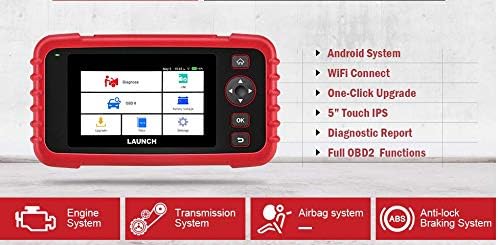
Figure 6.1: The main menu interface of the LAUNCH CRP239, providing access to all primary functions.
- Rozpoznać chorobę: For full system diagnostics (Engine, A/T, ABS, SRS).
- JESTEM: Readiness status for emissions.
- OBD II: Standard OBD II functions (read/clear DTCs, live data, freeze frame, O2 sensor test, etc.).
- Reset: Access various maintenance reset functions.
- Pojemność bateriitage: Wyświetla aktualną pojemność akumulatora pojazdutage.
- Aktualizacja: For software and firmware updates via Wi-Fi.
- Dane: Review saved diagnostic data and reports.
- Ustawienia: Configure device settings such as language, Wi-Fi, and display.
6.3. Wykonywanie skanowania diagnostycznego
- Z menu głównego wybierz "Rozpoznać chorobę".
- Narzędzie spróbuje automatycznie zidentyfikować pojazd poprzez skanowanie numeru VIN. W przypadku niepowodzenia może być konieczne ręczne wybranie marki, modelu i roku produkcji pojazdu.
- Wybierz układ, który chcesz zdiagnozować (np. silnik, skrzynia biegów, ABS, SRS).
- Wybierać "Read Fault Codes" Do view Diagnostic Trouble Codes (DTCs).
- Wybierać "Clear Fault Codes" to erase DTCs after repairs have been made. Caution: Clearing codes without addressing the underlying issue will result in the codes reappearing.
- Wybierać "Read Data Stream" Do view dane z czujników na żywo.
6.4. Korzystanie z funkcji resetowania
The CRP239 supports several common maintenance reset functions:
- Reset oleju: Resetuje przypomnienie o konieczności wymiany oleju.
- Resetowanie kąta skrętu: Resets the steering angle sensor after alignment or component replacement.
- Brake-Pad Reset (EPB): Resetuje elektroniczny układ hamulca postojowego po wymianie klocków hamulcowych.
- Dopasowanie baterii (BMS): Rejestruje nowy akumulator w systemie zarządzania akumulatorem pojazdu.
- Adaptacja przepustnicy: Ponowne ustalenie położenia przepustnicy po czyszczeniu lub wymianie.
- Regeneracja DPF: Rozpoczyna proces regeneracji filtra cząstek stałych.
To use a reset function, select "Nastawić" from the main menu, then choose the desired function and follow the on-screen instructions.
6.5. Aktualizacje oprogramowania
The CRP239 supports one-click Wi-Fi updates for software and vehicle coverage, ensuring you always have the latest diagnostic capabilities.
- Upewnij się, że urządzenie jest podłączone do stabilnej sieci Wi-Fi.
- Z menu głównego wybierz "Aktualizacja".
- The device will check for available updates. Select the updates you wish to install and confirm.
- Pozwól na nieprzerwane ukończenie procesu aktualizacji. Urządzenie może się ponownie uruchomić w trakcie tego procesu.

Figure 6.2: The update screen on the LAUNCH CRP239, showing available software updates for various vehicle brands.
6.6. Generowanie raportów diagnostycznych
The CRP239 can automatically generate diagnostic reports, which can be shared via email.
- After completing a diagnostic session, the tool will prompt you to generate a report.
- Confirm to generate the report.
- Przejdź do "Data" menu do view saved reports.
- Select a report and choose the option to share via email. Ensure your Wi-Fi is connected and email settings are configured in the 'Settings' menu.
7. Konserwacja
Proper maintenance ensures the longevity and optimal performance of your LAUNCH CRP239:
- Czyszczenie: Do czyszczenia urządzenia należy używać miękkiej, suchej ściereczki. Nie należy używać środków czyszczących o właściwościach ściernych ani rozpuszczalników.
- Składowanie: Store the device in its carrying case in a cool, dry place when not in use. Avoid extreme temperatures.
- Pielęgnacja baterii: Regularnie ładuj baterię, nawet jeśli urządzenie nie jest często używane, aby utrzymać ją w dobrym stanie. Unikaj całkowitego rozładowywania baterii przez dłuższy czas.
- Kontrola kabla: Periodically inspect the diagnostic and USB cables for any signs of damage. Replace damaged cables immediately.
8. Rozwiązywanie Problemów
This section addresses common issues you might encounter with the LAUNCH CRP239.
| Problem | Możliwa przyczyna | Rozwiązanie |
|---|---|---|
| Urządzenie nie włącza się. | Niski poziom naładowania akumulatora; nieprawidłowe połączenie z pojazdem. | Charge the device fully. Ensure the OBD II cable is securely connected to both the CRP239 and the vehicle. Check vehicle's ignition is ON. |
| Nie można nawiązać komunikacji z pojazdem. | Incorrect vehicle protocol; faulty OBD II port; damaged cable. | Verify vehicle compatibility. Check the vehicle's OBD II port for power. Try a different vehicle or cable if available. Ensure vehicle ignition is ON. |
| Aktualizacja oprogramowania nie powiodła się. | Niestabilne połączenie Wi-Fi; za mało pamięci. | Upewnij się, że masz silne i stabilne połączenie Wi-Fi. Sprawdź dostępną przestrzeń dyskową na urządzeniu. Uruchom ponownie proces aktualizacji. |
| Ekran nie reaguje. | Błąd oprogramowania; uszkodzenie fizyczne. | Perform a soft reset by holding the power button until the device restarts. If the issue persists, contact customer support. |
9. Specyfikacje
| Funkcja | Szczegół |
|---|---|
| Model | CRP239 (CREADER PROFESSIONAL 239) |
| Wyświetlacz | 5.0-inch 720p Touch Screen |
| Bateria | Akumulator litowo-polimerowy 4000 mAh (w zestawie) |
| Łączność | OBD II, Wi-Fi, USB |
| Pokrycie pojazdu | Domestic, Asian, European vehicles (1996 and newer OBD2) |
| Obsługiwane systemy | Engine, Automatic Transmission (A/T), ABS, SRS |
| Funkcje specjalne | Oil Reset, Steering Angle Reset, Brake-Pad Reset (EPB), Battery Matching (BMS), Throttle Adaptation, DPF Regeneration |
| Wymiary | 32.4 x 25.4 x 8 cm (opakowanie) |
| Waga przedmiotu | 560 gramów |
| Materiał zewnętrzny | Guma |
10. Informacje o gwarancji
The LAUNCH CRP239 comes with a standard manufacturer's warranty. For specific warranty terms and conditions, please refer to the warranty card included in your product package or visit the official Launch webZachowaj paragon jako dowód zakupu na wypadek reklamacji.
Opcje rozszerzonej gwarancji mogą być dostępne u zewnętrznych dostawców. Na przykładampNa ten produkt Salama Care oferuje roczną i dwuletnią rozszerzoną gwarancję.
11. Wsparcie
For technical assistance, product inquiries, or support, please contact Launch customer service through their official website or the contact information provided in your product documentation. Ensure you have your product model number (CRP239) and serial number ready when contacting support.
Aby uzyskać dodatkowe zasoby, odwiedź stronę Launch Official Webstrona.


