1. Wprowadzenie
Welcome to the instruction manual for your new Marea Smart Watch B60001/5. This guide will help you understand the features, setup, and operation of your device to ensure optimal performance and user experience. Please read this manual thoroughly before using your watch.
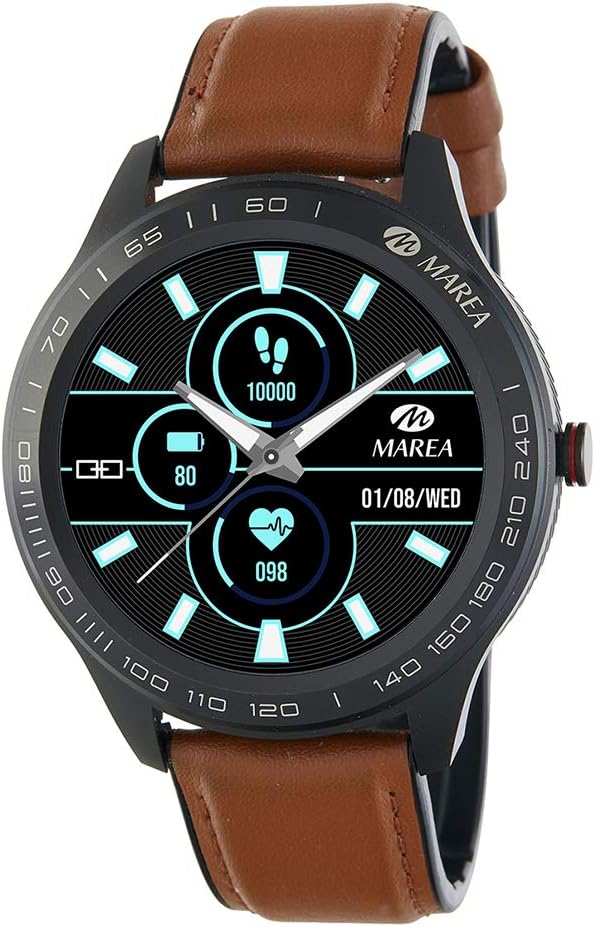
Image: Marea Smart Watch B60001/5. This image shows the watch face displaying steps (10000), battery level (80%), heart rate (098), and date (01/08/WED). The watch has a black casing and a brown leather strap.
2. Konfiguracja początkowa
2.1 Ładowanie zegarka
Before first use, fully charge your Marea Smart Watch. Connect the charging cable to the charging port on the back of the watch and plug the USB end into a power adapter (not included) or a computer's USB port. The watch display will indicate charging status.
- Pełne naładowanie trwa zazwyczaj około 2 godzin.
- Battery life is approximately 5 to 7 days, depending on usage.
2.2 Instalacja i parowanie aplikacji
To unlock the full potential of your Marea Smart Watch, you need to install the dedicated application on your smartphone and pair the devices.
- Pobierz aplikację: Szukaj the "Marea Smart" app in your smartphone's app store (Google Play Store for Android or Apple App Store for iOS).
- Zainstaluj aplikację: Aby zainstalować aplikację, postępuj zgodnie z instrukcjami wyświetlanymi na ekranie.
- Włącz Bluetooth: Upewnij się, że Bluetooth jest włączony w Twoim smartfonie.
- Otwórz aplikację: Launch the Marea Smart app and follow the prompts to create an account or log in.
- Sparuj zegarek: Within the app, navigate to the device pairing section. The app will search for available devices. Select "Marea B60001/5" from the list to initiate pairing. Confirm the pairing request on both your watch and smartphone if prompted.
Wymagania systemowe: iOS 8.0 or higher / Android 5.1 or higher.
3. Instrukcja obsługi
3.1 Podstawowa nawigacja
The Marea Smart Watch features a 1.39-inch touchscreen display. Swipe left, right, up, or down to navigate through different menus and functions. Tap to select an option or confirm an action. The side button typically serves as a power button or a back button, depending on the context.
3.2 Funkcje monitorowania stanu zdrowia
Your watch is equipped with various sensors to monitor your health metrics:
- Tętno: Ciągle monitoruje tętno.
- Ciśnienie krwi: Podaje szacunkowe odczyty ciśnienia krwi.
- Elektrokardiogram (EKG): Records ECG data.
- Tlen we krwi: Mierzy saturację krwi tlenem (SpO2).
- Monitorowanie snu: Monitoruje wzorce i jakość snu.
- Przypomnienie o wodzie: Przypomina o piciu wody w ustalonych odstępach czasu.
Uwaga: Dane z monitorowania stanu zdrowia mają charakter wyłącznie poglądowy i nie powinny być wykorzystywane do diagnozy ani leczenia. W przypadku problemów zdrowotnych należy skonsultować się z lekarzem.
3.3 Funkcje śledzenia aktywności
Track your daily activities and fitness goals:
- Kroki: Zlicza liczbę kroków wykonanych w ciągu dnia.
- Dystans: Szacuje pokonany dystans na podstawie wykonanych kroków.
- Calories Consumed: Oblicza liczbę kalorii spalanych podczas aktywności.
- Step Goal: Allows you to set and track daily step targets.
- Przypomnienie o siedzącym trybie życia: Otrzymujesz powiadomienie, gdy jesteś zbyt długo nieaktywny.
- Chronograf: Funkcja stopera do pomiaru czasu czynności.
3.4 Powiadomienia
Once paired with your smartphone, your Marea Smart Watch can display notifications:
- Powiadomienia o połączeniach: Otrzymuj powiadomienia o połączeniach przychodzących.
- Powiadomienia o wiadomościach: View przychodzące wiadomości tekstowe.
- Powiadomienia w mediach społecznościowych: Otrzymuj powiadomienia z podłączonych aplikacji mediów społecznościowych.
Ensure app permissions are granted on your smartphone for notifications to function correctly.
3.5 Inne funkcje
- Alarmy: Set multiple alarms through the app.
- Pilot do sterowania muzyką: Steruj odtwarzaniem muzyki na swoim smartfonie bezpośrednio z zegarka.
- Zdalne sterowanie kamerą: Używaj zegarka jako zdalnego wyzwalacza migawki aparatu w smartfonie.
- Znajdź zegarek: Użyj aplikacji, aby zlokalizować swój zegarek, jeśli znajduje się w zasięgu Bluetooth.
- Znajdź telefon: Use your watch to make your phone ring if it's within Bluetooth range.
4. Konserwacja i pielęgnacja
To ensure the longevity and proper functioning of your Marea Smart Watch, follow these care guidelines:
- Czyszczenie: Regularnie przecieraj zegarek i pasek miękką, suchą ściereczką. W razie potrzeby użyj lekko wilgotnej ściereczki.amp cloth, then dry thoroughly. Avoid harsh chemicals or abrasive materials.
- Wodoodporność: The watch has an IP67 protection rating, meaning it is resistant to dust and can withstand immersion in water up to 1 meter for 30 minutes. It is suitable for daily use and light splashes, but not recommended for swimming, diving, or hot showers.
- Temperatura: Unikaj wystawiania zegarka na działanie ekstremalnych temperatur (wysokiej lub niskiej) i bezpośredniego światła słonecznego przez dłuższy czas.
- Składowanie: Jeśli zegarek nie będzie używany przez dłuższy czas, należy go przechowywać w chłodnym i suchym miejscu.
5. Rozwiązywanie Problemów
If you encounter issues with your Marea Smart Watch, refer to the following common solutions:
- Zegarek się nie włącza: Upewnij się, że zegarek jest w pełni naładowany. Podłącz go do ładowarki na co najmniej 30 minut.
- Nie można sparować ze smartfonem:
- Upewnij się, że Bluetooth jest włączony w Twoim smartfonie.
- Upewnij się, że zegarek znajduje się w zasięgu Bluetooth (zazwyczaj 10 metrów).
- Uruchom ponownie zegarek i smartfon.
- Check if the Marea Smart app is updated to the latest version.
- Zapomnij urządzenie w ustawieniach Bluetooth w telefonie i spróbuj sparować je ponownie za pośrednictwem aplikacji.
- Powiadomienia nie zostały odebrane:
- Verify that notifications are enabled in the Marea Smart app.
- Check your smartphone's settings to ensure the app has permission to send notifications.
- Upewnij się, że zegarek jest połączony przez Bluetooth.
- Niedokładne dane dotyczące zdrowia: Upewnij się, że zegarek ściśle przylega do nadgarstka, na szerokość około jednego palca nad kością nadgarstka. Unikaj nadmiernego poruszania podczas pomiarów.
- Krótka żywotność baterii: Reduce screen brightness, disable continuous heart rate monitoring if not needed, and limit the number of notifications.
Jeśli problem będzie się powtarzał, skontaktuj się z obsługą klienta.
6. Specyfikacje
| Marka | Marea |
| Numer modelu | B60001 |
| Rozmiar wyświetlacza | 1.39 cali |
| System operacyjny | iOS and Android (iOS 8.0+, Android 5.1+) |
| Technologia łączności | Bluetooth |
| Cechy specjalne | Chronograph, Alarm, Health Monitoring (HR, BP, ECG, SpO2, Sleep), Activity Tracking |
| Kompatybilne urządzenia | Smartfon |
| Pojemność baterii | 160 mAh |
| Żywotność baterii | 5 do 7 dni |
| Ocena ochrony wody | IP67 |
| Kolor | Brązowy |
| GPS | Brak GPS-u |
7. Gwarancja i wsparcie
For warranty information, please refer to the documentation provided at the time of purchase or contact your retailer. If you require technical assistance or have questions not covered in this manual, please visit the official Marea webodwiedź witrynę lub skontaktuj się z działem obsługi klienta.
Zachowaj dowód zakupu na potrzeby roszczeń gwarancyjnych.