Wstęp
The Fender Mustang LT50 is a versatile 50-watt guitar amplifier designed for both practice and performance. It features a high-quality 12-inch speaker, a user-friendly interface with a full-color display, and a comprehensive collection of presets and effects. This amplifier is equipped with a USB audio interface for recording and can be managed with the free Fender TONE 3.0 software.
Główne cechy
- 50 watów mocy: Zapewnia ample volume for home practice, rehearsals, and small to medium-sized gigs.
- 12-inch Speaker: Delivers clear and full sound across various volume levels.
- Przyjazny dla użytkownika interfejs: Features a full-color display for easy navigation and control.
- 30 Preloaded Presets: Offers a wide range of electric guitar tones suitable for various music genres.
- 25 Onboard Effects: Includes multiple distortion, overdrive, compression, modulation, reverb, delay, and octave effects.
- Interfejs audio USB: Enables direct recording to a computer and integration with Fender TONE 3.0 software for editing and managing presets.
- Wejście pomocnicze: Allows connection of external audio devices for playing along with music.
- Wyjście słuchawkowe: Do cichej praktyki.
Organizować coś
- Rozpakowywanie: Ostrożnie usuń amplifier from its packaging. Ensure all components are present and undamaged.
- Podłączenie zasilania: Podłącz przewód zasilający do amplifier's input and then to a grounded electrical outlet.
- Podłączenie gitary: Podłącz gitarę do WEJŚCIE jack na amplifier's control panel using a standard 1/4-inch instrument cable.
- Auxiliary Devices (Optional): For playing along with external audio, connect your device to the AUX input using a 1/8-inch stereo cable.
- Słuchawki (opcjonalnie): For silent practice, plug headphones into the SŁUCHAWKI podnośnik.
- Połączenie USB (opcjonalnie): Połącz amplifier to your computer via the USB port for recording or using Fender TONE 3.0 software.
Before powering on, ensure all connections are secure and volume knobs are set to a low level.
Instrukcja obsługi
Kontrola nadview

This image displays the top control panel of the Fender Mustang LT50, highlighting the various knobs and buttons for sound shaping and navigation.
- WEJŚCIE: Gniazdo 1/4 cala do podłączenia gitary.
- AUX: 1/8-inch stereo input for external audio sources.
- SŁUCHAWKI: 1/8-inch stereo output for headphones.
- ZDOBYĆ: Adjusts the input sensitivity and amount of overdrive/distortion.
- TOM: Controls the overall output volume of the selected preset.
- TREBLE, MIDDLE, BASS: Tone controls to shape the high, mid, and low frequencies.
- MISTRZ: Kontroluje ogólną głośność wyjściową ampliyfikator.
- DATA WHEEL: Used to scroll through presets, adjust parameters, and navigate menus. Press to confirm selections.
- Z POWROTEM: Powrót do poprzedniego menu lub ekranu.
- RATOWAĆ: Saves current amplifier settings as a preset.
- MENU: Accesses the main menu for advanced settings and options.
- TAP/TUNER: Tap to set delay/tremolo tempo; hold to activate the built-in tuner.
- PRZEŁĄCZNIK WŁĄCZ / WYŁĄCZ: Moce amplifier włączony lub wyłączony.
- USB: Connects to a computer for recording and software control.
Selecting and Saving Presets
The Mustang LT50 comes with 30 preloaded presets and offers 30 user-programmable slots. To select a preset, rotate the KOŁO DANYCH. The display will show the preset number and name. To save your customized settings as a new preset or overwrite an existing one, press the RATOWAĆ i postępuj zgodnie z instrukcjami wyświetlanymi na ekranie.
Using Onboard Effects
Ten amplifier includes 25 different effects. These effects are integrated into the presets. You can edit the effects within a preset by navigating through the menu using the MENU przycisk i KOŁO DANYCH. Adjust individual effect parameters to customize your sound.
USB Audio Interface and Fender TONE 3.0
The integrated USB audio interface allows you to connect the amplifier directly to your computer for recording your guitar. Additionally, you can download the free Fender TONE 3.0 software for Mac or PC. This software provides an intuitive platform to edit, store, and manage your amplifier's presets, and access a community of user-created tones.
Konserwacja
- Czyszczenie: Do czyszczenia zewnętrznej części urządzenia używaj miękkiej, suchej szmatki amplifier. Unikaj środków czyszczących o właściwościach ściernych i rozpuszczalników.
- Składowanie: Przechowuj amplifier in a dry environment, away from extreme temperatures and direct sunlight.
- Wentylacja: Zapewnij odpowiednią wentylację wokół ampZabezpiecz przed przegrzaniem. Nie blokuj otworów wentylacyjnych.
- Pielęgnacja kabli: Regularly inspect all cables for damage. Replace frayed or damaged cables immediately.
- Ochrona głośników: Avoid placing heavy objects on the speaker grille.
Rozwiązywanie problemów
| Problem | Możliwa przyczyna | Rozwiązanie |
|---|---|---|
| Brak dźwięku | Brak zasilania, amplifier off, volume low, guitar cable faulty, incorrect input selected. | Sprawdź podłączenie zasilania, włącz amplifier, increase volume (Gain, Volume, Master), test guitar cable, ensure guitar is plugged into INPUT. |
| Zniekształcony dźwięk | Gain too high, faulty cable, speaker damage. | Reduce GAIN setting, test with a different cable, contact support if speaker damage is suspected. |
| Sterowanie nie reaguje | Tymczasowy błąd oprogramowania. | Włącz amplifier off, wait 10 seconds, then turn it back on. |
If you encounter issues not covered here, or if solutions do not resolve the problem, please contact Fender customer support for assistance.
Specyfikacje
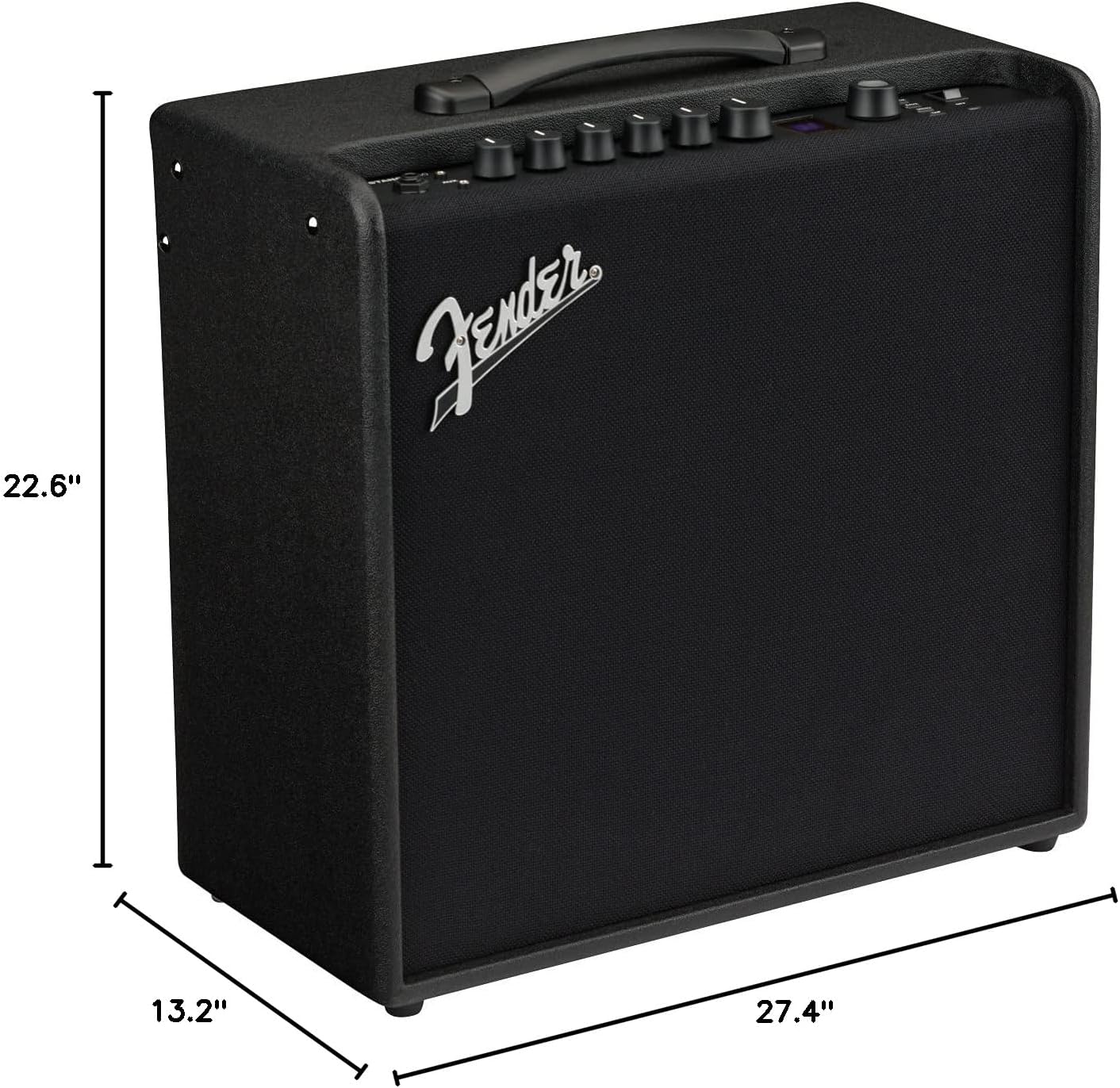
This image illustrates the physical dimensions of the Fender Mustang LT50 ampliyfikator.
- Numer modelu: 2311200000
- Moc wyjściowatage: 50 watów
- Rozmiar głośnika: 12 cali
- Waga przedmiotu: 23.5 funta
- Wymiary produktu: 27.4 x 22.6 x 13.2 cala (szerokość x wysokość x głębokość)
- Typ materiału: Drewno
- Typy złączy: 6.35 mm jack (Input), USB, 1/8-inch Aux, 1/8-inch Headphone
- Źródło zasilania: Elektryczny przewodowy
Gwarancja i wsparcie
The Fender Mustang LT50 Guitar Amplifier jest dostarczany z 2-roczna ograniczona gwarancja. This warranty covers defects in materials and workmanship from the original purchase date. For detailed warranty terms, service, or technical support, please visit the official Fender website or contact Fender customer service directly.
For additional resources and community support, consider exploring the Fender TONE community online.


