1. Wprowadzenie
Thank you for choosing the FeinTech LED Desk Lamp LTL00600. This high-quality desk lamp is designed to provide optimal lighting for your workspace while offering convenient features such as a USB charging port, adjustable brightness, and customizable color temperature. Please read this manual thoroughly before use to ensure proper operation and to maximize the lifespan of your product.
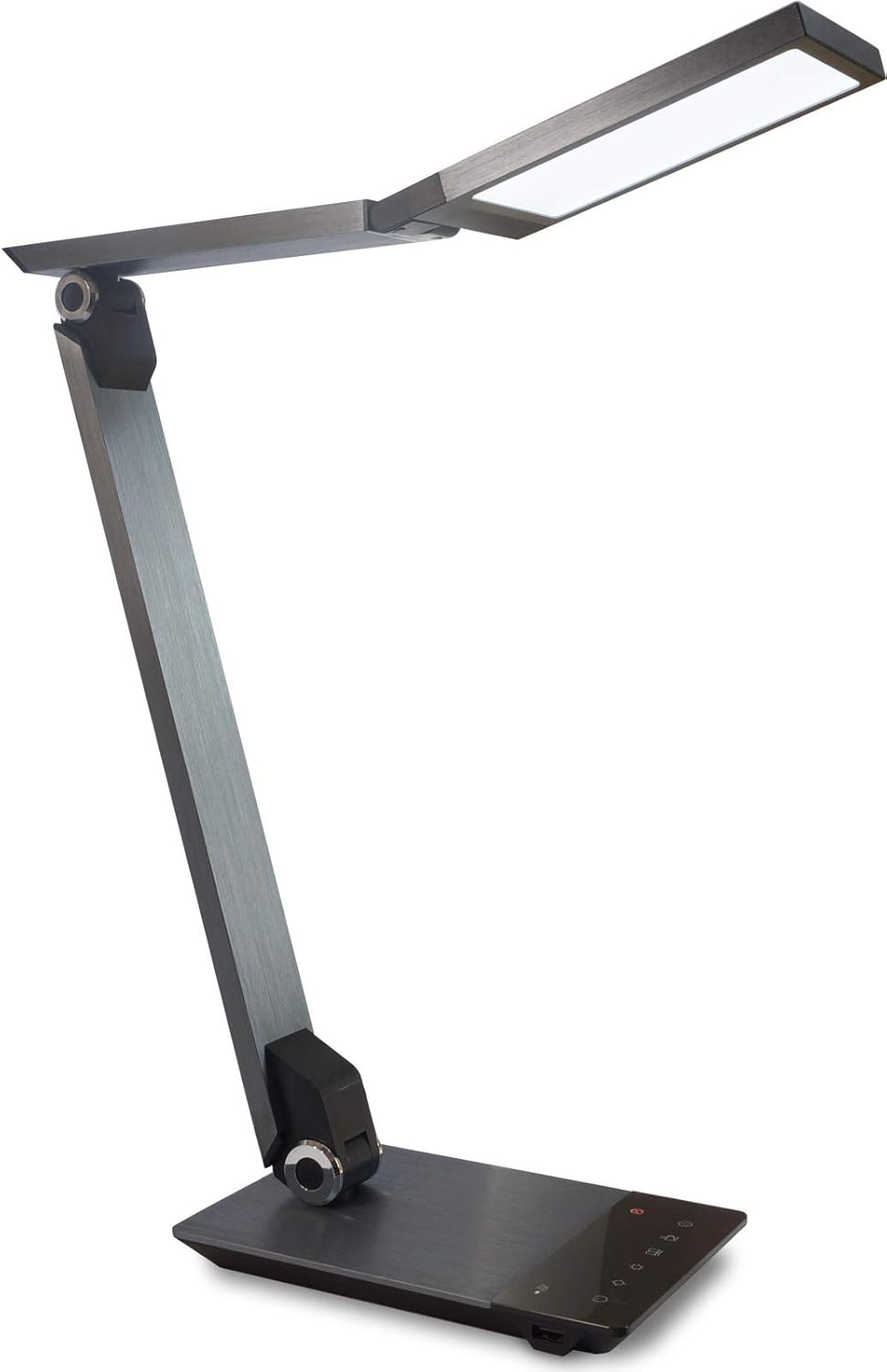
Image 1.1: FeinTech LED Desk Lamp LTL00600. This image displays the lamp w pozycji pionowej, pokażasing its brushed aluminum finish and sleek design.
2. Instrukcje bezpieczeństwa
Aby zapobiec uszkodzeniom lub obrażeniom, należy przestrzegać następujących środków ostrożności:
- Sprawdź, czy zasilacz jest podłączony do odpowiedniego gniazdka elektrycznego.
- Nie wystawiaj lamp to water or excessive humidity.
- Avoid disassembling or modifying the lamp. Repairs should only be performed by qualified personnel.
- Utrzymaj lamp z dala od źródeł ciepła i bezpośredniego światła słonecznego.
- Wyczyść lamp only with a soft, dry cloth. Do not use abrasive cleaners or solvents.
- Nie należy patrzeć bezpośrednio na źródło światła LED przez dłuższy czas.
3. Zawartość opakowania
Sprawdź, czy w przesyłce znajdują się wszystkie elementy:
- FeinTech LED Desk Lamp (Model: LTL00600)
- Zasilacz (12V/2A)
4. Koniec produktuview
Familiarize yourself with the components of your FeinTech LED Desk Lamp:
- Lamp Głowa: Contains the LED light source.
- Regulowane ramiona: Multiple joints for flexible positioning.
- Opierać: Provides stability and houses the control panel and USB port.
- Panel sterowania: Touch-sensitive buttons for power, brightness, color temperature, and timer.
- Port ładowania USB: Located on the side of the base for device charging.

Obraz 4.1: Widok z góry na dół view z lamp's base and control panel. This image highlights the touch-sensitive buttons for various functions.

Obraz 4.2: Bok view z lamp's base, showing the integrated USB charging port. This port allows for convenient charging of compatible devices.
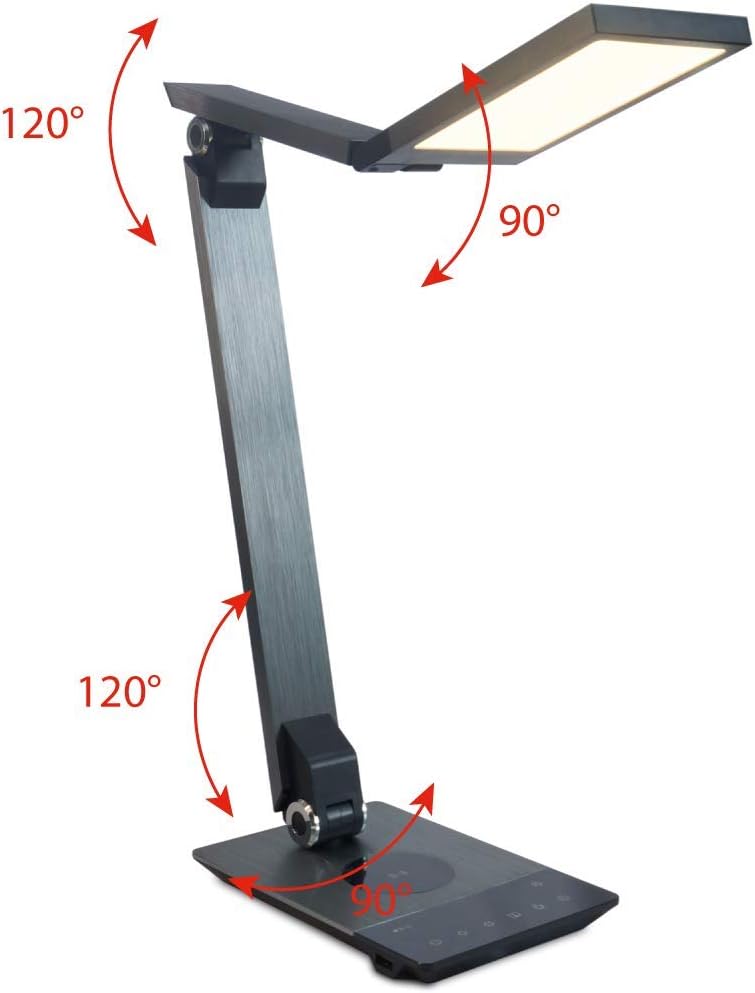
Image 4.3: Diagram illustrating the articulation angles of the lamp's joints. The lamp head can rotate 90 degrees, the upper arm 120 degrees, and the lower arm 120 degrees, allowing for flexible positioning.
5. Konfiguracja
Wykonaj poniższe kroki w celu wstępnej konfiguracji:
- Rozpakować: Ostrożnie wyjąć wszystkie elementy z opakowania.
- Umieszczenie: Umieść lamp base on a stable, flat surface. Ensure there is enough space for the lamp to be adjusted without obstruction.
- Podłącz zasilanie: Włóż kabel zasilacza do portu wejściowego DC z tyłu urządzenia.amp base. Plug the power adapter into a standard electrical outlet.
6. Instrukcja obsługi
The FeinTech LED Desk Lamp features intuitive touch controls on its base.
6.1 Włączanie/wyłączanie zasilania
- Dotknij Przycisk zasilania on the control panel (refer to Image 4.1) to turn the lamp włączony lub wyłączony.
6.2 Regulacja jasności (ściemnianie)
- Z lamp on, touch and hold the Zwiększenie jasności or Zmniejszona jasność buttons (refer to Image 4.1) to steplessly adjust the light intensity.
- Lamp base will vibrate slightly when the minimum or maximum brightness level is reached.
6.3 Regulacja temperatury barwowej
- Z lamp on, touch and hold the Color Temperature Up or Color Temperature Down buttons (refer to Image 4.1) to steplessly adjust the light color from warm white (2700K) to cool white (6500K).
- Lamp base will vibrate slightly when the minimum or maximum color temperature is reached.
6.4 Favorite Settings
- Lamp allows you to store and recall 3 favorite light settings (brightness and color temperature).
- To save a setting: Adjust the brightness and color temperature to your desired level. Then, touch and hold one of the Ulubione przyciski (refer to Image 4.1) until the lamp flashes briefly, indicating the setting is saved.
- To recall a setting: Simply touch the corresponding Ulubiony przycisk.
- The last used brightness and color temperature settings are automatically saved even after the lamp jest wyłączony.
6.5 Funkcja ładowania USB
- Connect your smartphone or other compatible device to the USB charging port on the side of the lamp base (refer to Image 4.2) using a suitable USB cable.
- The intelligent USB port delivers up to 2.4A for fast charging.
- An LED indicator will signal ongoing and completed charging status.
6.6 Funkcja timera
- Dotknij Przycisk timera (refer to Image 4.1) to activate the timer function.
- The first touch activates a 3-minute timer.
- A second touch activates a 1-hour timer.
- Lamp will automatically turn off after the selected time period.
7. Konserwacja
Aby utrzymać lamp's appearance and functionality:
- Zawsze odłączaj lamp od źródła zasilania przed czyszczeniem.
- Wytrzyj lamp miękką, suchą i niestrzępiącą się ściereczką.
- Do not use liquid or aerosol cleaners, as they may damage the finish or internal components.
- Avoid scratching the brushed aluminum surface.
8. Rozwiązywanie Problemów
Jeśli masz problemy z lamp, zapoznaj się z poniższymi typowymi problemami i rozwiązaniami:
| Problem | Możliwa przyczyna | Rozwiązanie |
|---|---|---|
| Lamp nie włącza się. | Brak zasilania. | Check if the power adapter is securely connected to the lamp i gniazdka elektrycznego. Sprawdź gniazdko za pomocą innego urządzenia. |
| Ładowanie przez USB nie działa. | Urządzenie nie jest kompatybilne lub kabel jest uszkodzony. | Ensure your device is compatible with USB charging. Try a different USB cable. Verify the lamp jest włączony. |
| Sterowanie dotykowe nie reaguje. | Tymczasowa usterka oprogramowania lub problem z zasilaniem. | Disconnect the power adapter for 30 seconds, then reconnect it. Ensure your fingers are clean and dry when operating the touch controls. |
9. Specyfikacje
| Numer modelu | 00600 LTL |
| Wymiary (dł. x szer. x wys.) | 36 x 13.5 x 44 cm (ok. 14.2 x 5.3 x 17.3 cala) |
| Waga | 1.84 kg (ok. 4.06 funta) |
| Tworzywo | Szczotkowane aluminium |
| Źródło światła | PROWADZONY |
| Max. Light Output | 500 lumens (1000 lux at 40 cm distance) |
| Temperatura barwowa (CCT) | 2700 K (Warm White) to 6500 K (Cool White) |
| Power Consumption (Lamp tylko) | Maks. 10 W |
| Power Consumption (Lamp & Charging) | Maks. 22 W |
| Wyjście USB | Do 2.4 A |
| Wejście Voltage (adapter) | 12 V / 2 A |
| Typ przełącznika | Dotykać |

Image 9.1: Diagram showing the dimensions of the FeinTech LED Desk Lamp. Lamp measures approximately 36 cm in length, 13.5 cm in width, and 44 cm in height.
10. Gwarancja i wsparcie
FeinTech products are designed for reliability and performance. For warranty information or technical support, please refer to the warranty card included with your purchase or visit the official FeinTech webStrona. Zachowaj dowód zakupu na wypadek roszczeń gwarancyjnych.


