Wstęp
The Douk Audio VU56C is a high-resolution 56-bit per channel LED music spectrum display designed to visually represent audio levels. It features 112-bit stereo display, offering real-time visualization of sound changes. This device enhances your listening experience by adding a dynamic visual element to your audio system.

Przód view of the Douk Audio VU56C 56-Bit Level Meter, showcasing its LED display.
Główne cechy
- Wyświetlacz o wysokiej rozdzielczości: Adopts MCU to process audio signals, providing 56 bits per channel for a total of 112 bits stereo display.
- Adjustable Input Level (Gain): Easily control input signals for optimal display effects.
- Five Display Effects: Includes Main beam, Main beam + peak point drop, Left and right channel beams mirroring-display, Left and right channel beams mirroring-display + peak point drop, and Spring beam.
- Independent Setting Items: All display parameters (descent speed of main beam, descent speed of peak point, stay time of peak point) are independently adjustable with 16-level speed settings.
- Clean Audio Path: Power supply is isolated from audio input/output circuits to prevent interference with sound quality.
- Szeroka kompatybilność: Standard stereo L/R RCA input and output for connection with mobile phones, computers, CD players, preamps, moc amplifiers, and studio mixers.
Zawartość opakowania
Sprawdź, czy w przesyłce znajdują się wszystkie elementy:
- 1x Finished LED Music Spectrum (Douk Audio VU56C)
- 1x kabel mikro-USB
- 1 Set x Stand
- 1 Set x Isolation Stand Feet
- 1x Instrukcja obsługi

Image showing the Douk Audio VU56C, Micro-USB cable, stand components, and isolation feet included in the package.
Organizować coś
1. Podłączanie dźwięku i zasilania
Connect your audio source (e.g., CD player, computer, phone) to the IN RCA ports on the back of the VU56C. Connect the NA ZEWNĄTRZ RCA ports to your audio receiver, amplifier, or mixer. Power the device using the provided Micro-USB cable connected to a DC 5V/100mA power source.

Diagram illustrating the audio input (IN) from sources like phones or computers, and audio output (OUT) to devices such as ampliyfikatory lub preamps, along with the GAIN knob, SET button, PREV/NEXT buttons, USB power input, and Ground set switch.
2. Montaż stojaka
The VU56C comes with a stand for vertical placement. Ensure to mount the stand components with the same serrations on the same side for stability. Attach the isolation stand feet to the bottom of the unit or stand as desired.
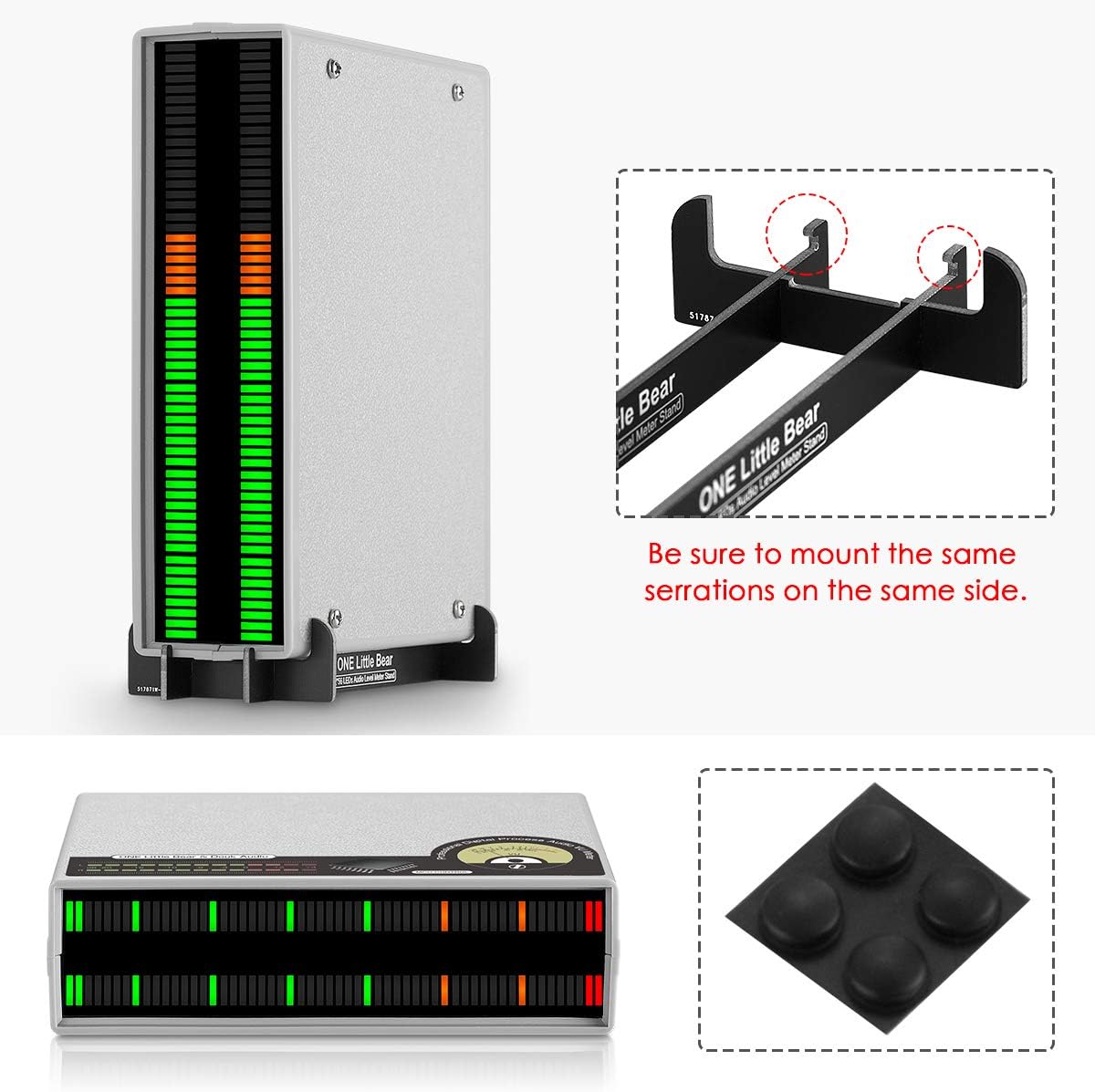
Image showing the vertical stand assembly for the VU56C and the included isolation stand feet.
Instrukcja obsługi
1. Włączanie/wyłączanie zasilania
The device supports power on/off functionality and power-off memory. To turn on, press and hold the 'SET' button for 3 seconds. To turn off, press and hold the 'SET' button again for 3 seconds.
2. Adjusting Input Level (GAIN)
Użyj OSIĄGAĆ knob on the back of the unit to adjust the input audio level. This helps in achieving the best visual beating effects on the LED display, matching the intensity of your audio signal.
3. Changing Display Effects
The VU56C offers 5 distinct display effects. In normal operating mode (not setup mode), use the POPRZEDNI I NASTĘPNY buttons to cycle through the different display effects:
- Światło główne
- Main beam + peak point drop
- Left and right channel beams mirroring-display
- Left and right channel beams mirroring-display + peak point drop
- Spring beam (Note: This effect does not support setting item adjustments.)
4. Setup Mode and Parameter Adjustments
To enter setup mode, press the USTAWIĆ button briefly. In setup mode, the 'Flash LED' indicates the current setting option value. Use the POPRZEDNI I NASTĘPNY buttons to change the value of the selected parameter. Press the USTAWIĆ button again to move to the next option or to exit setup mode.
The adjustable parameters (each with 16-level speed adjustments) include:
- The descent speed of the main beam
- The descent speed of the peak point
- The stay time of the peak point
All setup parameter changes will be displayed in real-time on the 'Preview bar'.

Diagram explaining the main display bar, peak LED, flash LED, and the setup bar with zones for main display falling speed, peak LED falling speed, and peak LED holding time settings. It also shows how to use PREV/NEXT and SET buttons in setup mode.
Official video demonstrating the various display effects and setup mode of the Douk Audio VU56C 56-Bit Music Spectrum Display.
Konserwacja
To ensure the longevity and optimal performance of your Douk Audio VU56C, follow these maintenance guidelines:
- Keep the device in a clean, dry environment, away from direct sunlight, high temperatures, and humidity.
- Avoid exposing the unit to water or other liquids.
- Czyść zewnętrzną część miękką, suchą ściereczką. Nie używaj silnych środków chemicznych ani ściernych środków czyszczących.
- Zapewnij odpowiednią wentylację wokół urządzenia, aby zapobiec przegrzaniu.
- Obchodź się z urządzeniem ostrożnie, aby uniknąć uszkodzeń fizycznych.
Rozwiązywanie problemów
If you encounter issues with your Douk Audio VU56C, please refer to the following common problems and solutions:
No Display or Weak Display
- Sprawdź moc: Ensure the Micro-USB cable is securely connected to a DC 5V/100mA power source and the unit is powered on.
- Sprawdź wejście audio: Verify that the audio source is playing and connected correctly to the IN Porty RCA.
- Dostosuj WZMOCNIENIE: Rotate the GAIN knob to increase the input level. If the input signal is too low, the display may not activate or appear weak.
Audible Noise in Audio System
Some users have reported audible noise (hum or clocking noise) when the unit is connected in pass-through mode or even when splitting the audio signal. This can be due to grounding issues or power supply interference.
- Ground Set Switch: Try adjusting the 'Ground set' switch on the back of the unit. Default is 'I'. If you experience back noise, switch to 'O'.
- Izoluj zasilanie: Use a different USB power adapter or a high-quality, isolated power supply.
- Audio Isolation: Consider using an audio isolation transformer or a mixing board between your audio source and the VU56C to electrically isolate the signal path.
Display Inaccuracy Between Channels
Due to the high resolution and MCU signal processing, a slight error of 1-3 bits between left and right channels may occur even with identical input signals. This is considered normal operation for this device.
Specyfikacje
| Liczba bitów | 56 bits / per channel |
| Opcje kolorów wyświetlacza | 32 bit green + 16 bit orange + 8 bit red |
| Interfejs zasilania | Mikro USB |
| Objętość roboczatage | DC 5V / 100mA |
| Wejście Voltage | 0 ~ 3 Vrms |
| Wejście audio | Stereo L/R RCA |
| Wyjście audio | Stereo L/R RCA |
| Wymiary (dł.*szer.*wys.) | 150 x 120 x 40 mm / 5.91 x 4.72 x 1.57 cala |
| Masa netto | 225g / 0.50 funta |
| Tworzywo | Akrylonitryl-butadien-styren (ABS) |
Gwarancja i wsparcie
Douk Audio products are designed for reliability and performance. For warranty information or technical support, please refer to the contact details provided with your purchase or visit the official Douk Audio webZachowaj paragon jako dowód zakupu na wypadek ewentualnych roszczeń gwarancyjnych.


