1. Wprowadzenie
The Audison SR 4.300 is a high-performance D-Class 4-channel amplifier designed for car audio systems. This amplifier delivers 85 W x 4 at 4 Ohms and features Audison D-Class Technology (ADT) for compact size without compromising audio quality. Its design incorporates extruded aluminum with rounded corners for easy installation in confined spaces, and generous heat sinks eliminate the need for internal cooling fans. This manual provides essential information for proper installation, operation, and maintenance of your SR 4.300 ampliyfikator.
2. Główne cechy
- ADC (Audison D-Class) Technology: Ensures high audio performance in a compact size with a 2 Ohm stable output stage.
- Kompaktowa konstrukcja: Extruded aluminum construction with fanless convection cooling.
- Universal Speakers Simulator (USS): Built-in for compatibility with various head units.
- Elastyczne dane wejściowe: Balanced high-noise rejection Speaker-In for OEM head units and RCA-In for aftermarket head units.
- Automatic Remote Turn-On/Off (ART): Automatically powers the amplifier on/off with the OEM head unit (can be enabled/disabled with Speaker-In inputs).
- Przedwyjście: Available even when using Speaker-In level inputs.
3. Informacje dotyczące bezpieczeństwa
Przed instalacją i uruchomieniem urządzenia należy uważnie przeczytać wszystkie instrukcje. amplifier. Failure to follow these guidelines may result in damage to the product, vehicle, or personal injury.
- Przed rozpoczęciem jakichkolwiek prac elektrycznych należy zawsze odłączyć ujemny zacisk akumulatora pojazdu.
- Ensure proper wiring gauge and fusing are used for power connections to prevent fire hazards.
- Zamontuj ampPrzechowywać w bezpiecznym miejscu, które zapewnia odpowiednią wentylację i jest chronione przed wilgocią i nadmiernym ciepłem.
- Unikaj instalowania amplifier in areas where it could interfere with vehicle safety systems or driver visibility.
- Jeśli masz jakiekolwiek wątpliwości dotyczące procesu instalacji, skonsultuj się z profesjonalnym instalatorem.
4. Zawartość opakowania
Sprawdź, czy w opakowaniu znajdują się wszystkie elementy:
- Audison SR 4.300 Klasa D 4-kanałowy Amplifier (Model: SR4.300-FBA)
- Instrukcja obsługi (ten dokument)
- Sprzęt montażowy (śruby itp.)
- Connection Terminals/Plugs (as supplied by manufacturer)
5. Instalacja i konfiguracja
Proper installation is crucial for optimal performance and safety. The Audison SR 4.300 amplifier przeznaczony jest do montażu powierzchniowego.
5.1. Miejsce montażu
Wybierz miejsce montażu, które jest suche, dobrze wentylowane i bezpieczne. Zapewnij wystarczającą ilość miejsca wokół amplifier for air circulation, especially around the heat sinks.
5.2. Połączenia ponadview
Ten amplifier features various input and output terminals for power, signal, and speaker connections. Refer to the images below for a visual guide.

Opis: This image displays the Audison SR 4.300 amplifier from a front-side perspective. Visible are the Audison logo, model number, and various input/output terminals including RCA inputs, speaker inputs, and power connections. The ribbed heat sink design is also prominent.

Opis: Na tym obrazie widać widok z góry view of the Audison SR 4.300 amplifier. The control panel is clearly visible, featuring switches and potentiometers for channel selection, input mode, filter settings (LP/HP/BP), and gain adjustments for channels A and B. Power and speaker terminals are also visible along the edges.
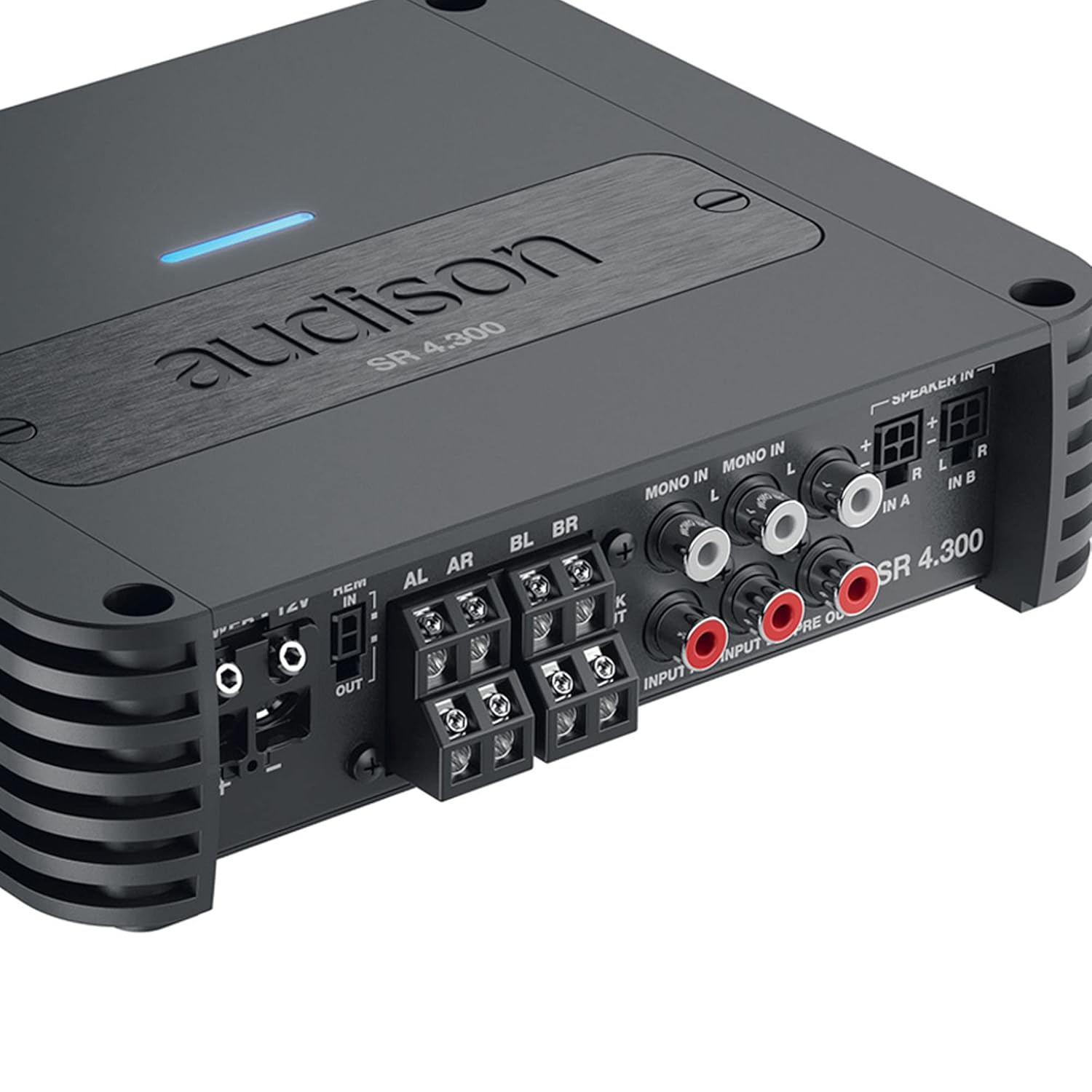
Opis: This close-up image focuses on the input and output section of the Audison SR 4.300 amplifier. It shows the RCA input jacks (MONO IN, IN A, IN B), speaker-level inputs, and pre-out connections. The power and remote turn-on terminals are also visible, along with the speaker output terminals.
5.3. Połączenia zasilania
- Connect the main power cable (positive +12V) to the amplifier's +12V terminal. Ensure an appropriate fuse (1 x 30A) is installed close to the vehicle's battery.
- Podłącz kabel uziemiający do amplifier's GND terminal and to a clean, unpainted metal point on the vehicle chassis.
- Podłącz przewód zdalnego włączania do jednostki głównej amplifier's REM IN terminal. If using Speaker-In inputs with an OEM head unit, the ART (Automatic Remote Turn-On/Off) feature can be utilized, eliminating the need for a separate remote wire.
5.4. Wejścia sygnałowe
- Wejścia RCA: For aftermarket head units, connect RCA cables from the head unit's pre-outs to the amplifier's RCA-In terminals (IN A, IN B).
- Wejścia głośnikowe: For OEM head units without RCA outputs, connect the speaker wires directly to the amplifier's Speaker-In terminals. The built-in USS (Universal Speakers Simulator) ensures compatibility.
5.5. Wyjścia głośnikowe
Podłącz głośniki do amplifier's speaker output terminals (AL, AR, BL, BR). Ensure correct polarity (+/-) for each speaker. The amplifier supports 2 Ohm stable operation.
6. Instrukcja obsługi
Po zainstalowaniu skonfiguruj amplifier settings using the controls on the top panel (refer to Figure 2).
- Tryb wprowadzania: Select the appropriate input mode (e.g., 2-channel, 4-channel) based on your system configuration.
- Ustawienia filtra: Adjust the High-Pass (HP), Low-Pass (LP), or Band-Pass (BP) filters for each channel pair to optimize sound reproduction for your speakers.
- Regulacja wzmocnienia: Carefully set the gain levels for channels A and B to match the output voltage jednostki głównej. Zacznij od minimalnego wzmocnienia i powoli je zwiększaj, aż do uzyskania pożądanej głośności bez zniekształceń.
7. Konserwacja
The Audison SR 4.300 amplifier wymaga minimalnej konserwacji, aby zapewnić długotrwałą wydajność.
- Zachowaj ampUtrzymuj filtr w czystości, bez kurzu i zanieczyszczeń. Do czyszczenia używaj miękkiej, suchej ściereczki.
- Ensure that the heat sinks are not obstructed to allow for proper cooling.
- Okresowo należy sprawdzać szczelność i korozję wszystkich połączeń.
8. Rozwiązywanie Problemów
Jeśli masz problemy z urządzeniem amplifier, zapoznaj się z poniższymi typowymi krokami rozwiązywania problemów:
- Brak zasilania: Check the main fuse, power connections (+12V, GND, REM), and ensure the vehicle battery is charged.
- Brak dźwięku: Verify all input and output signal connections. Check head unit settings and amplifier gain levels. Ensure speakers are properly connected and functional.
- Zniekształcony dźwięk: Reduce gain levels. Check for proper filter settings. Ensure speaker impedance matches ampmożliwości lifiera.
- Amplifier Przegrzanie: Zapewnij odpowiednią wentylację wokół amplifier. Check speaker impedance. Reduce volume levels.
If problems persist, consult an authorized Audison service center.
9. Specyfikacje
| Parametr | Wartość |
|---|---|
| Numer modelu | SR4.300-FBA |
| Objętość zasilaniatage / Bezpiecznik | 11 ÷ 15 V DC / 1 x 30 A |
| Objętość zasilania roboczegotage | 6.5V ÷ 17 VDC |
| Prąd jałowy | 1.6 A |
| Idling Current when off | 0.03mA |
| Consumption @ 14.4 VDC, 2Ω, Max Musical Power | 25 A |
| Wymiary opakowania | 10.2 x 7.91 x 3.7 cala |
| Waga | 4 funtów |
| Producent | Audison |
| Typ montażu | Montaż powierzchniowy |
10. Gwarancja i wsparcie
Audison products are manufactured to the highest quality standards. For warranty information, please refer to the warranty card included with your product or visit the official Audison website. For technical support or service inquiries, please contact your authorized Audison dealer or distributor.


