Wstęp
Dziękujemy za zakupasing the Muse M-1935 DJ Bluetooth Party Speaker. This powerful audio system is designed to deliver high-quality sound with dynamic light effects, perfect for any gathering. Featuring Bluetooth connectivity, USB playback, AUX input, and a microphone jack, it offers versatile entertainment options. Please read this manual carefully before using the device to ensure proper operation and to maximize its performance.
Ważne instrukcje bezpieczeństwa
- Przeczytaj te instrukcje.
- Zachowaj tę instrukcję.
- Przestrzegaj wszystkich ostrzeżeń.
- Postępuj zgodnie ze wszystkimi instrukcjami.
- Nie należy używać tego urządzenia w pobliżu wody.
- Czyścić wyłącznie suchą szmatką.
- Nie blokuj żadnych otworów wentylacyjnych. Zainstaluj zgodnie z instrukcjami producenta.
- Nie należy instalować w pobliżu źródeł ciepła, takich jak grzejniki, kratki wentylacyjne, piece lub inne urządzenia (w tym amp(lifiers) wytwarzające ciepło.
- Chroń przewód zasilający przed deptaniem i przytrzaśnięciem, zwłaszcza przy wtyczkach, gniazdkach i miejscach, w których wychodzi z urządzenia.
- Stosować wyłącznie dodatki/akcesoria wskazane przez producenta.
- Odłączaj urządzenie od zasilania podczas burzy z piorunami lub jeśli nie używasz go przez dłuższy czas.
- Wszelkie prace serwisowe należy zlecać wykwalifikowanemu personelowi serwisowemu. Serwisowanie jest wymagane, gdy urządzenie zostało w jakikolwiek sposób uszkodzone, np. przewód zasilający lub wtyczka są uszkodzone, płyn został wylany lub przedmioty wpadły do urządzenia, urządzenie zostało wystawione na działanie deszczu lub wilgoci, nie działa normalnie lub zostało upuszczone.
Zawartość opakowania
Sprawdź, czy w przesyłce znajdują się wszystkie wymienione poniżej elementy:
- Muse M-1935 DJ Party Speaker
- Zdalne sterowanie
- AUX IN Cable (3.5mm)
- Mikrofon przewodowy
- Kabel zasilający
- Instrukcja obsługi

Image showing the Muse M-1935 DJ Party Speaker along with its standard accessories: a remote control, a 3.5mm AUX input cable, and a wired microphone. These components are essential for full functionality and versatile use of the speaker system.
Produkt ponadview
The Muse M-1935 DJ is a tower-type party speaker featuring a robust design and multiple connectivity options. It includes an amber LED display for clear information, integrated color lights and flash effects for dynamic visuals, and various input ports for audio playback.
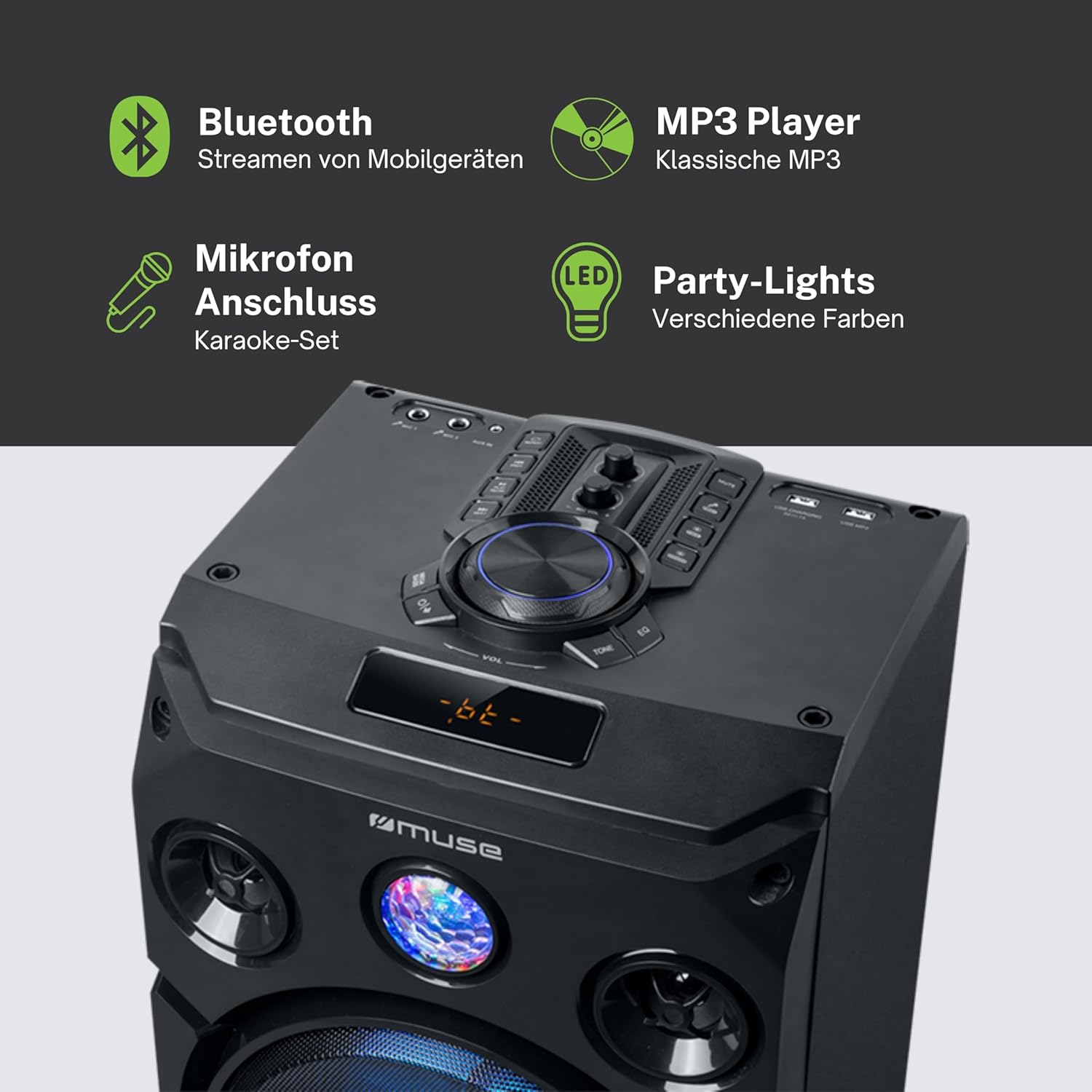
Na tym obrazie przedstawiono szczegółowo view of the speaker's key features, including the control panel at the top, the amber LED display, and the integrated party lights. Icons indicate support for Bluetooth streaming, MP3 playback via USB, microphone connection for karaoke, and dynamic party light effects.
Organizować coś
1. Podłączenie zasilania
- Upewnij się, że głośnik jest umieszczony na stabilnej, płaskiej powierzchni.
- Connect the power cable to the AC IN port on the back of the speaker.
- Podłącz drugi koniec kabla zasilającego do standardowego gniazdka ściennego (prąd zmienny 100–240 V, 50/60 Hz).
2. Audio Connections (Optional)
- Wejście AUX: For connecting external audio devices (e.g., smartphone, tablet, MP3 player) via a 3.5mm audio cable. Insert one end of the AUX cable into the AUX IN port on the speaker and the other end into your device's headphone jack.
- Odtwarzanie z USB: Włóż dysk flash USB zawierający dźwięk w formacie MP3 files into the USB port. The speaker will automatically detect and begin playing compatible files.
3. Złącze mikrofonu (opcjonalnie)
- Connect the wired microphone to the MIC IN jack on the speaker. Adjust the microphone volume using the dedicated control on the speaker's panel.
Instrukcja obsługi
1. Włączanie/wyłączanie zasilania
- Naciśnij MOC button on the control panel or remote control to turn the speaker on or off.
2. Parowanie Bluetooth
- Włącz głośnik. Wyświetlacz LED pokaże aktualny tryb.
- Naciśnij TRYB button to select Bluetooth mode. The display will show "BT" and an indicator will flash, signifying it's ready for pairing.
- Na urządzeniu z włączoną funkcją Bluetooth (smartfonie, tablecie itp.) włącz Bluetooth i wyszukaj dostępne urządzenia.
- Select "MUSE M-1935 DJ" from the list. Once paired, the speaker will emit a confirmation sound, and the Bluetooth indicator will stop flashing.
- Teraz możesz bezprzewodowo przesyłać dźwięk ze swojego urządzenia do głośnika.
3. Odtwarzanie USB
- Insert a USB flash drive into the USB port. The speaker will automatically switch to USB mode and begin playing MP3 files.
- Użyj ODTWÓRZ/PAUZA, NASTĘPNY, I POPRZEDNI przyciski do sterowania odtwarzaniem.
4. Wejście AUX
- Connect your external audio device to the AUX IN port using the provided 3.5mm cable.
- Naciśnij TRYB button to select AUX mode. Audio will now play through the speaker.
5. Obsługa radia FM
- Naciśnij TRYB przycisk, aby wybrać tryb radia FM.
- Naciśnij i przytrzymaj ODTWÓRZ/PAUZA button to initiate an automatic scan for FM stations. The speaker will save found stations as presets (up to 60 presets).
- Użyj NASTĘPNY I POPRZEDNI przyciski do poruszania się po zapisanych stacjach.
6. Użycie mikrofonu
- Ensure the microphone is connected to the MIC IN jack.
- Dostosuj głośność mikrofonu za pomocą dedykowanego pokrętła GŁOŚNOŚĆ MIKROFONU pokrętło na panelu sterowania.
7. Sterowanie efektami świetlnymi
- The speaker features integrated color lights and flash effects. Use the ŚWIATŁO button on the control panel or remote to cycle through different light modes or turn them off.
8. Regulacja głośności i tonu
- Dostosuj głośność główną za pomocą dużego pokrętła TOM pokrętło.
- Użyj BASS I POTROIĆ controls (if available) to fine-tune the audio output.

This diagram visually represents the diverse functionalities of the speaker, such as dynamic color and flash lighting, the clear amber LED display, USB connectivity for MP3 playback and charging, built-in FM radio with extensive preset memory, and a versatile AUX input for external devices.
Konserwacja
- Czyszczenie: Disconnect the power before cleaning. Use a soft, dry cloth to wipe the exterior of the speaker. Do not use liquid cleaners or aerosol sprays.
- Składowanie: Jeśli głośnik nie będzie używany przez dłuższy czas, należy przechowywać go w chłodnym i suchym miejscu, z dala od bezpośredniego światła słonecznego i ekstremalnych temperatur.
- Pielęgnacja baterii: The speaker contains a Lithium-ion battery. For optimal battery life, avoid fully discharging the battery frequently and store the unit with a partial charge if not used for long periods.
Rozwiązywanie problemów
| Problem | Możliwa przyczyna | Rozwiązanie |
|---|---|---|
| Brak zasilania | Power cable not connected; Power outlet faulty; Speaker turned off. | Ensure power cable is securely connected. Try a different power outlet. Press the POWER button to turn on the speaker. |
| Brak dźwięku | Zbyt niski poziom głośności; Wybrano niewłaściwy tryb wejściowy; Kabel audio nie jest prawidłowo podłączony (AUX); Bluetooth nie jest sparowany. | Increase volume. Select the correct input mode (Bluetooth, AUX, USB, FM). Check audio cable connections. Re-pair Bluetooth device. |
| Parowanie Bluetooth nie powiodło się | Głośnik nie jest w trybie parowania; Urządzenie jest za daleko; Zakłócenia. | Ensure speaker is in Bluetooth pairing mode. Move device closer to speaker (within 10m). Avoid obstacles and other wireless devices. |
| Odtwarzanie USB nie działa | Dysk USB nie jest poprawnie sformatowany; niezgodny file typy; dysk USB uszkodzony. | Ensure USB drive is FAT32 formatted. Only MP3 files are supported. Try a different USB drive. |
| Mikrofon nie działa | Microphone not connected; MIC VOL too low. | Ensure microphone is securely plugged into MIC IN. Increase the MIC VOL knob. |
Specyfikacje
| Funkcja | Specyfikacja |
|---|---|
| Numer modelu | M-1935 DJ |
| Moc wyjściowa | 400 watów |
| Typ głośnika | Wieża |
| Technologia łączności | Bluetooth, USB, AUX |
| Wejście audio | Microphone jacks, AUX IN (3.5mm) |
| Cechy specjalne | Bluetooth, Color Lights, Flash Effects, Amber LED Display, FM Radio (60 presets), USB Charging |
| Źródło zasilania | Electric Cable, Built-in Lithium-ion Battery |
| Tworzywo | Plastikowy |
| Kolor | Czarny |
| Wymiary produktu (dł. x szer. x wys.) | Wymiary 83.5 x 26.5 x 28.7 cm |
| Waga przedmiotu | 9.05 kilograma |
| Producent | MUZA |
| Kraj pochodzenia | Belgia |

This technical drawing provides precise measurements of the Muse M-1935 DJ speaker, indicating its height (835mm), width (287mm), and depth (265mm). These dimensions are crucial for planning placement and transportation.
Gwarancja i wsparcie
Gwarancja producenta
The Muse M-1935 DJ Party Speaker comes with a three-year warranty against manufacturing defects. Please retain your proof of purchase for warranty claims. This warranty covers defects in materials and workmanship under normal use. It does not cover damage caused by misuse, accidents, unauthorized modifications, or normal wear and tear.
Dostępność części zamiennych
Spare parts for this product are guaranteed to be available for 2 years from the date of purchase within the EU.
Obsługa klienta
For technical assistance, warranty service, or general inquiries, please contact Muse customer support. Refer to the official Muse webAby uzyskać najaktualniejsze dane kontaktowe, odwiedź witrynę lub dokumentację zakupu.


