Wstęp
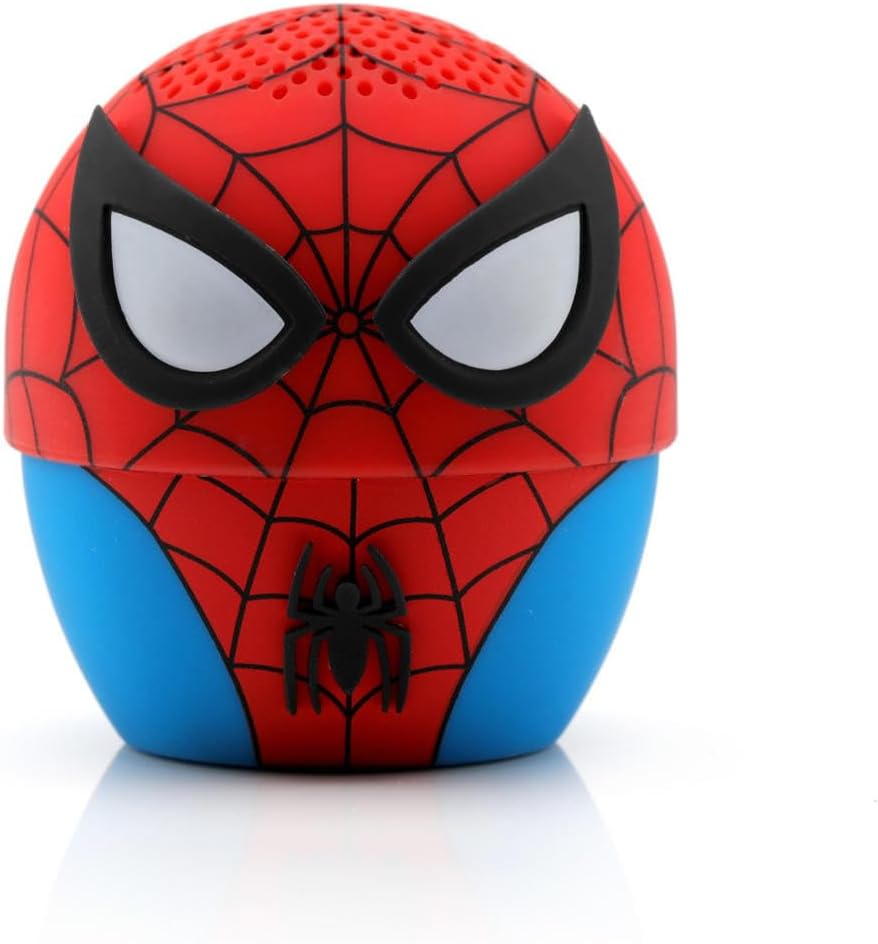
The Bitty Boomers Marvel Spider-Man Mini Bluetooth Speaker combines popular culture with portable audio technology. This ultra-portable speaker is designed for ease of use and delivers clear sound in a compact form factor.
Główne cechy obejmują:
- Ultra-Portable 2" Tall Speaker
- Bluetooth 5.0 Technology for Wireless Connectivity
- 30-Foot Wireless Range
- Over 4 Hours of Music Playtime on a Single Charge
- Rechargeable via Micro USB Cable (included)
- Ability to Connect 2 Bitty Boomers for a True Wireless Stereo Experience
- Integrated Selfie Remote Function
- Strap Included for Easy Attachment to Backpacks or Bags

The Bitty Boomers Spider-Man Mini Bluetooth Speaker fits comfortably in the palm of your hand.
Organizować coś
1. Ładowanie głośnika
Before initial use, fully charge your Bitty Boomers speaker. Connect the included Micro USB cable to the charging port on the speaker and the other end to a USB power source (e.g., computer, wall adapter). The LED indicator will show charging status.
2. Włączanie/wyłączanie zasilania
To power on the speaker, press and hold the power button located on the bottom of the unit until you hear an audible cue and the LED indicator lights up. To power off, press and hold the power button again until the LED turns off.

The power button and Micro USB charging port are located on the base of the speaker.
3. Parowanie Bluetooth
- Ensure your Bitty Boomers speaker is powered on and in pairing mode (LED will typically flash).
- Na urządzeniu mobilnym (smartfonie, tablecie itp.) przejdź do ustawień Bluetooth.
- Scan for available devices. You should see "BITTY BOOMER" appear in the list.
- Select "BITTY BOOMER" to connect. Once connected, you will hear a confirmation tone, and the LED indicator will change (e.g., solid blue).
Watch this instructional video for a visual guide on how to use your Bitty Boomer speaker.
Instrukcja obsługi
1. Single Speaker Playback
Once paired with your device, simply start playing audio from your device. The sound will be streamed wirelessly to your Bitty Boomers speaker.
2. Prawdziwe bezprzewodowe parowanie stereo (TWS)
To achieve a true wireless stereo experience, you can connect two Bitty Boomers speakers together:
- Ensure both Bitty Boomers speakers are powered on and not connected to any other Bluetooth device.
- Double-click the power button on one of the speakers. It will search for the second speaker.
- Once connected, you will hear a confirmation sound, and the two speakers will function as a stereo pair.
- Now, connect your mobile device to one of the paired Bitty Boomers via Bluetooth as described in the "Bluetooth Pairing" section.
3. Selfie Remote Function
Your Bitty Boomers speaker can also function as a remote shutter for your smartphone camera:
- Ensure your Bitty Boomers speaker is paired with your smartphone.
- Otwórz aplikację aparatu w smartfonie.
- Press the power button on your Bitty Boomers speaker once to capture a photo.
The included strap allows for easy portability and attachment to bags or wrists.
Konserwacja
- Czyszczenie: Do czyszczenia głośnika używaj miękkiej, suchej ściereczki. Unikaj stosowania silnych środków chemicznych i materiałów ściernych.
- Wodoodporność: The speaker is water-resistant, not waterproof. Avoid submerging it in water or exposing it to heavy rain.
- Pielęgnacja baterii: For optimal battery life, fully charge the speaker before long periods of non-use. Avoid extreme temperatures.
- Składowanie: Przechowuj głośnik w chłodnym, suchym miejscu, z dala od bezpośredniego światła słonecznego i ekstremalnych temperatur.
Rozwiązywanie problemów
- Głośnik nie włącza się: Ensure the speaker is fully charged. Connect it to a power source using the Micro USB cable.
- Nie można sparować z urządzeniem:
- Upewnij się, że Bluetooth jest włączony w Twoim urządzeniu.
- Sprawdź, czy głośnik jest w trybie parowania (migająca dioda LED).
- Przesuń głośnik bliżej urządzenia (na odległość nie większą niż 30 stóp).
- Turn off and restart both the speaker and your device.
- Brak dźwięku lub niski poziom głośności:
- Sprawdź poziom głośności głośnika i podłączonego urządzenia.
- Sprawdź, czy głośnik jest prawidłowo sparowany i podłączony.
- Krótka żywotność baterii: Ensure the speaker is fully charged before use. Battery performance may vary with volume levels and usage.
Specyfikacje
| Funkcja | Szczegół |
|---|---|
| Nazwa modelu | Malutkie boomery |
| Numer modelu przedmiotu | BITTYSPIDER |
| Wymiary | 2" gł. x 3" szer. x 5" wys. |
| Waga przedmiotu | 3 uncji |
| Technologia łączności | Bluetooth 5.0, USB |
| Zasięg bezprzewodowej | 30 stóp |
| Żywotność baterii | Over 4 Hours (on a single charge) |
| Źródło zasilania | Zasilanie bateryjne (wymagana 1 bateria litowo-polimerowa) |
| Typ głośnika | Głośnik wysokotonowy |
| Maksymalna moc wyjściowa głośnika | 5 watów |
| Poziom wodoodporności | Wodoodporny |
Co jest w pudełku
- Bitty Boomers Marvel Spider-Man Mini Bluetooth Speaker
- Kabel Micro USB
- Falrep

The product packaging displays the speaker, charging cable, and lanyard.
Gwarancja i wsparcie
This product comes with a limited warranty provided by the manufacturer, Fabrique Innovations. For detailed warranty information, technical support, or service inquiries, please refer to the documentation included with your product or visit the official Bitty Boomers webstrona.


