Wstęp
This user manual provides comprehensive instructions for the VTech SN5107 Amplified Accessory Handset. Designed to expand your VTech SN5127 or SN5147 Senior Phone System, this handset offers enhanced features such as amplified sound, large buttons, and a clear display, making communication more accessible and convenient. Please read this manual thoroughly to ensure proper setup, operation, and maintenance of your accessory handset.
Organizować coś
1. Rozpakowanie i komponenty
Carefully remove all components from the packaging. The package should contain the SN5107 accessory handset, a charging cradle, and a power adapter for the charging cradle. Ensure all parts are present before proceeding.

Image: The VTech SN5107 Amplified Accessory Handset resting in its charging cradle, showcasing its large buttons and clear display.
2. Instalacja baterii
Your handset comes with a rechargeable battery. Locate the battery compartment on the back of the handset. Insert the battery, ensuring the polarity matches the diagram inside the compartment. Close the battery compartment cover securely.
3. Ładowanie słuchawki
Connect the power adapter to the charging cradle and plug the other end into a standard electrical outlet. Place the handset in the charging cradle. The charge indicator light on the handset should illuminate, indicating that it is charging. For optimal performance, charge the handset for at least 16 hours before initial use.

Image: The VTech SN5107 handset positioned on its charging cradle on a wooden table, ready for use.
4. Registering the Accessory Handset
The SN5107 is an accessory handset and must be registered to a VTech SN5127 or SN5147 Senior Phone System base unit to function. Refer to the main system's user manual for detailed instructions on how to register new handsets. Typically, this involves placing the handset in the base unit's charger and pressing a registration button on the base.
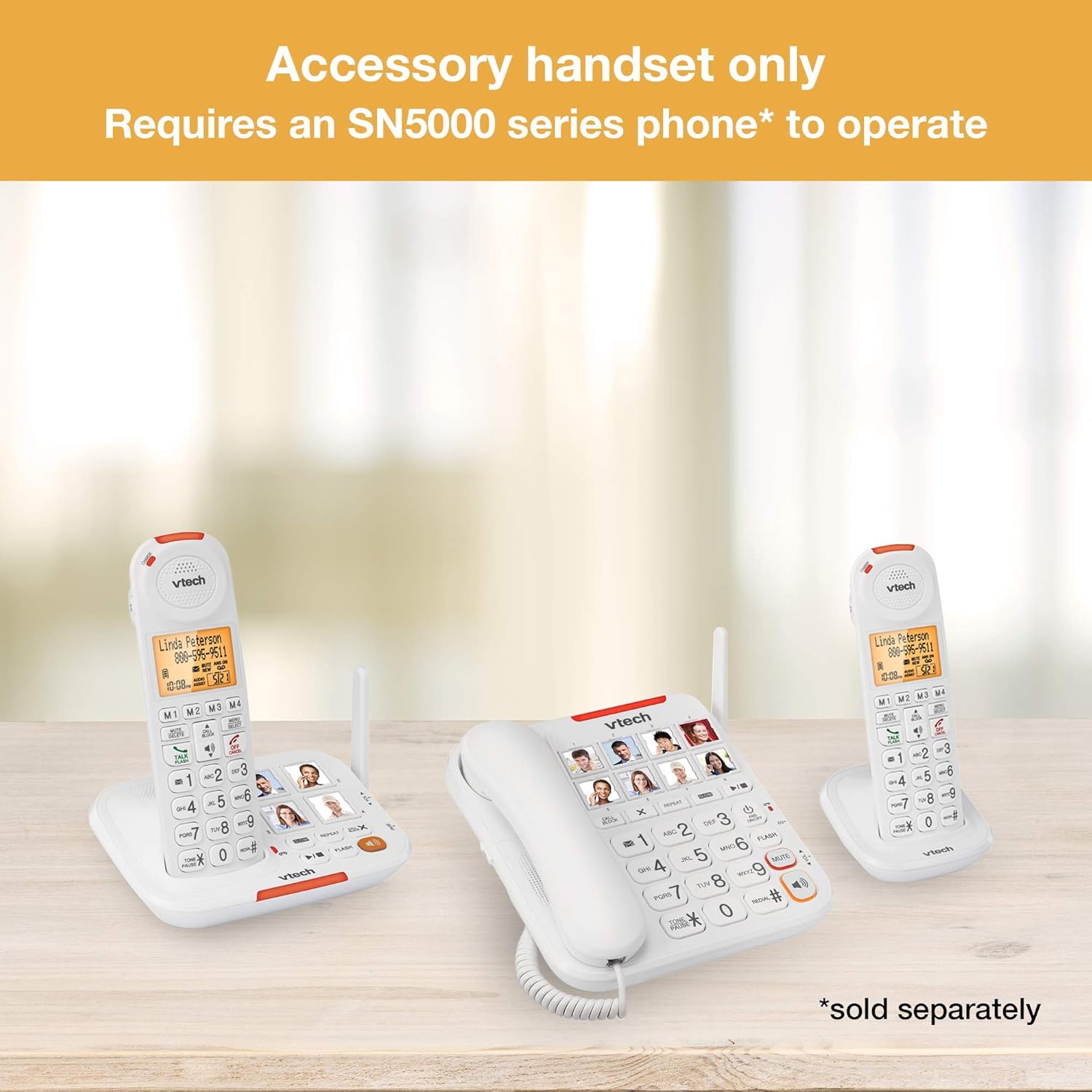
Image: An illustration showing the VTech SN5107 accessory handset alongside a main VTech SN5000 series phone system, indicating that the accessory handset requires the main unit to operate.
Instrukcja obsługi
1. Wykonywanie i odbieranie połączeń
- Zadzwonić: Naciśnij ROZMOWA/BŁYSK button, then dial the desired phone number using the large numeric keypad.
- Aby odebrać połączenie: Gdy zadzwoni telefon, naciśnij ROZMOWA/BŁYSK przycisk.
- Aby zakończyć połączenie: Naciśnij WYŁĄCZ/ANULUJ naciśnij przycisk lub odłóż słuchawkę z powrotem do stacji ładującej.

Obraz: Zbliżenie view of the VTech SN5107 handset, highlighting its oversized buttons and clear, backlit display for easy dialing and viewing.
2. Amplified Sound (50dB Audio Assist)
The SN5107 handset features 50dB Audio Assist for enhanced call volume. During a call, use the TOM buttons on the side of the handset to adjust the listening volume to your preferred level. This feature is particularly beneficial for users with hearing difficulties.

Obraz: strona A view of the VTech SN5107 handset, showing the conveniently located volume control buttons for easy audio adjustment during calls.
3. Inteligentna blokada połączeń
This handset is equipped with a smart call blocker that can store up to 1,000 names and numbers. To block a number during a call, press the ZADZWOŃ BLOK button. You can also manually add numbers to the block list through the handset's menu. This feature helps prevent unwanted nuisance calls.

Image: The VTech SN5107 handset with the "CALL BLOCK" button circled, indicating its function for managing unwanted calls.

Image: A graphic representation of the VTech SN5107 handset on a table, with a visual cue indicating that the smart call blocker prevents nuisance calls.
4. System odbierania połączeń
The main SN5127 or SN5147 system includes a built-in answering system with up to 14 minutes of recording time. You can access and manage messages from your SN5107 accessory handset. Refer to your main system's manual for detailed instructions on answering system operation.
5. Identyfikator dzwoniącego
The handset's large display screen shows caller ID information (name and number) for incoming calls, provided you subscribe to caller ID service from your telephone service provider. This allows you to screen calls before answering.
6. DECT 6.0 Technology
The SN5107 utilizes DECT 6.0 digital technology, which provides superior sound quality, security, and range. This technology helps eliminate interference from other wireless devices, ensuring clear conversations.
Konserwacja
1. Czyszczenie słuchawki
To clean your handset, use a soft, slightly damp cloth. Avoid using harsh chemicals or abrasive cleaners, as these can damage the surface. Do not immerse the handset or charging cradle in water.
2. Pielęgnacja baterii
To maximize battery life, always return the handset to the charging cradle when not in use. If the handset will not be used for an extended period, remove the battery to prevent leakage. The battery life can last up to 7 days on standby mode and up to 7 hours of talk time on a single charge.
Rozwiązywanie problemów
If you experience issues with your VTech SN5107 accessory handset, please refer to the following common problems and solutions:
| Problem | Możliwe rozwiązanie |
|---|---|
| Handset does not charge or power on. |
|
| "Out of Range" message displayed. |
|
| Brak sygnału wybierania lub niemożność wykonywania/odbierania połączeń. |
|
| Słaba jakość dźwięku lub szumy. |
|
If the problem persists after trying these solutions, please refer to the comprehensive troubleshooting section in your main SN5127 or SN5147 system user manual or contact VTech customer support.
Specyfikacje
- Model: SN5107-cr
- Wymiary produktu: 8.66 x 5.04 x 3.8 cala
- Waga przedmiotu: 11.4 uncji (0.71 funta)
- Baterie: 1 bateria specyficzna dla produktu (w zestawie)
- Czas rozmów telefonicznych: Do 7 godzin
- Czas czuwania: Do 7 dni
- Technologia: Technologia cyfrowa DECT 6.0
- Amplifikacja: 50dB Audio Assist
- System odbierania: Digital (up to 14 minutes recording time, managed by main system)
- Zgodne urządzenia: VTech SN5127, SN5147 Senior Phone Systems
- Kolor: Wielo
Gwarancja i wsparcie
As this product is listed as "Renewed," specific warranty terms may vary from new products. Please refer to the seller's or Amazon Renewed's policy regarding warranty coverage for renewed items. For technical support, product inquiries, or further assistance, please visit the official VTech support website or contact their customer service department. Keep your purchase receipt and product model number (SN5107-cr) readily available when seeking support.


