1. Wprowadzenie
Dziękujemy za zakupasing the Soundstream BTC-3100 Sound Tower Speaker. This device is designed to provide a versatile audio experience with its 360-degree sound output, integrated 20W subwoofer, and a unique detachable Bluetooth speaker for portable use. This manual provides essential information for safe operation, setup, and maintenance of your speaker system.
2. Instrukcje bezpieczeństwa
- Przeczytaj uważnie wszystkie instrukcje przed użyciem produktu.
- Nie wystawiaj urządzenia na działanie wody, wilgoci ani ekstremalnych temperatur.
- Nie próbuj samodzielnie demontować ani naprawiać urządzenia. Wszelkie prace serwisowe zleć wykwalifikowanemu personelowi.
- Trzymaj głośnik z dala od źródeł ciepła, takich jak grzejniki, kratki wentylacyjne, piece lub inne urządzenia (w tym amp(lifiers) wytwarzające ciepło.
- Używaj wyłącznie dodatków/akcesoriów wskazanych przez producenta.
- Odłączaj urządzenie od zasilania podczas burzy z piorunami lub jeśli nie używasz go przez dłuższy czas.
3. Zawartość opakowania
Sprawdź, czy w przesyłce znajdują się następujące elementy:
- Soundstream BTC-3100 Sound Tower Speaker (Main Unit)
- Odłączany głośnik Bluetooth
- Zasilacz
- Pomocniczy kabel audio
- Instrukcja obsługi (ten dokument)
4. Koniec produktuview
Familiarize yourself with the components of your Sound Tower Speaker system.

Rysunek 1: The Soundstream BTC-3100 Sound Tower Speaker, illustrating the main tower unit and the detachable portable speaker both connected and separated. The portable speaker sits atop the tower, and an arrow indicates its detachment.

Rysunek 2: Szczyt view of the detachable speaker, showing the control panel. From left to right, buttons include 'M' (Mode), '-' (Volume Down/Previous Track), '+' (Volume Up/Next Track), and the Power button.
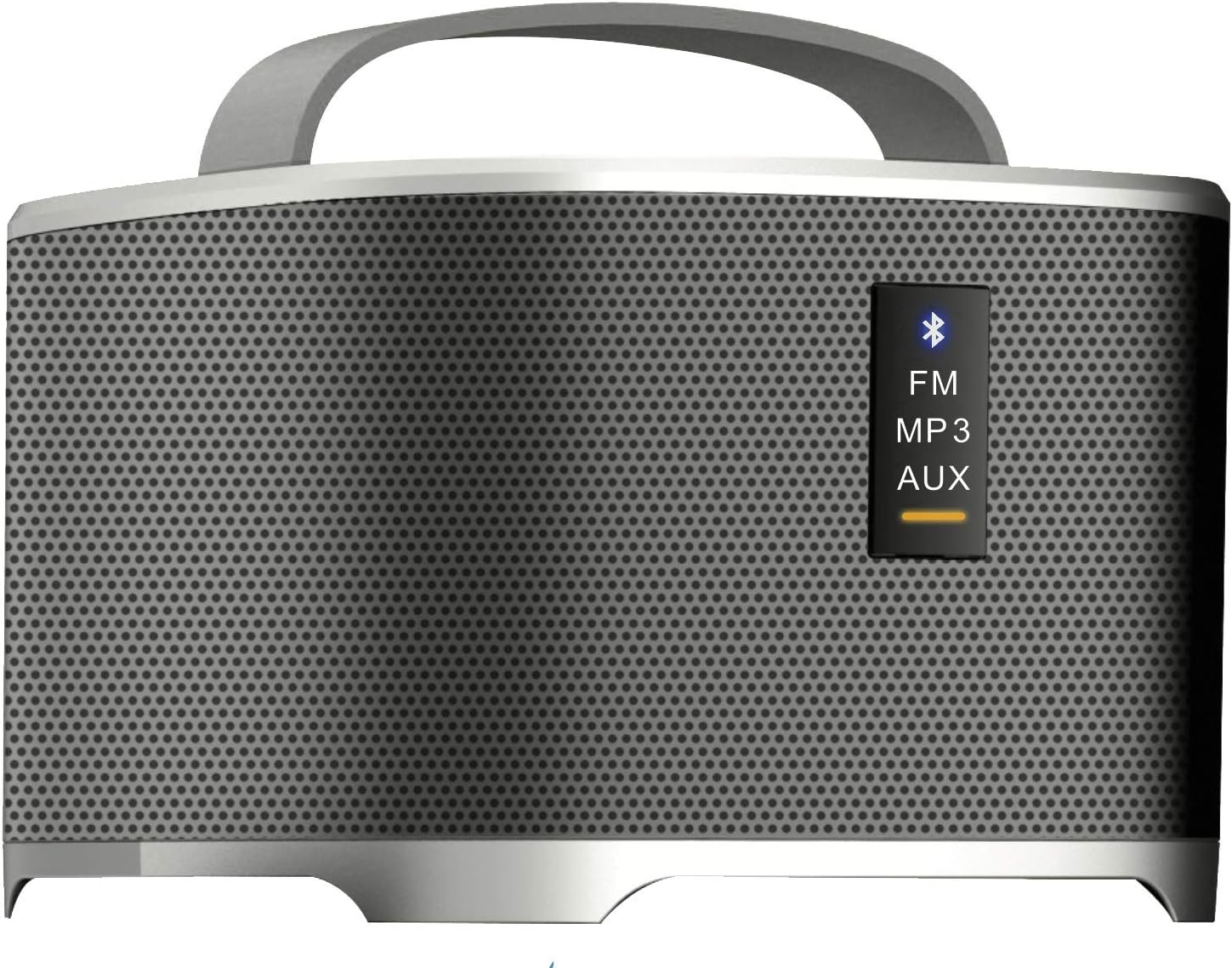
Rysunek 3: Front panel of the detachable speaker, displaying indicator lights for different modes: Bluetooth (blue icon), FM, MP3, and AUX. A yellow bar indicates the active mode.
Main Tower Unit
- Stacja dokująca: For charging and integrating the detachable speaker.
- Pobór mocy: Łączy się z zasilaczem.
- Głośnik niskotonowy: Provides enhanced bass audio.
Odłączany głośnik Bluetooth
- Przycisk zasilania: Włącza/wyłącza głośnik.
- Przycisk trybu (M): Switches between Bluetooth, FM, MP3, and AUX modes.
- Volume/Track Control (+/-): Adjusts volume with short presses; changes tracks/stations with long presses.
- Wskaźnik Bluetooth: Miga podczas parowania, świeci światłem ciągłym po nawiązaniu połączenia.
- Port ładowania: For direct charging when detached.
- Wejście AUX: Do przewodowego połączenia audio.
5. Konfiguracja
5.1 Konfiguracja początkowa
- Place the Sound Tower Speaker on a stable, flat surface.
- Ensure the detachable speaker is securely docked on top of the main tower unit.
- Connect the power adapter to the power input port on the main tower unit, then plug it into a wall outlet.
- The detachable speaker will begin charging automatically when docked and the main unit is powered.
5.2 Charging the Detachable Speaker
The detachable speaker has an internal rechargeable battery.
- While docked: The detachable speaker charges automatically when placed on the main tower unit, provided the tower is connected to power.
- While detached: Connect a compatible USB charging cable (not included, typically Micro-USB) to the charging port on the detachable speaker and a USB power source.
6. Instrukcja obsługi
6.1 Włączanie/wyłączanie
- Main Tower Unit: The main unit powers on when connected to an electrical outlet. There is no separate power button for the tower itself.
- Detachable Speaker: Press and hold the Power button on the top panel of the detachable speaker for 2-3 seconds to turn it on or off.
6.2 Bluetooth Pairing (Detachable Speaker)
- Ensure the detachable speaker is powered on and in Bluetooth mode. The Bluetooth indicator light will flash. If not, press the 'M' (Mode) button until the Bluetooth indicator flashes.
- Enable Bluetooth on your audio device (smartphone, tablet, etc.).
- Szukaj available devices and select "BTC-3100" from the list.
- Po nawiązaniu połączenia kontrolka Bluetooth zacznie świecić światłem ciągłym.
6.3 Using the Detachable Speaker Independently
When detached from the main tower, the portable speaker functions as a standalone Bluetooth speaker. All controls (power, mode, volume/track) are located on the speaker itself.
Tryb radia FM 6.4
- With the detachable speaker powered on, press the 'M' (Mode) button repeatedly until the FM indicator light is active.
- Long press the '+' or '-' buttons to scan for the next/previous available FM station.
- Short press the '+' or '-' buttons to fine-tune the frequency.
6.5 MP3/AUX Input Mode
- AUX: Connect one end of the auxiliary audio cable to the AUX input port on the detachable speaker and the other end to the audio output of your device. Press the 'M' button until the AUX indicator is active.
- MP3: If the speaker supports USB or MicroSD card input (check product specifications for confirmation), insert the storage device. Press the 'M' button until the MP3 indicator is active.
6.6 Regulacja głośności
Short press the '+' button to increase volume and the '-' button to decrease volume on the detachable speaker. Volume can also be controlled from your connected audio device.
7. Konserwacja
- Czyszczenie: Do czyszczenia zewnętrznej części głośnika należy używać miękkiej, suchej ściereczki. Nie należy używać płynnych środków czyszczących ani materiałów ściernych.
- Składowanie: Jeśli głośnik nie będzie używany przez dłuższy czas, należy przechowywać go w chłodnym i suchym miejscu, z dala od bezpośredniego światła słonecznego i ekstremalnych temperatur.
- Pielęgnacja baterii: To prolong the life of the detachable speaker's battery, avoid fully discharging it frequently. Charge it regularly, even if not in use.
8. Rozwiązywanie Problemów
If you encounter issues with your Soundstream BTC-3100, refer to the following common problems and solutions:
- Brak zasilania:
- Ensure the main tower unit's power adapter is securely plugged into both the speaker and a working wall outlet.
- For the detachable speaker, ensure it is charged or docked correctly.
- Brak dźwięku:
- Check the volume level on both the speaker and your connected audio device.
- Ensure the correct input mode (Bluetooth, AUX, FM, MP3) is selected on the detachable speaker.
- Jeśli używasz technologii Bluetooth, upewnij się, że głośnik jest prawidłowo sparowany i połączony z urządzeniem.
- Brak połączenia Bluetooth:
- Make sure the detachable speaker is in Bluetooth pairing mode (indicator flashing).
- Ensure your audio device's Bluetooth is enabled and within range (typically 10 meters/33 feet).
- Spróbuj rozłączyć i ponownie sparować głośnik w ustawieniach Bluetooth swojego urządzenia.
- Wyłącz głośnik i urządzenie, a następnie włącz je ponownie.
- Słaby odbiór FM:
- Przenieś głośnik w miejsce, gdzie odbiór sygnału jest lepszy.
- Ensure no large metal objects are obstructing the signal.
9. Specyfikacje
| Marka | Strumień dźwiękowy |
| Numer modelu | BTC-3100 |
| Typ głośnika | Subwoofer, Surround Sound |
| Funkcja specjalna | Portable (Detachable Speaker) |
| Kompatybilne urządzenia | Laptop, smartfon, tablet |
| Konfiguracja kanału dźwięku przestrzennego | 4.2 |
| Źródło zasilania | Battery Powered (Detachable Speaker) |
| Metoda kontroli | App (if supported), On-device buttons |
| Maksymalna moc wyjściowa głośnika | 20 watów (subwoofer) |
| Technologia łączności | Bluetooth |
| Tryb wyjścia audio | Stereo, dźwięk przestrzenny |
| Typ montażu | Stały podłogowe |
| Waga przedmiotu | 11.13 funta |
| Wymiary opakowania | 36 x 8.8 x 7.9 cala |
| UPC | 709483059689 |
10. Gwarancja i wsparcie
Soundstream products are designed and manufactured to the highest quality standards. For information regarding warranty coverage, please refer to the warranty card included with your product or visit the official Soundstream website. For technical support or customer service inquiries, please contact Soundstream customer support through their official channels.


