Wstęp
Welcome to your Donner DDP-100 Digital Piano. This manual provides essential information for setting up, operating, and maintaining your instrument, ensuring you get the most out of its features and enjoy a rich musical experience.
Główne cechy
- Authentic Key Feel: Experience the precision of an 88-key fully-weighted action digital piano. Designed to replicate the genuine touch of traditional pianos, it captures every nuance for an enhanced playing experience.
- Meticulous Sound Engineering: Our experts have adjusted timbre details, providing a more lifelike sound that sharpens your ability to discern musical notes.
- Versatile Audio Options: An 88 key weighted keyboard with input and playback for MP3 tracks through the built-in amplifier, whether you're using external speakers or headphones.
- Elegancki design: A sleek, streamlined piano keyboard with wooden cabinet coupled with a sliding key cover ensures your keys are always protected and your piano always looks its best.
- Unparalleled Sound Quality: The Donner DDP-100 beginner digital piano boasts pure tones sampled directly from real acoustic grand pianos, assuring the pinnacle of sound quality for both practice and performance.
Organizować coś
Follow these steps to assemble and connect your Donner DDP-100 Digital Piano.
Rozpakowanie i montaż
Carefully remove all components from the packaging. Ensure all parts are present before beginning assembly. Refer to the included assembly guide for detailed instructions on putting together the piano stand and attaching the keyboard unit.

Image: The Donner DDP-100 Digital Piano fully assembled, showcasing its black wooden cabinet, 88 keys, music stand, and triple pedals.
Connecting Power and Pedals
Once assembled, connect the necessary cables for power and pedal functionality.

Obraz: Zbliżenie view of the connectivity panel on the Donner DDP-100, highlighting the MP3 interface, USB-MIDI port, Sustain Pedal Socket, Audio In, Audio Out, and Power Interface.
- Interfejs zasilania (DC IN): Connect the provided power adapter to this port and plug it into a standard wall outlet.
- Sustain Pedal Socket: Connect the cable from the triple pedal unit securely into this socket.
Instrukcja obsługi
Podstawowa obsługa
To power on the piano, press the power button located on the control panel. Press it again to power off. Adjust the master volume knob to your desired listening level.
Key Feel and Timbre
The DDP-100 features 88 fully weighted keys designed to replicate the feel of an acoustic piano. The key weight is graded, meaning lower octaves have a heavier touch, gradually becoming lighter towards the upper octaves. The piano offers a pure tone sampled from acoustic grand pianos, providing a realistic and expressive sound.

Image: Illustrates the "Performance-Level Timbre" of the Donner DDP-100, emphasizing 128 max polyphony and 1 pure tone, with hands playing the keyboard.

Image: Demonstrates the 88 fully weighted keys of the Donner DDP-100, showing how key weight changes from light to heavy across the keyboard to precisely match finger strength.
Tryb słuchawkowy
For private practice sessions, connect up to two sets of headphones to the dedicated headphone jacks located on the front of the piano. This allows for quiet practice without disturbing others.

Image: Shows two individuals using headphones while playing the Donner DDP-100, illustrating the dual headphone jack feature for quiet practice.
MP3 Playback and USB-MIDI
The piano supports MP3 input and playback through its built-in amplifier. Use the MP3 interface to connect external audio devices. The USB-MIDI port allows you to connect the piano to a computer or other MIDI devices for recording, using music software, or expanding your sound library.
- Interfejs MP3: Connect your MP3 player or smartphone to play along with your favorite songs.
- USB-MIDI: Facilitates communication with MIDI-compatible software and hardware.
- Wejście/wyjście audio: For connecting to external audio systems or recording devices.
Konserwacja
To ensure the longevity and optimal performance of your Donner DDP-100 Digital Piano, follow these maintenance guidelines:
- Czyszczenie: Use a soft, dry cloth to wipe down the piano's surface. Avoid abrasive cleaners or solvents. For keys, a slightly damp Można użyć ściereczki, a następnie wytrzeć do sucha.
- Składowanie: When not in use, ensure the sliding key cover is closed to protect the keys from dust and debris.
- Środowisko: Keep the piano away from direct sunlight, extreme temperatures, and high humidity. Avoid placing it near heat sources or in areas with significant temperature fluctuations.
- Poruszający: When moving the piano, lift it carefully from the base. Avoid dragging or pushing it, which could damage the stand or internal components.
Rozwiązywanie problemów
If you encounter any issues with your Donner DDP-100, refer to the following common problems and solutions:
| Problem | Możliwa przyczyna | Rozwiązanie |
|---|---|---|
| Brak dźwięku | Power not connected; Volume too low; Headphones connected. | Check power adapter connection; Increase master volume; Disconnect headphones if using speakers. |
| Klawisze nie odpowiadają | Piano not powered on; Internal issue. | Ensure piano is powered on; If problem persists, contact customer support. |
| Pedały nie działają | Kabel pedału nie jest całkowicie włożony. | Ensure the triple pedal unit cable is securely connected to the Sustain Pedal Socket. |
| Problemy z odtwarzaniem plików MP3 | Incorrect cable; Volume too low on external device. | Use correct audio cable; Increase volume on the connected MP3 device. |
Specyfikacje
Detailed technical specifications for the Donner DDP-100 Digital Piano.
| Funkcja | Szczegół |
|---|---|
| Marka | Donner |
| Nazwa modelu | DDP-100 |
| Numer modelu | EC3013 |
| Liczba kluczy | 88 |
| Kluczowe działanie | Ważony |
| Kolor | Czarny |
| Łączność | MIDI USB, Auxiliary |
| Źródło zasilania | Adapter |
| Waga przedmiotu | 44 kilograma |
| Wymiary przedmiotu (gł. x szer. x wys.) | 54.33" gł. x 16.14" szer. x 33.27" wys. |
| Rodzaj wykończenia | Lakierowany |
| Poziom umiejętności | Początkujący |
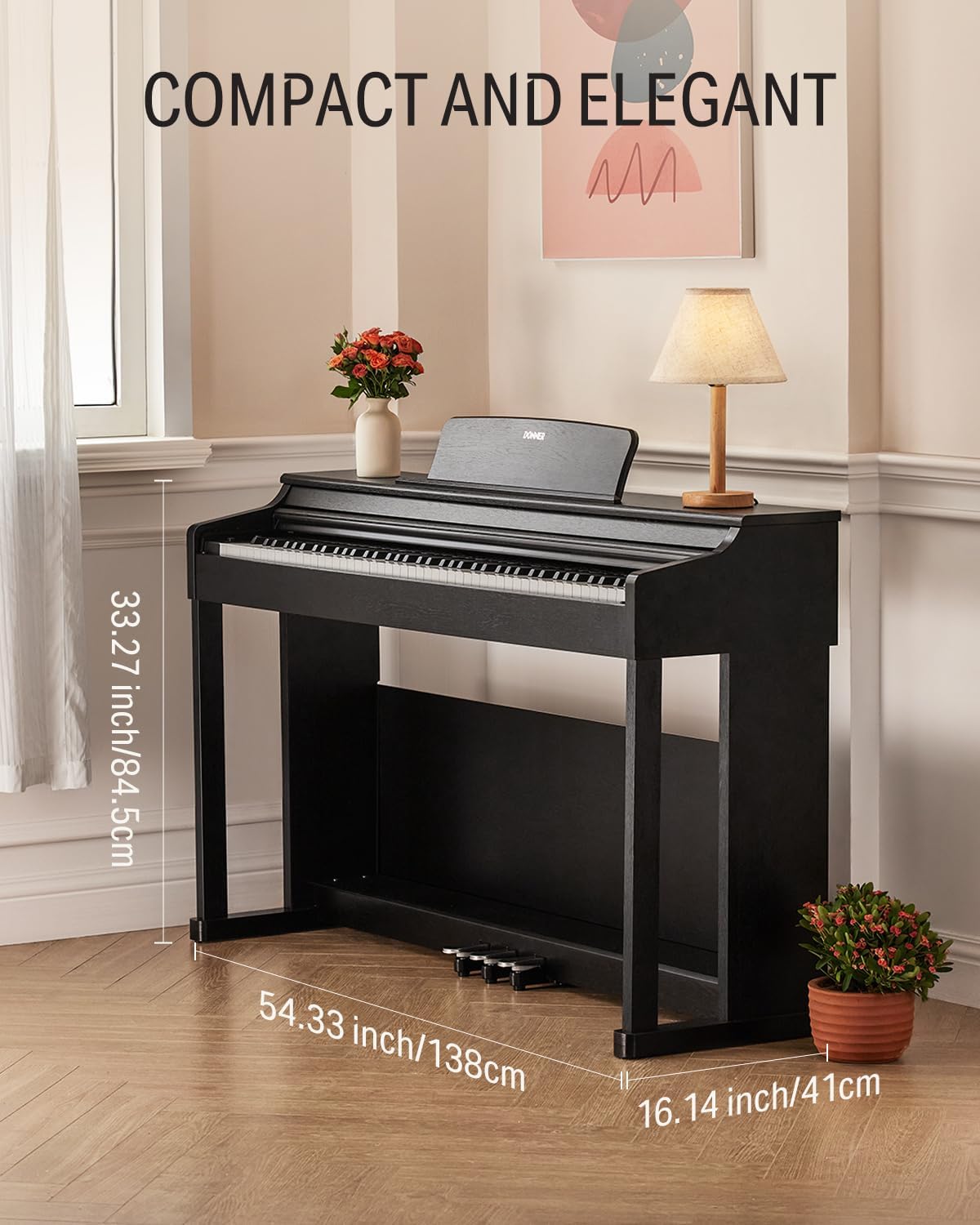
Image: Displays the compact and elegant design of the Donner DDP-100, with dimensions indicated as 54.33 inches (138cm) wide, 16.14 inches (41cm) deep, and 33.27 inches (84.5cm) high.
Gwarancja i wsparcie
Gwarancja: The product specifications indicate "No." warranty description. Please refer to your purchase documentation or contact the retailer for specific warranty information regarding your Donner DDP-100 Digital Piano.
Obsługa klienta: For further assistance, technical support, or inquiries, please visit the official Donner website or contact their customer service directly. They can provide detailed guidance for any issues not covered in this manual.
You can also find additional resources and free online courses to enhance your learning experience through the Donner Music App.

Image: Promotes the Donner Music App, offering free online courses for learning to play the digital piano.
Dodatkowe zasoby
Explore the full range of Donner products and accessories to complement your musical journey.


