1. Ważne instrukcje bezpieczeństwa
Please read these instructions carefully before operating your Marantz SR5014 AV Receiver. Keep this manual for future reference.
- Nie zasłaniaj żadnych otworów wentylacyjnych. Montaż należy wykonać zgodnie z instrukcją producenta.
- Nie należy instalować w pobliżu źródeł ciepła, takich jak grzejniki, kratki wentylacyjne, piece lub inne urządzenia (w tym amp(lifiers) wytwarzające ciepło.
- Chroń przewód zasilający przed deptaniem i przytrzaśnięciem, zwłaszcza przy wtyczkach, gniazdkach i miejscach, w których wychodzi z urządzenia.
- Stosować wyłącznie dodatki/akcesoria wskazane przez producenta.
- Odłączaj urządzenie od zasilania podczas burzy z piorunami lub jeśli nie używasz go przez dłuższy czas.
- Wszelkie czynności serwisowe należy powierzyć wykwalifikowanemu personelowi serwisowemu. Serwis jest wymagany, gdy urządzenie zostało w jakikolwiek sposób uszkodzone.
2. Koniec produktuview
The Marantz SR5014 is a high-performance 7.2 channel 4K Ultra HD AV Receiver designed to deliver immersive home theater and musical experiences. It features advanced video processing, support for the latest audio formats, and HEOS Built-in for multi-room audio streaming.
2.1 Główne cechy
- 7.2 Channel discrete power amplifier, 180 Watts per channel.
- Supports 4K Ultra HD, HDR, HLG, and Dolby Vision.
- eARC (Enhanced Audio Return Channel) support.
- Dolby Atmos, DTS:X, and DTS Virtual:X decoding.
- HEOS Built-in for multi-room audio, streaming services, and voice control.
- Audyssey MultEQ XT room acoustic correction.
- Multiple HDMI inputs and outputs.
2.2 Układ panelu przedniego
The front panel provides access to essential controls and connections for convenient operation.

Obraz: Przód view of the Marantz SR5014 AV Receiver, showcasing the central display, input selector, volume knob, and front panel connections.
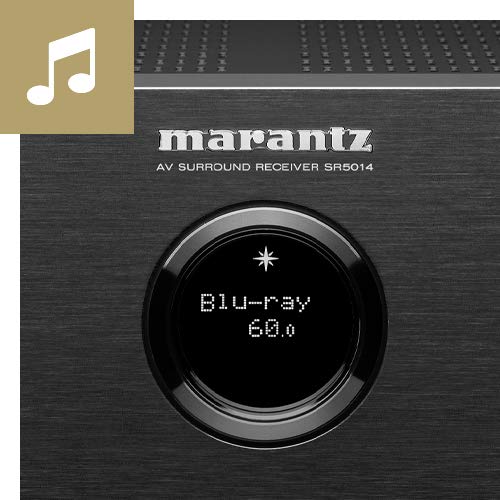
Image: Close-up of the Marantz SR5014's front panel display and controls, highlighting the input selection and volume knobs.
- Przycisk zasilania: Włącza lub wyłącza urządzenie.
- Wyświetlacz: Pokazuje aktualny stan wejścia, poziom głośności i inne informacje o stanie.
- Selektor wejścia: Rotates to select different audio/video sources.
- Pokrętło głośności: Dostosowuje główny poziom głośności.
- TELEFONY Gniazdo: Do podłączenia słuchawek.
- Port USB: Do podłączania urządzeń pamięci masowej USB.
- Wejście HDMI: Front HDMI input for quick connection of devices like cameras or game consoles.
2.3 Połączenia panelu tylnego
The rear panel houses all the necessary connections for your home theater system, including HDMI, audio, and speaker terminals.
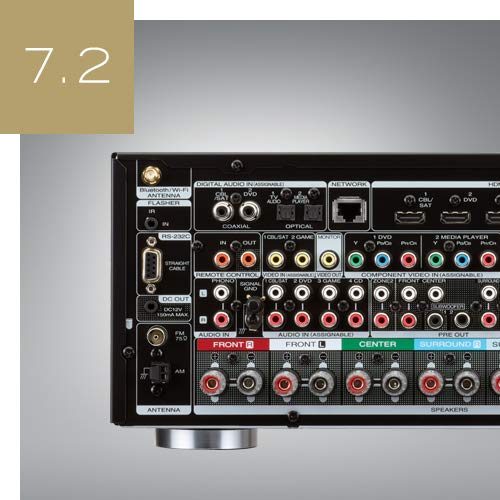
Obraz: Tył view of the Marantz SR5014 AV Receiver, showing the extensive array of input and output ports, including HDMI, speaker terminals, and network connections.
- Wejścia/wyjścia HDMI: Connect your video sources (Blu-ray player, game console) and display (TV, projector).
- Terminale głośnikowe: Connect your speakers (Front, Center, Surround, Surround Back/Height).
- Network Port (Ethernet): Do przewodowego połączenia sieciowego.
- Anteny Wi-Fi/Bluetooth: For wireless network and Bluetooth connectivity.
- Cyfrowe wejścia audio (optyczne/koncentryczne): Do podłączania cyfrowych źródeł dźwięku.
- Wejścia audio analogowe: Do podłączania analogowych źródeł dźwięku.
- Przed wyjściem: Do podłączenia zasilania zewnętrznego amplifiers or powered subwoofers.
3. Przewodnik konfiguracji
3.1 Rozpakowywanie i umieszczanie
Carefully remove the receiver from its packaging. Place the receiver on a sturdy, level surface with adequate ventilation around it. Ensure there is at least 10 cm (4 inches) of clear space above the unit and 5 cm (2 inches) on the sides and rear for proper heat dissipation.
3.2 Połączenia głośników
The SR5014 supports 7.2 channel configurations. Connect your speakers to the corresponding terminals on the rear panel. Ensure correct polarity (+ to + and - to -) for all speakers.
- Głośniki przednie (L/P): Connect to the FRONT L and FRONT R terminals.
- Głośnik centralny: Podłącz do zacisku CENTER.
- Głośniki przestrzenne (L/P): Connect to the SURROUND L and SURROUND R terminals.
- Surround Back / Height Speakers (L/R): Connect to the SURROUND BACK L and SURROUND BACK R terminals. These can be configured as Surround Back or Height speakers in the setup menu.
- Subwoofery: Connect powered subwoofers to the SUBWOOFER 1 and SUBWOOFER 2 PRE OUT jacks using an RCA cable.
3.3 Połączenia HDMI
Connect your video sources and display using high-speed HDMI cables.
- Connect your TV or projector to the HDMI MONITOR OUT port. For eARC functionality, ensure your TV's HDMI port also supports eARC and connect to the designated eARC HDMI output on the receiver.
- Connect your Blu-ray player, game console, or other HDMI devices to any of the available WEJŚCIE HDMI porty.
3.4 Połączenie sieciowe
A network connection is required for HEOS features, firmware updates, and internet radio.
- Połączenie przewodowe: Podłącz kabel Ethernet do routera i portu NETWORK w odbiorniku.
- Połączenie bezprzewodowe: Attach the two Wi-Fi/Bluetooth antennas to the rear panel. During initial setup, you will be prompted to connect to your wireless network.
3.5 Initial Setup and Audyssey Calibration
After connecting all components, power on the receiver and follow the on-screen setup assistant. This assistant will guide you through speaker configuration, network setup, and input assignments.
The included Audyssey MultEQ XT microphone should be used to perform room acoustic correction. Place the microphone at various listening positions as prompted by the on-screen guide. This process optimizes the sound for your specific room and speaker setup.
4. Instrukcja obsługi
4.1 Podstawowa obsługa
- Włączanie/wyłączanie: Naciśnij przycisk zasilania na panelu przednim lub pilocie.
- Wybór wejścia: Use the INPUT SELECTOR knob on the front panel or the dedicated input buttons on the remote control to switch between connected sources (e.g., Blu-ray, TV Audio, Game).
- Regulacja głośności: Użyj pokrętła VOLUME na panelu przednim lub przycisków VOLUME +/- na pilocie.
- Niemy: Press the MUTE button on the remote control to temporarily silence the audio.
4.2 Wbudowany HEOS
The SR5014 features HEOS Built-in technology, allowing you to stream music from various online services, network storage, and control multi-room audio.
- Pobierz Aplikacja HEOS on your smartphone or tablet (available for iOS and Android).
- Open the app and follow the instructions to add your SR5014 to your HEOS system.
- Browse and play music from streaming services (e.g., Spotify, Amazon Music), internet radio, or your local music library.
- Group multiple HEOS-enabled devices to play the same music in perfect synchronization across different rooms.
4.3 Tryby audio
The receiver automatically detects the incoming audio format and applies the appropriate decoding. You can also manually select various sound modes.
- Automatyczny: Automatically selects the optimal sound mode based on the input signal.
- Film: Optimized for movie soundtracks (e.g., Dolby Atmos, DTS:X, Dolby Surround, DTS Neural:X).
- Muzyka: Optimized for music playback (e.g., Stereo, Multi-Channel Stereo).
- Gra: Zoptymalizowany pod kątem dźwięku w grach.
- Czysty Bezpośredni: Bypasses all processing for the purest audio signal.
5. Konserwacja
5.1 Czyszczenie
To maintain the appearance of your receiver, wipe the cabinet and front panel with a soft, dry cloth. Do not use abrasive cleaners, waxes, or solvents as they may damage the finish.
5.2 aktualizacji oprogramowania sprzętowego
Marantz periodically releases firmware updates to improve performance and add new features. Ensure your receiver is connected to the internet to receive these updates.
- You will typically be notified on the display when an update is available.
- Follow the on-screen prompts to initiate the update.
- Do not power off the unit during a firmware updateponieważ może to spowodować uszkodzenie.
6. Rozwiązywanie Problemów
If you experience issues with your Marantz SR5014, refer to the following common problems and solutions.
| Problem | Możliwa przyczyna | Rozwiązanie |
|---|---|---|
| Brak zasilania | Przewód zasilający odłączony; Zasilanie wyłączonetage | Check power cord connection; Check household circuit breaker. |
| Brak dźwięku | Incorrect input selected; Volume too low; Mute engaged; Speaker wires disconnected | Select correct input; Increase volume; Disable mute; Check speaker connections. |
| Brak wideo | Incorrect input selected; HDMI cable issue; TV input not set correctly | Select correct input; Check HDMI cable connections; Ensure TV is on correct HDMI input. |
| Połączenie sieciowe nie powiodło się | Incorrect network settings; Router issue; Wi-Fi signal weak | Re-run network setup; Restart router; Ensure Wi-Fi antennas are properly attached. |
| Pilot nie działa | Baterie wyczerpane; Przeszkoda między pilotem a odbiornikiem | Wymień baterie. Usuń wszelkie przeszkody. |
Jeśli po wypróbowaniu tych rozwiązań problem nadal występuje, skontaktuj się z obsługą klienta Marantz.
7. Specyfikacje
| Funkcja | Szczegół |
|---|---|
| Marka | Marantz |
| Model | SR5014/N1B |
| Kanały | 7.2 |
| Moc wyjściowa | 180 Watts (Speakers Maximum Output Power) |
| Wymiary produktu (dł. x szer. x wys.) | Wymiary 44 x 33.8 x 16.11 cm |
| Waga przedmiotu | 10 kilogramów |
| Technologia łączności | HDMI, Ethernet, USB |
| Porty HDMI | Multiple (Total HDMI Ports: 1 is listed, but typically more for AV Receiver) |
| Cechy specjalne | Wbudowany HEOS |
| Kompatybilne urządzenia | Głośnik |
| Tryb wyjścia audio | Stereo, dźwięk przestrzenny |
| Konfiguracja kanału dźwięku przestrzennego | 5.1 (Note: Product title states 7.2CH, this may be a default or minimum configuration) |
| Obsługa formatów multimediów | 4K |
| Zawiera pilota | Tak |
8. Gwarancja i wsparcie
Marantz products are designed for reliability and performance. For information regarding your product's warranty, please refer to the warranty card included in the product packaging or visit the official Marantz webwitryna dla Twojego regionu.
For technical support, troubleshooting assistance beyond this manual, or service inquiries, please contact Marantz customer support through their official webna miejscu lub w autoryzowanych punktach serwisowych.
Więcej informacji i materiałów pomocniczych znajdziesz na stronie: www.marantz.com


