1. Wprowadzenie
1.1 Produkt powyżejview
This manual provides comprehensive instructions for the installation, operation, and maintenance of your KMC 55 Inch LED Standard TV, Model K16M55260. This television features a 55-inch Full HD LED display with a resolution of 1920x1080, offering a clear and vibrant viewing experience. It includes various input options such as USB, Component, AV, and PC/VGA for versatile connectivity.
1.2 Informacje dotyczące bezpieczeństwa
Przed użyciem tego produktu należy uważnie przeczytać wszystkie ostrzeżenia i instrukcje dotyczące bezpieczeństwa, aby zapobiec obrażeniom lub uszkodzeniom. Zachowaj tę instrukcję do wykorzystania w przyszłości.
- Nie wystawiaj telewizora na działanie deszczu ani wilgoci.
- Nie blokuj otworów wentylacyjnych.
- Zapewnij odpowiedni poziom zasilaniatage.
- Unikaj ustawiania telewizora na niestabilnych powierzchniach.
- Odłączaj telewizor od zasilania podczas burzy z piorunami lub jeśli nie używasz go przez dłuższy czas.
- Wszelkie prace serwisowe należy powierzać wykwalifikowanemu personelowi.
2. Konfiguracja
2.1 Rozpakowanie
Ostrożnie wyjmij telewizor i wszystkie akcesoria z opakowania. Zachowaj materiały opakowaniowe do transportu lub przechowywania w przyszłości.
- KMC 55 Inch LED Standard TV
- Zdalne sterowanie
- Baterie do pilota
- Elementy stojaka pod telewizor
- Instrukcja obsługi (ten dokument)
2.2 Montaż stojaka
To assemble the table stand, align the stand components with the designated slots at the bottom of the TV. Secure them using the provided screws. Ensure the stand is firmly attached before placing the TV on a flat, stable surface.
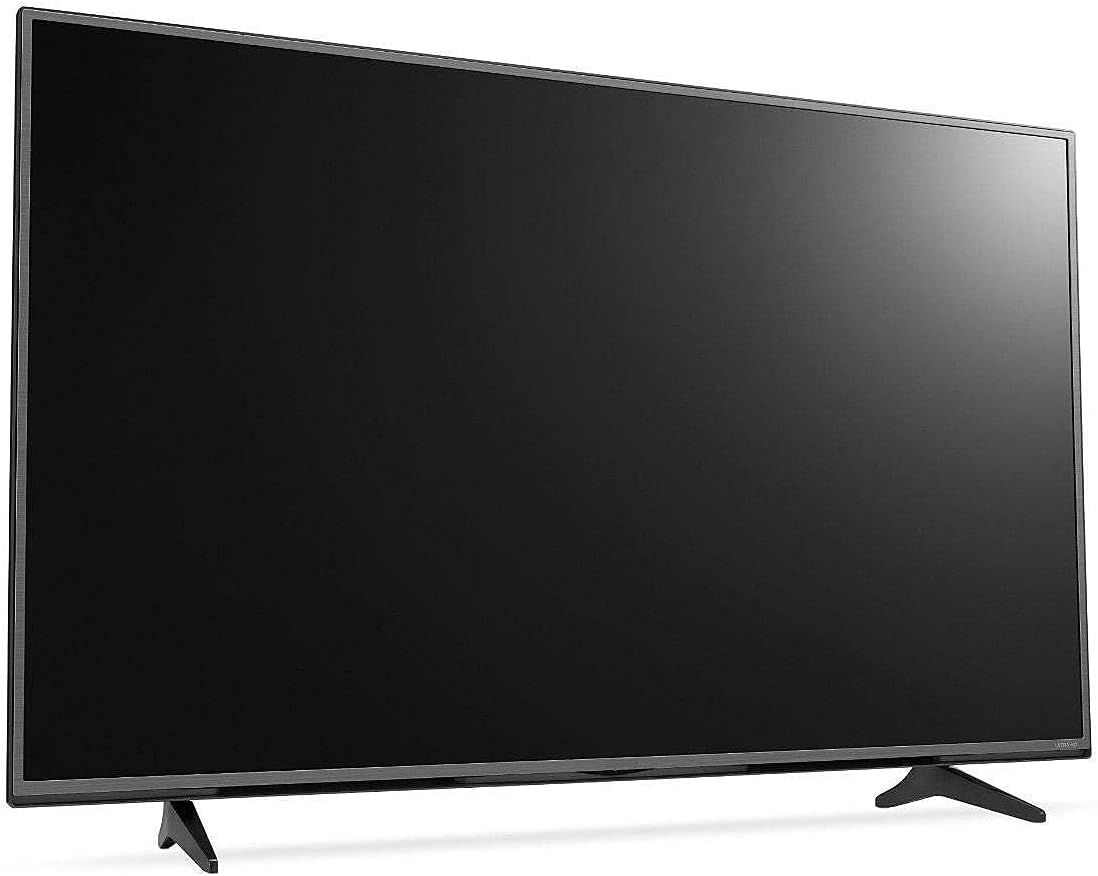
Rycina 2.1: Przód view of the KMC 55 Inch LED Standard TV with its table stand assembled. The screen is black, and the slim bezels are visible.
2.3 Połączenia
Connect your external devices to the appropriate ports on the rear of the TV. The KMC K16M55260 supports USB, Component, AV, and PC/VGA inputs.
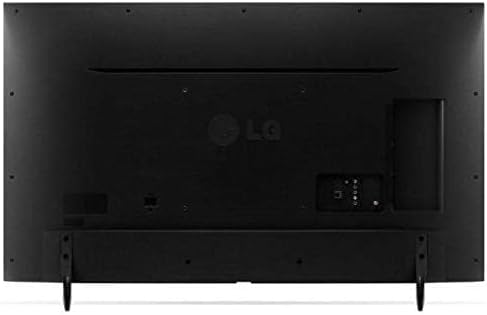
Rysunek 2.2: Tył view of the KMC 55 Inch LED Standard TV, displaying the various input ports including USB, Component, AV, and PC/VGA connections.
- Podłączenie zasilania: Podłącz przewód zasilający do telewizora, a następnie do gniazdka ściennego.
- Wejście USB: Do podłączania urządzeń pamięci masowej USB w celu odtwarzania multimediów.
- Wejście komponentu: For high-quality analog video and audio connections.
- Wejście AV: For standard definition video and stereo audio connections.
- PC/VGA Input: For connecting a computer or laptop.
3. Obsługa
3.1 Podstawowa obsługa
After connecting the TV to power, press the Power button on the remote control or on the TV itself to turn it on. The initial setup wizard may guide you through language selection and channel scanning.
3.2 Pilot zdalnego sterowania
The included remote control allows you to access all TV functions. Insert the provided batteries into the remote control, ensuring correct polarity.
- Przycisk zasilania: Włącza lub wyłącza telewizor.
- Źródło sygnału wejściowego: Selects the input source (HDMI, AV, USB, etc.).
- Zwiększanie/zmniejszanie głośności: Reguluje poziom dźwięku.
- Kanał w górę/w dół: Zmienia kanały telewizyjne.
- Menu: Otwiera menu główne umożliwiające zmianę ustawień.
- Przyciski nawigacyjne (góra/dół/lewo/prawo): Umożliwia nawigację po opcjach menu.
- OK/Wprowadź: Potwierdza wybór.
- Wyjście/Powrót: Wraca do poprzedniego ekranu lub wychodzi z menu.
3.3 Nawigacja po menu
Naciśnij Menu button on the remote control to access the TV's settings. Use the navigation buttons to move between categories such as Picture, Sound, Channel, Time, and Setup. Press OK to enter a sub-menu or confirm a setting. Press Wyjście aby zamknąć menu.
4. Konserwacja
4.1 Czyszczenie
To clean the TV screen, gently wipe it with a soft, lint-free cloth. For stubborn marks, slightly dampen the cloth with water or a specialized screen cleaner. Do not spray cleaner directly onto the screen. For the TV casing, należy używać miękkiej, suchej ściereczki.
- Zawsze odłączaj telewizor od zasilania przed czyszczeniem.
- Unikaj stosowania ściernych środków czyszczących i rozpuszczalników.
- Nie należy wywierać nadmiernego nacisku na ekran.
4.2 Przechowywanie
If you need to store the TV for an extended period, ensure it is unplugged and stored in a cool, dry place, away from direct sunlight and extreme temperatures. It is recommended to use the original packaging for protection during storage or transport.
5. Rozwiązywanie Problemów
This section provides solutions to common issues you might encounter with your KMC TV. If the problem persists, please contact customer support.
| Problem | Możliwa przyczyna | Rozwiązanie |
|---|---|---|
| Brak zasilania | Przewód zasilający nie jest podłączony; gniazdko elektryczne nie działa. | Sprawdź, czy przewód zasilający jest prawidłowo podłączony. Sprawdź gniazdko, podłączając je do innego urządzenia. |
| Brak obrazu, ale dźwięk jest | Wybrano nieprawidłowe źródło sygnału wejściowego; problem z podświetleniem. | Naciśnij Źródło sygnału wejściowego button to select the correct input; Contact support if backlight is suspected. |
| Brak dźwięku, ale obraz jest | Volume is muted or too low; Audio cables not connected properly. | Wyłącz wyciszenie lub zwiększ poziom głośności; Sprawdź połączenia kabli audio. |
| Pilot nie działa | Baterie są rozładowane lub nieprawidłowo włożone; Przeszkoda między pilotem a telewizorem. | Wymień baterie. Upewnij się, że czujnik podczerwieni telewizora jest w zasięgu wzroku. |
6. Specyfikacje
Technical specifications for the KMC 55 Inch LED Standard TV, Model K16M55260.
- Marka: KMC
- Numer modelu: K16M55260
- Rozmiar ekranu: 55 cale (widoczna przekątna 140 cm)
- Technologia wyświetlania: PROWADZONY
- Rezolucja: 1920x1080 (Full HD, 1080p)
- Kolor: Czarny
- Cechy szczególne: Flat Display
- Technologia łączności: USB, VGA, Component, AV
- Zawartość zestawu: TV, Remote Control, Batteries, Stand
- Typ montażu: Mocowanie na stole
- Wymiary opakowania: Wymiary 129 x 77 x 13 cm
- Waga paczki: 16 kilogramów
7. Gwarancja i wsparcie
For warranty information or technical support, please contact KMC customer service. Details regarding warranty coverage and service procedures are typically provided with your purchase documentation or can be found on the official KMC webstrona.
When contacting support, please have your TV's model number (K16M55260) and serial number ready.


