1. Wprowadzenie
The Verbatim Keypad Secure USB 3.0 Flash Drive provides secure data storage with 256-bit AES hardware encryption and a built-in keypad for password entry. This manual provides essential information for setting up, operating, maintaining, and troubleshooting your device, ensuring your data remains protected and accessible.

Image: Verbatim Keypad Secure USB drive connected to a laptop, illustrating its secure function.
2. Informacje dotyczące bezpieczeństwa
- Nie wystawiaj urządzenia na działanie ekstremalnych temperatur, bezpośredniego światła słonecznego i wysokiej wilgotności.
- Unikaj upuszczania i narażania urządzenia na silne uderzenia.
- Przechowywać w miejscu niedostępnym dla dzieci.
- Nie należy podejmować prób demontażu ani modyfikacji urządzenia. Spowoduje to unieważnienie gwarancji i może spowodować uszkodzenia.
- Aby zapobiec przegrzaniu, należy zadbać o odpowiednią wentylację podczas użytkowania.
3. Koniec produktuview
Główne cechy:
- Built-in Keypad: For secure password entry, supporting up to 12 digits.
- 256-bit AES Hardware Encryption: Encrypts all data on the drive in real-time.
- 100% Data Encryption: Ensures complete data protection.
- Data Wipe Feature: Automatically erases data after multiple failed password attempts to prevent unauthorized access.
- USB 3.0 Type-A Interface: Offers high-speed data transfer, backward compatible with USB 2.0.
- Zgodność międzyplatformowa: Works with both PC (Windows) and Mac operating systems.
- Pojemność pamięci masowej 32 GB: Ample space for important documents, photos, and videos.
Składniki:
- Złącze USB: Standard USB Type-A for connecting to your computer.
- Klawiatura: Numeric keys (0-9) and lock/unlock buttons for password input.
- Wskaźniki LED: Display power, lock, and encryption status.
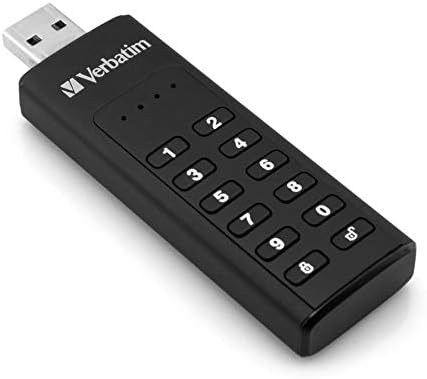
Image: Close-up of the Verbatim Keypad Secure USB drive, highlighting the keypad.
4. Konfiguracja
Follow these steps for initial setup and password creation:
- Podłącz dysk: Plug the Verbatim Keypad Secure USB drive into an available USB port on your computer. The drive's LED indicators will illuminate.
- Initial Password Entry: The drive will typically require an initial default password. Refer to the small instruction leaflet included in the packaging for this default password.
- Set Your Personal Password: After entering the default password and unlocking the drive, you will be prompted to set a new, personal password. This password should be between 6 and 12 digits long. Enter your desired password and confirm it.
- Drive Initialization (if necessary): For some operating systems or if the drive is not immediately recognized, you may need to initialize and format the drive through your computer's disk management utility. Follow on-screen prompts or consult your operating system's help for 'Disk Management' or 'Disk Utility'.
- Zabezpiecz dysk: Once your password is set, the drive will automatically lock when removed from the USB port or after a period of inactivity.

Image: Connecting the Verbatim Keypad Secure USB drive to a computer via a USB hub.
5. Instrukcja obsługi
Odblokowanie dysku:
- Plug the drive into a USB port.
- Naciśnij Odblokować button (often represented by an open padlock icon) on the keypad.
- Enter your personal password using the numeric keys.
- Naciśnij Odblokować button again to confirm. The LED indicator will change to show the drive is unlocked and ready for use.
Przesyłanie danych:
Once unlocked, the drive functions like any standard USB flash drive. You can drag and drop files, copy and paste, or save directly to the drive.
Locking the Drive:
The drive automatically locks when safely ejected from the computer or when power is removed. To manually lock the drive while connected, press the Zamek button (often represented by a closed padlock icon) on the keypad.
Bezpieczne usuwanie:
Always safely eject the USB drive from your operating system before physically removing it from the USB port to prevent data corruption.
6. Konserwacja
- Zachowaj czystosc: Do czyszczenia zewnętrznej części napędu używaj miękkiej, suchej ściereczki. Unikaj płynnych środków czyszczących.
- Aktualizacje oprogramowania układowego: Periodically check the Verbatim webodwiedź naszą witrynę, aby sprawdzić, czy są dostępne aktualizacje oprogramowania sprzętowego dla Twojego urządzenia, dzięki czemu zapewnisz mu optymalną wydajność i bezpieczeństwo.
- Kopia zapasowa danych: While the drive offers strong security, it is always recommended to maintain backups of critical data on multiple storage devices.
- Składowanie: Store the drive in a cool, dry place away from direct sunlight and strong magnetic fields.
7. Rozwiązywanie Problemów
- Drive not recognized by computer:
- Sprawdź, czy dysk jest całkowicie włożony do portu USB.
- Wypróbuj inny port USB na swoim komputerze.
- Przetestuj dysk na innym komputerze, aby wykluczyć problem związany z danym komputerem.
- Check your computer's Device Manager (Windows) or Disk Utility (Mac) to see if the drive is detected but not assigned a drive letter or formatted.
- Cannot unlock the drive:
- Upewnij się, że wpisujesz prawidłowe hasło.
- The drive will wipe its data after a certain number of incorrect password attempts (typically 10-20 attempts). If this occurs, the data is unrecoverable, and the drive will need to be reset and reformatted.
- Niska prędkość przesyłu danych:
- Ensure you are connected to a USB 3.0 port on your computer for optimal performance. USB 2.0 ports will result in slower speeds.
- Avoid using long or low-quality USB extension cables, as these can degrade transfer speeds.
- Duży file transfers can sometimes cause the drive to warm up, which may lead to a temporary reduction in speed to protect the device.
- Drive gets warm during use:
- It is normal for the drive to become warm during extended periods of data transfer, especially with USB 3.0 speeds. This is generally not a cause for concern unless it becomes excessively hot to touch.
8. Specyfikacje
| Nazwa modelu | Keypad Secure |
| Numer modelu | 49427 |
| Pojemność | 32 GB |
| Interfejs | USB 3.0 (USB 3.1 Gen 1) Type-A |
| Szyfrowanie | AES 256-bit Hardware Encryption |
| Prędkość odczytu | Do 160 MB/s |
| Prędkość zapisu | Do 130 MB/s |
| Zgodność | Windows 7, 8, 10; Mac OS X 10.4 or higher |
| Wymiary (dł. x szer. x wys.) | Wymiary: 93.5mm x 28mm x 12mm |
| Waga | 30 gramów |
| Kolor | Czarny |

Image: Dimensional diagram of the Verbatim Keypad Secure USB drive.
9. Informacje o gwarancji
For detailed warranty information, please refer to the warranty card included with your product packaging or visit the official Verbatim webWarunki gwarancji mogą się różnić w zależności od regionu.
10. Wsparcie
If you encounter any issues or have questions not covered in this manual, please visit the official Verbatim support webStrona z odpowiedziami na często zadawane pytania, możliwością pobrania sterowników i informacjami kontaktowymi w celu uzyskania pomocy technicznej.
Urzędnik Webstrona: www.verbatim.com