1. Wprowadzenie
Dziękujemy za zakupasing the Acme Cargo Metal Frame Desk and Hutch. This manual provides essential information for the safe assembly, proper use, and maintenance of your new furniture. Please read these instructions carefully before beginning assembly and retain this manual for future reference.
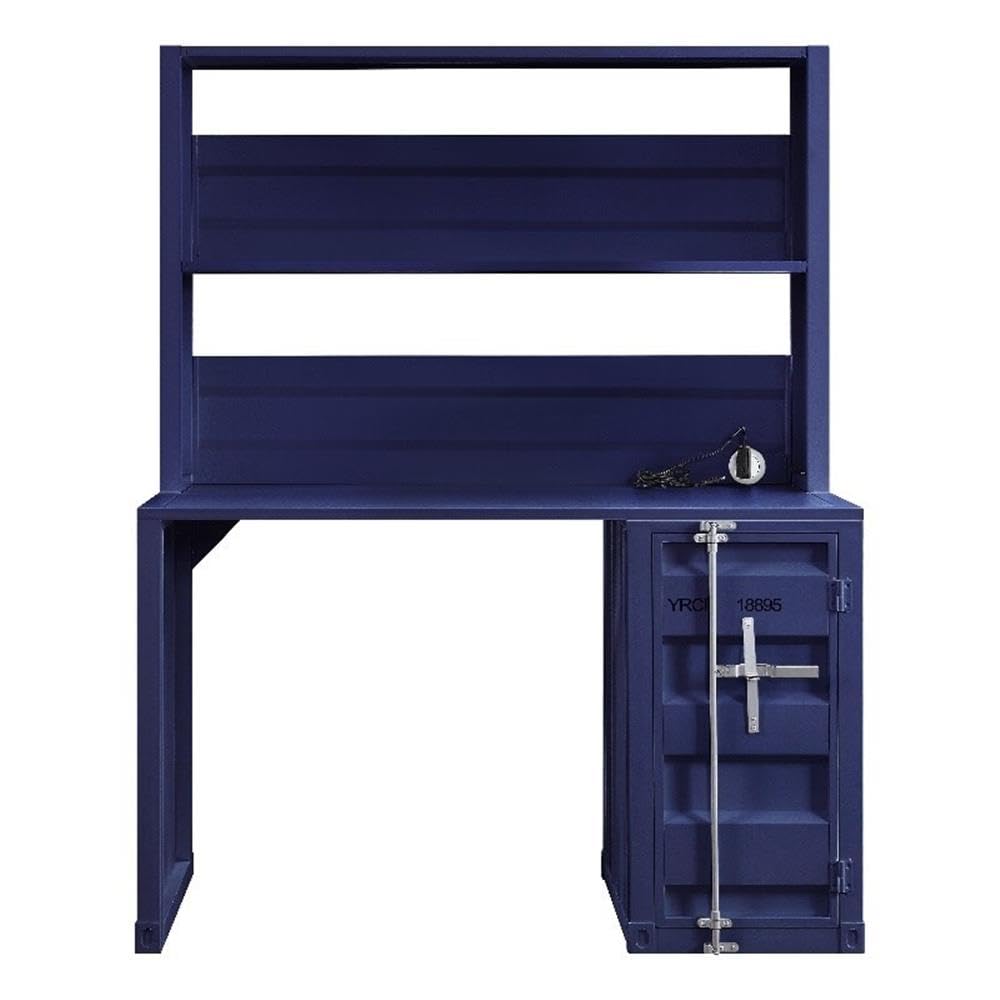
Figure 1: Fully assembled Acme Cargo Metal Frame Desk and Hutch.
The Acme Cargo Desk and Hutch features a robust metal frame design, offering a functional workspace with integrated storage. It includes a rectangular writing desk surface, an overhead hutch with open compartments, and a storage base with a door and internal shelving.
2. Informacje dotyczące bezpieczeństwa
OSTRZEŻENIE: Nieprzestrzeganie tych instrukcji bezpieczeństwa może spowodować obrażenia ciała lub uszkodzenie produktu.
- Aby zapobiec zarysowaniom, produkt należy zawsze składać na miękkiej i czystej powierzchni.
- Przed rozpoczęciem montażu upewnij się, że wszystkie części są kompletne i nieuszkodzone. Nie kontynuuj montażu, jeśli brakuje którejkolwiek części lub jest ona uszkodzona.
- Do montażu potrzebne są dwie osoby dorosłe. Nie należy podejmować prób samodzielnego montażu.
- Trzymaj małe części i materiały opakowaniowe poza zasięgiem dzieci i zwierząt domowych.
- Do not exceed the maximum weight capacity of 208 pounds (94 kg) for the desk surface.
- Do not climb on the desk or hutch.
- Aby zapobiec chwianiu się i niestabilności biurka, należy ustawić je na równej powierzchni.
- Regularnie sprawdzaj i dokręcaj wszystkie elementy mocujące, aby zapewnić stabilność.
- If the product includes anti-tip hardware, it is highly recommended to install it to prevent tipping, especially in households with children.
3. Zawartość opakowania
Before assembly, verify that all components listed below are included in your package. If any parts are missing or damaged, please contact customer support immediately.
- Desk Frame (Left and Right Supports)
- Panel pulpitu
- Hutch Frame (Top and Side Panels)
- Hutch Shelves (2)
- Storage Base Unit
- Storage Base Door
- Internal Storage Shelf (1)
- Hardware Pack (screws, bolts, cam locks, hinges, etc.)
- Assembly Tools (Hex Key, etc. - Note: Additional tools like a screwdriver may be required and are not included)
4. Instrukcja montażu i konfiguracji
Please follow these steps carefully. Assembly is recommended for two people.
Wymagane narzędzia (brak w zestawie):
- Śrubokręt krzyżakowy
- Młotek gumowy (opcjonalnie, do delikatnego uderzania)
Kroki montażu:
- Rozpakuj i zidentyfikuj części: Carefully remove all components from the packaging. Lay them out on a clean, soft surface (e.g., carpet or blanket) to prevent scratches. Identify each part using the provided parts list.
- Złóż podstawę biurka: Attach the left and right desk support frames to the desktop panel using the provided bolts and hex key. Ensure all connections are secure but do not overtighten initially.
- Assemble Storage Base: Attach the storage base unit to the right side of the desktop panel. Secure it with the appropriate fasteners.
- Install Storage Door: Attach the hinges to the storage base door and then to the storage base unit. Ensure the door opens and closes smoothly. Install the internal storage shelf as desired.
- Attach Hutch Frame: Position the hutch frame onto the back of the desktop panel, aligning the pre-drilled holes. Secure the hutch frame to the desktop and the rear of the desk supports using the designated fasteners.
- Montaż półek wiszących: Insert the two hutch shelves into the designated slots or attach them to the hutch frame using the provided hardware.
- Ostateczne dokręcanie: Once all components are assembled, carefully move the desk to its desired location. On a level surface, gradually tighten all bolts and screws until secure. Do not overtighten.
- Sprawdzenie stabilności: Gently push and pull the desk to ensure it is stable and does not wobble. If wobbling occurs, recheck all connections and ensure the desk is on a level surface.

Figure 2: Storage base with door open, revealing internal shelf.
5. Instrukcja obsługi (użytkowanie)
Your Acme Cargo Desk and Hutch is designed for versatile use in a home office, dorm, or bedroom.
- Powierzchnia biurka: Use the main desk surface for your computer, writing, or other tasks. Ensure the weight distributed on the surface does not exceed 208 pounds (94 kg).
- Hutch Shelves: The open hutch shelves are ideal for storing books, decorative items, or small office supplies. Distribute weight evenly and avoid placing excessively heavy items on the upper shelves.
- Podstawa magazynowa: The enclosed storage base with a door provides discreet storage for files, larger items, or personal belongings. The internal shelf can be used to organize items within the compartment.
- Zarządzanie kablami: While not explicitly designed with cable management features, you can use cable ties or adhesive clips (not included) to organize power cords and data cables behind the desk for a tidy workspace.
6. Konserwacja
Właściwa pielęgnacja przedłuży żywotność i wygląd Twojego biurka.
- Czyszczenie: Przetrzyj powierzchnie miękką, damp cloth. Avoid abrasive cleaners, harsh chemicals, or solvents, as these can damage the painted finish. Dry immediately with a clean cloth.
- Regularna kontrola: Periodically check all bolts, screws, and fasteners to ensure they remain tight. Retighten as necessary to maintain structural integrity and prevent wobbling.
- Unikaj wilgoci: Do not place hot items directly on the desk surface without protection. Wipe up spills immediately to prevent water damage or staining.
- Ekspozycja na światło słoneczne: Avoid prolonged exposure to direct sunlight, which can cause fading or discoloration of the finish over time.
7. Rozwiązywanie Problemów
| Problem | Możliwa przyczyna | Rozwiązanie |
|---|---|---|
| Biurko chwieje się lub jest niestabilne. | Nierówna powierzchnia podłogi, luźne elementy mocujące, nieprawidłowy montaż. | Ensure the desk is on a level surface. Check and tighten all assembly fasteners. Review kroki montażu, aby zapewnić prawidłową instalację. |
| Storage door does not close properly. | Hinges are misaligned or loose; obstruction. | Check hinge alignment and tighten screws. Ensure nothing is obstructing the door's path. |
| Parts appear bent or damaged upon arrival. | Uszkodzenie przesyłki. | Do not proceed with assembly. Contact customer support immediately with photos of the damage for replacement parts or a return. |
| Brak sprzętu lub komponentów. | Błąd w opakowaniu. | Carefully check all packaging materials. If still missing, contact customer support for replacement parts. |
8. Specyfikacje
| Funkcja | Szczegół |
|---|---|
| Marka: | Kulminacja |
| Numer modelu: | AC-37907 |
| Wymiary produktu (gł. x szer. x wys.): | 24" gł. x 47" szer. x 60" wys. (61 cm gł. x 119 cm szer. x 152 cm wys.) |
| Waga przedmiotu: | 104 funtów (47.2 kg) |
| Tworzywo: | Metal (Frame, Top, Base, Hutch) |
| Kolor: | Niebieski |
| Rodzaj wykończenia: | Wykończenie malowane |
| Maksymalna zalecana waga: | 208 funtów (94 kg) |
| Liczba półek: | 2 (Hutch) + 1 (Internal Storage) |
| Liczba szafek: | 1 |
| Wymagany montaż: | Tak |
| Zalecana liczba osób do montażu: | 2 |

Figure 3: Product dimensions for the Acme Cargo Desk and Hutch.
9. Informacje o gwarancji
This Acme Cargo Metal Frame Desk and Hutch is covered by a Ograniczona gwarancja from the manufacturer. The specific terms and duration of the warranty may vary. For detailed information regarding your product's warranty, including coverage, limitations, and how to make a claim, please refer to the official Acme Furniture webodwiedź witrynę lub skontaktuj się bezpośrednio z działem obsługi klienta.
Proszę zachować dowód zakupu na wypadek ewentualnych roszczeń gwarancyjnych.
10. Obsługa klienta
If you have any questions, require assistance with assembly, or need to report missing or damaged parts, please contact Acme Furniture customer support:
- Webstrona: Visit the official Acme Furniture webwitryna z odpowiedziami na często zadawane pytania, rejestracją produktów i formularzami kontaktowymi.
- Detalista: If purchased from a retailer, you may also contact their customer service department for assistance.
When contacting support, please have your model number (AC-37907) and proof of purchase readily available.


