1. Wprowadzenie i koniecview
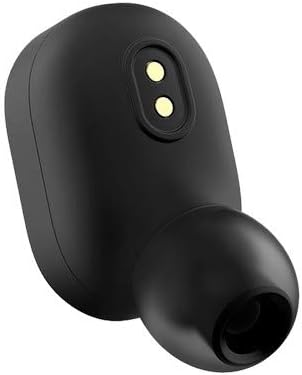
The Xiaomi Redmi AirDots TWS Bluetooth Sports Earphones are designed to provide a seamless and high-quality audio experience. Featuring Bluetooth 5.0 technology, these true wireless stereo (TWS) earbuds offer stable connectivity and clear stereo bass audio. Their compact and lightweight design ensures comfortable wear for extended periods, making them ideal for music listening during various activities, including sports, thanks to their waterproof rating.
The package includes the earphones and a charging case, providing convenience and portability.
2. Zawartość opakowania
Po otwarciu opakowania należy sprawdzić, czy znajdują się w nim wszystkie elementy:
- Xiaomi Redmi AirDots TWS Earphones (Left and Right)
- Etui ładujące
- Instrukcja obsługi (ten dokument)
- Additional Eartips (various sizes)


3. Konfiguracja
3.1. Ładowanie początkowe
Before first use, fully charge the earphones and the charging case. The charging time for the earphones is approximately 1.5 hours. Use a standard USB charger (not included) to connect to the micro-USB port on the charging case.
3.2. Parowanie Bluetooth
The Redmi AirDots utilize Bluetooth 5.0 for stable and efficient wireless connectivity. Follow these steps to pair your earphones with a device:
- Sprawdź, czy słuchawki są w pełni naładowane.
- Take both earphones out of the charging case. They will automatically power on and attempt to pair with each other.
- Włącz Bluetooth na swoim urządzeniu (smartfonie, tablecie itp.).
- Szukaj available Bluetooth devices. The earphones should appear as "Redmi AirDots" or "MI AirDots".
- Select the earphones from the list to complete the pairing process.
- Po sparowaniu słuchawki automatycznie połączą się z urządzeniem po wyjęciu z etui, jeśli w urządzeniu włączony będzie moduł Bluetooth.
4. Instrukcja obsługi
4.1. Noszenie słuchawek
The Redmi AirDots are designed for an in-ear fit. Choose the appropriate eartip size for a secure and comfortable fit. Gently insert each earbud into your ear canal and twist slightly to lock it in place. A proper seal is crucial for optimal sound quality and bass response.

4.2. Sterowanie
The earphones feature media control and voice control capabilities. Specific functions are typically managed via a multi-function button on each earbud:
- Odtwórz/Pauza: Naciśnij raz przycisk na dowolnej słuchawce.
- Odbieranie/kończenie połączeń: Naciśnij raz przycisk na dowolnej słuchawce.
- Odrzuć połączenie: Press and hold the button on either earbud.
- Aktywuj asystenta głosowego: Double-press the button on either earbud (e.g., Siri, Google Assistant).
- Następny utwór: Double-press the button on the right earbud (may vary based on model/firmware).
- Poprzedni utwór: Double-press the button on the left earbud (may vary based on model/firmware).
Refer to the quick start guide included in your package for precise button functions, as these can sometimes vary slightly between production batches.
5. Konserwacja
5.1. Czyszczenie
Regular cleaning helps maintain sound quality and hygiene. Use a soft, dry, lint-free cloth to wipe the earphones and charging case. For eartips, remove them from the earbuds and clean with a mild soap solution if necessary, then rinse thoroughly and dry completely before reattaching.
5.2. Przechowywanie
Always store the earphones in their charging case when not in use to protect them from dust, damage, and to keep them charged. Store in a cool, dry place away from extreme temperatures.
5.3. Wodoodporność
The Redmi AirDots are rated as waterproof, offering protection against sweat and light splashes. They are not designed for submersion in water. Avoid exposing them to heavy rain or showering with them.
6. Rozwiązywanie Problemów
| Problem | Możliwa przyczyna | Rozwiązanie |
|---|---|---|
| Słuchawki nie łączą się z urządzeniem. | Bluetooth wyłączony, słuchawki nie są w trybie parowania, występują zakłócenia. | Ensure Bluetooth is on. Place earphones back in case, then remove to re-enter pairing mode. Forget device on your phone and re-pair. |
| Działa tylko jedna słuchawka. | Earbuds not paired with each other, low battery. | Place both earbuds back in the charging case, close the lid, then open and remove them simultaneously. Ensure both are charged. |
| Niska głośność lub słaba jakość dźwięku. | Improper fit, dirty eartips/speakers, device volume low. | Adjust eartips for a secure seal. Clean eartips and speaker mesh. Increase volume on your device. |
| Słuchawki się nie ładują. | Poor contact with charging pins, faulty cable/charger. | Ensure earbuds are correctly seated in the case. Clean charging contacts on earbuds and case. Try a different charging cable or adapter. |
7. Specyfikacje
| Funkcja | Szczegół |
|---|---|
| Marka | Xiaomi |
| Model | Redmi Airdots |
| Technologia łączności | Bezprzewodowa (Bluetooth 5.0) |
| Umieszczenie ucha | W uchu |
| Współczynnik kształtu | W uchu |
| Czas pracy baterii (słuchawki douszne) | Do 4 godzin |
| Czas ładowania | Około 1.5 godzin |
| Typ sterowania | Sterowanie multimediami, sterowanie głosowe |
| Poziom wodoodporności | Waterproof (Sweat and splash resistant) |
| Zakres częstotliwości | 20 Hz - 20 kHz |
| Tworzywo | Plastikowy |
| Wymiary produktu | 1.57 x 1.18 x 2.36 cala |
| Waga przedmiotu | 1.23 uncji (0.04 kilograma) |
| Kontrola hałasu | Nic |
8. Gwarancja i wsparcie
Aby uzyskać informacje dotyczące gwarancji i pomocy technicznej, zapoznaj się z oficjalną stroną Xiaomi website or contact their customer service directly. Details can typically be found on the product packaging or the official brand store page.
Producent: Xiaomi
Więcej informacji znajdziesz na stronie Sklep Xiaomi na Amazonie.